 Today let’s talk about how to run OpenTelemetry in Kubernetes and integrate it with the VictoriaMetrics stack – VictoriaMetrics for metrics, VictoriaLogs for logs, and VictoriaTraces for traces.
Actually, this post wasn’t planned at all, and once a draft did appear – it was supposed to be the third in the series, but in the end I decided to make it the first one.
After this one I’ll finish two more posts – the first about Observability and tracing with VictoriaTraces, the second about OpenTelemetry instrumentation in Python and writing traces to VictoriaTraces, and then – about LLM Observability and monitoring.
Actually, that’s exactly how OpenTelemetry showed up on my current project – we wanted to take a closer look at how things work with various LLM providers, and over there everything is “tailored” for OpenTelemetry, because the Prometheus metrics format doesn’t really fit.
So the first thing I did was add VictoriaTraces and trace recording from our Backend API, then I looked at the whole thing, decided I didn’t have enough context – and decided to add the full OpenTelemetry stack.
See the following part VictoriaTraces: Tracing, Observability та OpenTelemetry.
Let’s start with the context.
Contents
OpenTelemetry, Observability and Context
The main idea behind observability is in the context, because context is, surprise, not just about AI/LLM, but also about monitoring and Observability.
We’ll talk about Monitoring vs Observability in the next post (which was supposed to be the first one), and today let’s look at how to run OpenTelemetry in Kubernetes.
But, in short, Observability is built on the “three pillars of observability” – Metrics, Logs, Traces.
But just having metrics, logs and traces isn’t enough – because all our three pillars need to share some common attributes, common data, that would allow doing “end-to-end observability” – meaning, having the ability within a single context to inspect EC2 metrics, AWS Application Load Balancer metrics, the specific Kubernetes Pods of the Backend API itself, and eventually – the specific function calls, the business logic that’s executed inside that Pod in response to a request that came from AWS ALB from a specific user – that is, to build an observability pipeline.
And in order for all the data to share this common context – it needs to have some common traits, attributes, by which we can group everything we receive – in other words, labels.
But when using the “default” Prometheus stack, we have a bunch of different exporters for metrics, separate exporters for logs, and on top of that traces in OTel format – and each one writes labels in its own way. So to somehow unify all this in Grafana dashboards or alerts, you have to deal with all kinds of label_replace hassle.
A real example from one of my alerts:
- record: aws:node:cpu_utilization:percent
  expr: |
    100 * (1 - avg by(instance, cluster) (
      label_replace(
        rate(node_cpu_seconds_total{mode="idle"}[5m]),
        "instance",
        "ip-${1}-${2}-${3}-${4}.ec2.internal",
        "instance",
        "(.*)\\.(.*)\\.(.*)\\.(.*):9100"
      )
    ))
Here, from the node_cpu_seconds_total metric we take the value of the instance label like 10.0.50.18 and build a new value of the form ip-10-0-50-18.ec2.internal, which is then used in Grafana dashboards for filters – because some other metric returns the host name in that format, while the node_exporter metric doesn’t have a default label like node_name="ip-10-0-50-18.ec2.internal".
So we can go a different route – replace how we collect these metrics in the first place: instead of having 10 different exporters for metrics – node_exporter for EC2, YACE exporter for AWS CloudWatch, a separate k8s-event-logger exporter for shipping Kubernetes Events as logs, a separate AWS ALB Logs collector reading from S3 – we can have a single system that does all of this on its own and, most importantly, adds common labels to all signals by itself – metrics, logs, traces.
Pros and cons of OpenTelemetry
Obviously, it’s not all rainbows: OpenTelemetry Collector is a bit more complex to configure, consumes more resources, requires additional monitoring.
That’s pretty much expected, because if a system gives you more capabilities “out of the box” – then its configuration will be a bit more complex than for some single Prometheus Node Exporter.
Same goes for resources – when an exporter handles both metrics and logs collection – it will consume more resources than a single exporter that’s “focused” on just one task: the fact that OTel has OOMKiller protection “out of the box” tells you something.
Still, if you add up the CPU/RAM consumption of all the Prometheus-format exporters and compare it with a single Kubernetes Pod for OpenTelemetry Collector – it’s still a question which one will be lighter.
Also – the OTel format for metrics is bigger in size than Prometheus metrics – because the format itself contains more data.
And the last nuance that comes to mind right now is that 95% of all alerts and Grafana dashboards are written specifically for metrics in Prometheus format and from Prometheus exporters like node_exporter and cAdvisor.
So if you’re rolling out OTel as the main system for data collection – keep in mind that you’ll need to update all the related resources too.
That said, in my specific case – we’re still a small startup, and the main Grafana dashboards I do by hand anyway, so with an LLM the task of updating all of this gets done relatively quickly.
So I’ll give it a try, run it in parallel with the existing Prometheus-like stack of exporters and logs for now, and see what comes out of it.
VictoriaTraces and traces are already in place too, but we’ll talk about that separately.
VictoriaMetrics and my current monitoring stack
On our project everything runs on AWS Elastic Kubernetes Service – the Backend API and other project services, the VictoriaMetrics monitoring stack itself, plus various AWS services – RDS, CloudFront, DynamoDB etc.
What stays the same – our “storages”: VictoriaMetrics for metrics, VictoriaLogs for logs, VictoriaTraces for traces.
What changes – how we collect this data: instead of a bunch of Prometheus exporters and VMAgent that scrapes them – we’ll have a separate OTel Gateway service that receives data from OTel Collector. And OTel Collector will replace the whole zoo of Prometheus Exporters and Log collectors.
Separately from this infrastructure there are many integrations with AI providers – Anthropic, OpenAI – but their monitoring is a whole separate topic that I’ll (hopefully) be writing about later.
OpenTelemetry – general architecture and components
For collecting data – metrics, logs and traces – OpenTelemetry has its own OpenTelemetry Collector, which can play different roles.
Actually, it’s the same binary file whose behavior depends on what we pass it in the configuration:
- the Kubernetes Collector role: we collect Kubernetes events, metrics from Kubernetes WorkerNodes, Kubernetes Pods, containers, logs
- the AWS Collector role: collects metrics from CloudWatch and/or logs from AWS ALB via S3 and/or VPC Flow Log
- the OpenTelemetry Gateway role: agents (OTel Collectors) push their data to the Gateway, and the Gateway forwards it to specific backends – VictoriaMetrics, VictoriaLogs, VictoriaTraces
Schematically it can look something like this:
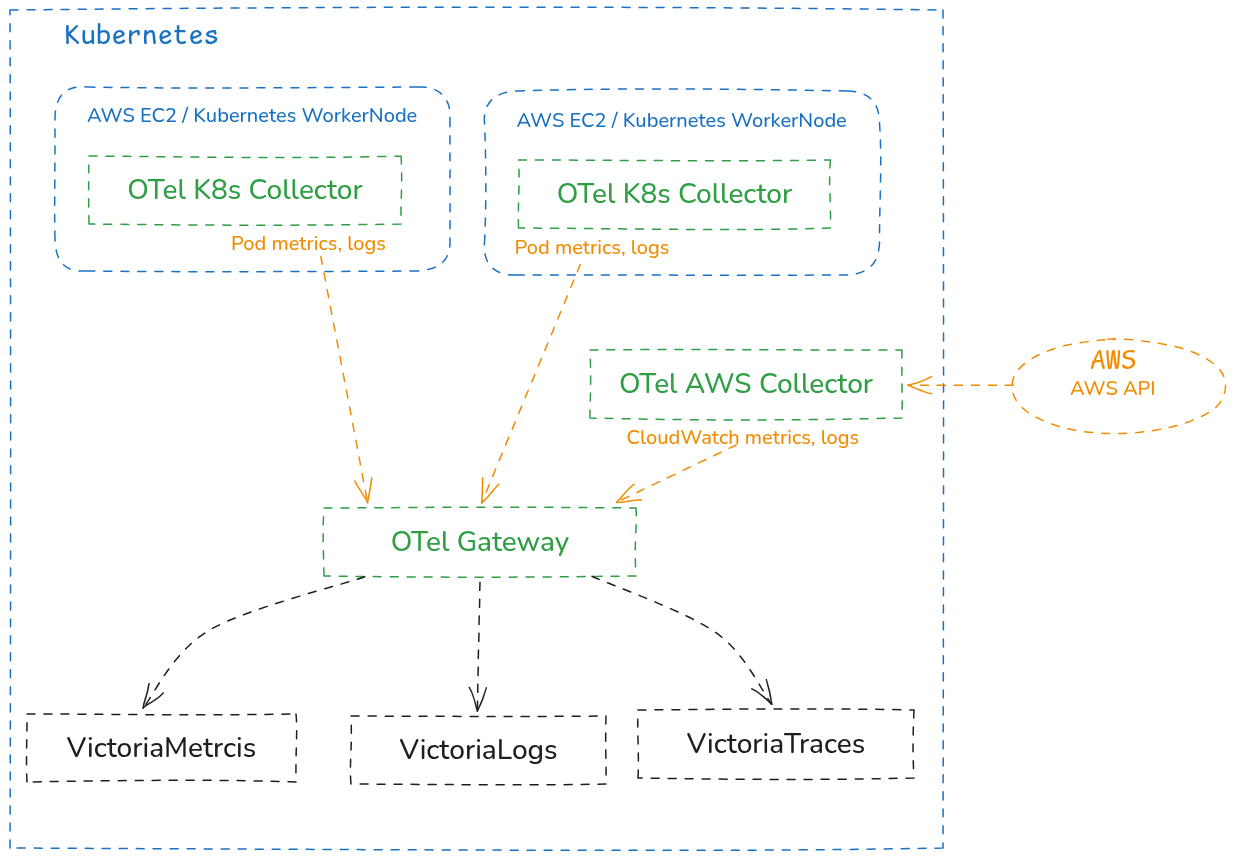
One thing to mention before we move on: I refer to OTel Collectors both as “collector” and as “agent“, but the name doesn’t change the essence – it’s just a role the service plays.
OpenTelemetry Collector configuration structure
There are lots of example files on the internet, for instance in the official repo k8s/otel-config.yaml, or a small collection at Cloud-Architect-Emma/opentelemetry-collector-examples.
But to use them or write your own – you should take a quick look at the general syntax and the components described in the config.
Documentation:
- Configuration reference
- Agent pattern
- Gateway pattern
- Agent-to-Gateway pattern
- Components registry (all receivers/processors/exporters with search)
- Contrib repo
In each component we’ll set our own parameters – but the structure is the same everywhere:
- receivers: describe where to get data from – Kubernetes API, AWS API, logs
- for the Kubernetes Collector here we’ll have
hostmetrics(metrics like the ones fromnode_exporter),kubeletstats(container metrics),filelog(Pod logs) - on the Gateway,
receiverswill haveotlp– to receive data from Collectors, andk8s_clusterandk8sobjects– it will collect data from the Kubernetes API andkubeletitself
- for the Kubernetes Collector here we’ll have
- processors: data transformations – adds metadata (attributes, labels), filters or drops unneeded stuff, groups, performs transformations – field renaming, normalization
- exporters: where we send the data
- on the Gateway, exporters will be
otlphttp/vmetrics,otlphttp/vlogs,otlphttp/vtraces. - on the Agent, exporters will be
otlp_grpc(with the Gateway address)
- on the Gateway, exporters will be
- extensions: additional capabilities (authentication, health check, encoding extensions, etc.)
- connectors: connect different pipelines together
- service: ties together and activates the described configs –
recievers,processors, etc
OpenTelemetry Pipelines
All received signals go through a pipeline: that is, receiver – got the signal, processor – processed it, exporter – sent it somewhere.
For each type of signal – metrics, logs and traces – we’ll have our own pipelines, because the data is related but processed differently.
Each pipeline can have its own identifier – just a name, to make the config easier to read, for example:
connectors:
  spanmetrics:
    # config...

service:
  pipelines:
    traces:
      receivers: [otlp]
      exporters: [otlphttp/vtraces, spanmetrics]  # spanmetrics here is an exporter

    metrics/from_traces:
      receivers: [spanmetrics]                    # the same spanmetrics here is an receiver
      exporters: [otlphttp/vmetrics]
Now we can start writing our own configs and launching collectors.
OpenTelemetry: running it in Kubernetes
There are several ways to run the stack – “bare” containers, a Helm chart, or the OpenTelemetry Operator, see Install the Collector.
For VictoriaMetrics I use the Helm chart victoria-metrics-k8s-stack, which installs VictoriaMetrics Operator, VMAgent, VMAlert, Alertmanager, Grafana, and all settings are done via VictoriaMetrics CRD resources.
I wrote about this setup in VictoriaMetrics: building a Kubernetes monitoring stack with a custom Helm chart, and about Kubernetes Operators and CRDs – in Kubernetes: what is a Kubernetes Operator and CustomResourceDefinition.
For OpenTelemetry I’ll just go with a Helm chart for now – it’ll be easier to figure out the main components without spending time on the operator’s documentation and its CRDs.
And once all of this goes to production – we can switch over to the OpenTelemetry Operator.
We’ll set it up as three separate components:
- OTel Gateway: receives data from the Kubernetes API, Kubernetes and AWS Collectors, processes it, forwards it to the backends – VictoriaMetrics, VictoriaLogs, VictoriaTraces
- Kubernetes Agent: runs on every Kubernetes WorkerNode, collects data from
kubeletand Pod logs - AWS Agent: collects data from AWS – metrics, logs
Let’s start with the OTel Gateway, because all other components will send data through it, it’s the one that does all the processing, and it’s the one that ships data to the VictoriaMetrics stack.
Add the Helm repo:
$ helm repo add open-telemetry https://open-telemetry.github.io/opentelemetry-helm-charts
$ helm repo update
Check the charts are there:
$ helm search repo open-telemetry/opentelemetry-collector
NAME                                    CHART VERSION   APP VERSION     DESCRIPTION
open-telemetry/opentelemetry-collector  0.155.0         0.151.0         OpenTelemetry Collector Helm chart for Kubernetes
All components – OTel Gateway, Kubernetes Agent, AWS Agent – will be installed from it, but each with its own values.
Running OpenTelemetry Gateway
Prepare the file otel-gateway-values.yaml – these will be the values for our OTel Gateway:
# OTel Collector - Gateway role (Deployment)
#
# Responsibilities at this phase:
#   - Accept OTLP from future Agents (DaemonSet)
#   - Collect cluster-level metrics via k8s_cluster receiver
#   - Collect K8s events as logs via k8sobjects receiver
#   - Enrich all signals with K8s metadata (k8sattributes processor)
#   - Export metrics to VictoriaMetrics, logs to VictoriaLogs
#
# Traces pipeline is intentionally not enabled yet - that's Phase 2

# docs: https://opentelemetry.io/docs/collector/architecture/

mode: deployment

replicaCount: 2

# contrib image has all the receivers/processors/exporters we need
image:
  repository: otel/opentelemetry-collector-contrib

resources:
  limits:
    cpu: 1000m
    memory: 2Gi
  requests:
    cpu: 200m
    memory: 512Mi

# RBAC for k8sattributes (pod metadata lookup) and k8s_cluster (cluster state).
# Full list of required permissions:
# https://github.com/open-telemetry/opentelemetry-collector-contrib/tree/main/receiver/k8sclusterreceiver
clusterRole:
  create: true
  rules:
    - apiGroups: [""]
      resources:
        - pods
        - namespaces
        - nodes
        - nodes/stats
        - nodes/proxy
        - events
        - services
        - resourcequotas
        - replicationcontrollers
        - replicationcontrollers/status
      verbs: ["get", "list", "watch"]
    - apiGroups: ["apps"]
      resources: ["replicasets", "deployments", "statefulsets", "daemonsets"]
      verbs: ["get", "list", "watch"]
    - apiGroups: ["extensions"]
      resources: ["replicasets"]
      verbs: ["get", "list", "watch"]
    - apiGroups: ["batch"]
      resources: ["jobs", "cronjobs"]
      verbs: ["get", "list", "watch"]
    - apiGroups: ["autoscaling"]
      resources: ["horizontalpodautoscalers"]
      verbs: ["get", "list", "watch"]
    - apiGroups: ["events.k8s.io"]
      resources: ["events"]
      verbs: ["get", "list", "watch"]

# Self-monitoring port
ports:
  metrics:
    enabled: true
    containerPort: 8888
    servicePort: 8888
    protocol: TCP

service:
  type: ClusterIP

config:
  receivers:
    # PUSH receiver
    # Accepts data from Agents and from apps
    # OTel TracerProvider() for the Backend API will send traces to this receiver
    otlp:
      protocols:
        grpc:
          endpoint: 0.0.0.0:4317
          # Agent batches of logs may exceed default 4 MiB gRPC limit
          max_recv_msg_size_mib: 16
        http:
          endpoint: 0.0.0.0:4318

    # PULL receiver
    # Will go to the Kubernetes API to get the cluster-level state
    # Runs only on Gateway (one place per cluster)
    # uses GET /api/v1/nodes, GET /apis/apps/v1/deployments etc.
    # converts responses to metircs like k8s.deployment.available, k8s.node.condition_ready, k8s.hpa.current_replicas
    # returns them to a corresponding pipeline
    k8s_cluster:
      collection_interval: 30s
      node_conditions_to_report: [Ready, MemoryPressure, DiskPressure, PIDPressure]
      allocatable_types_to_report: [cpu, memory, ephemeral-storage]

    # PULL receiver
    # Will go to the Kubernetes API, but uses `watch` mode
    # uses the 'events.k8s.io/v1/events' endpoint to receive event stream in real time
    # converts Kubernetes Events to Log records
    # returns them to the logs pipeline
    k8sobjects:
      objects:
        - name: events
          mode: watch
          group: events.k8s.io

  processors:
    # Memory protection against traffic spikes to avoid OOM kills
    memory_limiter:
      check_interval: 1s
      limit_percentage: 80
      spike_limit_percentage: 25

    # Enrich every signal with K8s pod metadata - this is what unifies labels
    # across metrics, logs and traces
    # docs: https://opentelemetry.io/docs/platforms/kubernetes/collector/components/#kubernetes-attributes-processor
    k8sattributes:
      auth_type: serviceAccount
      passthrough: false
      extract:
        # data taken from the Kubernetes API - fields from the Pod object to be added as attributes
        # i.e. a Kubernetes Namespace 'dev-backend-api-ns' for a Pod will be set as k8s.namespace.name="dev-backend-api-ns"
        # https://github.com/open-telemetry/opentelemetry-collector-contrib/tree/main/processor/k8sattributesprocessor#configuration
        metadata:
          - k8s.namespace.name
          - k8s.pod.name
          - k8s.pod.uid
          - k8s.pod.start_time
          - k8s.deployment.name
          - k8s.statefulset.name
          - k8s.daemonset.name
          - k8s.cronjob.name
          - k8s.job.name
          - k8s.node.name
        # add custom labels from the Pod object
        # i.e. a Pod with label 'app.kubernetes.io/component=backend' will be set as app.label.component="backend"
        labels:
          - tag_name: app.label.component
            key: app.kubernetes.io/component
            from: pod
          - tag_name: app.label.name
            key: app.kubernetes.io/name
            from: pod
      # pod_association processor is used to associate signals (metrics, logs, traces) with the correct Pod
      # e.g. when the Gateway receive a metric from a Pod, it need to know how to find that Pod in the Kubernetes API
      # for example, our Kubernetes Agent will send a metric from 'kubeletstats' for a container
      # but this metrics will not have a corresponding 'k8s.deployment.name'
      # so here, k8sattributes proecessor will ask the Kubernetes API to get additional metadata and set it as attributes
      pod_association:
        - sources:
            - from: resource_attribute
              name: k8s.pod.ip
        - sources:
            - from: resource_attribute
              name: k8s.pod.uid
        - sources:
            - from: connection

    # similar to the k8sattributes.extract.labels above, but for the resource attributes to all signals
    # sets hard-coded values
    resource:
      attributes:
        # action may be set as:
        # - insert: add only if not exists
        # - update: update if exists
        # - upsert: insert if not exists, update if exists
        # - delete: delete if exists
        - key: k8s.cluster.name
          value: eks-ops-1-33
          action: upsert
        - key: cloud.provider
          value: aws
          action: upsert

    # Batch records for efficient export
    # collects data to its buffer and sends it to the exporter in batches
    # docs: https://github.com/open-telemetry/opentelemetry-collector-contrib/tree/main/processor/batchprocessor
    batch:
      send_batch_size: 8192
      timeout: 10s

  # Where to send the data to - in our case, to VictoriaMetrics and VictoriaLogs
  # docs: https://docs.victoriametrics.com/opentelemetry/
  exporters:
    # VictoriaMetrics - OTLP endpoint
    # docs: https://docs.victoriametrics.com/victoriametrics/data-ingestion/opentelemetry-collector/
    # the '/v1/metrics' part will be added by the exporter itself
    otlphttp/vmetrics:
      endpoint: http://vmsingle-vm-k8s-stack.ops-monitoring-ns.svc.cluster.local:8428/opentelemetry
      tls:
        insecure: true

    # VictoriaLogs - OTLP endpoint
    # docs: https://docs.victoriametrics.com/victorialogs/data-ingestion/opentelemetry/
    # the '/v1/logs' part will be added by the exporter itself
    otlphttp/vlogs:
      endpoint: http://atlas-victoriametrics-victoria-logs-single-server.ops-monitoring-ns.svc.cluster.local:9428/insert/opentelemetry
      tls:
        insecure: true

    # Debug exporter - for troubleshooting, can be added to any pipeline temporarily
    debug:
      verbosity: basic

  # Combine everything into a single service definition
  service:
    # Pipelines operate on three telemetry data types: traces, metrics, and logs.
    # Each pipeline has its own set of receivers, processors and exporters.
    # docs: https://opentelemetry.io/docs/collector/architecture/#pipelines
    pipelines:
      metrics:
        # Reference receivers by their names from the config.receivers section above
        receivers: [otlp, k8s_cluster]
        # Reference processors by their names from the config.processors section above
        # IMPORTANT NOTE: order matters - processors run in the order listed here
        processors: [memory_limiter, k8sattributes, resource, batch]
        # Reference exporters by their names from the config.exporters section above
        exporters: [otlphttp/vmetrics]

      logs:
        receivers: [otlp, k8sobjects]
        processors: [memory_limiter, k8sattributes, resource, batch]
        exporters: [otlphttp/vlogs, debug]

    telemetry:
      metrics:
        readers:
          - pull:
              exporter:
                prometheus:
                  host: 0.0.0.0
                  port: 8888
Actually, I’ve explained it all in the comments – but quickly, here’s what we have:
mode="deployment": we create the Gateway as a Kubernetes Deployment with two Pods- for the Kubernetes Agent we’ll do a DaemonSet, because it needs to run on every WorkerNode
receivers: describes the inputs – can be PULL (they reach out to external APIs themselves), or PUSH (agents/collectors push to them)otlp: endpoints for the Kubernetes and AWS Agentsk8s_cluster: reaches out to the Kubernetes API, gets info about Nodes, Pods, Eventsk8sobjects.objects="events": continuously receives Kubernetes Events from the Kubernetes API, writes them as logs
processors:k8sattributes: adds attributes to every metric or log (namespace, deployment name, etc)resource.attributes: adds “global” attributes to every received signal (see OpenTelemetry Resource Attributes Explained Practically)
exporters: where the data gets written – the backends, in our case we forward to VictoriaMetrics, VictoriaLogs and VictoriaTracesservice: ties together everything described abovepipelines:metrics: in what order and what to do with metricslogs: same thing – but for logs- later there will be a pipeline for traces here
telemetry: enables self monitoring – so we can look at the OTel’s own metrics
Deploy:
$ helm -n ops-monitoring-ns upgrade --install otel-gateway open-telemetry/opentelemetry-collector -f otel-gateway-values.yaml
Check the Pods:
$ kubectl -n ops-monitoring-ns get pod -l app.kubernetes.io/instance=otel-gateway
NAME                                                    READY   STATUS    RESTARTS   AGE
otel-gateway-opentelemetry-collector-57b74ffd98-4pqhw   1/1     Running   0          68s
otel-gateway-opentelemetry-collector-57b74ffd98-td6hr   1/1     Running   0          68s
The Kubernetes Service – the one Agents will use:
$ kubectl -n ops-monitoring-ns get svc -l app.kubernetes.io/instance=otel-gateway
NAME                                   TYPE        CLUSTER-IP       EXTERNAL-IP   PORT(S)                                                            AGE
otel-gateway-opentelemetry-collector   ClusterIP   172.20.204.222   <none>        6831/UDP,14250/TCP,14268/TCP,8888/TCP,4317/TCP,4318/TCP,9411/TCP   90s
Checking Metrics
And in a minute we can already check the metrics with {k8s.cluster.name="eks-ops-1-33"}:
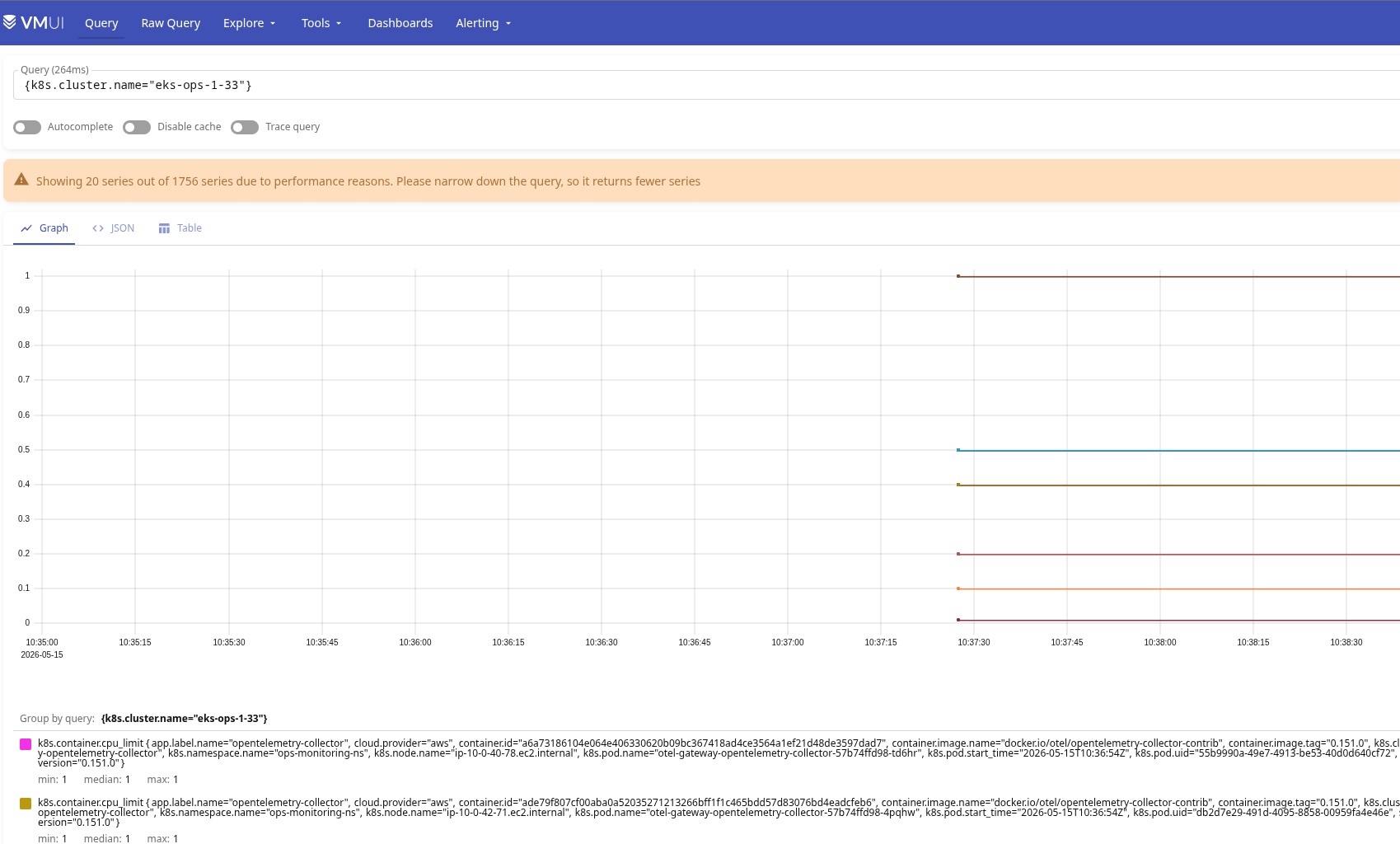
We see the metric k8s.container.cpu_limit – this comes from the k8s_cluster receiver, which went to /api/v1/pods in the Kubernetes API and read spec.containers[].resources.limits.cpu.
The Cardinality Issue
And here’s an important point – in the labels we see lots of different IDs, for example:
k8s.container.cpu_limit {..., container.id="a6a73186104e064e406330620b09bc367418ad4ce3564a1ef21d48de3597dad7", ..., k8s.pod.name="otel-gateway-opentelemetry-collector-57b74ffd98-td6hr",k8s.pod.start_time="2026-05-15T10:36:54Z",k8s.pod.uid="55b9990a-49e7-4913-be53-40d0d640cf72", ...}
Every time a Kubernetes Pod gets recreated – a new value is generated for its k8s.pod.uid.
I covered in detail why and how this affects VictoriaMetrics storage and load in the post VictoriaMetrics: Churn Rate, High cardinality, metrics and IndexDB, but in short – every unique value of every label increases both the disk usage and the size of the VictoriaMetrics IndexDB, and accordingly affects CPU/RAM consumption and search speed.
To prevent this – we can add another processor that will drop such labels.
The order of declaration in config.processors doesn’t matter – it matters in the pipeline, but it makes sense to put it near the resource block:
...
  processors:
    ...
    resource:
      attributes:
        - key: k8s.cluster.name
          value: eks-ops-1-33
          action: upsert
        - key: cloud.provider
          value: aws
          action: upsert

    # Drop high-cardinality resource attributes from metrics only
    # These change on every pod recreation and cause series explosion in VictoriaMetrics.
    # Logs and traces keep them - useful for debugging specific pod instances.
    resource/drop_volatile_labels:
      attributes:
        - key: k8s.pod.uid
          action: delete
        - key: container.id
          action: delete
        - key: k8s.pod.start_time
          action: delete
...
Another option is to drop them via -search.maxStalenessInterval=4h on VictoriaMetrics itself, see List of command-line flags.
Keep in mind that we have two different types of attributes, and accordingly these will be different processors:
- record-level attributes: attributes of a specific record (i.e. container CPU usage)
- resource-level attributes: attributes of the source – added to all signals that are sent to the backends
To check which attributes exactly need to be modified, look at the docs of the specific processor, for example for the k8sattributes processor:
The processor automatically discovers k8s resources (pods), extracts metadata from them and adds the extracted metadata to the relevant spans, metrics and logs as resource attributes.
Or in the OTel specification, for example for Pod the docs have the URI /resource/k8s/#pod.
Add the new processor to the metrics pipeline – after resource, but before batch:
...
  service:
    pipelines:
      metrics:
        receivers: [otlp, k8s_cluster]
        processors: [memory_limiter, k8sattributes, resource, resource/drop_volatile_labels, batch]
...
Why this specific position in the pipeline – because everything in the pipeline runs in the order it’s declared, and resource/drop_volatile_labels processing should go:
- after
k8sattributes– because it’s the one that addsk8s.pod.uid, we need to drop it after it appears - after
resource– so that theresourceprocessor has time to set its own labels - before
batch– so thatbatchgroups already-cleaned data
Update the deploy, check:
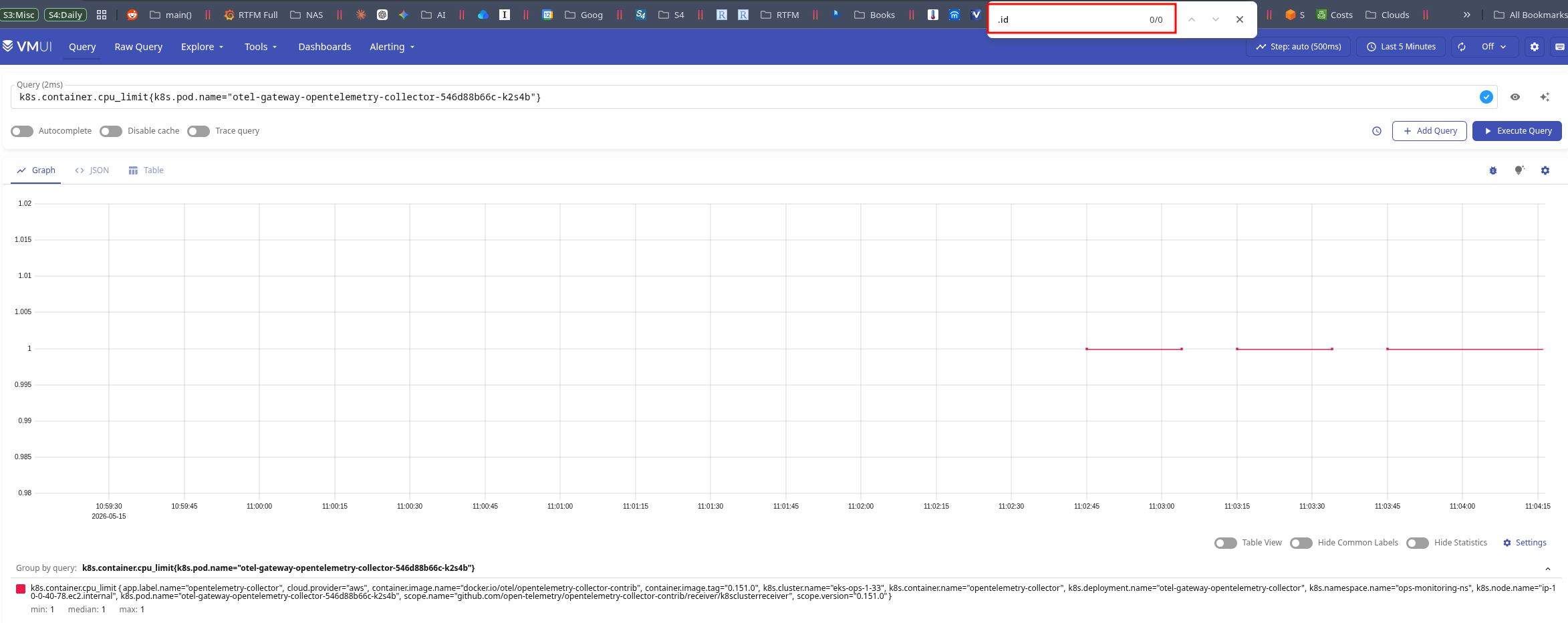
And the .id labels are gone.
Now we have a working OTel Gateway, where we:
- are ready to receive data from future Agents and our services like Backend API (ports 4317/4318)
- collect cluster-level metrics (
k8s_cluster) - collect K8s events as logs (
k8sobjects) - enrich with k8s metadata (
k8sattributes) - add our own labels to all data (
k8s.cluster.name,cloud.provider) - control cardinality (
resource/drop_volatile_labels) - have OOM Killer protection (
memory_limiter) - have batch export to VictoriaMetrics and VictoriaLogs configured
What’s left – the AWS Collector for metrics from AWS CloudWatch and AWS ALB logs, and setting up the receiving and forwarding of traces.
Checking Logs
Check the logs – the query {k8s.cluster.name="eks-ops-1-33"}.
For now we only have logs from Kubernetes Events – we’ll add Pod logs later via filelog in the Kubernetes Agent:
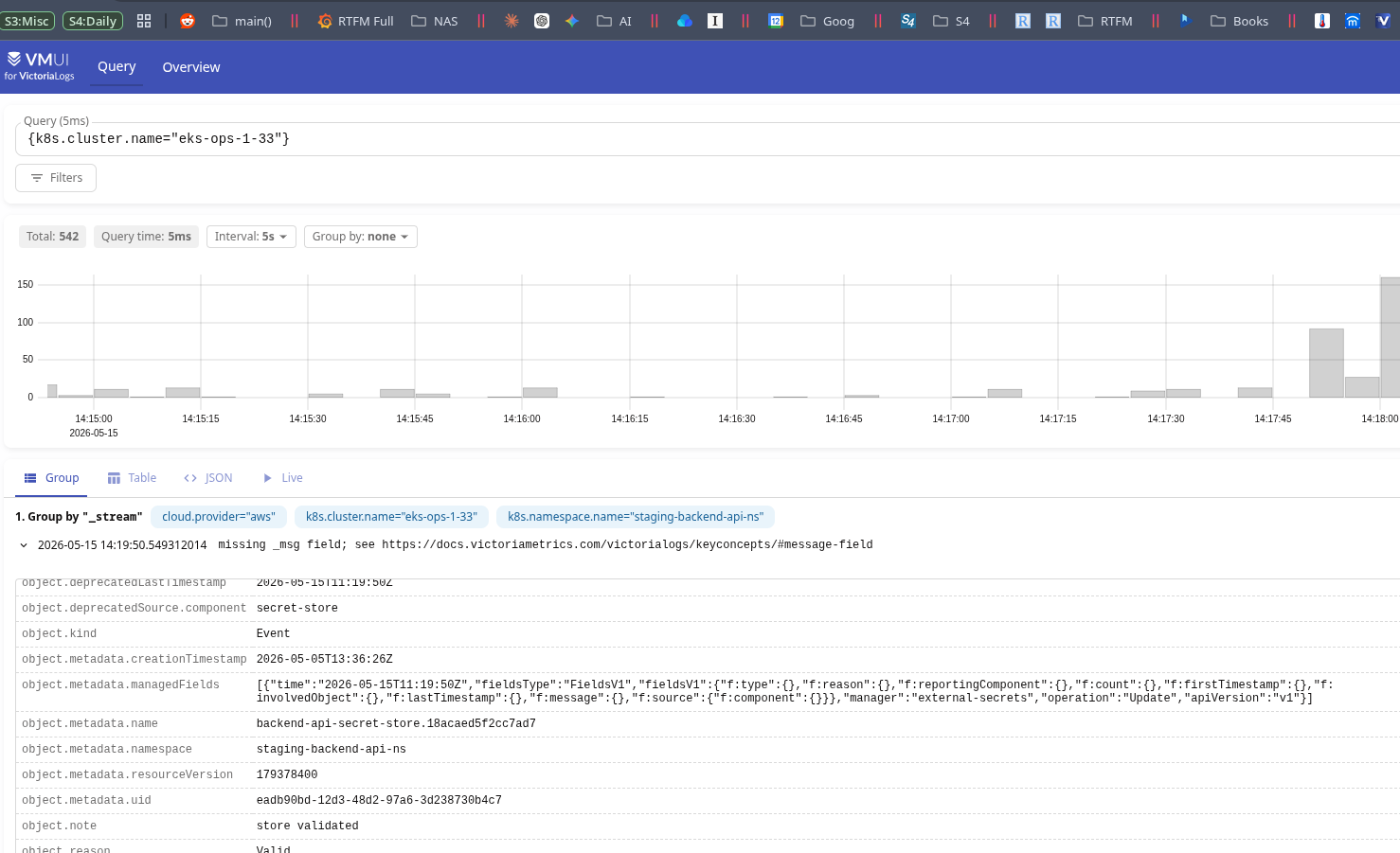
There are two small problems here:
- the
_msgfield isn’t formed - there’s garbage in
object.metadata.managedFields
Adding transform for logs
We can override what exactly gets written to the log and how via processors.transform:
...
config:
  ...
  processors:

    ...
    # Normalize k8sobjects events: set readable body, drop noisy fields
    transform/k8s_events:
      #error_mode: ignore
      error_mode: propagate
      log_statements:
        - context: log
          statements:
            # k8sobjects stores the Event as a map in body.
            # VictoriaLogs flattens it into object.* fields automatically.
            # Build readable "REASON: note" message from body fields.
            - >-
              set(body, Concat([body["object"]["reason"], ": ", body["object"]["note"]], ""))
              where attributes["event.domain"] == "k8s" and attributes["k8s.resource.name"] == "events"
...
Here we shape the body field ourselves, which VictoriaLogs will use for its _msg field.
To see how the event object is built in the first place, enable the debug exporter with detailed verbosity:
...
debug:
      verbosity: detailed
...
Then add it to the logs pipeline:
...
logs:
        receivers: [otlp, k8sobjects]
        processors: [memory_limiter, k8sattributes, resource, batch]
        exporters: [otlphttp/vlogs, debug]
...
And then just look at the logs of the Gateway Pods.
Add transform/k8s_events to the logs pipeline before batch:
...
  service:
    pipelines:
      metrics:
        ...

      logs:
        receivers: [otlp, k8sobjects]
        processors: [memory_limiter, k8sattributes, resource, transform/k8s_events, batch]
        exporters: [otlphttp/vlogs, debug]
...
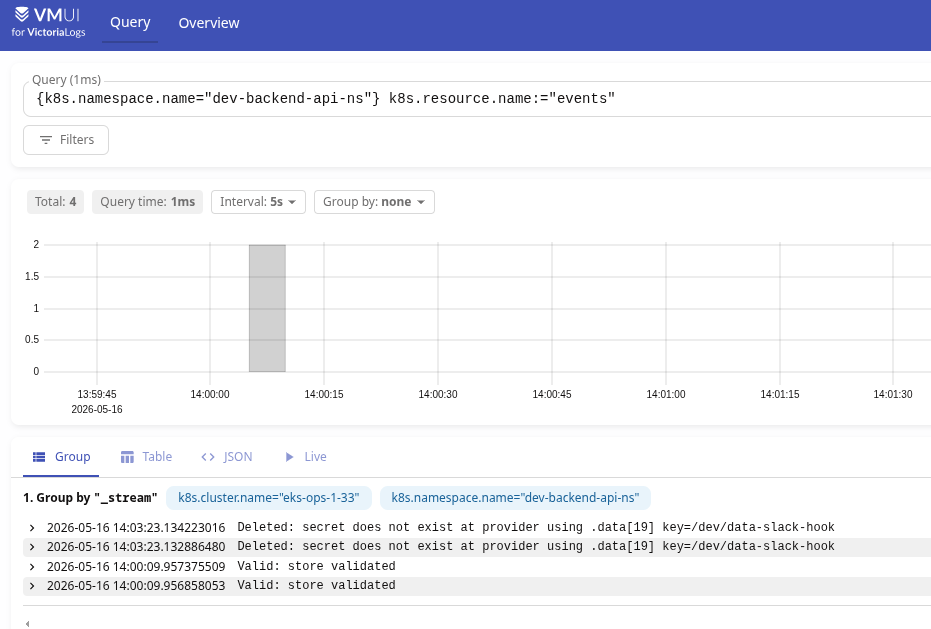
And now we have a nice-looking _msg field:
Running the Kubernetes Agent
The next step is to add an exporter that will collect Pod-level data – metrics and logs.
Create the file otel-k8s-agent-values.yaml:
# OTel Collector - Agent role (DaemonSet)
#
# Runs on every node, collects local data only:
#   - System metrics from host /proc, /sys (hostmetrics receiver)
#   - Pod/container metrics from local kubelet (kubeletstats receiver)
#   - Container logs from /var/log/pods (filelog receiver)
#
# Forwards everything to Gateway via OTLP gRPC.
# Gateway adds k8s metadata and exports to Victoria-* backends.

mode: daemonset

# contrib image has hostmetrics, kubeletstats, filelog receivers
image:
  repository: otel/opentelemetry-collector-contrib

# Mount host filesystem paths needed by hostmetrics and filelog
extraVolumes:
  - name: varlogpods
    hostPath:
      path: /var/log/pods
  - name: varlibdockercontainers
    hostPath:
      path: /var/lib/docker/containers
  - name: hostfs
    hostPath:
      path: /

extraVolumeMounts:
  - name: varlogpods
    mountPath: /var/log/pods
    readOnly: true
  - name: varlibdockercontainers
    mountPath: /var/lib/docker/containers
    readOnly: true
  - name: hostfs
    mountPath: /hostfs
    readOnly: true
    mountPropagation: HostToContainer

# Root is required to read /proc, /sys from the host
securityContext:
  runAsUser: 0
  runAsGroup: 0

resources:
  limits:
    cpu: 500m
    memory: 1Gi
  requests:
    cpu: 100m
    memory: 256Mi

# Agent must run on every node, including tainted ones
tolerations:
  - effect: NoSchedule
    operator: Exists
  - key: CriticalAddonsOnly
    operator: Exists
    effect: NoSchedule
  - key: CriticalAddonsOnly
    operator: Exists
    effect: NoExecute
  - key: BackendOnly
    operator: Exists
  - key: BackendDevOnly
    operator: Exists
  - key: BackendProdOnly
    operator: Exists
  - key: GitHubOnly
    operator: Exists
  - key: GitHubControllerOnly
    operator: Exists
  - key: GitHubRunnersOnly
    operator: Exists

# Inject node identity and host paths into the collector container
extraEnvs:
  - name: K8S_NODE_NAME
    valueFrom:
      fieldRef:
        fieldPath: spec.nodeName
  - name: K8S_POD_IP
    valueFrom:
      fieldRef:
        fieldPath: status.podIP
  # hostmetrics uses these env vars to read host /proc, /sys instead of container's
  - name: HOST_PROC
    value: /hostfs/proc
  - name: HOST_SYS
    value: /hostfs/sys
  - name: HOST_ETC
    value: /hostfs/etc
  - name: HOST_VAR
    value: /hostfs/var
  - name: HOST_RUN
    value: /hostfs/run
  - name: HOST_DEV
    value: /hostfs/dev

# Need read access to kubelet stats endpoint
clusterRole:
  create: true
  rules:
    - apiGroups: [""]
      resources: ["nodes/stats", "nodes/proxy", "nodes/metrics"]
      verbs: ["get"]
    - apiGroups: [""]
      resources: ["pods", "namespaces", "nodes"]
      verbs: ["get", "list", "watch"]

# Self-monitoring port
ports:
  metrics:
    enabled: true
    containerPort: 8888
    servicePort: 8888
    protocol: TCP

config:
  receivers:
    # PULL receiver
    # Reads node-level system metrics from host /proc and /sys
    # Replaces node_exporter functionality
    # Produces: system.cpu.*, system.memory.*, system.disk.*, system.network.*,
    #           system.filesystem.*, system.load.*, system.paging.*, system.processes.*
    hostmetrics:
      collection_interval: 30s
      root_path: /hostfs
      scrapers:
        cpu:
          metrics:
            system.cpu.utilization:
              enabled: true
        memory:
          metrics:
            system.memory.utilization:
              enabled: true
        disk:
        filesystem:
          exclude_mount_points:
            mount_points: ["/var/lib/kubelet/*", "/var/lib/docker/*", "/proc/*", "/sys/*"]
            match_type: regexp
          exclude_fs_types:
            fs_types: [tmpfs, devtmpfs, overlay, squashfs]
            match_type: strict
        network:
        load:
        paging:
        processes:

    # PULL receiver
    # Queries local kubelet (port 10250) for per-pod and per-container metrics
    # Replaces cadvisor functionality (which is built into kubelet)
    # Produces: k8s.node.*, k8s.pod.*, container.* (cpu/memory/network/filesystem)
    kubeletstats:
      collection_interval: 30s
      auth_type: serviceAccount
      endpoint: "https://${env:K8S_NODE_NAME}:10250"
      insecure_skip_verify: true
      metric_groups:
        - node
        - pod
        - container
        - volume

    # PULL receiver
    # Reads container logs from disk - standard CRI/containerd path
    # Replaces promtail / fluent-bit functionality
    # Container operator parses CRI log format and extracts k8s.* attributes from file path
    filelog:
      include:
        - /var/log/pods/*/*/*.log
      exclude:
        # Don't collect our own logs to avoid feedback loops
        - /var/log/pods/ops-monitoring-ns_otel-*/*/*.log
      start_at: end
      include_file_path: true
      include_file_name: false
      operators:
        - type: container
          id: container-parser

  processors:
    # Memory protection against traffic spikes
    memory_limiter:
      check_interval: 1s
      limit_percentage: 80
      spike_limit_percentage: 25

    # Tag everything with the node we're running on
    # Cluster-level attributes (k8s.cluster.name etc.) are added by Gateway
    resource:
      attributes:
        - key: k8s.node.name
          value: ${env:K8S_NODE_NAME}
          action: upsert

    # Batch records before sending to Gateway
    batch:
      send_batch_size: 8192
      timeout: 10s

  exporters:
    # Forward everything to Gateway via OTLP gRPC
    # Gateway will add k8s metadata and route to the right Victoria backend
    otlp:
      endpoint: otel-gateway-opentelemetry-collector.ops-monitoring-ns.svc.cluster.local:4317
      tls:
        insecure: true
      sending_queue:
        enabled: true
        num_consumers: 4
        queue_size: 1000
      retry_on_failure:
        enabled: true
        initial_interval: 5s
        max_interval: 30s

  service:
    pipelines:
      metrics:
        receivers: [hostmetrics, kubeletstats]
        processors: [memory_limiter, resource, batch]
        exporters: [otlp]

      logs:
        receivers: [filelog]
        processors: [memory_limiter, resource, batch]
        exporters: [otlp]

    telemetry:
      metrics:
        readers:
          - pull:
              exporter:
                prometheus:
                  host: 0.0.0.0
                  port: 8888
Here we have a structure similar to the Gateway – also receivers, processors, exporters and pipelines.
The difference is in how we deploy the Pods, which receivers we describe, and where we export to:
mode="daemonset": the Collector must run on every WorkerNode in the clusterreceivers:hostmetrics: node-level – CPU, RAM, disks, network (equivalent to Prometheus Node Exporter)kubeletstats: container metrics (equivalent to cAdvisor_exporter)filelog: collect container logs (equivalent to Promtail/Filebeat/etc)
exporters: the data collected by the agent gets forwarded to the OTel Gateway – it will process it and send it to VictoriaMetrics/Logs/Traces
Deploy:
$ helm -n ops-monitoring-ns upgrade --install otel-k8s-agent open-telemetry/opentelemetry-collector -f otel-k8s-agent-values.yaml
Check the Pods:
$ kubectl -n ops-monitoring-ns get pods -l app.kubernetes.io/instance=otel-k8s-agent
NAME                                                 READY   STATUS    RESTARTS   AGE
otel-k8s-agent-opentelemetry-collector-agent-2ft7s   1/1     Running   0          35s
otel-k8s-agent-opentelemetry-collector-agent-79gs2   1/1     Running   0          35s
otel-k8s-agent-opentelemetry-collector-agent-bdhsd   0/1     Pending   0          35s
...
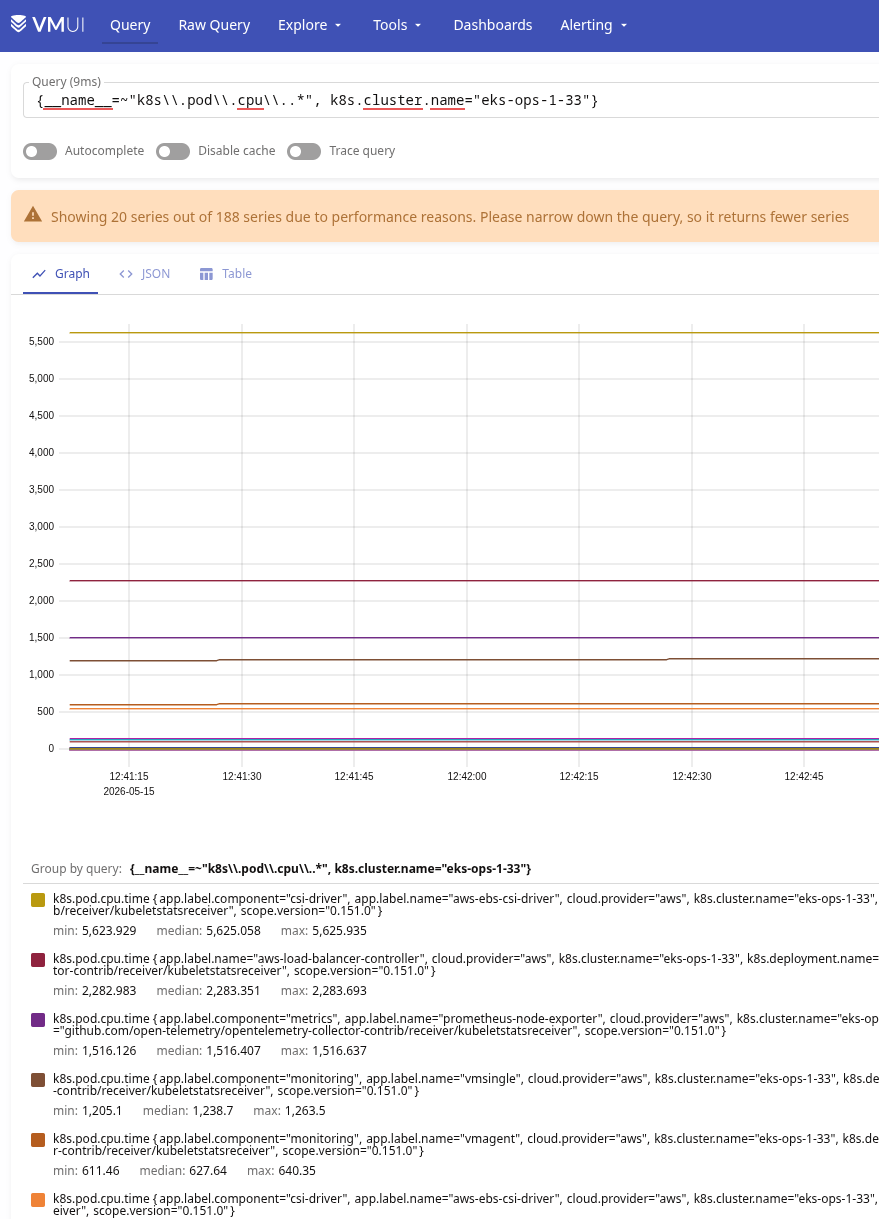
In a minute we check the metrics in VictoriaMetrics – {__name__=~"k8s\\.pod\\.cpu\\..*", k8s.cluster.name="eks-ops-1-33"}:
And the logs, for example from {k8s.namespace.name="dev-backend-api-ns"}:
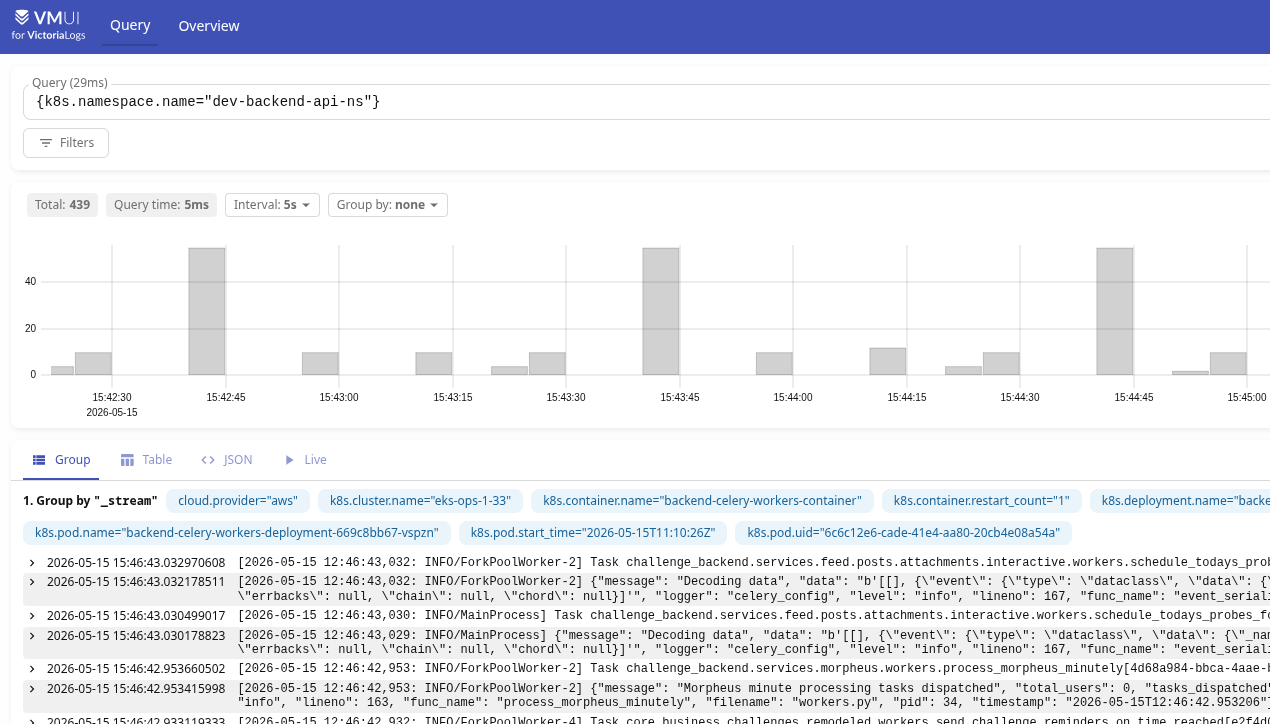
What’s not great here is that log streams get created with such a huge set of labels:
_stream {cloud.provider="aws",k8s.cluster.name="eks-ops-1-33",k8s.container.name="backend-celery-workers-container",k8s.container.restart_count="1",k8s.deployment.name="backend-celery-workers-deployment",k8s.namespace.name="dev-backend-api-ns",k8s.node.name="ip-10-0-37-96.ec2.internal",k8s.pod.name="backend-celery-workers-deployment-669c8bb67-vspzn",k8s.pod.start_time="2026-05-15T11:10:26Z",k8s.pod.uid="6c6c12e6-cade-41e4-aa80-20cb4e08a54a"}
This can also be solved with the processor we did for metrics, or by creating a new one, for example:
resource/drop_log_labels:
      attributes:
        - key: k8s.pod.uid
          action: delete
        - key: k8s.container.restart_count
          action: delete
And then hook it into the logs pipeline:
...
      logs:
        receivers: [otlp, k8sobjects]
        processors: [memory_limiter, k8sattributes, resource, resource/drop_log_labels, transform/k8s_events, batch]
        exporters: [otlphttp/vlogs]
...
But some labels can be useful – like k8s.container.restart_count.
So another option is to pass collector.streamFields or collector.ignoreFields on VictoriaLogs itself, or do it right in OTel Gateway via the VL-Stream-Fields header:
...

    otlphttp/vlogs:
      endpoint: http://atlas-victoriametrics-victoria-logs-single-server.ops-monitoring-ns.svc.cluster.local:9428/insert/opentelemetry
      tls:
        insecure: true
      headers:
        VL-Stream-Fields: "k8s.cluster.name,k8s.namespace.name,k8s.deployment.name,k8s.container.name,k8s.pod.name"

...
Grafana and Prometheus vs OpenTelemetry queries
And a bit about what changes in Grafana and alerts.
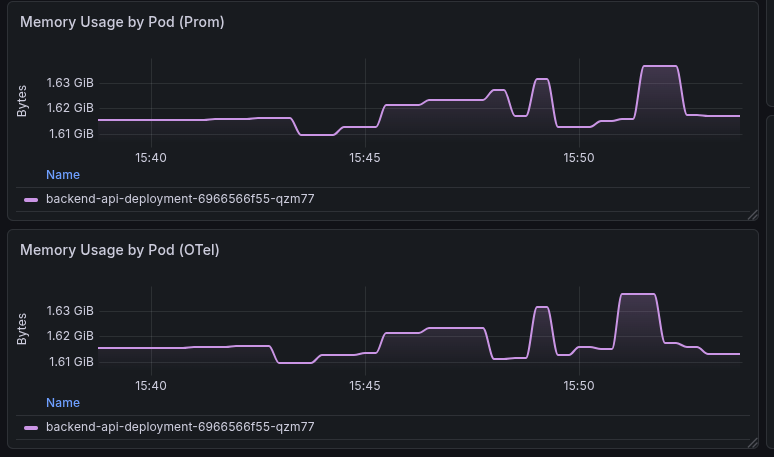
For example, here’s a query in Prometheus format:
sum(container_memory_working_set_bytes{namespace="$namespace", pod="$pod", image!="", container!="POD", container!=""}) by (pod)
In OpenTelemetry format it will look like this:
sum({__name__="container.memory.working_set", k8s.namespace.name="$namespace", k8s.pod.name="$pod"}) by (k8s.pod.name)
The result on the graphs – the old one on top (Prometheus), the new one at the bottom (OpenTelemetry):
For VictoriaMetrics you can set opentelemetry.usePrometheusNaming (see List of command-line flags) and Label sanitization – then metrics will be created in Prometheus format with “_” instead of “.“.
But for VictoriaLogs and VictoriaTraces I don’t see such an option – I’ll ask the devs if there are any reasonable ways to solve this.
