 We ran into a pretty standard OOM Killer issue in Kubernetes. I thought I would take a quick look – but somehow it “suddenly” turned into a pretty decent post.
What made it even better is that I hadn’t dug into things like Linux OOM Killer, cgroups, memory types and Kubernetes limits myself for quite a while – so it was genuinely nice to dive back into this wonderful world and remind myself that I’m not just a “Codex operator” – but still a bit of an engineer too.
The post ended up without a final “here’s what caused the problem” – but along the way I had to dig into metrics and Linux kernel mechanisms a bit, so the investigation turned out to be interesting.
And it’s worth reading simply because there will be quite a lot about Linux cgroups, memory and cAdvisor metrics.
By the way, see also Kubernetes: Pod resources.requests, resources.limits and Linux cgroups.
Contents
The Issue
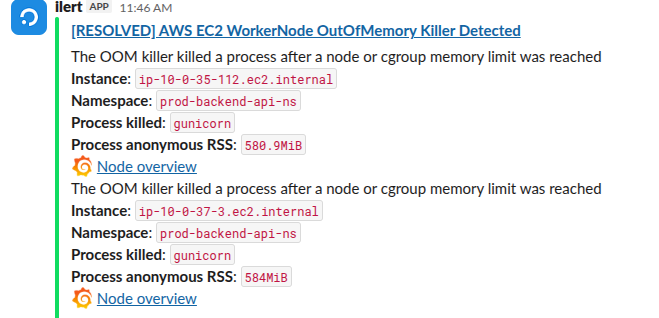
A really standard issue that we’ve all run into more than once – a container gets killed by the OOM Killer:
And after that – 502 errors on the Load Balancer, which was pretty much expected (btw, see Kubernetes: 503 errors with AWS ALB – possible causes and solutions):
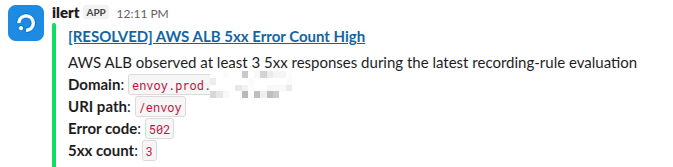
Since the endpoint “envoy.prod.example.co” belongs to a new service, I decided to check what had happened there. For most of our services we have already “tuned” Kubernetes resources.requests and resources.limits, and there are no issues there – but with a new service it was worth taking a quick look.
Well, it wasn’t exactly “quick” – I got pulled into the topic and refreshed my memory on how the limit mechanisms and Linux OOM Killer actually work.
Investigating: Grafana and OOM Killer logs
The first thing I noticed was that our Grafana didn’t show any major spikes for this Pod:

There was a small increase to ~607 MB – but we had set the limits with some headroom, up to 1 GB:
deployment_envoy:
  # sized to the API tier: 2 Pods x 2 gunicorn workers, every endpoint is sync/GIL-bound
  replicas: 2
  resources:
    requests:
      memory: 640Mi
      cpu: 100m
    limits:
      memory: 1Gi
Let’s check the logs around that time:
"Killed process" "gunicorn" hostname:="ip-10-0-35-112.ec2.internal"
And sure enough – we can see 4 killed gunicorn processes:
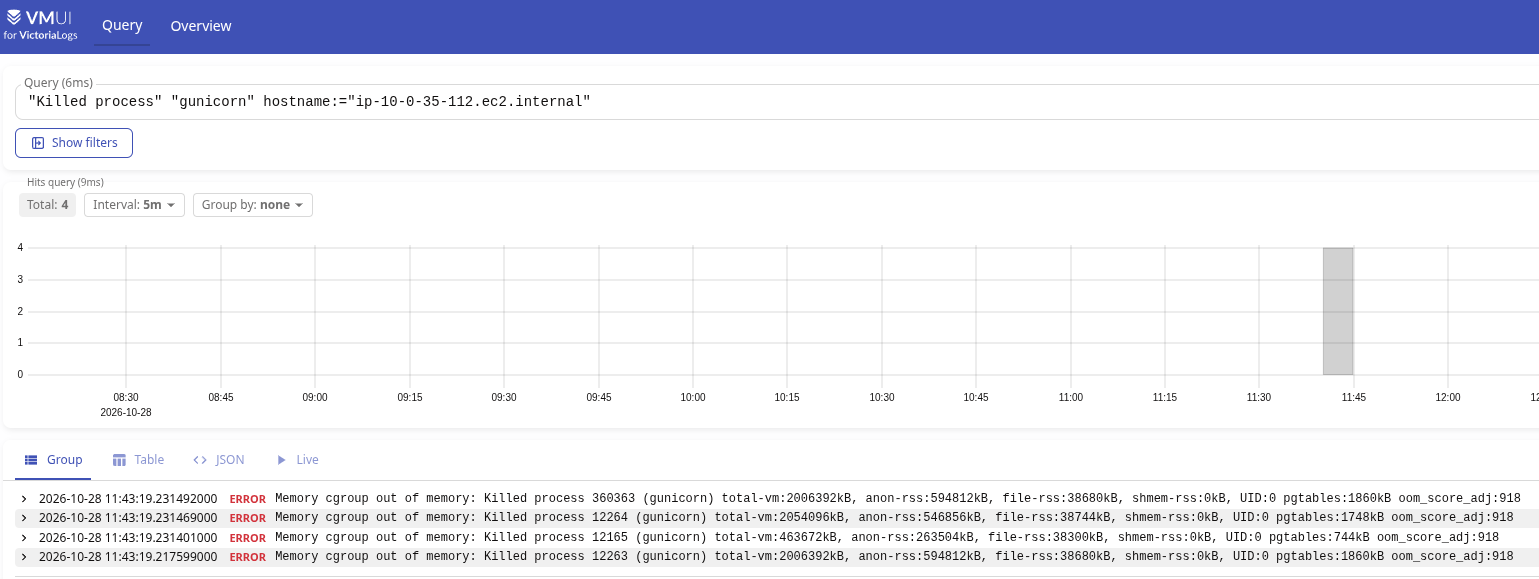
- Killed process 360363 – rss:594812kB (580.9 MiB)
- Killed process 12264 – rss:546856kB (534.0 MiB)
- Killed process 12165 – rss:263504kB (257.3 MiB)
- Killed process 12263 – rss:594812kB (580.9 MiB)
Why several processes were killed at once – because each Pod has one gunicorn master + 2 gunicorn workers (here’s an example from a Pod that is still alive):
root@backend-envoy-deployment-fc8c468d-frn4l:/app# ps aux | grep gun
root           1  0.0  3.8 463672 302348 ?       Ss   Oct28   0:17 /app/.venv/bin/python /app/.venv/bin/gunicorn envoy.run_api:app -c gunicorn.conf.py --bind 0.0.0.0:8000 -w 2 -k uvicorn.workers.UvicornWorker --log-level debug --keep-alive 75
root           8  0.5  5.1 1889828 406744 ?      Sl   Oct28   6:07 /app/.venv/bin/python /app/.venv/bin/gunicorn envoy.run_api:app -c gunicorn.conf.py --bind 0.0.0.0:8000 -w 2 -k uvicorn.workers.UvicornWorker --log-level debug --keep-alive 75
root           9  0.4  5.0 1955844 399948 ?      Sl   Oct28   5:20 /app/.venv/bin/python /app/.venv/bin/gunicorn envoy.run_api:app -c gunicorn.conf.py --bind 0.0.0.0:8000 -w 2 -k uvicorn.workers.UvicornWorker --log-level debug --keep-alive 75
root         543  0.0  0.0   3760  1972 pts/0    S+   10:50   0:00 grep gun
We’ll get to the fourth process separately.
Back to the issue itself: we have three killed processes, each with between 257 and 581 MB of RSS.
All processes were killed together – because they all belonged to the same container. But we don’t just take anyone’s word for it – let’s verify that, and at the same time see how it all happened.
OOM Killer and containerd: how it happened
Let’s expand the query:
hostname:="ip-10-0-35-112.ec2.internal" job:="systemd-journal" ("memory: usage" OR "Memory cgroup stats" OR "oom-kill" OR "Tasks in" OR "Killed process" OR "TaskOOM" OR "ContainerDied" OR "exit_status:137")
Now we can see the full picture of what happened:
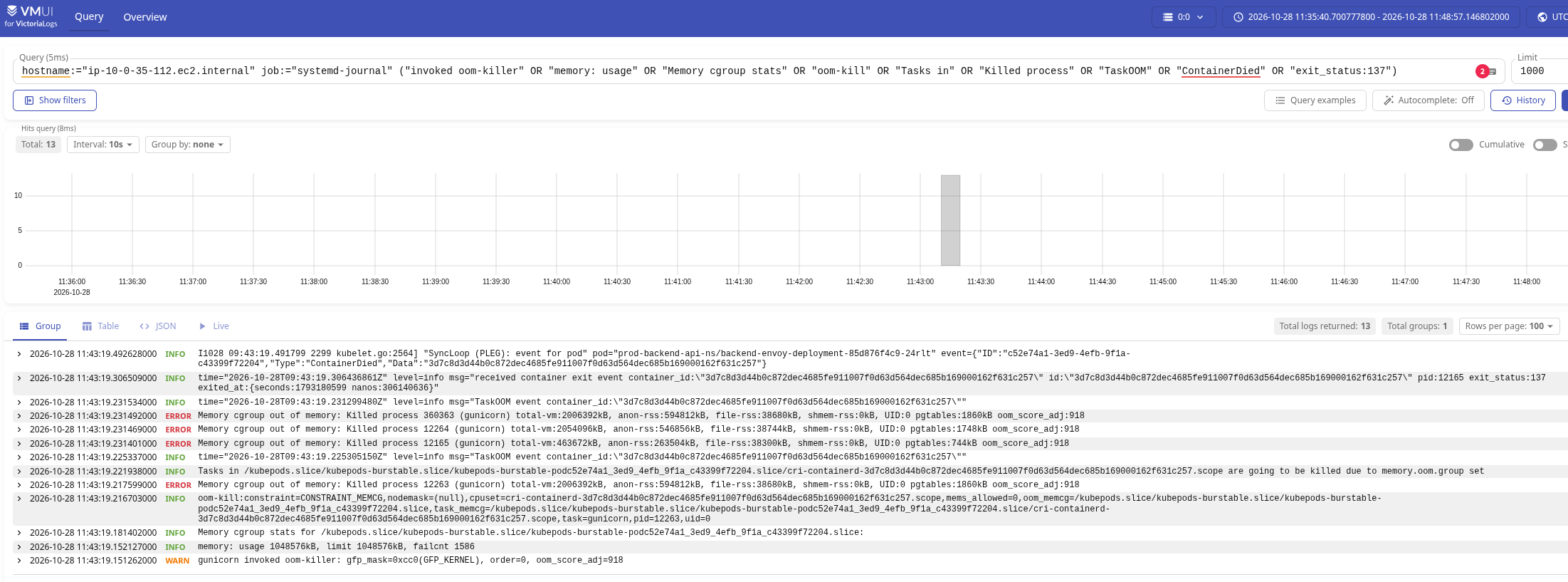
Read from the bottom, starting with the earliest message:
- 11:43:19.151262: a
gunicornprocess triggered theoom-killer- the reason –
memory: usage 1048576kBwithlimit 1048576kB
- the reason –
- 11:43:19.216703: the kernel determines what to kill:
- it identifies the cgroup that “hit the memory limit” (
oom_memcg– Out Of Memory Control Group) – the Pod with ID 52e74a1…204:oom_memcg=/kubepods.slice/***/kubepods-burstable-pod52e74a1...204.slice
- it identifies the child cgroup containing the containers in this Pod – here there was just one container, with ID 3d7c8d…257
task_memcg=/kubepods.slice/***/kubepods-burstable-pod52e74a1...204.slice/cri-containerd-3d7c8d...257.scope
- and the process in that group using the most memory –
task=gunicorn,pid=12263
- it identifies the cgroup that “hit the memory limit” (
- 11:43:19.217599: the first process gets killed, the one that was using the most memory:
Memory cgroup out of memory: Killed process 12263 (gunicorn)
- 11:43:19.221938000: but since
memory.oom.groupis enabled for the cgroup, the OOM Killer effectively gets a “Kill’em All!” instruction for all tasks (processes) intask_memcg:Tasks in /kubepods.slice/***/kubepods-burstable-pod52e74a1...204.slice/cri-containerd-3d7c8d...257.scope are going to be killed due to memory.oom.group set
- the remaining PIDs in this group are killed – 12264 and 12165
- 11:43:19.306509: since all processes in the container have exited – including init PID 12165 – containerd reports that the container has exited, with error code 137:
msg="received container exit event container_id:\"3d7c8d...257\" ... pid:12165 exit_status:137 ...
So the picture is pretty clear:
- there was a cgroup
kubepods-burstable-pod52e74a1***204.slicewith a 1 GB limit - this Pod had a container with
cri-containerd-3d7c8d***257.scopeand three processes – 12165 (gunicorn master) and two workers – 12263 and 12264 - all processes were killed
But in the screenshot, at 11:43:19.231492000, there is another mysterious Killed process 360363 (gunicorn).
Mystery number one: the “mysterious” PID 360363
If processes 12263, 12264 and 12165 fit the overall picture – one gunicorn master and two workers, all three killed – then PID 360363 doesn’t quite fit this logic, even though it also had comm == gunicorn.
And the only thing left in the logs for PID 360363 is this entry:
11:43:19.151428000 warn CPU: 0 UID: 0 PID: 360363 Comm: gunicorn Tainted: G OE 6.12.111-136.204.amzn2023.x86_64 #1
My first assumption was that gunicorn master 12165 received SIGHUP (reload) and started a new worker with PID 360363 – because on HUP, Gunicorn starts new workers first – Gunicorn signal handling.
Then, after starting up, PID 360363 consumed 594812kB – and that triggered an OOM event for the entire slice.
But parent 12165 was killed at 11:43:19.231401, while 360363 was killed at 11:43:19.231492 – after it.
Also, if we search the logs for “Tasks state (memory values in pages)“, we get a list of processes in the cgroup, since this is “Memory cgroup stats for /kubepods.slice/kubepods-burstable.slice/kubepods-burstable-podc52e74a…204.slice” (this was further down in the logs):

And PID 360363 is not among them.
But here is another interesting thing – let’s look at the information from the “kill logs” for these processes.
For 360363 we have total-vm:2006392kB, anon-rss:594812kB, file-rss:38680kB:
Killed process 360363 (gunicorn) total-vm:2006392kB, anon-rss:594812kB, file-rss:38680kB, ... pgtables:1860kB
And we have exactly the same picture for 12263:
Killed process 12263 (gunicorn) total-vm:2006392kB, anon-rss:594812kB, file-rss:38680kB, ... pgtables:1860kB
So my second assumption is that perhaps 360363 is simply a thread of process 12263 – because the memory numbers for both PIDs look very much like they share the same mm_struct, which is shared by a parent process and all its threads – meaning their total-vm, anon-rss, file-rss and pgtables would be identical.
Just a note: Kubernetes, containerd and finding PIDs and TIDs
Just a note, really, and also a way to better understand how things work “under the hood”.
So if the container were still alive, we could check all its PIDs and TIDs.
First, find its ID by the Kubernetes Pod name:
$ kk -n prod-backend-api-ns get pod backend-envoy-deployment-fc8c468d-frn4l -o jsonpath='{.metadata.uid}'
2ced21f3-265b-440c-ba59-ba0ff7b8991a
And the ID of the container inside it:
$ kk -n prod-backend-api-ns get pod backend-envoy-deployment-fc8c468d-frn4l -o jsonpath='{.status.containerStatuses[?(@.name=="backend-envoy-container")].containerID}'
containerd://908251abc04b5e7d23cb7e3d8f8e112df43ddcb23e0ac1c569398ca7e4afc950
Next, connect to its WorkerNode and check the cgroup.procs file:
[root@ip-10-0-47-179 ~]# cat /sys/fs/cgroup/kubepods.slice/kubepods-burstable.slice/kubepods-burstable-pod2ced21f3_265b_440c_ba59_ba0ff7b8991a.slice/cri-containerd-908251abc04b5e7d23cb7e3d8f8e112df43ddcb23e0ac1c569398ca7e4afc950.scope/cgroup.procs
3970
4228
4229
614309
And all the threads are in cgroup.threads:
[root@ip-10-0-47-179 ~]# cat /sys/fs/cgroup/kubepods.slice/kubepods-burstable.slice/kubepods-burstable-pod2ced21f3_265b_440c_ba59_ba0ff7b8991a.slice/cri-containerd-908251abc04b5e7d23cb7e3d8f8e112df43ddcb23e0ac1c569398ca7e4afc950.scope/cgroup.threads
3970
4228
...
683930
Mystery number two: Grafana, container_memory_working_set_bytes and memory.max
Another open question – why did Grafana show memory usage at around ~600 MB while the OOM Killer was triggered at the 1 GB limit? After all, the logs showed “memory: usage 1048576kB, limit 1048576kB“.
The memory: usage 1048576kB value comes from memory.current, while limit 1048576kB is the value of memory.max.
And what exactly goes into memory.current?
See Control Group v2:
- memory.current: The total amount of memory currently being used by the cgroup and its descendants
- memory.stat: breaks down the cgroup’s memory footprint into different types of memory
- memory.max: Memory usage hard limit. This is the main mechanism to limit memory usage of a cgroup. If a cgroup’s memory usage reaches this limit and can’t be reduced, the OOM killer is invoked in the cgroup
If we look at the description of memory.stat, we see:
anon: heap, Python objects, stackfile: file page cacheshmem: tmpfs, shared memorykernel: slab, kernel stacks, pagetables, per-CPU structures, vmallocsock: network buffers
So a process in the cgroup requested more memory from the kernel => the kernel tried to allocate more memory, increasing memory.current => the allocation would exceed memory.max and could not be satisfied by reclaiming memory => the OOM Killer was invoked.
So why don’t we see that in Grafana?
cAdvisor and container_memory_working_set_bytes: what does it actually show?
In Grafana, we use the container_memory_working_set_bytes metric from cAdvisor:
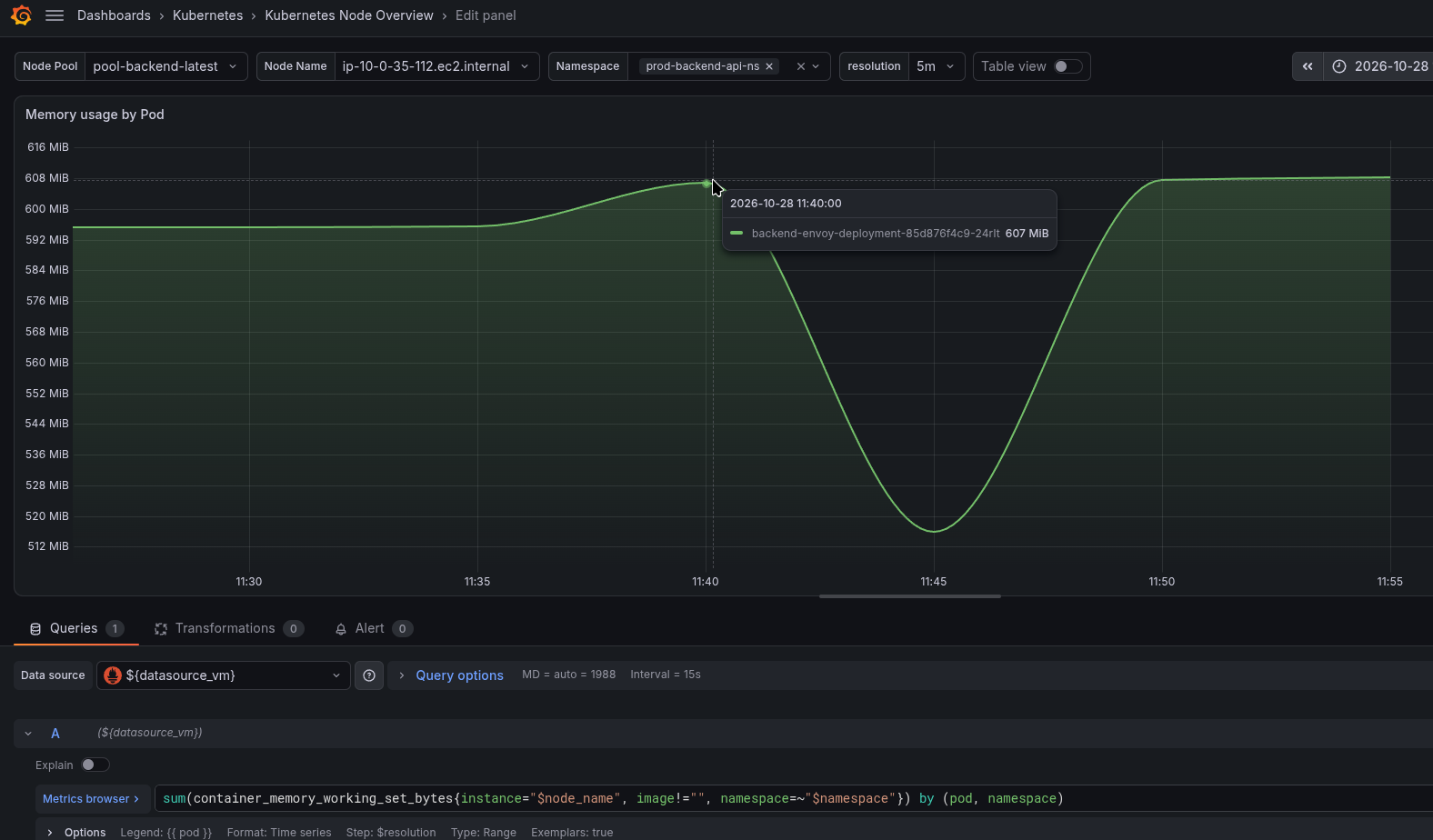
And logically, we might expect to see around 1 GB in container_memory_working_set_bytes – because the OOM Killer was invoked when memory.current reached memory.max and a further allocation could not be satisfied.
container_memory_working_set_bytes, memory.current and the cAdvisor code
Actually, container_memory_working_set_bytes can be somewhat lower than memory.current, because container_memory_working_set_bytes is (memory.current – inactive_file):
workingSet = (Memory.Usage - MemoryStats.Stats[inactiveFileKeyName])
Or the full code from handler.go:
  workingSet := ret.Memory.Usage
  if v, ok := s.MemoryStats.Stats[inactiveFileKeyName]; ok {
    ret.Memory.TotalInactiveFile = v
    if workingSet < v {
      workingSet = 0
    } else {
      workingSet -= v
    }
  }
  ret.Memory.WorkingSet = workingSet
}
And ret.Memory.Usage is the value of MemoryStats.Usage.Usage – see memory.go:
ret.Memory.Usage = s.MemoryStats.Usage.Usage
And MemoryStats.Usage.Usage gets its value from memory.current – see getMemoryDataV2():
usage := moduleName + ".current"
So container_memory_working_set_bytes should be lower than memory.current, which is used by the OOM Killer – but only by the size of inactive_file.
And in theory, Grafana using container_memory_working_set_bytes could show less memory than what was accounted for during the OOM Kill, precisely because of inactive_file.
But let’s check the value of container_memory_total_inactive_file_bytes:
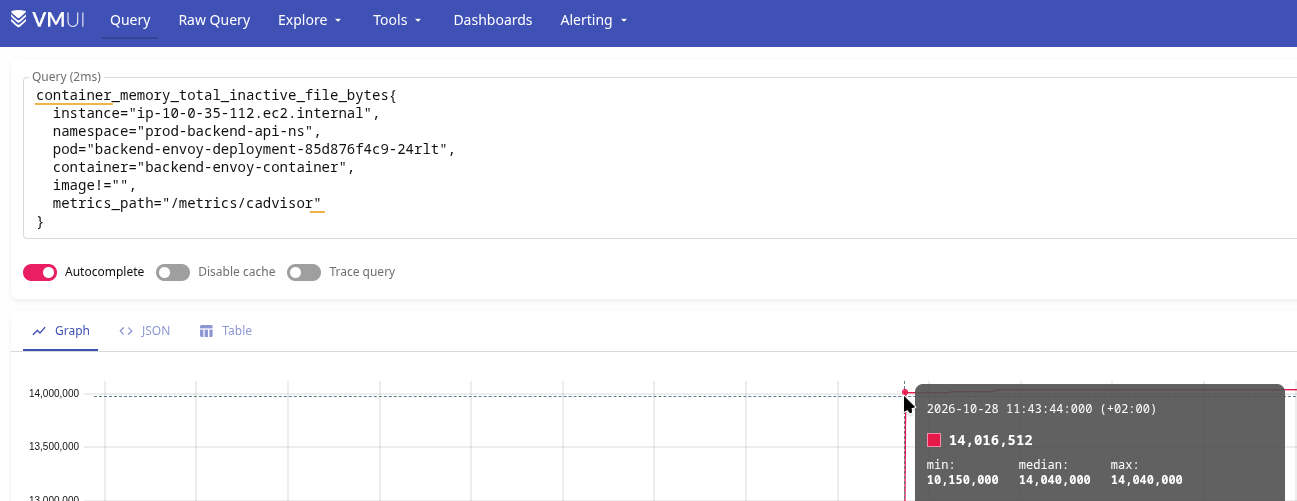
~14 megabytes.
Doesn’t add up.
Besides, we also have container_memory_usage_bytes, which includes container_memory_working_set_bytes + container_memory_total_inactive_file_bytes – and it reports only ~645 MB:
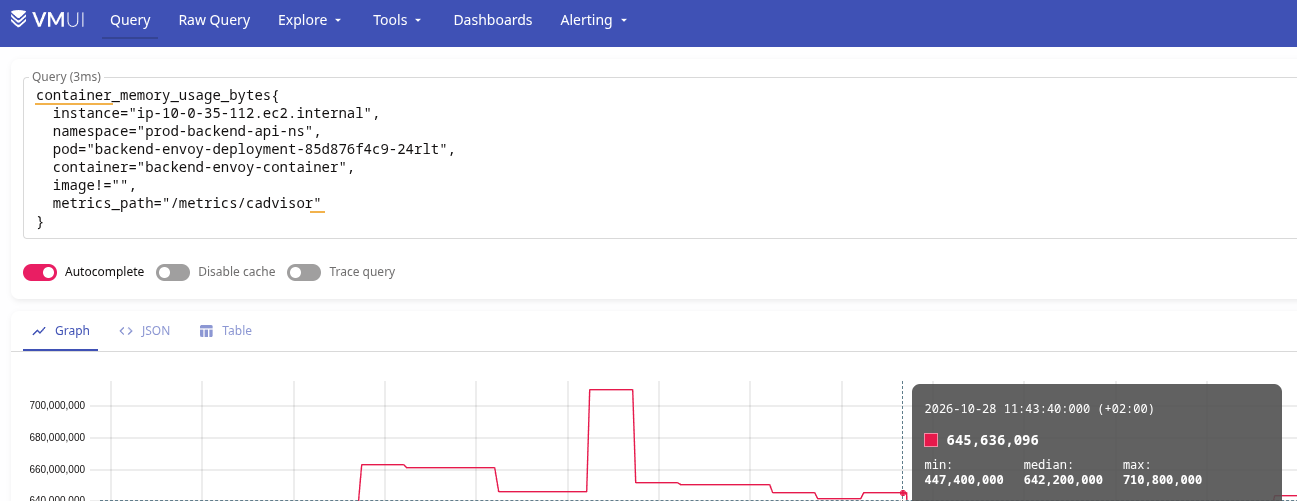
“So where are the megabytes, Bill?”
The only explanation I have here is that the memory spike happened so suddenly that cAdvisor simply didn’t manage to capture it in the metrics.
But the Linux kernel did, of course, see the allocation request – and triggered an OOM Kill for the entire group of processes in the container.
One more note: Linux RSS Total vs memory.current
And one last thing – why is the sum of the processes’ RSS larger than memory.current?
In other words, if we add up all the anon-rss + file-rss values from the logs (even without the “mysterious” PID 360363), we get around 1.4 GB – much more than memory.current or memory.max (which were roughly equal when the OOM Killer was invoked).
Why: because each process’s RSS represents memory mapped into that particular process’s virtual address space, and shared pages can be counted more than once across processes.
So the total RSS of the processes can be greater than the memory.current value of their cgroup.
And the RSS values in the OOM logs come from the kernel’s internal memory accounting, with the corresponding RssAnon and RssFile fields also visible in /proc/<PID>/status.
Instead of conclusions
Actually, we still don’t know exactly why the container was killed.
We know it reached the 1 GB memory limit and an additional allocation failed, but why… Well – it’s Python. And the developers don’t have profiling enabled.
Besides, this is the only OOM Kill we’ve seen for this service so far – so, okay. We’ll see how it goes.
But for me personally, the most interesting part of this story was the process itself – when for once it was not a request to Claude/Codex like “Hey, there’s an alert, go investigate and fix it, make no mistakes” – but me sitting there, digging into things myself, remembering, thinking.
And this is exactly what I wrote about in AI: LLMs, agents, work and us – engineers. Personal thoughts, in the section “Thought number three: laziness!“:
An agent doesn’t just allow us to not know – it trains us to not even try to remember.
Before, we would spend a minute racking our brains first – “Damn, avg or sum – how does that work again, what’s the difference?” – and at the same time, this would trigger those parts of our memory, those neurons where we store our knowledge about metrics, time series and data formats.
And only after we had thought about it and remembered at least some of it would we go to the documentation, but even then, while using the docs, we would keep thinking and remembering other relevant details.
We need to use our own brains – whenever possible.
It’s both useful and enjoyable – because dopamine.
There would have been more dopamine if I’d found the root cause – but I personally enjoy the process itself too.
