 The main goal we had when introducing LiteLLM AI Gateway on the project (see LiteLLM: AI Gateway for LLMs – features overview) was access and cost control, because right now we can’t enable auto-recharge for our OpenAI or OpenRouter account: our startup is still in the development and experimentation stage, developers actively use AI agents for work – they can vibe-code something and suddenly start using LLMs way too actively. And our services themselves rely on LLMs too – so they can also “go crazy” and start burning too many credits at the provider.
Without limits on these expenses, one morning we could “happily” discover the bill for the previous day, so for now we solve this by simply topping up provider accounts in controlled amounts. But quite often the money runs out anyway (even despite alerts) – and services start getting 429 and Openai.RateLimitError.
Especially since alerts don’t always help – OpenAI API simply doesn’t provide a way to get the current remaining credit balance (which is kind of ridiculous, actually, because OpenRouter returns it just fine).
Our main provider (at least today) is OpenAI, plus we have models in OpenRouter – but OpenRouter is used as a fallback in case OpenAI runs out of money (see LiteLLM: OpenRouter and Fallbacks configuration).
So, the final goal of the LiteLLM Budgets setup is to keep credits in OpenAI all the time via auto-recharge, while moving cost control to LiteLLM.
In addition, OpenAI itself will have its own limits, because it allows us to configure Organization limits and Project limits – but those limits can only be set per month (“budget reset window”), while I want daily limits.
So we’ll build a kind of “two-level protection”: LiteLLM will be our “main controller”, while OpenAI’s own Limits will act as a “fuse”.
Besides, having configuration and control in LiteLLM is simpler than configuring all of this separately across different providers, especially considering that we may add models from Anthropic later.
And we also keep in mind that LiteLLM can calculate costs incorrectly, for example – see LiteLLM: debugging AI Cost Monitoring with VictoriaMetrics, so having a “second level of safety” is a must-have option.
So today we’ll talk about LiteLLM Budgets, briefly about OpenAI Limits, about a very important part – monitoring all of this with VictoriaMetrics, Grafana and alerts, and about some nuances of configuring Team Budgets in LiteLLM – because there turned out to be a few non-obvious things there.
Contents
LiteLLM Budgets
Documentation – Budgets, Rate Limits.
In LiteLLM we have two mechanisms for limiting usage – Budgets, which define some maximum usage, and limits – Tokens Per Minute (TPM) and Requests Per Minute (RPM).
We’ll start specifically with Budgets, while TPM && RPM limits can be configured later if needed, because so far we haven’t had any problems with them – so throughout this post I’ll use the term “limit” specifically in the context of budgets, not TPM/RPM limits.
An important nuance: LiteLLM needs a database for budgets to work, because LiteLLM stores and calculates spend there – see What is stored in the DB and Spend Tracking.
If LiteLLM runs with replicas, meaning it has more than one Kubernetes Pod – Redis is required to synchronize the data.
LiteLLM has a concept called “Team soft budget” – it can send notifications when a Team Budget is close to being exhausted. But this is an Enterprise feature, and we already have alerts based on the percentage of budget usage anyway – we’ll talk about monitoring and alerts later.
LiteLLM budget types
Budgets can be configured at different “levels”:
- Global Proxy Budget: one global budget for all requests through LiteLLM
- Team Budget: a shared budget for all API keys (Virtual Keys) created with the corresponding
team_id- there is one nuance here: if a user is included in a Team but has permission to create a key and creates it without assigning it to the Team – the Team limits are not applied to that key
- Team Member Budget: a personal user limit within the Team budget
- Internal User Budget: a user budget for all of their keys created without a
team_id- at the same time, if the key belongs to a Team – its owner’s personal budget is not applied, and only the Team or Team Member budget is counted
- Virtual Key Budget: a separate budget for a specific API key
- Customer / End User Budgets: a budget for the user passed in the request’s
userfield (user_id)- applies globally to this customer ID across all LiteLLM, regardless of API key or Team
- Tag Budget: similar to End User budget – a shared budget for requests with a specific tag, which is set in the API key parameters or passed by the client (script/service)
- Model Access Group Budget: a shared budget for a group of models, for example to limit spending on some expensive premium models
- Agent / Session Budget: budgets for agents and individual agent sessions
Another interesting option is Fallback to ‘free’ models: you can configure models with “0” cost, set them as fallback options, and then requests will be routed to them even when the Global Proxy Budget has already been exhausted. But for those models both input_cost_per_token and output_cost_per_token have to be set to zero.
In LiteLLM, budgets are not inherited and are not combined into a single effective limit – each budget is checked separately, and a request is blocked as soon as at least one of them is exhausted.
Planning: LiteLLM Teams and Budgets
What we have organizationally right now: the main grouping is Teams. Our Teams are split into two “types” – ServiceAccount Teams and Users Teams.
Each of our services has its own separate Team for each environment, and each such Team can have several different API Keys (Virtual Keys in LiteLLM terms) – because one service like Backend API can have different features using different API keys – both for better cost control and for monitoring, so we can have metrics and graphs for those individual features.
For example:
- Team:
svc-kraken-prod: our Backend API, with different “feature services”, each such service/feature has its own API Key:- keys:
svc-kraken-chat-prod,svc-kraken-knowledge-base-prod
- keys:
- Team:
usr-kraken-devs: keys for our backend developers are here- keys:
usr-andriy-dev,usr-dima-dev
- keys:
- Team:
svc-system-ops: Ops team, mostly various testing keys here- keys:
svc-system-testing-ops
- keys:
To start with, we’ll configure budgets specifically at the Team level – then we’ll look at monitoring, at who spends how much of the budgets, and if needed we’ll set limits for specific Virtual Keys or specific users.
We’ll reset LiteLLM budgets once per day, in UTC – see Budget Reset Times and Timezones.
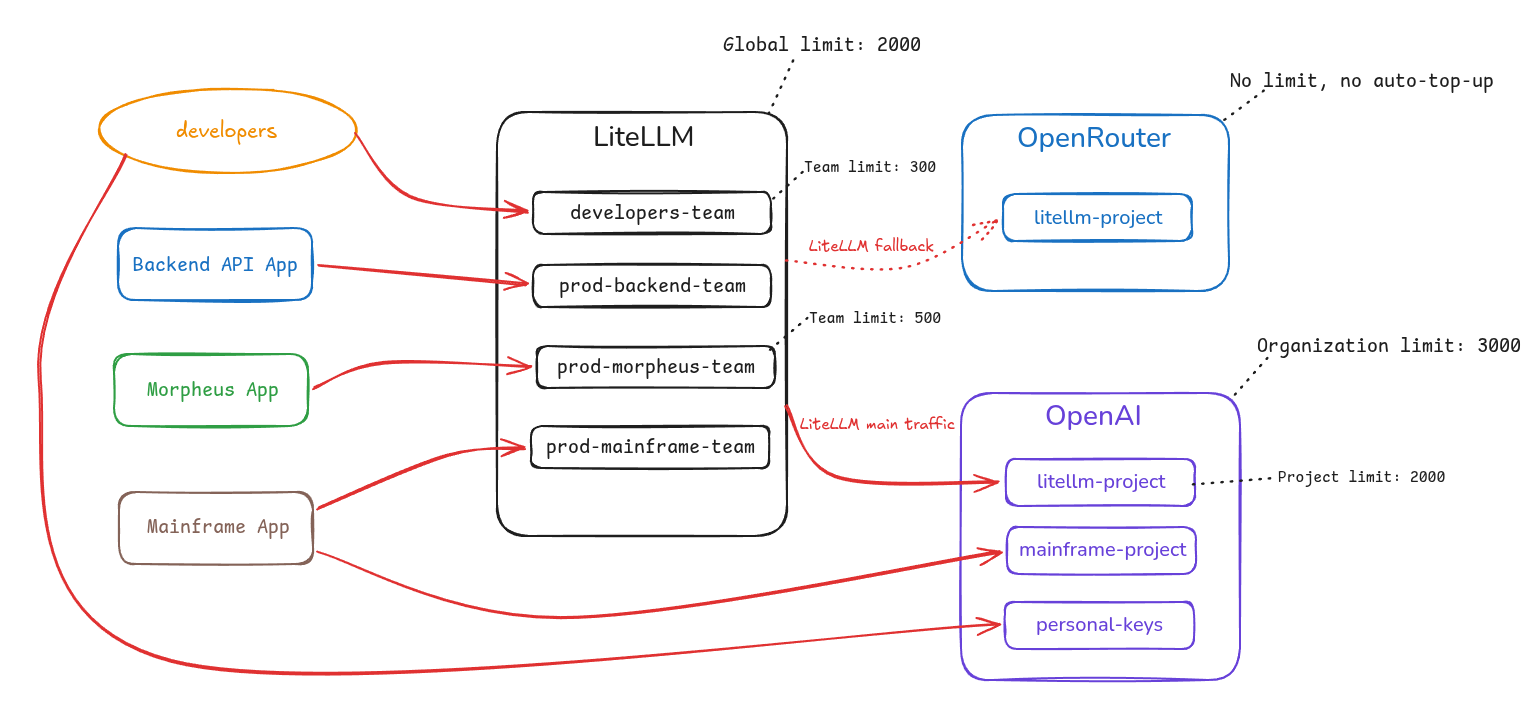
Overall LiteLLM and OpenAI limits scheme
So, all together it will look like this:
LiteLLM:
- has a Global budget for all spending
- has different Teams, each with its own budgets
- each of our services uses API Keys assigned to a specific Team
OpenAI:
- has a global Organization Limit
- has limits for Organization Projects
- in Projects we have a separate
litellm-project– this is where LiteLLM’s own API key lives - we have several additional Projects – because some services use OpenAI directly rather than through LiteLLM
- in Projects we have a separate
In the diagram below we have four groups of LiteLLM “clients” – developers, our Backend API service, and two other services – Morpheus and Mainframe.
Each client group uses its own LiteLLM API Keys assigned to a specific LiteLLM Team – but Mainframe App and the developers make requests both through LiteLLM and directly to OpenAI.
LiteLLM has a configured Global Budget and separate budgets for each Team, while LiteLLM uses the OpenAI API key from litellm-project in OpenAI.
In OpenAI, we have an OpenAI Organization Limit with a global spending limit – and separate limits for each OpenAI Project:
 Monitoring
This is probably the most complicated part of the whole system.
First – OpenAI returns metrics not quite the way I’d like it to, and second – data from LiteLLM may not match data from OpenAI or OpenRouter. More on that a bit later.
The main thing – what do we actually need to monitor:
- for LiteLLM:
- spending per Team and API Key
- budget usage percentages – Global and per Team
- for OpenAI – similarly:
- spending per Project and API Key
- Limit usage percentages – Organization and per Project
In addition, I don’t really trust LiteLLM that much anymore (after the story with LiteLLM: debugging AI Cost Monitoring with VictoriaMetrics, which I already mentioned above), and spending is calculated a bit differently anyway – so I want to see data received both from LiteLLM and from OpenAI (and a bit from OpenRouter).
Spending metrics – LiteLLM and OpenAI
For OpenAI there is the foxdalas/openai-exporter, which returns metrics for requests/tokens and spend, but on my project we have our own exporter with a few more metrics. I should probably write a separate post about it, maybe I even started one and have a draft somewhere.
For OpenRouter we have a similar exporter – so we have spending metrics there too.
And LiteLLM itself returns metrics as well – I covered those in the posts LiteLLM: metrics, traces and integration with VictoriaMetrics Stack and LiteLLM: monitoring with VictoriaMetrics – alerts and Grafana.
The main problem I ran into is that LiteLLM’s own metrics are of the Counter type, while the metrics returned by my exporters are Gauge, so accordingly – we can’t simply use identical MetricsQL/PromQL queries and be guaranteed to see identical results.
Although in practice the data returned by OpenAI API behaves like a counter – because the counter resets at 00:00 UTC, but for exactly this reason we can’t have a counter metric in our own exporter – because then we’d have to somehow account for these daily value “resets”.
So my main metric is openai_cost_usd_daily of the Gauge type, which has date, day_start and project labels, for example:
openai_cost_usd_daily {cluster="eks-ops-1-33",date="2026-06-26",day_start="1782432000",instance="openai-exporter-service:9108",job="openai-exporter",project="morpheus-prod",project_id="proj_Zd1***GOi",prometheus="ops-monitoring-ns/vm-k8s-stack"}
Here the date and day_start labels are used specifically to solve the problem with the OpenAI counter resetting at the beginning of a new day – we keep the Gauge type for our metric, but as soon as the day changes, the updated date label makes VictoriaMetrics start creating a new time series with new values (see Metric vs Time Series vs Sample).
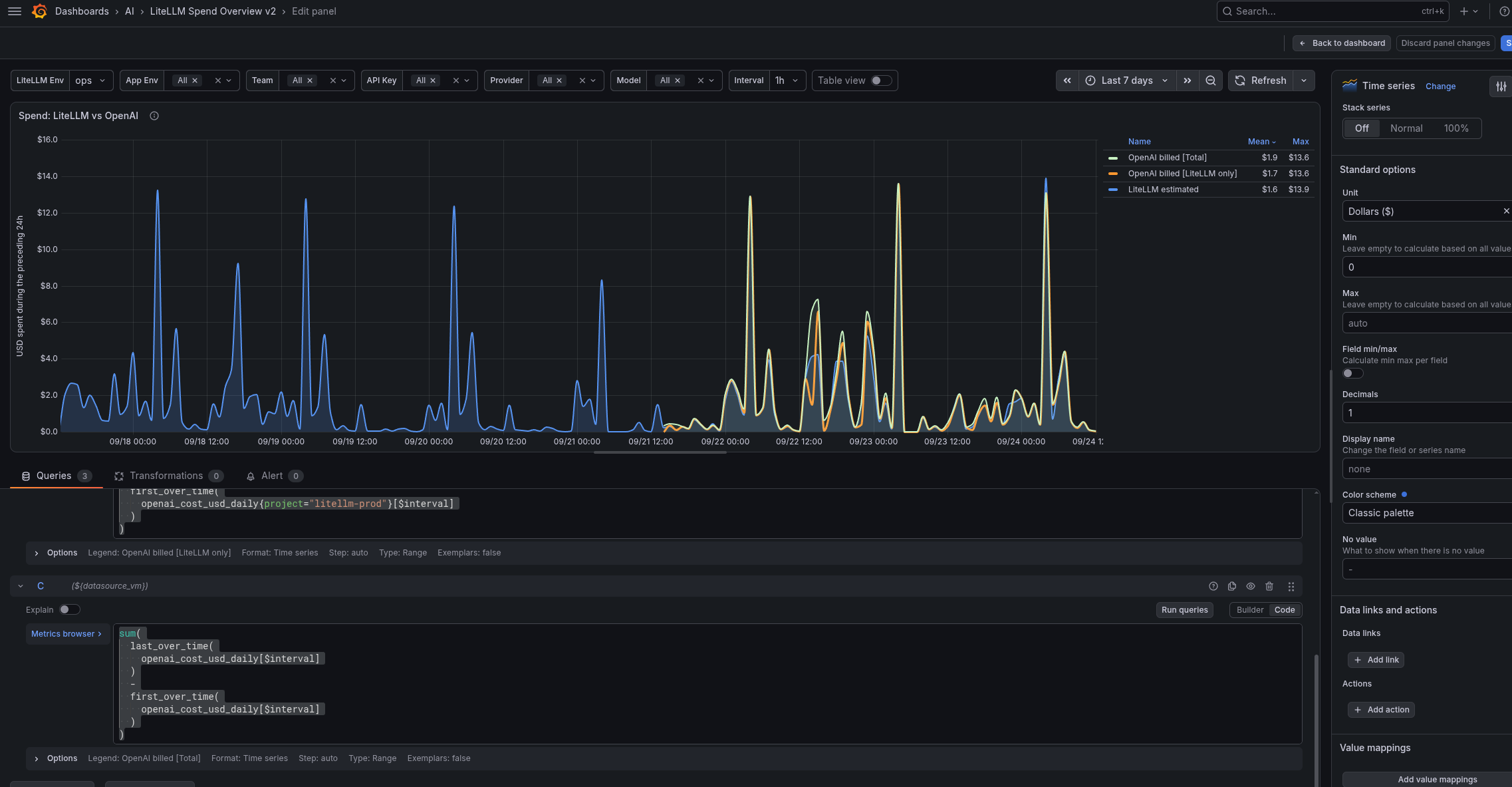
And using this metric together with the LiteLLM metric – in Grafana we have a graph with three queries where the difference between OpenAI and LiteLLM data is clearly visible.
Query for the LiteLLM spending graph:
sum(increase(
  litellm_spend_metric_total{
    env_name=~"$litellm_env",
    api_provider="openai"
  }[$interval]
))
Query for the OpenAI spending graph – but only for the “litellm-prod” Project (this is the main one for comparing with the spending data calculated by LiteLLM):
sum(
  last_over_time(
    openai_cost_usd_daily{project="litellm-prod"}[$interval]
  )
  -
  first_over_time(
    openai_cost_usd_daily{project="litellm-prod"}[$interval]
  )
)
And total OpenAI spending – because, as I wrote above, some requests go directly:
sum(
  last_over_time(
    openai_cost_usd_daily[$interval]
  )
  -
  first_over_time(
    openai_cost_usd_daily[$interval]
  )
)
And everything together on the graph:
OpenAI Project Limit metrics
To display OpenAI limit usage data, I added separate metrics:
openai_cost_usd_month_total: gets the project’s monthly spending value (because OpenAI limits are configured per month), Gauge type (documentation – GET /v1/organization/costs)openai_spend_limit_usd: the soft limit value per project (documentation – GET /v1/organization/projects/{project_id}/spend_alerts)- we use the soft limit specifically – because we don’t enable Hard Limit for every project
- for hard limits – the endpoint is
/v1/organization/projects/{project_id}/spend_limit
Additionally, we have metrics where the exporter records the result of checking whether data retrieval succeeded – openai_spend_limit_collection_success and openai_cost_collection_success: this is done in case there was a problem getting the data – or if a project doesn’t have a limit configured at all.
The Grafana query:
(
  100 * sum by (project) (openai_cost_usd_month_total)
  / on (project) group_left(project_id)
    max by (project, project_id) (
      openai_spend_limit_usd{scope="project", limit_type="soft"}
    )
)
and on() (min(openai_spend_limit_collection_success) == 1)
and on() (min(openai_cost_collection_success) == 1)
And the graph itself: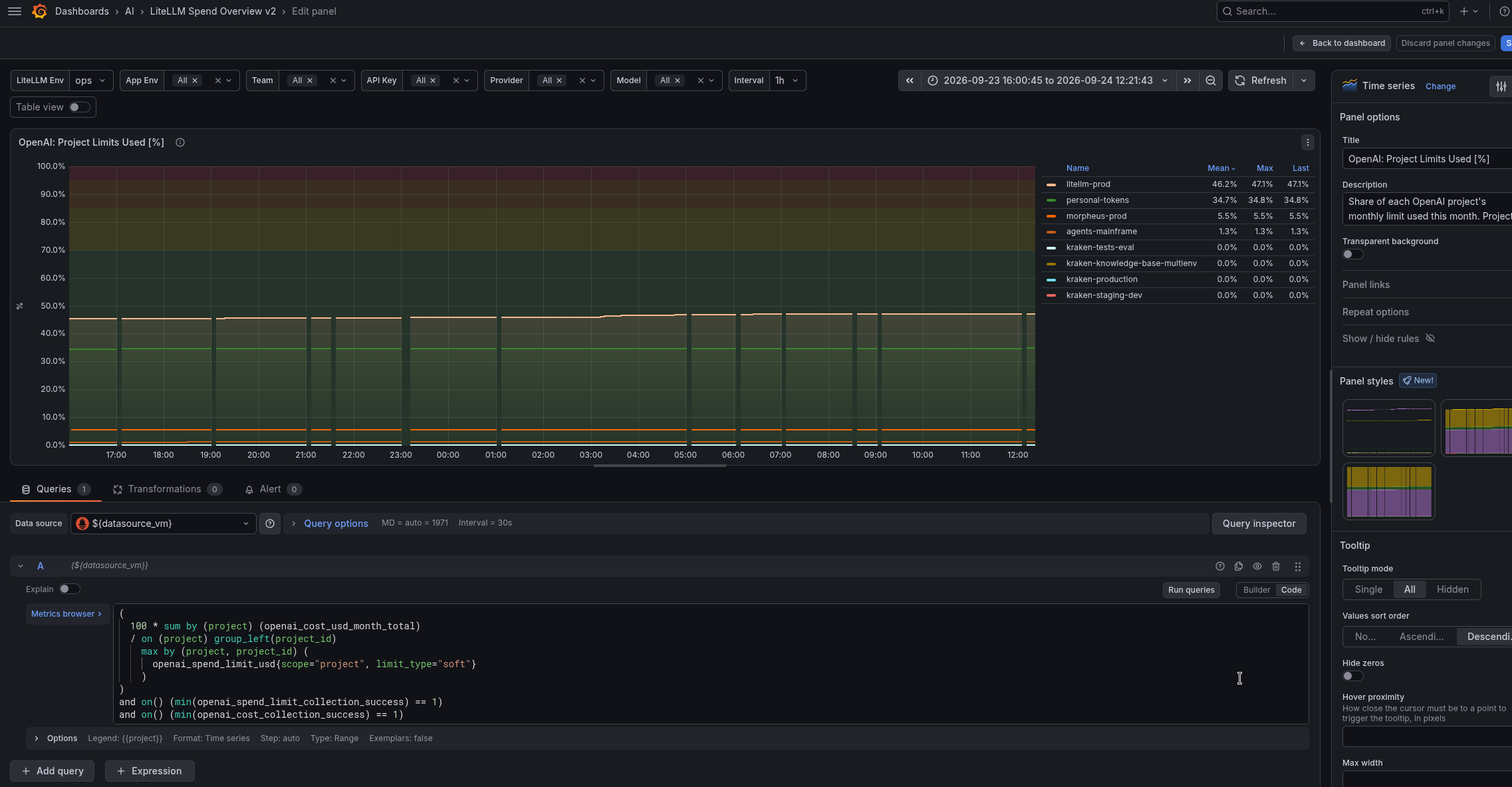
LiteLLM Team Budget metrics
This is simpler – because these are default LiteLLM metrics.
The query itself – we display the percentage of each Team’s budget usage:
100 * (
  1 -
  min by (namespace, team, team_alias) (
    litellm_remaining_team_budget_metric{
      env_name=~"$litellm_env",
      team_alias=~".*-${app_env}",
      team_alias=~"$team",
      team_alias!="",
      team_alias!="None"
    }
  )
  /
  (
    max by (namespace, team, team_alias) (
      litellm_team_max_budget_metric{
        env_name=~"$litellm_env",
        team_alias=~".*-${app_env}",
        team_alias=~"$team",
        team_alias!="",
        team_alias!="None"
      }
    ) > 0
  )
)
And the graph:
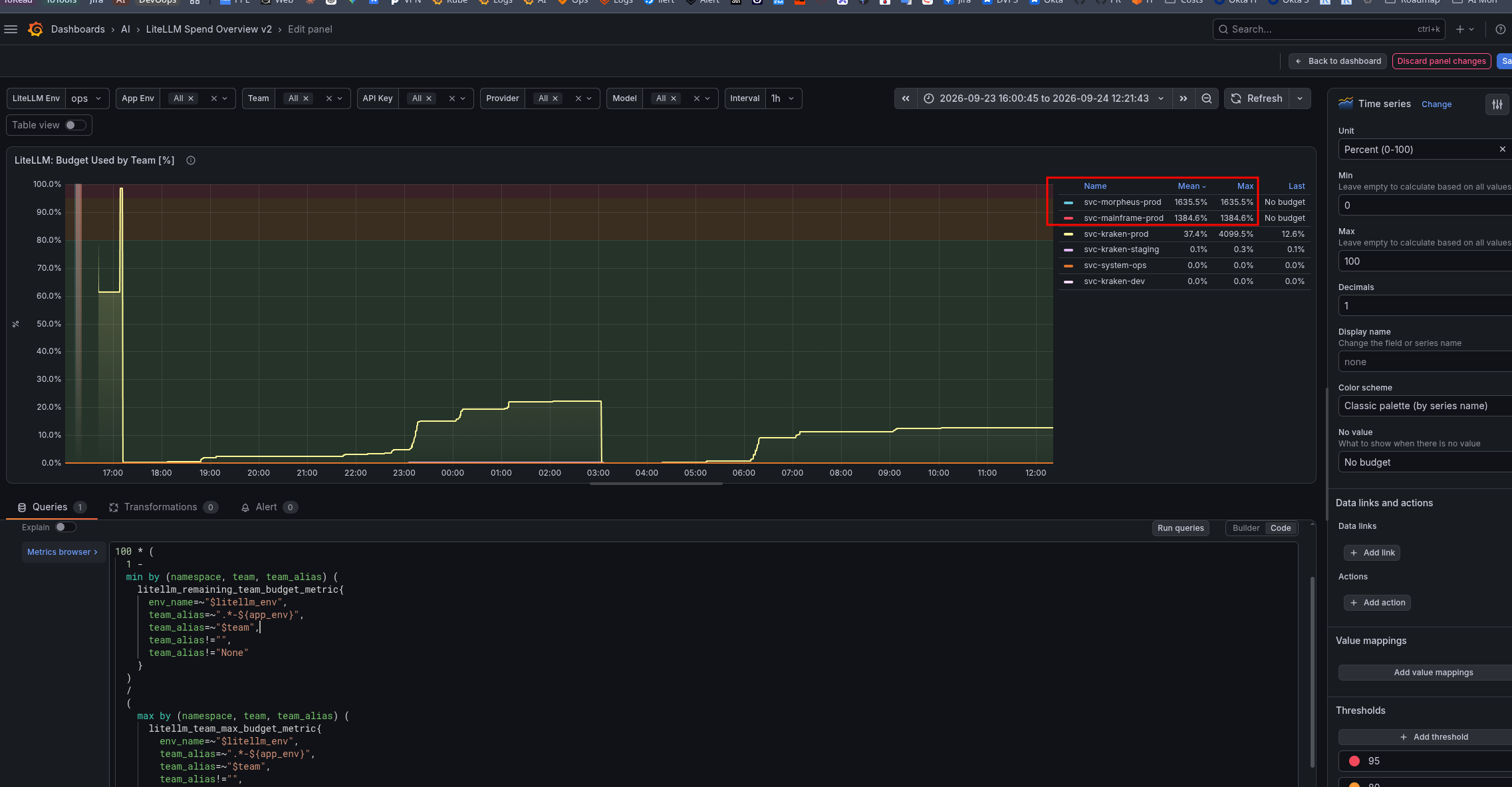
On the graph, I highlighted in red that same “interesting nuance” with LiteLLM budgets that I mentioned at the beginning – I’ll cover it separately below.
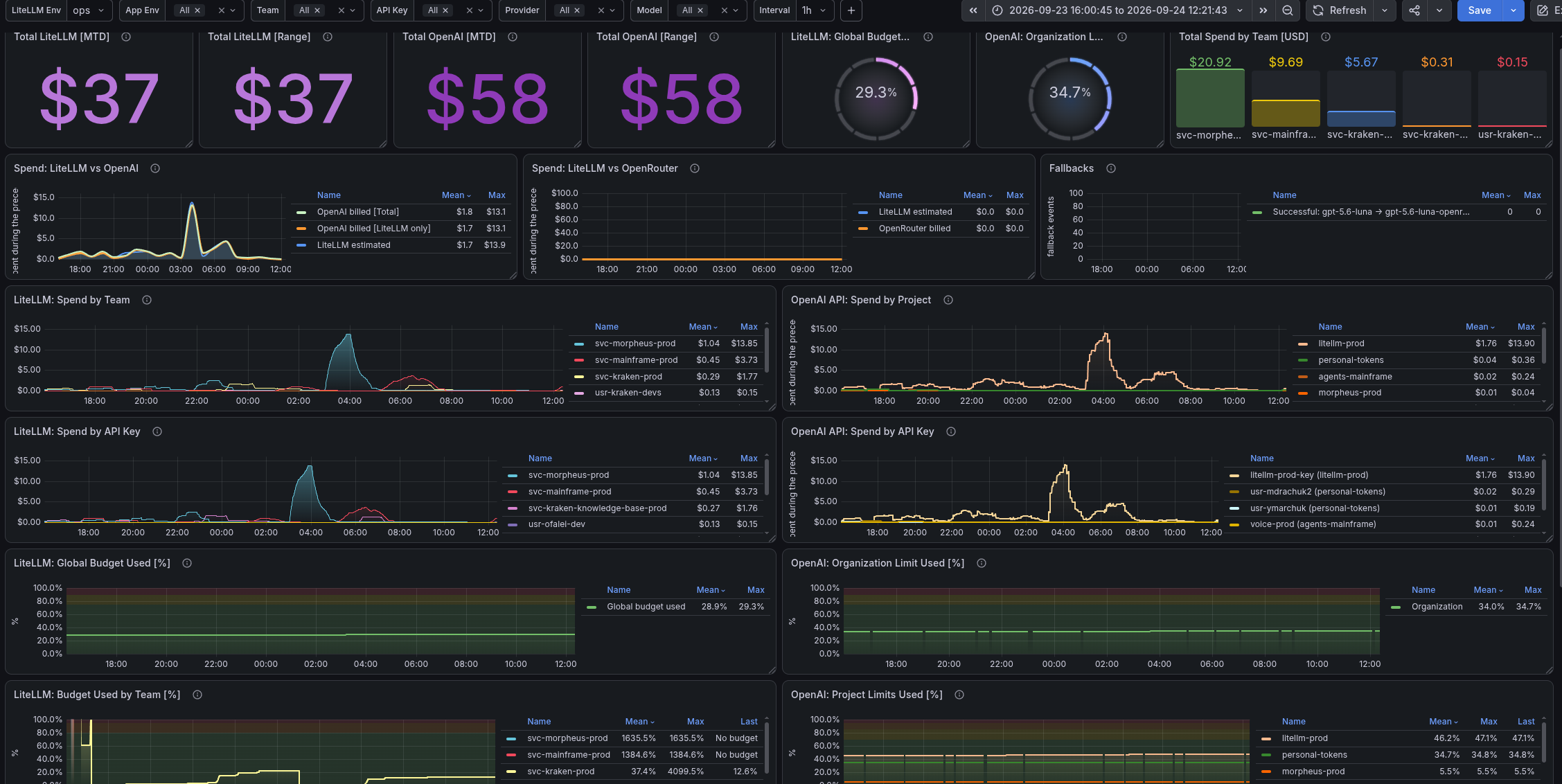
The whole dashboard currently looks like this:
Alerting
Briefly – about alerts.
The main thing is that we need notifications when OpenAI Limits or a LiteLLM Team Budget are close to being exhausted.
Alert examples – LiteLLM, Team budget usage percentage:
# Team budget less than 10% remaining
- alert: LiteLLM Team Budget Low
  expr: |
    (
      min by (namespace, team, team_alias) (litellm_remaining_team_budget_metric)
      /
      (
        max by (namespace, team, team_alias) (litellm_team_max_budget_metric) > 0
      )
    ) * 100 < 10
  for: 5m
  labels:
    component: devops
    environment: ops
    severity: warning
    ilert_routingkey: devops-ops-warning
  annotations:
    summary: LiteLLM Team Budget Low
    description: |-
      LiteLLM team budget is less than 10% remaining
      *Namespace*: `{{ "{{" }} $labels.namespace }}`
      *Team*: `{{ "{{" }} $labels.team_alias }}`
      *Budget left percentage*: `{{ "{{" }} printf "%.0f" $value }}%`
      <https://{{ $.Values.monitoring.root_url }}/d/a24h8k/litellm-spend-overview-v2|:grafana: LiteLLM Spend Overview v2>
And a similar one for OpenAI Project Limits – here there is a separate rule that creates a metric like the one we use in Grafana:
rules:
  # Calculate current-month spend as a percentage of each project's positive
  # soft limit. The cost metric has the project name, while group_left adds
  # project_id from the limit metric. Health gates suppress stale API data.
  - record: openai:project_spend_limit_used_percent
    expr: |
      (
        100 * sum by (project) (openai_cost_usd_month_total)
        / on (project) group_left(project_id)
          max by (project, project_id) (
            openai_spend_limit_usd{
              scope="project",
              limit_type="soft"
            } > 0
          )
      )
      and on() (min(openai_spend_limit_collection_success) == 1)
      and on() (
        time() - max(openai_spend_limit_last_success_timestamp_seconds) < 900
      )
      and on() (min(openai_cost_collection_success) == 1)
      and on() (
        time() - max(openai_cost_last_success_timestamp_seconds) < 900
      )

  - alert: OpenAI Project Spend Limit Warning
    expr: |
      openai:project_spend_limit_used_percent
        >= 75
      and
      openai:project_spend_limit_used_percent
        < 90
    for: 10m
    labels:
      component: devops
      environment: ops
      severity: warning
      ilert_routingkey: devops-ops-warning
    annotations:
      summary: OpenAI project spend limit usage is high
      description: |-
        OpenAI project spend has used at least 75% of its monthly limit for more than `{{ "{{" }} $for }}`.
        *Project*: `{{ "{{" }} $labels.project }}`
        *Limit used*: `{{ "{{" }} printf "%.1f" $value }}%`
        <https://{{ $.Values.monitoring.root_url }}/d/a24h8k/litellm-spend-overview-v2|:grafana: LiteLLM Spend Overview v2>
There are also separate alerts for LiteLLM Teams or OpenAI Projects that don’t have a Budget/Limit configured – in case someone creates a new Team or project and doesn’t set any limits.
LiteLLM:
# Alert when a team exists but has no positive max budget.
- alert: LiteLLM Team Budget Not Configured
  expr: |
    min by (namespace, team, team_alias) (
      litellm_remaining_team_budget_metric{
        team_alias!="",
        team_alias!="None"
      }
    )
    unless on (namespace, team, team_alias)
    max by (namespace, team, team_alias) (
      litellm_team_max_budget_metric{
        team_alias!="",
        team_alias!="None"
      } > 0
    )
  for: 30m
  labels:
    component: devops
    environment: ops
    severity: warning
    ilert_routingkey: devops-ops-warning
  annotations:
    summary: LiteLLM team budget is not configured
    description: |-
      A LiteLLM team has no positive max budget configured for more than `{{ "{{" }} $for }}`.
      *Namespace*: `{{ "{{" }} $labels.namespace }}`
      *Team*: `{{ "{{" }} $labels.team_alias }}`
      <https://{{ $.Values.monitoring.root_url }}/d/a24h8k/litellm-spend-overview-v2|:grafana: LiteLLM Spend Overview v2>
OpenAI:
- alert: OpenAI Project Spend Limit Not Configured
  expr: |
    (
      max by (project, project_id) (
        openai_project_info{status="active"} > 0
      )
      unless on (project, project_id)
      max by (project, project_id) (
        openai_spend_limit_usd{scope="project"} > 0
      )
    )
    and on() (min(openai_spend_limit_collection_success) == 1)
    and on() (
      time() - max(openai_spend_limit_last_success_timestamp_seconds) < 900
    )
  for: 30m
  labels:
    component: devops
    environment: ops
    severity: warning
    ilert_routingkey: devops-ops-warning
  annotations:
    summary: OpenAI project spend limit is not configured
    description: |-
      An active OpenAI project has no positive spend limit configured for more than `{{ "{{" }} $for }}`.
      *Project*: `{{ "{{" }} $labels.project }}`
      <https://{{ $.Values.monitoring.root_url }}/d/a24h8k/litellm-spend-overview-v2|:grafana: LiteLLM Spend Overview v2>
Defining OpenAI Limits and LiteLLM Budgets
Actually, you can just manually check the values in VictoriaMetrics/Prometheus.
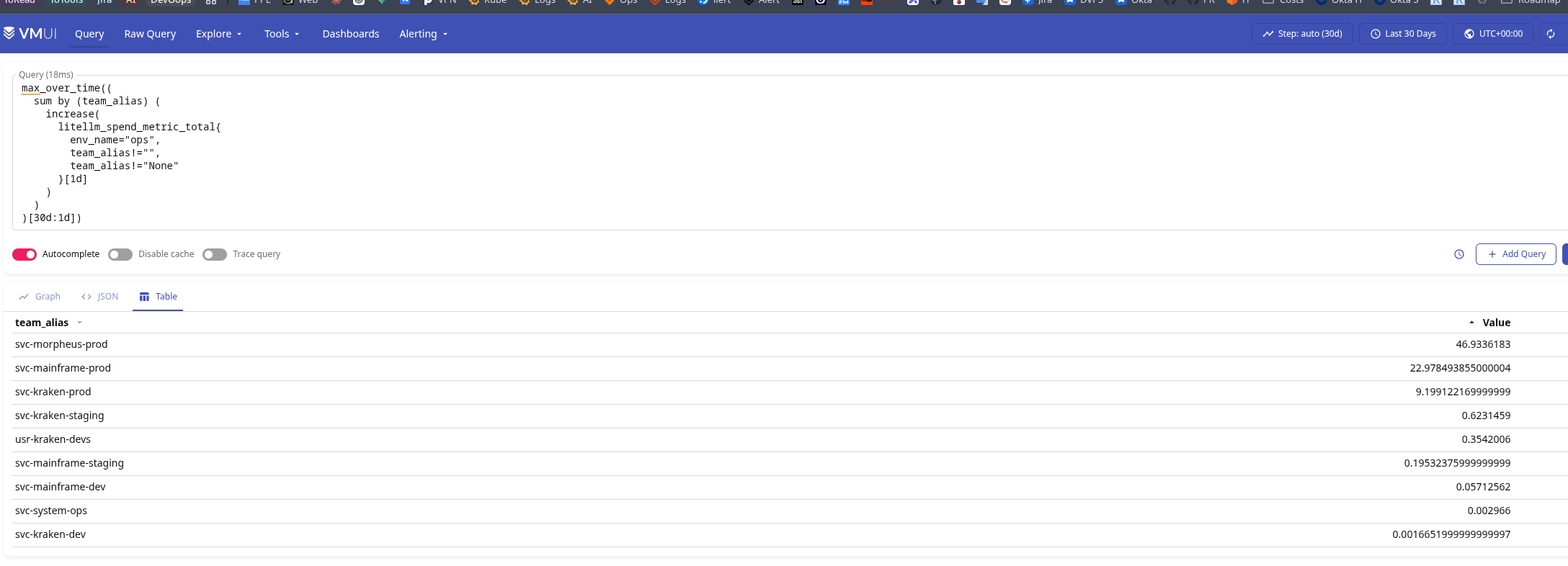
For LiteLLM I’ll use per-day budgets – so we take the maximum daily spending value for, for example, the last month:
max_over_time((
  sum by (team_alias) (
    increase(
      litellm_spend_metric_total{
        env_name="ops",
        team_alias!="",
        team_alias!="None"
      }[1d]
    )
  )
)[30d:1d])
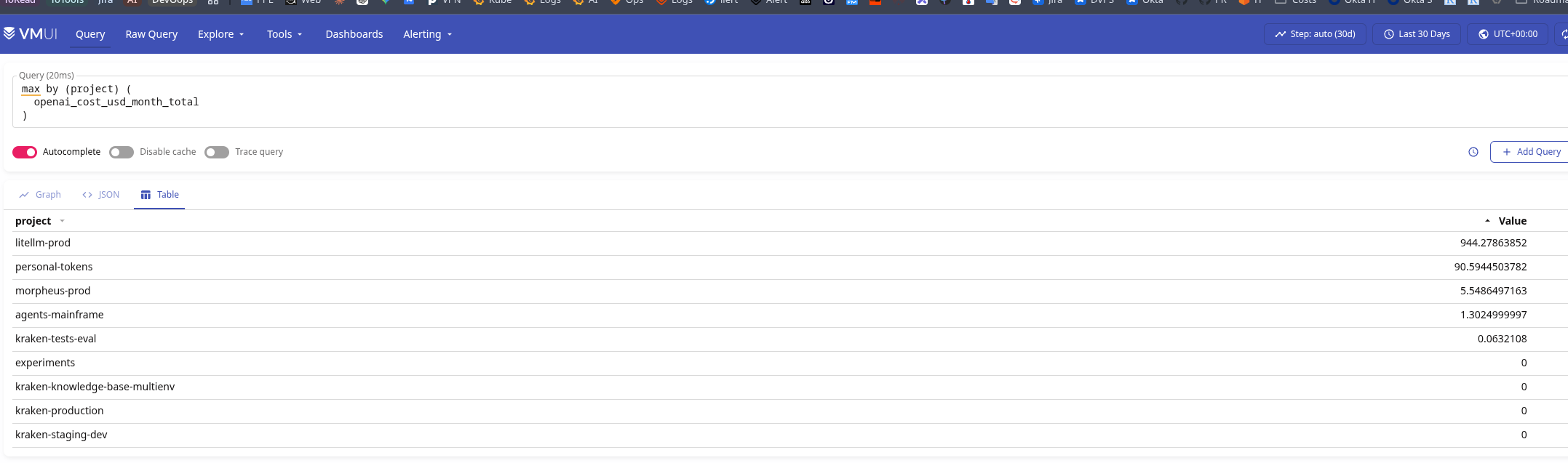
And similarly for OpenAI – but this is simpler, because I already have a separate metric for this spending:
max by (project) (
  openai_cost_usd_month_total
)
And once we know the maximum values, we can estimate what limits/budgets to set.
Or even make tables like these in Grafana:
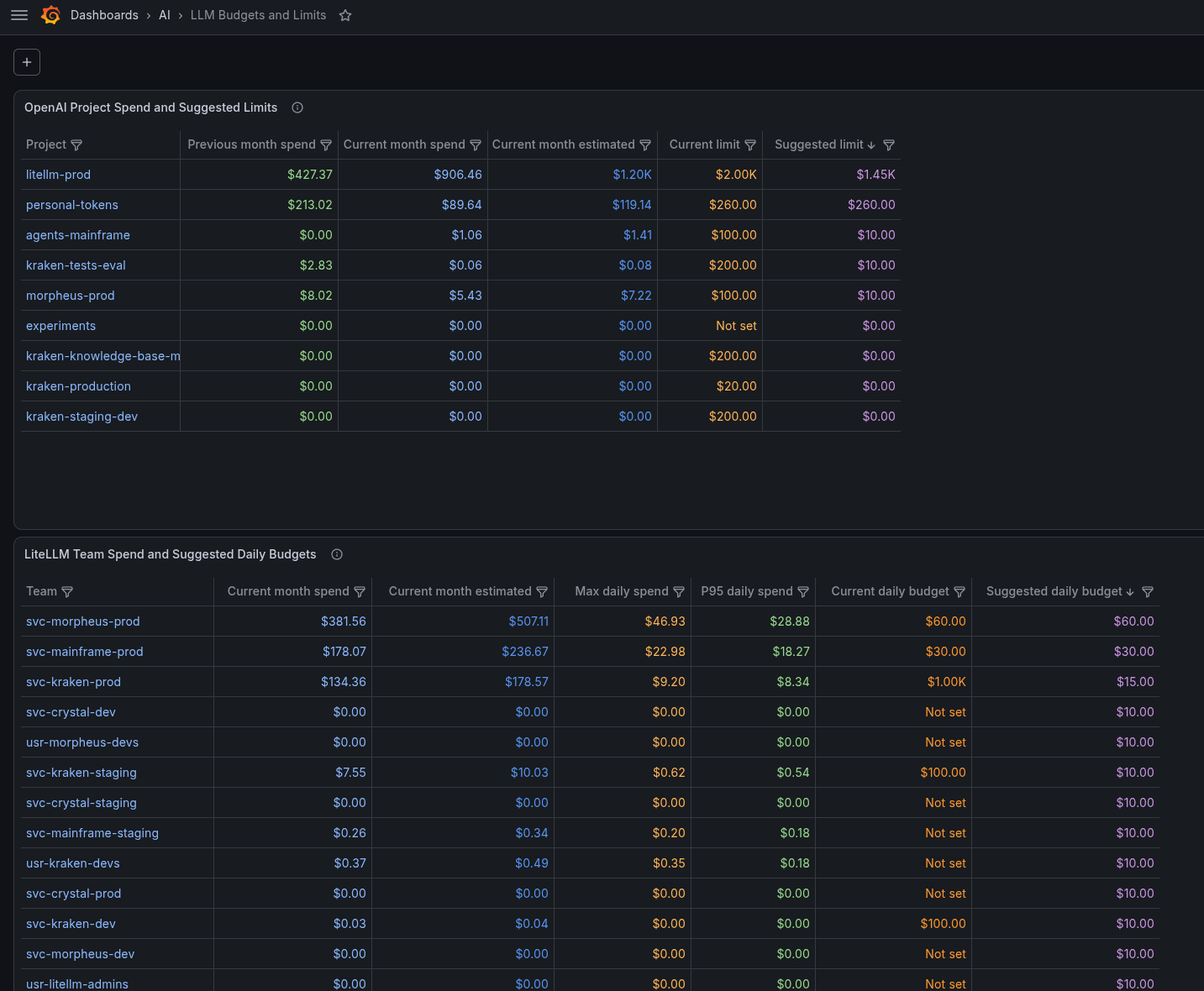
Where “Suggested daily budget” = “Max daily spend” over the last 30 days multiplied by 1.2.
I set the actual budgets and limits myself, but as a reference point for what to base them on – this is convenient.
LiteLLM Budgets: configuration and an important nuance with Spending and reset window
With OpenAI, limits are straightforward to configure – but with LiteLLM I ran into an interesting issue.
So, what we need to do is set a Daily Spend Budget for a LiteLLM Team.
Seems simple enough – go to the Team settings and set the value:
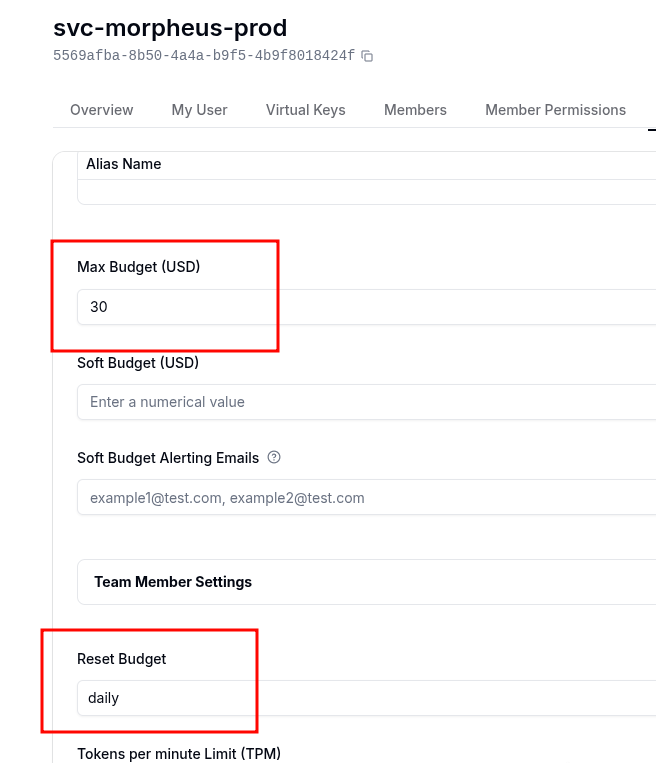
But when I started setting these values for Teams – I saw an interesting picture in LiteLLM itself:

And then I tested how the alerts work in production 🙂
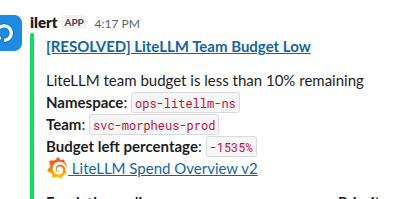
Here’s the reason: if a LiteLLM Team was created without a budget reset window, its Spend is counted from the moment that Team was created.
When we set max_budget and budget_duration (see Team) – the Spend for that Team includes the value that has already accumulated – the same one counted “from the moment that Team was created”.
And it will only reset when the next budget_duration period comes – in my case I set it to once per day.
So as a “workaround” (or a not particularly pretty and dirty hack) – first we set Reset Budget to, for example, 1 hour, wait until the current Spend resets to zero – and only then set the daily limit and Reset Budget to 1 day.
There is a similar GitHub Issue – Applying budget_duration on an existing key/user/team doesn’t reset carried spend.
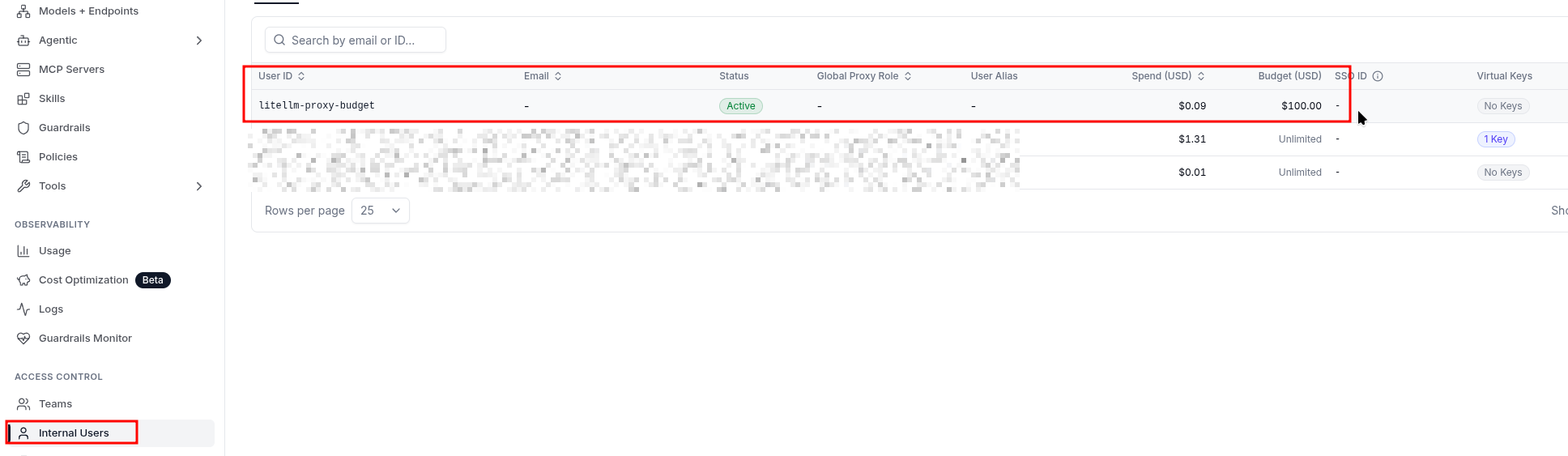
And one more interesting thing – I was looking for where the configured Global Proxy Budget is displayed in the UI.
Surprise – a new user litellm-proxy-budget is created under Internal Users, and the budget is assigned to it:
 That’s pretty much it for now.
All Limits and Budgets are enabled – now we wait and see who falls over first 🙂
