 Sometimes on FreeBSD you need to run services that aren’t officially supported by FreeBSD, and this post actually came about because I was installing Open WebUI on my NAS – and Open WebUI was easier to set up on Linux.
So I spun it up in a FreeBSD Linux jail, and to create the container I used Bastille, which simplifies management.
I might write up a draft about Open WebUI itself, but I decided to put Bastille in a separate post – because right now I’m setting up Hermes Agent (already done – see Hermes Agent: running an AI Agent in a FreeBSD Jail with Bastille), and I want to have a short reference on how to work with FreeBSD jails using Bastille.
There’s a whole series of posts about my NAS itself, 15 of them already, see the start in FreeBSD: Home NAS, part 1 – setting up ZFS mirror.
Contents
What are FreeBSD Jails and Bastille?
To answer this question, we first need to remember what FreeBSD Jails are.
FreeBSD jails are an analog of Docker/ContainerD on Linux – but they appeared much earlier than Linux LXC and namespaces and cgroups, which later “evolved” into Docker. I wrote about Linux cgroups in detail in Kubernetes: Pod resources.requests, resources.limits and Linux cgroups.
FreeBSD jails appeared back in 1999 as an evolution of the “incomplete” chroot system, which didn’t provide full isolation. With jails came the ability to separate the filesystem, have a separate network stack, your own PIDs and so on – basically everything we’re used to in Linux and its containers.
Just the other day I came across an interesting post on this topic, which among other things talks about the history of containerization – Your Container Is Not a Sandbox.
Unlike Linux containers, FreeBSD jails are a single part of the system kernel, while Linux is a combination of different mechanisms (namespaces, cgroups).
True, this also has its drawbacks – because it’s still the same FreeBSD kernel, but it’s simpler – and therefore safer and easier to work with and debug.
Bastille itself is an evolution of the jails system, or more precisely – a system to simplify container management on FreeBSD, so you don’t have to write jail.conf by hand and have a simple CLI for management (just like Docker is a “wrapper” for Linux containers).
Bastille isn’t the only one – there are similar solutions like iocage, ezjail, pot and others.
Why I picked Bastille – the project is actively developed, has a large community, has a convenient CLI and integrates well with ZFS features.
Installing Bastille
We install it from the repository and add it to autostart:
[root@test-free-15-bastille ~]# pkg install bastille
[root@test-free-15-bastille ~]# sysrc bastille_enable=YES
bastille_enable:  -> YES
Check the ZFS Pool name:
[root@test-free-15-bastille ~]# zpool list -Ho name
zroot
See ZFS Support.
Add ZFS support to Bastille – the file /usr/local/etc/bastille/bastille.conf:
...
## ZFS options
bastille_zfs_enable="YES"
bastille_zfs_zpool="zroot"
bastille_zfs_prefix="bastille"
...
Bastille setup: basic system configuration
Check the host version:
[root@test-free-15-bastille ~]# freebsd-version
15.0-RELEASE
You can run bastille setup – the system will configure the network itself, more on networking a bit later:
[root@test-free-15-bastille ~]# bastille setup
bastille_enable: YES -> YES

ZFS has already been configured!

Configuring bastille0 loopback interface
cloned_interfaces:  -> lo1
ifconfig_lo1_name:  -> bastille0

Bringing up new interface: [bastille0]
Created clone interfaces: lo1.
bastille_network_loopback: bastille0 -> bastille0
bastille_network_shared:  ->

Loopback interface successfully configured: [bastille0]

Determined default network interface: (em0)
/usr/local/etc/bastille/pf.conf does not exist: creating...
pf_enable: NO -> YES
Bastille pf ruleset created. Please review '/usr/local/etc/bastille/pf.conf' and enable pf using 'service pf start'.

Bastille has successfully been configured.
It immediately enabled Packet Filter – needed for NAT, and created the rules. See FreeBSD: Home NAS, part 2 – getting to know Packet Filter (PF) firewall.
If PF isn’t running – start it (if you’re on SSH, the connection will drop):
[root@test-free-15-bastille ~]# service pf start
And after setup we now have a new loopback interface:
[root@test-free-15-bastille ~]# ifconfig bastille0
bastille0: flags=8008<LOOPBACK,MULTICAST> metric 0 mtu 16384
        options=680003<RXCSUM,TXCSUM,LINKSTATE,RXCSUM_IPV6,TXCSUM_IPV6>
        groups: lo
        nd6 options=21<PERFORMNUD,AUTO_LINKLOCAL>
Networking for jails
Documentation – Networking and a great post Managing Jails in FreeBSD with Bastille (2022, but still mostly relevant).
Bastille supports several network types:
- VNET (DHCP): Bastille creates an interface of type bridge and connects the jail through
epair– each jail gets its own MAC and IP address, and looks like a separate host on the network - Bridged VNET (own bridge): same thing, but the bridge is created manually – used for custom or isolated networks
- Alias/Shared Interface: a single host interface, with IP addresses for jails added as aliases of the host’s physical interface – a simple option, but without a separate network stack (meaning everyone shares the host’s firewall, routing, etc.)
- NAT/Loopback Interface: the jail gets an IP on an internal network and reaches the outside world through the host’s NAT, port forwarding is needed for external access to the jail
- Inherit: the jail uses the same IP and interface as the host, rarely used – usually for specific cases, access is split by ports – inconvenient, inflexible, doesn’t scale
Next we’ll take a closer look at the three main types – VNET, Alias and NAT.
Bastille bootstrap
Run bastille bootstrap, the analog of docker pull – download the base archive with the system we pass as an argument, and unpack it for further use.
If we’re making a container with FreeBSD, the version of the system in the jail must be =< the host version – check it with freebsd-version:
[root@test-free-15-bastille ~]# freebsd-version
15.0-RELEASE
Prepare an “image” with this version:
[root@test-free-15-bastille ~]# bastille bootstrap 15.0-RELEASE

Attempting to bootstrap FreeBSD release: 15.0-RELEASE

Fetching MANIFEST...
/usr/local/bastille/cache/15.0-RELEASE/MANIFES        1044  B 7334 kBps    00s

Fetching distfile: base.txz
/usr/local/bastille/cache/15.0-RELEASE/base.tx         157 MB 8232 kBps    19s

Validating checksum for archive: base.txz
MANIFEST: ac0c933cc02ee8af4da793f551e4a9a15cdcf0e67851290b1e8c19dd6d30bba8
DOWNLOAD: ac0c933cc02ee8af4da793f551e4a9a15cdcf0e67851290b1e8c19dd6d30bba8

Extracting archive: base.txz

Bootstrap successful.
And we have new ZFS datasets:
[root@test-free-15-bastille ~]# zfs list -r zroot/bastille
NAME                                   USED  AVAIL  REFER  MOUNTPOINT
zroot/bastille                         532M  65.9G   120K  /usr/local/bastille
zroot/bastille/backups                  96K  65.9G    96K  /usr/local/bastille/backups
zroot/bastille/cache                   158M  65.9G    96K  /usr/local/bastille/cache
zroot/bastille/cache/15.0-RELEASE      158M  65.9G   158M  /usr/local/bastille/cache/15.0-RELEASE
zroot/bastille/jails                    96K  65.9G    96K  /usr/local/bastille/jails
zroot/bastille/logs                     96K  65.9G    96K  /var/log/bastille
zroot/bastille/releases                374M  65.9G    96K  /usr/local/bastille/releases
zroot/bastille/releases/15.0-RELEASE   374M  65.9G   374M  /usr/local/bastille/releases/15.0-RELEASE
zroot/bastille/templates                96K  65.9G    96K  /usr/local/bastille/templates
Now we’re all set to create containers – let’s see how to make jails with FreeBSD and Linux with different network configurations.
Creating jails
If we’re running this in VirtualBox – enable Promiscuous Mode set to Allow All:
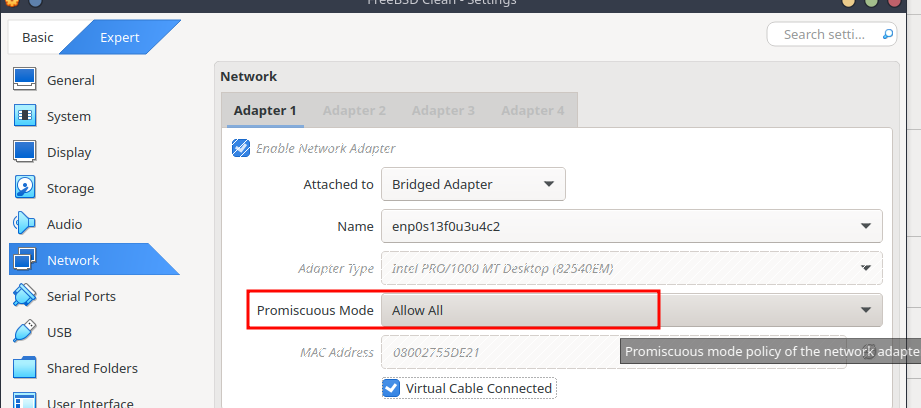
Creating FreeBSD jails
First we’ll make a few containers with FreeBSD and different network parameters – and then we’ll spin up a Linux jail.
All created jails are stored in the /usr/local/bastille/jails/ directory – there for each container there’s a directory with its name and a jail.conf file describing the parameters of that container.
Network type VNET
First let’s look at the VNET option – I use it the most because it’s convenient to have direct access into containers, plus full network-level isolation.
To set the network type to VNET – pass the --vnet option to bastille create (or the short form -V), then the jail name, system version, IP address, and the host interface for creating the bridge.
You can omit the interface if bastille_network_gateway is set in /usr/local/etc/bastille/bastille.conf.
Instead of passing an IP explicitly, you can specify the DHCP or SYNCDHCP option – then the jail will get an address from the router:
[root@test-free-15-bastille ~]# bastille create --vnet testjailVnetIp 15.0-RELEASE 192.168.0.205/24 em0

Attempting to create jail: testjailVnetIp

Valid IP: 192.168.0.205/24

...

[testjailVnetIp]:
e0a_bastille1
e0b_bastille1
testjailVnetIp: created
[root@test-free-15-bastille ~]# bastille list
 JID  Name            Boot  Prio  State  Type   IP Address     Published Ports  Release       Tags
 2    testjailVnetIp  on    99    Up     thin   192.168.0.205  -                15.0-RELEASE  -
Deep dive: VNET networking
I went into a bit of detail on how networking works – actually you can skip this part, but if you’re curious – let’s trace how a packet from a laptop on the local network with the FreeBSD host gets inside the jail.
In this example we have all hosts on the same 192.168.0.0/24 network:
- work laptop with Arch Linux
- FreeBSD host with the jail – 192.168.0.72
- and the jail itself with IP 192.168.0.205
Interfaces
Check the interfaces on the FreeBSD host:
[root@test-free-15-bastille ~]# ifconfig
em0: [...]
        ...
        ether 08:00:27:d5:55:b2
        inet 192.168.0.72 netmask 0xffffff00 broadcast 192.168.0.255
        ...
em0bridge: [...]
        ...
        ether 58:9c:fc:10:fa:c0
        ...
        member: e0a_bastille1 [...]
                ...
        member: em0 [...]
                ...
        groups: bridge
        ...
e0a_bastille1: [...]
        description: vnet0 host interface for Bastille jail testjailVnetIp
        ...
        ether 02:20:99:d5:55:b2
        ...
        groups: epair
        ...
What we have now:
- interface
em0:- IP: 192.168.0.72
- MAC: 08:00:27:d5:55:b2
- interface
em0bridge: an L2 switch – passes packets between its members- groups: bridge
- member: em0
- port 1
- member: e0a_bastille1
- port 5
- interface
e0a_bastille1(with a): host sideepair- groups: epair
- ether 02:20:99:d5:55:b2
And the e0b_bastille1 interface (with b) is created inside the jail – just with the name vnet0 (for convenience).
Check it with jexec <jailname> ifconfig:
[root@test-free-15-bastille ~]# jexec testjailVnetIp ifconfig
lo0: [...]
        ...
vnet0: [...]
        description: jail interface for em0
        ...
        ether 0e:20:99:d5:55:b2
        ...
        inet 192.168.0.205 netmask 0xffffff00 broadcast 192.168.0.255
        groups: epair
        ...
Where we can see that vnet0 has the same MAC 0e:20:99:d5:55:b2 as the host’s e0a_bastille1 and em0 interfaces.
Data flow and ARP table
And now we can trace the data transfer process to the jail:
- from the laptop we run
ssh 192.168.0.205– to the jail’s IP - the laptop sends a broadcast ARP request to the 192.168.0.0/24 network – “who has 192.168.0.205?“
- the physical
em0interface on the host receives this request, the kernel sees thatem0is a member of theem0bridgebridge interface on port 1, and passes the data toem0bridge em0bridgeforwards it to its members on the other ports – in our case toe0a_bastille1onport 5e0a_bastille1is the “input” socket, ande0b_bastille1is its “output” inside the jail- as an analogy you can think of
socketpair(), which connects two sockets, each with its own file descriptor – one on the “input” side and one on the “output” side: anything written to the “input” socket ends up on the second socket of the connected pair
- as an analogy you can think of
- the
vnet0interface in the jail receives this request, replies to the laptop “that’s my IP” and returns its MAC - the laptop writes that MAC into its ARP table
We can check the ARP table on Arch Linux with ip neigh show:
[setevoy@setevoy-work ~]  $ ip neigh show
192.168.0.205 dev enp0s13f0u3u4c2 lladdr 0e:20:99:d5:55:b2 REACHABLE
...
Then, when forming a packet for this jail, the Arch Linux host’s kernel will build an Ethernet frame (see TCP/IP: OSI and TCP/IP models, TCP packets, Linux sockets and ports) with an IP packet inside:
- OSI layer 2 (Ethernet frame) headers:
- src MAC: MAC of the interface – in my case enp0s13f0u3u4c2
- dst MAC: 0e:20:99:d5:55:b2 (MAC of FreeBSD
em0and the jail’se0b_bastille1)
- OSI layer 3 (IP packet) headers:
- src IP: IP of the Arch Linux host
- dst IP: 192.168.0.205 – jail IP
And the data delivery process to the jail looks like this:
- the laptop builds an Ethernet frame with dst MAC 0e:20:99:d5:55:b2
- the frame goes through the home network’s router/switch and arrives at the FreeBSD host’s
em0 - the FreeBSD kernel “sees” that
em0is a member of theem0bridgegroup and passes the data toe0a_bastille1 - the packet “enters”
e0a_bastille1and “exits” ate0b_bastille1– thevnet0interface inside our jail - the kernel inside the jail unpacks the Ethernet frame, checks the dst IP (192.168.0.205) and dst Port (22), sees that this is its IP and there’s an SSH daemon on port 22 – and passes the IP packet to SSH
Looks like I described it correctly.
Now that we’ve sorted out networking a bit, we can move on to creating more containers.
Connecting to the jail
We can connect from the host with bastille console:
[root@test-free-15-bastille ~]# bastille console testjailVnetIp

[testjailVnetIp]:
root@testjailVnetIp:~ #
Inside the container we start sshd:
root@testjailVnetIp:~ # sysrc sshd_enable="YES"
sshd_enable: NO -> YES
root@testjailVnetIp:~ # service sshd start
...
Starting sshd.
Add a user:
root@testjailVnetIp:~ # pw useradd setevoy -m -s /bin/sh
root@testjailVnetIp:~ # passwd setevoy
And connect from the laptop:
[setevoy@setevoy-work ~]  $ ssh [email protected]
([email protected]) Password for setevoy@testjailVnetIp:
...
setevoy@testjailVnetIp:~ $
Network type Alias/Shared Interface
With Alias/Shared Interface, a second IP is just added as an alias to the em0 interface.
Create the container – without any extra options, just the IP address and the host interface, like in the VNET example:
[root@test-free-15-bastille ~]# bastille create testjailAlias 15.0-RELEASE 192.168.0.206 em0

Attempting to create jail: testjailAlias

Valid IP: 192.168.0.206

Valid interface: em0

...

[testjailAlias]:
testjailAlias: created
Check on the host – now we have two addresses:
[root@test-free-15-bastille ~]# ifconfig
em0: flags=1008943<UP,BROADCAST,RUNNING,PROMISC,SIMPLEX,MULTICAST,LOWER_UP> metric 0 mtu 1500
        ...
        inet 192.168.0.72 netmask 0xffffff00 broadcast 192.168.0.255
        inet 192.168.0.206 netmask 0xffffffff broadcast 192.168.0.206
        ...
lo0: flags=1008049<UP,LOOPBACK,RUNNING,MULTICAST,LOWER_UP> metric 0 mtu 16384
        ...
bastille0: flags=8008<LOOPBACK,MULTICAST> metric 0 mtu 16384
        ...
em0bridge: flags=1008843<UP,BROADCAST,RUNNING,SIMPLEX,MULTICAST,LOWER_UP> metric 0 mtu 1500
        ...
e0a_bastille1: flags=1008943<UP,BROADCAST,RUNNING,PROMISC,SIMPLEX,MULTICAST,LOWER_UP> metric 0 mtu 1500
        description: vnet0 host interface for Bastille jail testjailVnetIp
        ...
And inside the container we have all the same interfaces as on the host, but for em0 only one IP:
[root@test-free-15-bastille ~]# jexec testjailAlias ifconfig
em0: flags=1008943<UP,BROADCAST,RUNNING,PROMISC,SIMPLEX,MULTICAST,LOWER_UP> metric 0 mtu 1500
        ...
        ether 08:00:27:d5:55:b2
        inet 192.168.0.206 netmask 0xffffffff broadcast 192.168.0.206
        ...
lo0: flags=1008049<UP,LOOPBACK,RUNNING,MULTICAST,LOWER_UP> metric 0 mtu 16384
        ...
bastille0: flags=8008<LOOPBACK,MULTICAST> metric 0 mtu 16384
        ...
em0bridge: flags=1008843<UP,BROADCAST,RUNNING,SIMPLEX,MULTICAST,LOWER_UP> metric 0 mtu 1500
        ...
e0a_bastille1: flags=1008943<UP,BROADCAST,RUNNING,PROMISC,SIMPLEX,MULTICAST,LOWER_UP> metric 0 mtu 1500
        ...
Now if we don’t start sshd in the container – then a connection to IP 192.168.0.206 will go to the SSH daemon of the host itself – “Password for setevoy@test-free-15-bastille”
[setevoy@setevoy-work ~] $ ssh -o StrictHostKeyChecking=no -o UserKnownHostsFile=/dev/null [email protected]
Warning: Permanently added '192.168.0.206' (ED25519) to the list of known hosts.
([email protected]) Password for setevoy@test-free-15-bastille:
But if we have port 22 open inside the container:
root@testjailAlias:~ # service sshd onestart
Then the request will go to it – “Password for setevoy@testjailAlias“:
[setevoy@setevoy-work ~] $ ssh -o StrictHostKeyChecking=no -o UserKnownHostsFile=/dev/null [email protected]
Warning: Permanently added '192.168.0.206' (ED25519) to the list of known hosts.
([email protected]) Password for setevoy@testjailAlias:
Simpler than VNET – but we have shared Packet Filter rules, the firewall is on the host, no way to get an address from DHCP, possible problems with overlapping ports, and importantly: if our jail gets compromised – the attacker gets access to the entire host network.
Network type NAT
And the last example for today – with NAT, only now we set the IP not from the home network’s pool, and for the interface we specify the host’s loopback interface bastille0:
[root@test-free-15-bastille ~]# bastille create testjailNat 15.0-RELEASE 10.0.0.10 bastille0

Attempting to create jail: testjailNat

Valid IP: 10.0.0.10

Valid interface: bastille0

...
Check the jails now:
[root@test-free-15-bastille ~]# bastille list
 JID  Name            Boot  Prio  State  Type   IP Address     Published Ports  Release       Tags
 4    testjailAlias   on    99    Up     thin   192.168.0.206  -                15.0-RELEASE  -
 6    testjailNat     on    99    Up     thin   10.0.0.10      -                15.0-RELEASE  -
 2    testjailVnetIp  on    99    Up     thin   192.168.0.205  -                15.0-RELEASE  -
Packet routing to the jail will go through Packet Filter:
[root@test-free-15-bastille ~]# pfctl -s nat
nat on em0 from <jails> to any -> (em0:0)
rdr-anchor "rdr/*" all
Start SSH inside the container:
[root@test-free-15-bastille ~]# bastille service testjailNat sshd onestart

[testjailNat]:
Generating RSA host key.
...
Starting sshd.
We can connect from the host to 10.0.0.10:
[root@test-free-15-bastille ~]# ssh 10.0.0.10
...
([email protected]) Password for root@testjailNat:
And to connect from the external network – on the host we enable port forwarding (bastille rdr – redirect via Packet Filter):
[root@test-free-15-bastille ~]# bastille rdr testjailNat tcp 2222 22
IPv4 tcp/2222:22 on em0
And we connect via SSH to the FreeBSD host’s IP, but with port 2222, and we end up in the new Jail – “Password for setevoy@testjailNat“:
[setevoy@setevoy-work ~]  $ ssh -p 2222 [email protected]
...
([email protected]) Password for setevoy@testjailNat:
And finally – jails with Linux.
Creating Linux Jails
Documentation – Linux Jails.
An important limitation of Linux jails – VNET options aren’t available for networking. So the choices are – either NAT and port-forward, or Alias with all its limitations and possible problems.
Plus – “Linux jails are still considered experimental” – although in general it works pretty stably.
For Linux we need to run bastille setup linux – then Bastille will pull in the necessary modules and scripts:
[root@test-free-15-bastille ~]# bastille setup linux
[WARNING]: Running linux jails requires loading additional kernel
modules, as well as installing the 'debootstrap' package.
Do you want to proceed with setup? [y|n]:y

Loading kernel module: fdescfs

Persisting module: fdescfs
fdescfs_load:  -> YES

Loading kernel module: linprocfs

Persisting module: linprocfs
linprocfs_load:  -> YES

Loading kernel module: linsysfs

Persisting module: linsysfs
linsysfs_load:  -> YES

Loading kernel module: linux

Loading kernel module: linux64
linux_enable: NO -> YES

...
Now in the /usr/local/share/debootstrap/scripts/ directory we have a set of shell scripts that configure the Linux environment:
[root@test-free-15-bastille ~]# less /usr/local/share/debootstrap/scripts/gutsy
case $ARCH in
  amd64|i386)
        case $SUITE in
          gutsy|hardy|intrepid|jaunty|karmic|lucid|maverick|natty|oneiric|precise|quantal|raring|saucy|utopic|vivid|wily|yakkety|zesty)
        default_mirror http://old-releases.ubuntu.com/ubuntu
...
keyring /usr/local/share/keyrings/ubuntu-archive-keyring.gpg
Run bootstrap, specify the system name – actually, the name of the script from /usr/local/share/debootstrap/scripts/.
But for Ubuntu the latest available version is Jammy, 22.04.
It’ll take 10-15 minutes, maybe more, while everything downloads:
[root@test-free-15-bastille ~]# bastille bootstrap jammy

Attempting to bootstrap Linux/Ubuntu release: Ubuntu_2204

Ensuring Linux compatability...

...
Then create the container with create and the --linux option (-L):
[root@test-free-15-bastille ~] bastille create -L openwebui jammy 192.168.0.207/24 em0

...

[openwebui]:
openwebui: created
And we have a container with “Ubuntu”:
[root@test-free-15-bastille ~]# bastille cmd openwebui lsb_release -a

[openwebui]:
No LSB modules are available.
Distributor ID: Ubuntu
Description:    Ubuntu 22.04 LTS
Bastille and Jails management – main commands
And a bit about the main commands available for working with containers, see also examples in FreeBSD Jails with Bastille – a fresh one from 2025.
Documentation – Bastille sub-commands.
clone: copy a jail (see Limitations – there are some nuances with interfaces)cmd: run a command in the jail:
[root@test-free-15-bastille ~]# bastille cmd testjailNat ps

[hermesagent1]:
  PID TT  STAT    TIME COMMAND
63825  2  R+J  0:00.00 ps
config: get or change a parameter:
[root@test-free-15-bastille ~]# bastille config testjailVnetIp get vnet.interface
e0b_bastille1
cp: copy a file from the host into the jaildestroy: delete the jail and all its dataexport: create an archive with all jail data, then with import you can restore it on another hostmount: mount a file or directory from the host into the containerrestart: restart the jailtop,htop: resources and processes in the container
Also worth a look at bastille monitor – it has some interesting options for monitoring and alerting, and Templates – creating containers from templates that you can grab from BastilleBSD/templates or build your own.
And with bastille zfs – you can create ZFS snapshots of containers (see FreeBSD: Home NAS, part 5 – ZFS pool, datasets, snapshots and monitoring).
