 Just a quick note, because I’ve needed to do something like this fairly often – and only today discovered how elegantly it’s done with
 vmalert.
So, sometimes in an alert you want to display multiple $value entries, for example:
- alert: OpenAI Budget Usage
  expr: |
    openai_budget_used_usd / openai_budget_total_usd * 100 > 80
  ...
  annotations:
    summary: OpenAI Budget Usage
    description: |-
      OpenAI budget used amount is greater than 80% of the total budget
      *Budget used percentage*: < $value from the openai_budget_used_usd >
      *Budget used amount*: < $value from the expr: openai_budget_used_usd / openai_budget_total_usd * 100 >
      *Budget total amount*: < $value from the openai_budget_total_usd >
The only way I found before to display a $value other than from the expr was to use valueFrom:
- alert: OpenAI Spending Too High Warning
  expr: (project_spending_current > project_spending_avg_3d * 1.3) > 3
  ...
  valueFrom:
    metric: project_spending_today
  annotations:
    summary: 'OpenAI Spending Too High'
    description: |-
      Current OpenAI project spending exceeds the 3-day average by 30%
      *Project*: `{{ $labels.project }}`
      *Spent today*: `{{ $value }}`
(honestly, I’m not sure how this worked, since I can’t find valueFrom anywhere in the documentation now – but at some point it did work exactly like this for me)
With this alert structure – it fires on the condition in expr: (project_spending_current > project_spending_avg_3d * 1.3) > 3, but *Spent today*: {{ $value }} will show the value of the metric from valueFrom – metric: project_spending_today.
But vmalert has Template functions with the function query() that can be called directly from an alert, for example:
- alert: OpenAI Budget Usage
  expr: |
    openai_budget_used_usd / openai_budget_total_usd * 100 > 80
  ...
  annotations:
    summary: OpenAI Budget Usage
    description: |-
      OpenAI budget used amount is greater than 80% of the total budget
      *Budget used percentage*: `{{ printf "%.0f" $value }}%`
      *Budget used amount*: `{{ printf "%.0f" (query "openai_budget_used_usd" | first | value) }}` USD
      *Budget total amount*: `{{ printf "%.0f" (query "openai_budget_total_usd" | first | value) }}` USD
Here:
- *Budget used percentage*: `{{ printf “%.0f” $value }}%`: the value from
expr: openai_budget_used_usd / openai_budget_total_usd * 100 - *Budget used amount*: `{{ printf “%.0f” (query “openai_budget_used_usd” | first | value) }}` USD: the value from
openai_budget_used_usd, wherefirstmeans “take the first (latest) value of the metric” - *Budget total amount*: `{{ printf “%.0f” (query “openai_budget_total_usd” | first | value) }}` USD: same, but from the
openai_budget_total_usdmetric
And the result is an alert that immediately shows all the data you need:
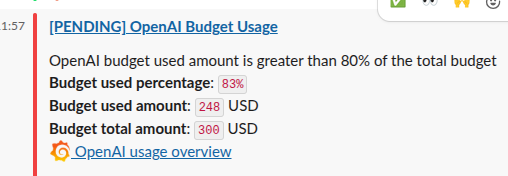
Done.
“Not using VictoriaMetrics yet? Then we’re coming to you!” (c)
And the main takeaway: RTFM! Read the manuals more often – especially since VictoriaMetrics has excellent documentation.
