 On the project, we’ve gradually grown to the point where it’s time to have proper tracing – to build real observability, not just monitoring.
A long time ago I did something similar with Jaeger – a monster, and it kind of stayed in my drafts from 2019 or 2020. Since right now our entire stack is VictoriaMetrics – VictoriaMetrics itself for metrics and VictoriaLogs for logs – we’ll use a solution from the VictoriaMetrics team for traces too: VictoriaTraces.
On top of that, VictoriaTraces is much lighter both in resources and in setup. You can probably compare Loki vs VictoriaLogs – and Jaeger vs VictoriaTraces: same story, a much simpler setup, much less CPU/RAM.
This post was planned as the first in a series on traces – so the first half here will be more theoretical, on Observability and OpenTelemetry. And in the second half, we’ll spin up VictoriaTraces in Kubernetes.
In the previous post OpenTelemetry: OTel Collectors in Kubernetes and integration with VictoriaMetrics stack I described a pure OpenTelemetry stack for metrics and logs, and in this post I’ll be referring back to it.
And in the next one, the third – we’ll look at how to create traces from Python.
Contents
Monitoring vs Observability
“Monitoring is a passive action. Observability is an active practice” – from the excellent book Learning OpenTelemetry, Setting Up and Operating a Modern Observability System.
The first thing I want to cover separately is the difference between “monitoring” and “observability“.
These are often confused or used interchangeably – but while they’re related, they’re really about different concepts.
So, Monitoring is when we know in advance what can break and we set up checks specifically for that: “CPU above 90% => alert. Disk more than 85% full => alert. 5xx errors on the ALB => alert.”
In other words, we’re answering questions we’ve already formulated in advance. It’s essentially a dashboard-driven approach: we look at known metrics and react to known problems.
Observability is when the system lets us answer questions we didn’t formulate in advance: something “weird” is happening, and we can “dig out” the cause – even if we’ve never run into it before.
The key word here is explorability: the ability to investigate the connections and causes of problems.
For example – Backend API latency is up. Monitoring will just say “latency is high” (alert fired), but observability lets us drill down – walk through the whole chain and find the root cause: is the latency spike on a specific endpoint? a specific tenant? a specific Kubernetes Pod? Maybe one upstream is slow? In other words, we go from the symptom – to the cause through data that already exists in the system.
That’s actually why people talk about the “three pillars of observability” – Metrics, Logs, Traces. Traces (distributed tracing) are usually what distinguishes “just monitoring” from observability in practice, because traces are what let us investigate an unknown problem – see the path of a request through services and find a bottleneck we didn’t anticipate.
That said, observability isn’t about some “magical dynamic alerts”: we still keep regular pre-defined alerts in the system like “if 5xx is above 1%, send a message to Slack”.
What changes is what happens after the alert fires: we don’t just see “this domain is returning errors” and go grep logs in VictoriaLogs by hand – we have the ability to walk the full path: from the Slack alert – through AWS ALB – through the Kubernetes Pod – down to the component inside that Pod, and ultimately to the specific method() in the code that’s returning errors, and to the user whose requests are making that method generate errors.
So alerting is still the “monitoring” part: observability starts the moment the alert fires and you need to understand why.
Observability isn’t about detecting problems, it’s about investigating them.
What is: Tracing
Tracing (or distributed tracing) is a way to follow the path of a single request through the entire system: from the moment it hits the ALB – through a Kubernetes Pod – to the database, an external API or an LLM call, and back.
Going forward we’ll be talking about VictoriaTraces, which is built on VictoriaLogs – because the tracing concept itself is the same as for logs: a service records every “blip” – every call, every action, every request to external systems. The difference from “just logging” is that traces have an ID that ties all related calls into a tree, which lets us build the full path of a request.
One such path is called a trace. A trace consists of spans, where each span is one operation – a specific HTTP request, an SQL query, a call to another service, a queue processing step. Spans are linked into a tree via trace_id (shared across the whole trace) and parent_id (who called this span).
It looks roughly like this:
trace_id: abc123

[HTTP GET /api/orders]                                        # root span (120ms)
  ├─ [auth-service: validate token]                           # child span (8ms)
  ├─ [orders-service: get orders]                             # child span (95ms)
  │    ├─ [PostgreSQL: SELECT * FROM orders WHERE user_id=42] # (80ms)
  │    └─ [Redis: GET cache:user:42]                          # (2ms)
  └─ [response serialization]                                 # child span (12ms)
Every span in this trace has a trace_id field, every span has parent_id and span_id fields: on the root span, parent_id will be empty, on the second span parent_id == span_id of the first span of this trace, and so on.
Besides execution time, each span can contain attributes – key-value pairs with additional context: some attributes are added automatically (HTTP method, status code, DB statement), some are added manually by developers (tenant_id, row_count, cache_hit). The more context in attributes – the more you can investigate without adding new metrics or logs.
For example (this is already from the next post, we’ll go into more detail there):
...
orders-api  |     "attributes": {
orders-api  |         "http.scheme": "http",
orders-api  |         "http.host": "172.25.0.3:8000",
orders-api  |         "net.host.port": 8000,
orders-api  |         "http.flavor": "1.1",
orders-api  |         "http.target": "/api/orders/by-customer/Vasya",
orders-api  |         "http.url": "http://172.25.0.3:8000/api/orders/by-customer/Vasya",
orders-api  |         "http.method": "GET",
orders-api  |         "http.server_name": "localhost:8000",
orders-api  |         "http.user_agent": "curl/8.20.0",
orders-api  |         "net.peer.ip": "172.25.0.1",
orders-api  |         "net.peer.port": 54900,
orders-api  |         "http.route": "/api/orders/by-customer/{name}",
orders-api  |         "customer.name": "Vasya",
orders-api  |         "customer.orders_count": 3,
orders-api  |         "http.status_code": 200
orders-api  |     },
...
Effectively, attributes in traces are the labels of Prometheus-format metrics, which we can later use to search for traces and – more importantly – to correlate related metrics, logs, and traces.
A tracing-driven debugging example
Let’s go back to the example I described above: we have an alert in Slack saying that Backend API latency on the /coach endpoint has jumped to 20 seconds:
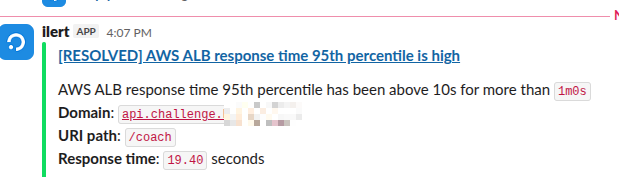
The alert has a link to a Grafana dashboard with the status of the AWS Application Load Balancer, the dashboard has a link to VictoriaLogs with ALB and Backend API logs, a link to the dashboard with the Kubernetes Pods of our Backend API and its AWS RDS.
The Grafana metrics show a spike, the logs – nothing suspicious. Without traces, the next step is guesswork – we go look at CPU/RAM on the Kubernetes Worker Nodes, the load on related Pods, the Grafana dashboard for AWS RDS with PostgreSQL, trying to piece together a picture of where the problem is.
With traces, we open the slow traces for this endpoint and immediately see: out of the total 120ms to process the whole request – 80ms is spent on executing one SQL query. We look at the attributes of that span – db.statement: SELECT * FROM orders WHERE user_id=42, the index isn’t being used: root cause found in a minute.
What is: the OpenTelemetry
OpenTelemetry (OTel) is first of all a set of common “rules” for how data should be collected and what metadata should be present in it.
We mentioned the “three pillars of observability” above – Metrics, Logs, Traces: every action of a service and its components is an event, or a Signal in OTel terminology.
OpenTelemetry and its OpenTelemetry Protocol (see the OTLP Specification 1.10.0) describe how data should be transmitted (HTTP/gRPC) and which fields and headers it must carry, unifying metrics, logs, and traces into a single format.
With OTel we collect these signals at the code level, from Kubernetes Pods/Nodes or from the AWS API, process them by adding attributes and merging them into a shared context, and pass them on to a backend where the data is stored – metrics to VictoriaMetrics, logs to VictoriaLogs, traces to VictoriaTraces.
OpenTelemetry vs Prometheus
When we work with VictoriaMetrics or Prometheus, we have the usual approach to metrics: an exporter exposes a /metrics endpoint, VictoriaMetrics with VMAgent goes to that endpoint and collects the metrics (PULL model). The metrics format is a simple text one like metric_name{label="value"} 123.45.
OpenTelemetry (OTel) takes a different approach, because it usually works on a PUSH model: the service itself sends data to the OTel Collector, which then routes it wherever needed – to VictoriaMetrics, VictoriaLogs, VictoriaTraces, or any other backend.
That said, OTel Collector receivers can also make requests to some APIs themselves, for example – k8s_cluster makes requests to the Kubernetes API /apis/apps/v1/deployments to get additional info on Kubernetes Pods.
Why OpenTelemetry, if there’s Prometheus
For metrics, the Prometheus format really does work great, but Prometheus is only metrics: it doesn’t do traces, it doesn’t do structured logs, and most importantly – it doesn’t tie a metric, a log, and a trace together: we already have VictoriaLogs for logs, VictoriaMetrics for metrics – but these are separate systems with their own formats, so tying a specific metric to a specific log and a specific trace is hard, because they don’t share context.
OTel solves exactly this problem: when metrics, logs, and traces all go through one SDK, they automatically get a shared context – trace_id, service.name, deployment.environment, kubernetes.pod.name. As a result, from an alert on metric_name we can jump to the trace of a specific request, and from a trace – to the logs of a specific span. Without OTel, these three systems live separately and you have to wire them up manually.
OpenTelemetry components
OpenTelemetry consists of three main parts:
- OTel SDK: embedded in code and generates telemetry
- for auto-instrumentation it’s just a few lines at service startup – and we immediately get spans for HTTP, gRPC, SQL (see Instrumentation below)
- OTel Collector: a separate service (DaemonSet or Deployment in Kubernetes) that receives data from the SDK in services, processes it and sends it on to backends
- the same Collector in an agent role can itself collect metrics and logs from Kubernetes or AWS – also described in the previous post
- OTLP (OpenTelemetry Protocol): the format and protocol for transmitting data, which runs over gRPC or HTTP and is supported by pretty much every modern backend – VictoriaMetrics, Grafana Tempo, Jaeger, Datadog
OpenTelemetry Instrumentation
The term instrumentation itself, in the context of OpenTelemetry and tracing, is the process of adding specific code to a service or system that enables observability of that code.
See Instrumentation and Zero-code Instrumentation.
With OpenTelemetry there are three ways to do instrumentation:
- zero-code instrumentation: we don’t change anything in the code at all – our service is invoked through an external wrapper that intercepts calls to our code and adds the needed data itself
- fast and convenient – but the least flexible, since it doesn’t let you decide what and where to add yourself
- auto instrumentation: the OTel SDK can automatically create spans for HTTP requests, DB clients, gRPC calls, and add the necessary attributes
- for auto-instrumentation we use the OTel SDK by adding libraries to our code, which through its own methods and functions adds information to calls of our code’s methods and functions
- manual instrumentation: we can add our own custom spans and attributes in the code for business logic that auto-instrumentation can’t see
- for example, creating a span for processing one item in a batch job, or an
order.total_itemsattribute on a SQL call inside the order-processing span
- for example, creating a span for processing one item in a batch job, or an
Usually, you start with auto-instrumentation (to get a baseline picture right away), and then add manual instrumentation gradually – where there isn’t enough context to debug specific problems.
What is: VictoriaTraces
Documentation – VictoriaTraces and Key concepts.
Project repo – VictoriaTraces.
VictoriaTraces is built on VictoriaLogs: it receives data from the OTel Collector as JSON in OTLP format and writes it in its own format, transforming the field names.
The project is still in the This project is currently a work in progress stage, so changes are possible – but it’s already perfectly usable.
Like VictoriaLogs, VictoriaTraces forms stream fields, which are used to optimize data storage and search for logs or traces.
As a result, every recorded trace span is stored as part of a specific stream – similar to how every log record in VictoriaLogs is part of one specific log stream.
In VictoriaTraces, the service.name attribute is used for the stream field, and every unique value in a stream field affects how much data ends up in VictoriaTraces storage and IndexDB, which is used to search the data when we run sum by (label_name).
See VictoriaMetrics: Churn Rate, High cardinality, metrics and IndexDB – because the data storage approach in VictoriaMetrics, VictoriaLogs, and VictoriaTraces is the same.
Like VictoriaMetrics and VictoriaLogs, VictoriaTraces has its own VM UI where we can search for traces using LogsQL:
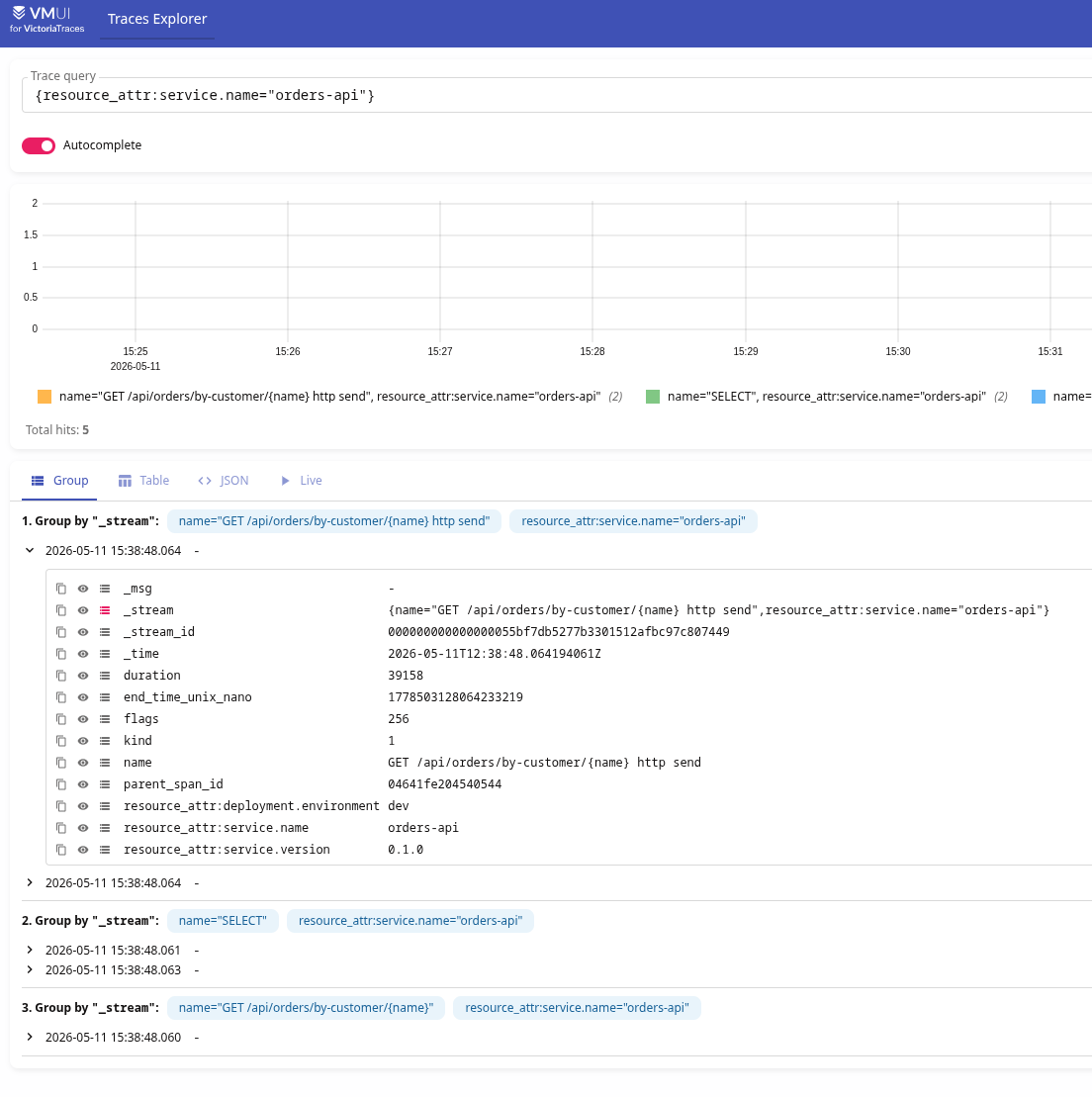
Although for displaying the trace tree it’s better to use Grafana – we’ll do that further down.
Also see the VictoriaTraces docs on Monitoring – we can collect metrics, and Retention – traces, like logs and metrics, are also stored on disk, so disk usage is something to keep in mind.
And a really tasty feature – creating your own metrics from traces, we’ll do that later in this post.
Running VictoriaTraces in Kubernetes
Like VictoriaLogs, VictoriaTraces has a single instance mode and a cluster mode for High Availability – but in my case single instance is more than enough, so for now we’ll use that.
To run VictoriaTraces in Kubernetes there are separate Helm charts – victoria-traces-single and victoria-traces-cluster.
Chart documentation – VictoriaTraces Single.
Add the repository:
$ helm repo add vm https://victoriametrics.github.io/helm-charts/
$ helm repo update
Find the latest available chart version:
$ helm search repo vm/victoria-traces-single
NAME                            CHART VERSION   APP VERSION     DESCRIPTION
vm/victoria-traces-single       0.0.7           v0.8.0          The VictoriaTraces single Helm chart deploys Vi...
Write a values.yaml, defaults are in the chart repo, for example:
victoria-traces-single:
  enabled: true
  server:
    mode: deployment
    ingress:
      enabled: true
      ingressClassName: alb
      annotations:
        alb.ingress.kubernetes.io/group.name: ops-1-33-internal-alb
        alb.ingress.kubernetes.io/target-type: ip
        alb.ingress.kubernetes.io/certificate-arn: arn:aws:acm:us-east-1:492***148:certificate/ad0ae28d-1843-412d-b3e1-05235186ea11
      hosts:
        - name: vmtraces.monitoring.1-33.ops.example.co
          path:
            - /
          port: http
    resources:
      requests:
        cpu: 100m
        memory: 256Mi
    persistentVolume:
      enabled: true
      storageClassName: gp3-retain
      size: 50Gi
    retentionPeriod: 30d
    vmServiceScrape:
      enabled: true
Here I set the deployment type to Deployment instead of StatefulSet and added an Ingress via AWS ALB.
In persistentVolume we create a disk, in retentionPeriod we change the default value of 7 days to a month.
Deploy, check:
$ kk get deploy atlas-victoriametrics-vt-single-server
NAME                                     READY   UP-TO-DATE   AVAILABLE   AGE
atlas-victoriametrics-vt-single-server   1/1     1            1           44h
Check the Kubernetes Service:
$ kk get svc atlas-victoriametrics-vt-single-server
NAME                                     TYPE        CLUSTER-IP   EXTERNAL-IP   PORT(S)     AGE
atlas-victoriametrics-vt-single-server   ClusterIP   None         <none>        10428/TCP   2d20h
VictoriaTraces accepts OTLP/HTTP on the /insert/opentelemetry/v1/traces endpoint.
We can push a trace with curl for a test – open the port:
$ kk port-forward svc/atlas-victoriametrics-vt-single-server 10428
Send a JSON with fields that our OTel SDK will later be creating:
$ curl -v -X POST "http://localhost:10428/insert/opentelemetry/v1/traces" -H "Content-Type: application/json" -d "{\"resourceSpans\":[{\"resource\":{\"attributes\":[{\"key\":\"service.name\",\"value\":{\"stringValue\":\"test-curl\"}}]},\"scopeSpans\":[{\"scope\":{\"name\":\"manual-test\"},\"spans\":[{\"traceId\":\"aaaaaaaaaaaaaaaabbbbbbbbbbbbbbbb\",\"spanId\":\"cccccccccccccccc\",\"name\":\"test-span\",\"kind\":2,\"startTimeUnixNano\":\"$(date +%s)000000000\",\"endTimeUnixNano\":\"$(date +%s)000000000\",\"attributes\":[{\"key\":\"http.method\",\"value\":{\"stringValue\":\"GET\"}},{\"key\":\"http.route\",\"value\":{\"stringValue\":\"/api/test\"}}],\"status\":{\"code\":1}}]}]}]}"
Check in the VM UI – http://localhost:10428/select/vmui/:
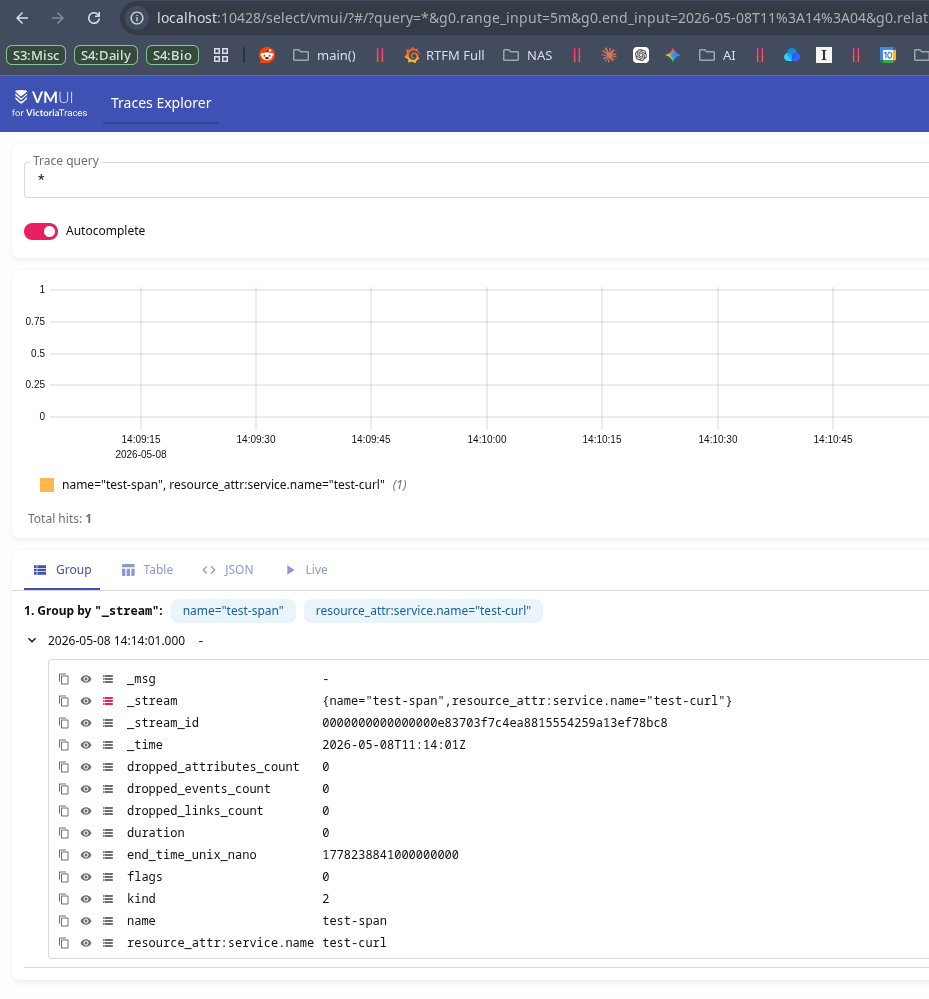
The query format is standard LogsQL:
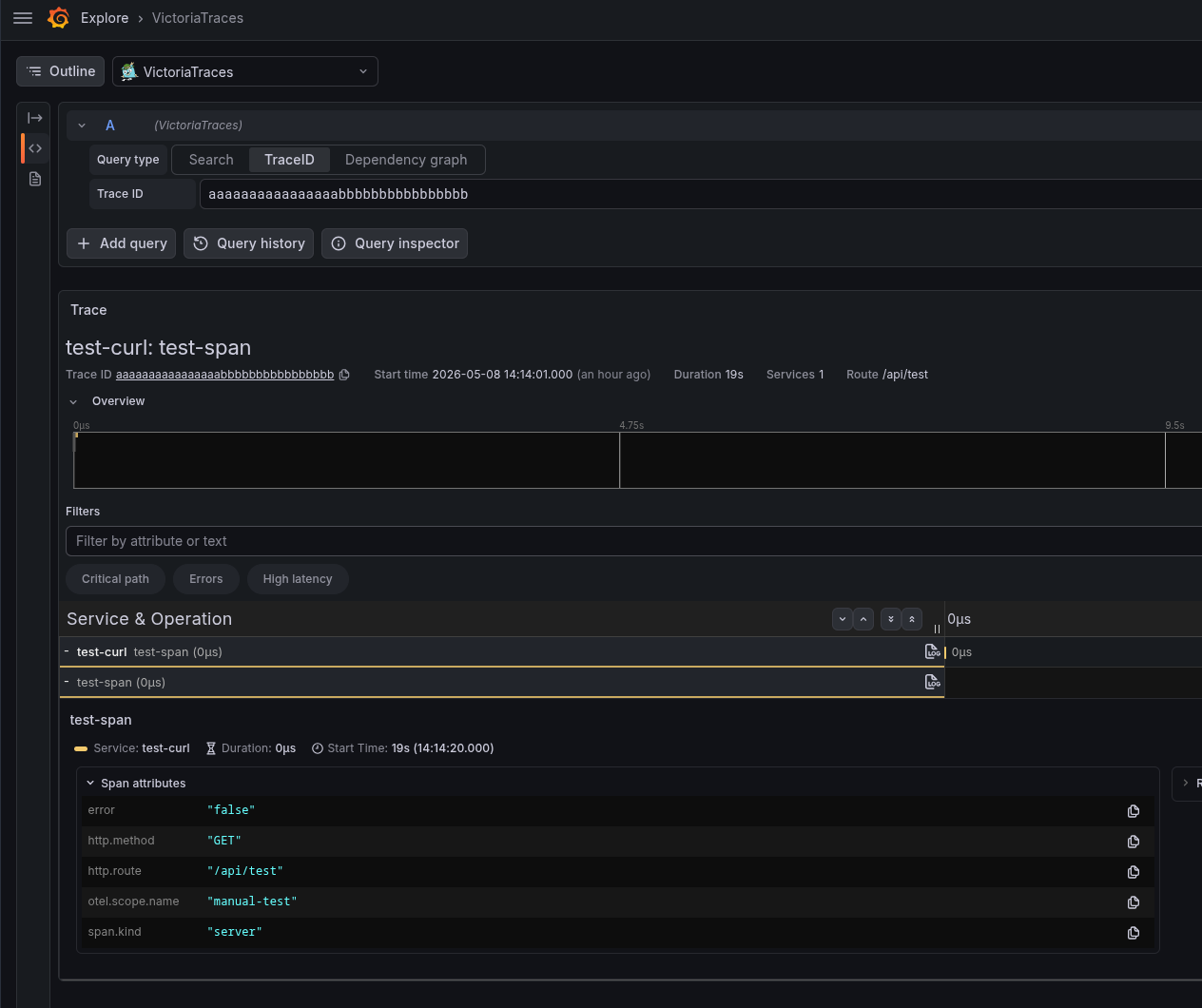
{name="test-span"} trace_id:"aaaaaaaaaaaaaaaabbbbbbbbbbbbbbbb"
And that’s it, VictoriaTraces is ready to go. All that’s left is to add instrumentation to our code – more details in the next part, here just as an example of what it can look like – this is auto instrumentation for FastAPI and asyncpg:
import os
from fastapi import FastAPI, HTTPException
from contextlib import asynccontextmanager
import asyncpg

from opentelemetry.instrumentation.fastapi import FastAPIInstrumentor
from opentelemetry.instrumentation.asyncpg import AsyncPGInstrumentor

from opentelemetry import trace
from opentelemetry.sdk.trace import TracerProvider
from opentelemetry.sdk.trace.export import ConsoleSpanExporter, SimpleSpanProcessor, BatchSpanProcessor
from opentelemetry.exporter.otlp.proto.http.trace_exporter import OTLPSpanExporter


pool = None


@asynccontextmanager
async def lifespan(app: FastAPI):
    global pool
    pool = await asyncpg.create_pool(
        host=os.getenv("DB_HOST", "postgres-test"),
        port=int(os.getenv("DB_PORT", "5432")),
        user=os.getenv("DB_USER", "postgres"),
        password=os.getenv("DB_PASSWORD", "testpass"),
        database=os.getenv("DB_NAME", "demo"),
        min_size=2,
        max_size=10,
    )
    yield
    await pool.close()


# Set up OTel tracer provider
provider = TracerProvider()

# Console exporter (for local debugging)
provider.add_span_processor(SimpleSpanProcessor(ConsoleSpanExporter()))
# OTLP exporter to VictoriaTraces
provider.add_span_processor(BatchSpanProcessor(OTLPSpanExporter()))

trace.set_tracer_provider(provider)

app = FastAPI(title="Orders API", lifespan=lifespan)

FastAPIInstrumentor.instrument_app(app)
AsyncPGInstrumentor().instrument()

@app.get("/healthz")
async def healthz():
    return {"status": "ok"}


@app.get("/api/orders")
async def list_orders():
    rows = await pool.fetch("SELECT * FROM orders ORDER BY id")
    return [dict(r) for r in rows]


@app.get("/api/orders/{order_id}")
async def get_order(order_id: int):
    row = await pool.fetchrow("SELECT * FROM orders WHERE id = $1", order_id)
    if not row:
        raise HTTPException(status_code=404, detail="Order not found")
    return dict(row)


@app.get("/api/orders/by-customer/{name}")
async def orders_by_customer(name: str):
    # get currently processing span
    current_span = trace.get_current_span()
    # add attribute to the current span: customer name
    current_span.set_attribute("customer.name", name)
    # fetch orders from the database
    rows = await pool.fetch(
        "SELECT * FROM orders WHERE customer_name = $1 ORDER BY id", name
    )
    # add attribute to the current span: number of orders fetched
    current_span.set_attribute("customer.orders_count", len(rows))
    return [dict(r) for r in rows]
VMAlert and Recording Rules with VictoriaTraces
A neat feature – we can have Recording Rules that use VictoriaTraces – see Alerting with traces.
The logic is the same as for Recording Rules and metrics from logs in VictoriaLogs: we describe a rule with type="vlogs" – vmalert generates a metric, and then we can use that metric in alerts or Grafana.
The only catch here – if you already have a vmalert instance for logs, you need a second instance – because the type in the Recording Rules is the same (vlogs), and VMAlert itself needs a different datasource.url.
Adding VMAlert
vmalert can be installed from the Helm chart victoria-metrics-alert, or, as in my case using victoria-metrics-k8s-stack and the VictoriaMetrics Kubernetes Operator – create a second instance via kind=VMAlert.
Docs for vmalert itself – here>>>.
Example with kind: VMAlert:
apiVersion: operator.victoriametrics.com/v1beta1
kind: VMAlert
metadata:
  name: vmalert-traces
spec:
  datasource:
    url: http://atlas-victoriametrics-vt-single-server:10428
  remoteWrite:
    url: http://vmsingle-vm-k8s-stack:8428
  notifiers:
    - url: http://vmalertmanager-vm-k8s-stack.ops-monitoring-ns.svc.cluster.local:9093
  ruleSelector:
    matchLabels:
      app: vmalert-traces
Here:
datasource.url: the VictoriaTraces endpoint –vmalertwill hit it to get tracesremoteWrite: where to write the generated metrics
remoteRead here is optional – this instance only generates metrics.
But notifiers is required – even though it won’t be generating alerts.
In ruleSelector we specify which VMRules to use – otherwise all VMRules would end up in this VMAlert instance’s ConfigMap.
Adding a VMRule
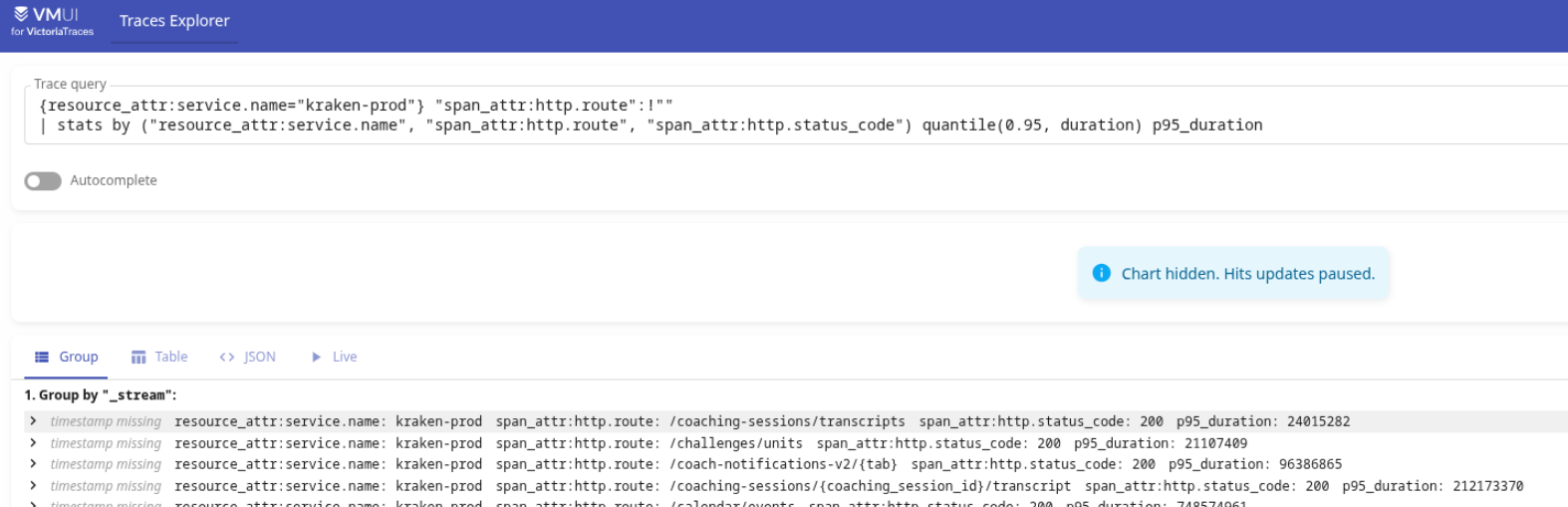
First, in VictoriaTraces itself, let’s check some query, for example:
{resource_attr:service.name="kraken-prod"} "span_attr:http.route":!""
| stats by ("resource_attr:service.name", "span_attr:http.route", "span_attr:http.status_code") quantile(0.95, duration) p95_duration
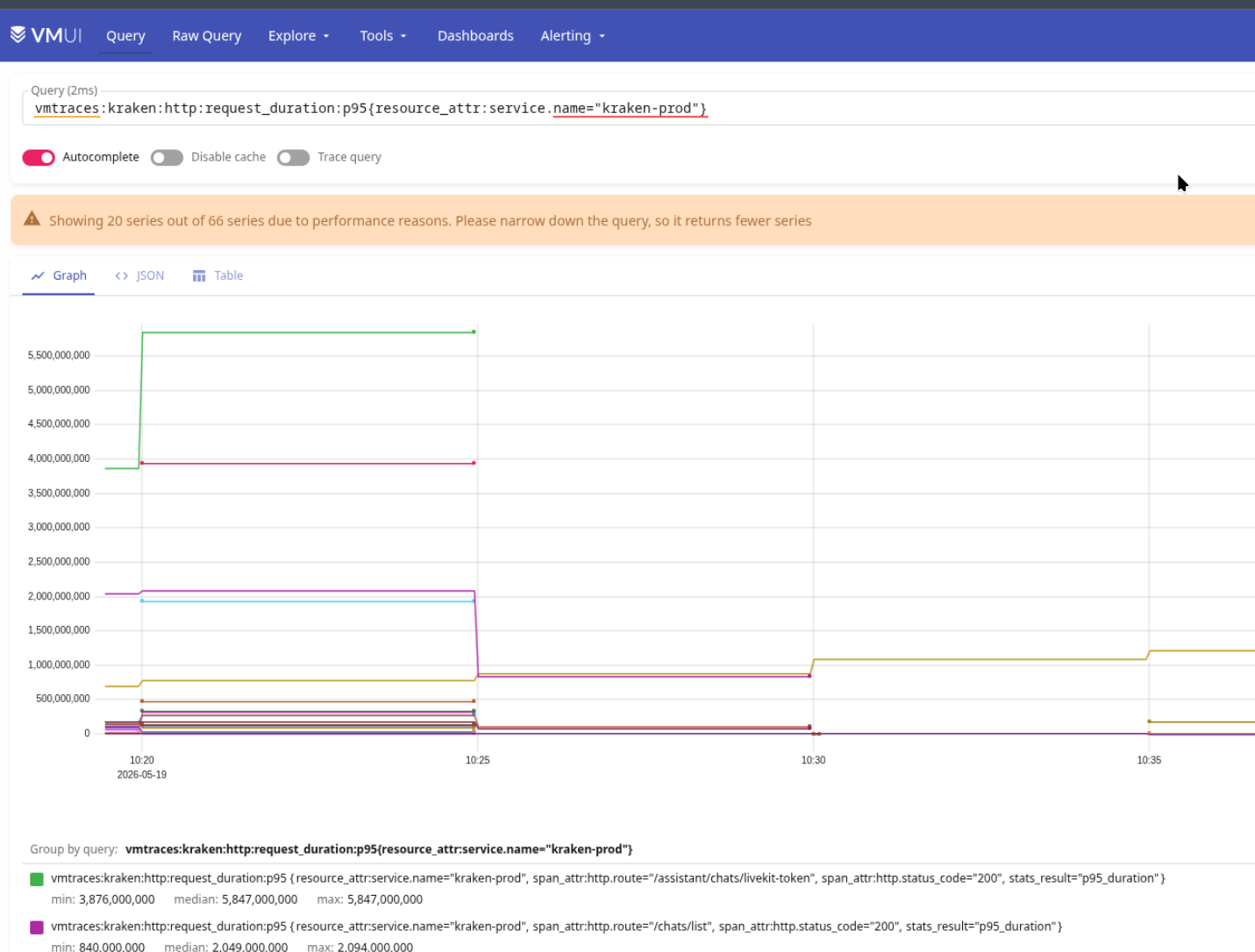
Here we get all spans with resource_attr:service.name="kraken-prod", pick only those that have span_attr:http.route, and compute the 95th percentile on the duration field:
Describe the VMRule itself, in labels we set app="vmalert-traces" – ruleSelector will pick only this VMRule by that label:
apiVersion: operator.victoriametrics.com/v1beta1
kind: VMRule
metadata:
  name: recording-rules-vmalert-traces
  labels:
    app: vmalert-traces
spec:
  groups:
    - name: Traces.VictoriaTraces.Logs.rules
      type: vlogs
      interval: 5m

      rules:

        # Target Status: metrics on events from Target Status logs
        - record: vmtraces:kraken:http:request_duration:p95
          expr: |
            {resource_attr:service.name=~"kraken-.*"} "span_attr:http.route":!""
            | stats by ("resource_attr:service.name", "span_attr:http.route", "span_attr:http.status_code") quantile(0.95, duration) p95_duration
Deploy and check the vmalert objects:
$ kk get vmalert
NAME             STATUS        REPLICACOUNT   AGE
vm-k8s-stack     operational   1              343d
vmalert-traces   operational                  42m
Here vm-k8s-stack is the default vmalert from the victoria-metrics-k8s-stack chart – it handles alerts and has Recording Rules for logs (later I’ll probably split it into separate instances – one for alerts, one for Recording Rules from logs, one for VictoriaTraces).
And, accordingly, we get a new Kubernetes Pod:
$ kk get pod | grep vmalert
vmalert-vm-k8s-stack-f6cdd77d9-mcnks                              2/2     Running     0               3d23h
vmalert-vmalert-traces-b8f77656c-jqzbp                            2/2     Running     0               4m29s
For which a dedicated ConfigMap is created:
$ kk get pod vmalert-vmalert-traces-b8f77656c-jqzbp -o yaml | yq '.spec.volumes'
...
  {
    "configMap": {
      "defaultMode": 420,
      "name": "vm-vmalert-traces-rulefiles-0"
    },
    "name": "vm-vmalert-traces-rulefiles-0"
  },
...
Which contains the rules from the VMRule recording-rules-vmalert-traces:
$ kk describe cm vm-vmalert-traces-rulefiles-0
Name:         vm-vmalert-traces-rulefiles-0
...
Data
====
ops-monitoring-ns-recording-rules-vmalert-traces.yaml:
----
groups:
- name: Traces.VictoriaTraces.Logs.rules
  interval: 5m
  rules:
  - record: vmtraces:kraken:http:request_duration:p95
    expr: |
      {resource_attr:service.name=~"kraken-.*"} "span_attr:http.route":!""
      | stats by ("resource_attr:service.name", "span_attr:http.route", "span_attr:http.status_code") quantile(0.95, duration) p95_duration
Deploy, and a minute later we have new metrics in VictoriaMetrics:
VictoriaTraces and Grafana
To make working with traces convenient, let’s add a Grafana data source.
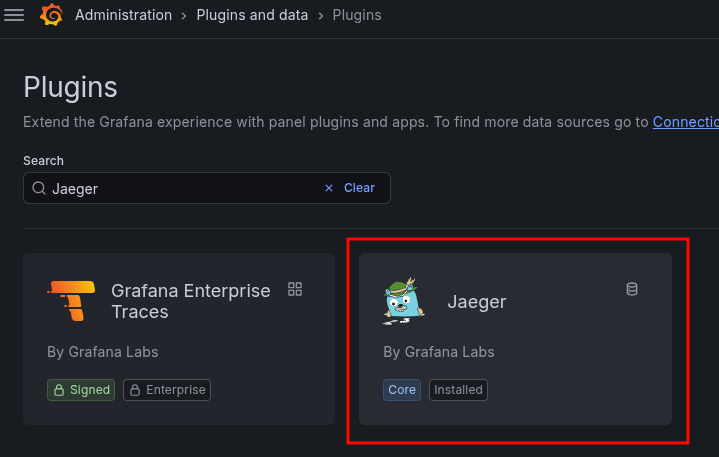
For VictoriaTraces the default Jaeger one is used for now, later they’ll probably add their own plugin – for VictoriaMetrics, at first, the regular Prometheus plugin was used too, for VictoriaLogs there was the Loki plugin, and then the team added their own.
We already found the service:
$ kk get svc | grep vt
atlas-victoriametrics-vt-single-server                   ClusterIP   None             <none>        10428/TCP                    24h
Check the Jaeger plugin:
Add a new data source:

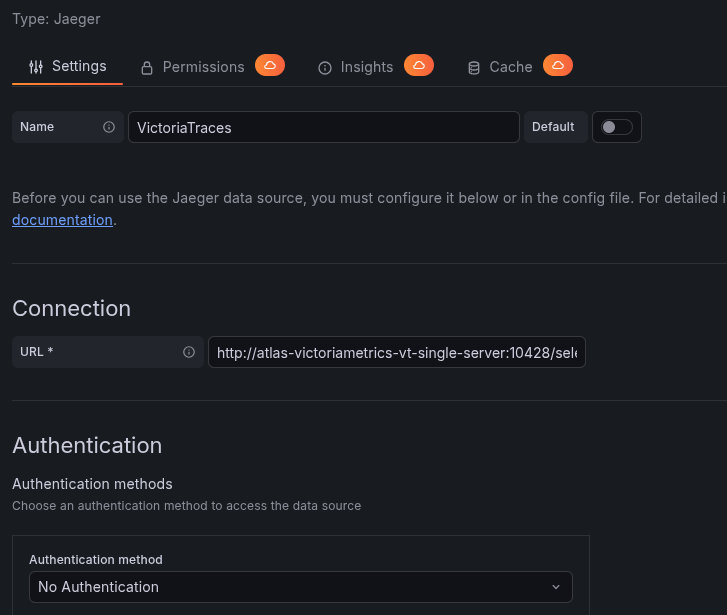
Set the URL to http://atlas-victoriametrics-vt-single-server:10428/select/jaeger:
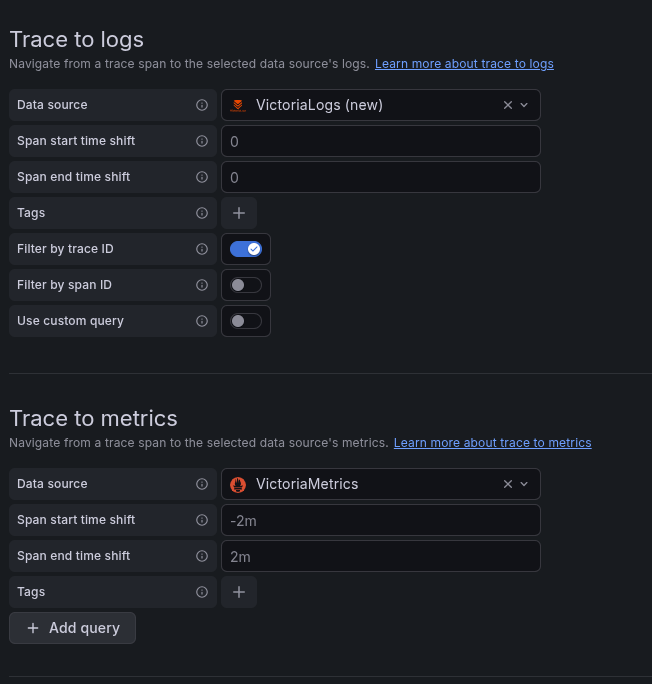
You can enable Trace to Logs and Metrics – then in Grafana Explore, by trace_id, links to related metrics and logs will be generated:
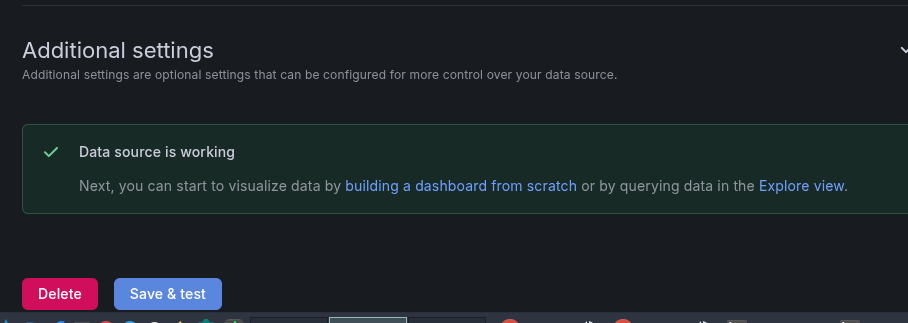
Save, check:
Go to Explore and search by Trace ID:
VictoriaLogs, Derived Fields and VictoriaTraces
The VictoriaLogs plugin supports derived fields: you can build a link to VictoriaTraces straight from VictoriaLogs logs.
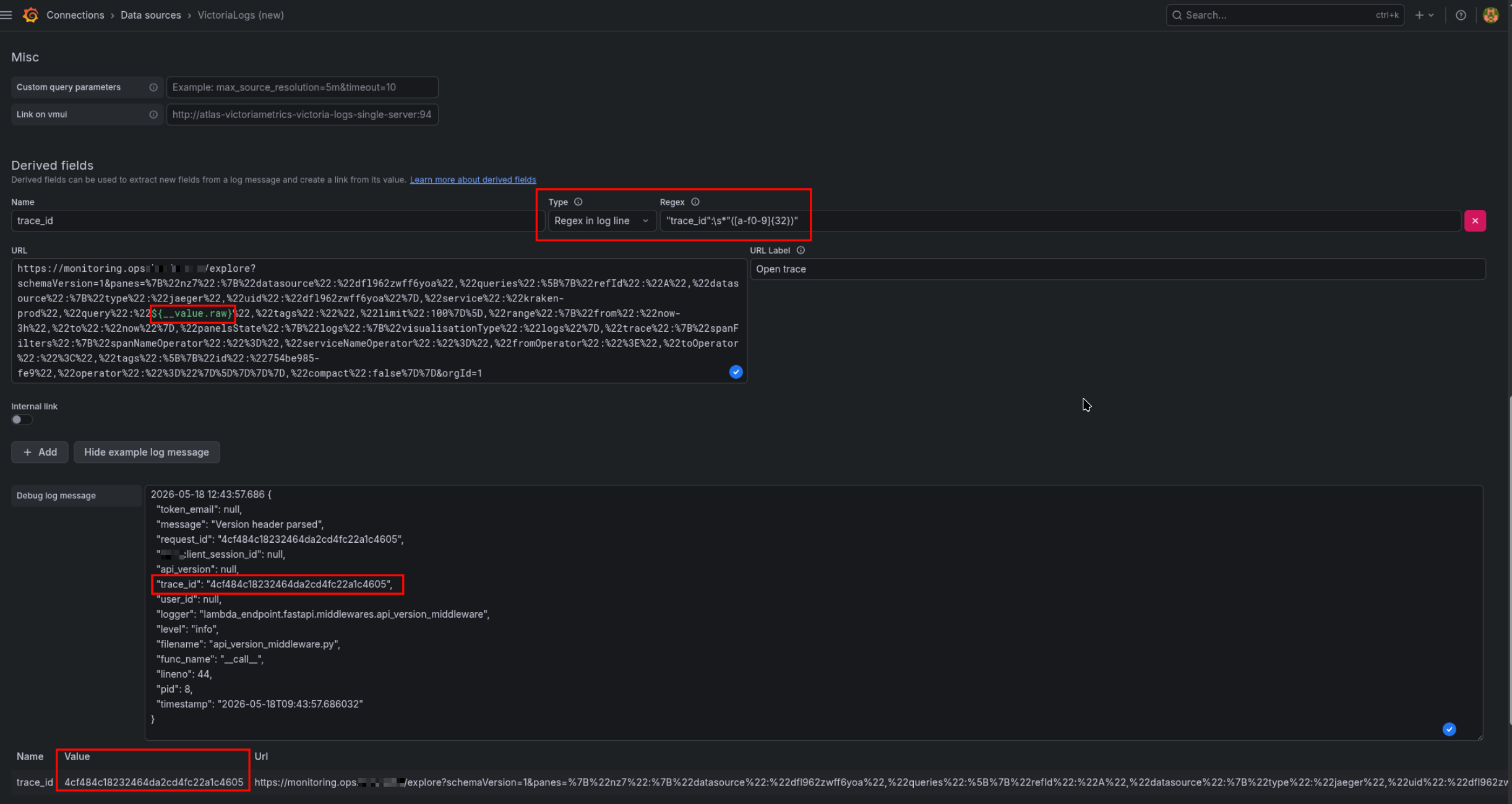
Configured in Grafana Connections > VictoriaLogs: set the name, pick the type – in my case the logs are JSON, so via “Regex in log line”:
"trace_id":\s*"([a-f0-9]{32})"
In the URL field use ${__value.raw} – that’s where the trace_id value will be substituted.
In Example log message you can check whether the regex works correctly:
After that, when you open a log with a trace_id field – on the right you’ll see a “Links” block:
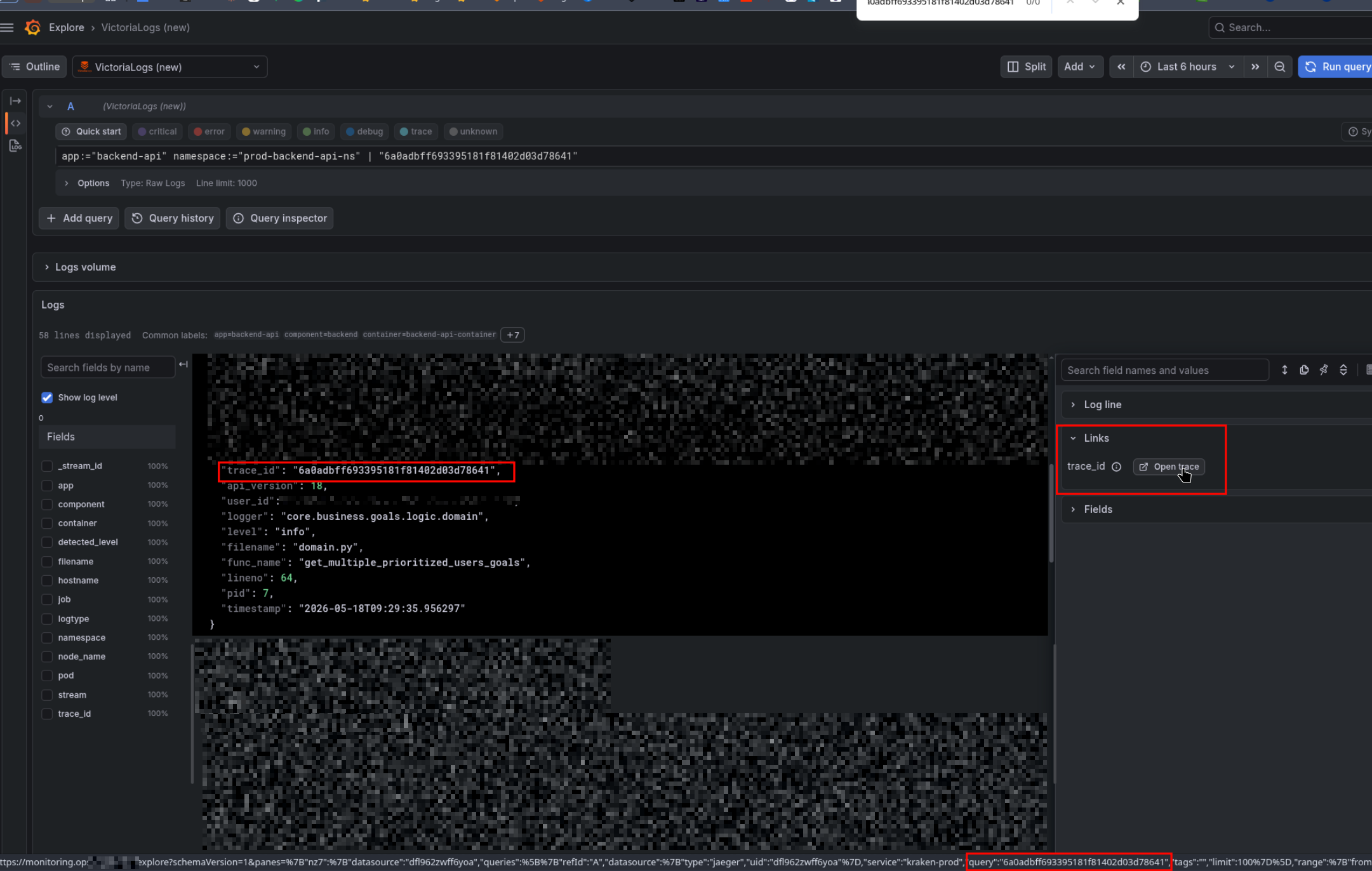
Which will open the link to that trace:
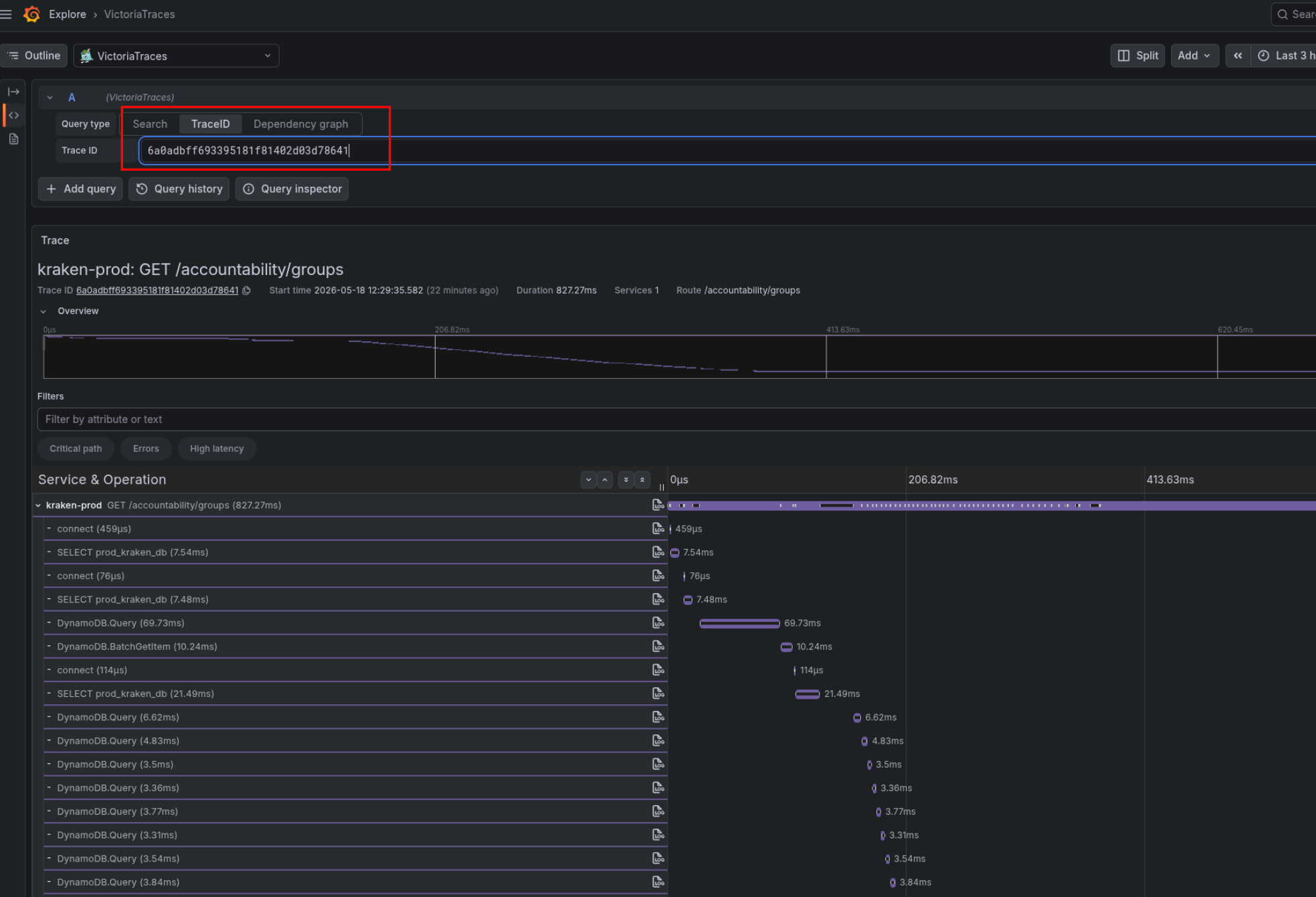
And that’s pretty much it for today.
In the next post we’ll look at how to use OpenTelemetry instrumentation and create traces from a Python app.
