 During applications deploy from a Helm chart described in the Istio: shared Ingress/AWS ALB, Helm chart with conditions, Istio, and ExternalDNS we are getting the “spec.ports[0].nodePort: Forbidden: may not be used when `type` is ‘ClusterIP’” error.
Let’s reproduce it and find solutions with kubectl and Helm to solve it.
The “spec.ports[0].nodePort: Forbidden: may not be used when `type` is ‘ClusterIP'” error – reproduce
Create a Service with the type: NodePort:
---
apiVersion: v1
kind: Service
metadata:
  name: test-svc
spec:
  type: NodePort
  ports:
  - port: 80
    targetPort: 80
    protocol: TCP
  selector:
    app: test
Deploy it and check:
[simterm]
$ kubectl get svc test-svc
NAME       TYPE       CLUSTER-IP       EXTERNAL-IP   PORT(S)        AGE
test-svc   NodePort   172.20.129.242   <none>        80:31853/TCP   22s
[/simterm]
Ports of this Service:
[simterm]
$ kubectl get svc test-svc -o json | jq '.spec.ports[]'
{
  "nodePort": 31231,
  "port": 80,
  "protocol": "TCP",
  "targetPort": 80
}
[/simterm]
Now, update the manifest and change its type to the ClusterIP:
---
apiVersion: v1
kind: Service
metadata:
  name: test-svc
spec:
  type: ClusterIP
  ports:
  - port: 80
    targetPort: 80
    protocol: TCP
  selector:
    app: test
Deploy again, and:
[simterm]
$ kubectl apply -f test-svc.yaml
The Service "test-svc" is invalid: spec.ports[0].nodePort: Forbidden: may not be used when `type` is 'ClusterIP'
[/simterm]
Actually, the issue here happens because if the nodePort as it’s not present in the ClusterIP specification.
Solutions
kubectl apply --force
The first way is to use kubectl with the apply --force option. In this way, a Service will be deleted first and then a new one will be created:
[simterm]
$ kubectl apply -f test-svc.yaml --force
service/test-svc configured
[/simterm]
Check the ports:
[simterm]
$ kubectl get svc test-svc -o json | jq '.spec.ports[]'
{
  "port": 80,
  "protocol": "TCP",
  "targetPort": 80
}
[/simterm]
kubectl edit service
Another way could be to run kubectl edit service, update a Service manually and then apply an updated manifest with a new Service type:
[simterm]
$ kubectl edit svc test-svc
[/simterm]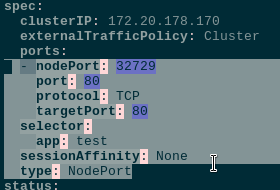
Remove the nodePort: 32729 and type: NodePort:
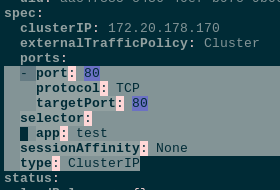
Deploy with apply but at this time without --force:
[simterm]
$ kubectl apply -f test-svc.yaml
service/test-svc configured
[/simterm]
Check ports again:
[simterm]
$ kubectl get svc test-svc -o json | jq '.spec.ports[]'
{
  "port": 80,
  "protocol": "TCP",
  "targetPort": 80
}
[/simterm]
A solution for Helm
But our main goal is to find a solution for a Helm chart that can do everything in an automated way during deployments.
Create a test chart:
[simterm]
$ helm create test-svc
Creating test-svc
[/simterm]
Delete generated manifests:
[simterm]
$ cd test-svc
$ rm -rf templates/* values.yaml
[/simterm]
Crate own values.yaml and a manifest for a Service:
[simterm]
$ vim -p values.yaml templates/svc.yaml
[/simterm]
In the values set a Service’s type to the NodePort:
serviceType: NodePort
And describe this Service using the serviceType parameter:
---
apiVersion: v1
kind: Service
metadata:
  name: test-svc
spec:
  type: {{ .Values.serviceType }}
  ports:
  - port: 80
    targetPort: 80
    protocol: TCP
  selector:
    app: test
Deploy:
[simterm]
$ helm upgrade --install test-svc .
[/simterm]
Check the type:
[simterm]
$ kk get svc test-svc
NAME       TYPE       CLUSTER-IP       EXTERNAL-IP   PORT(S)        AGE
test-svc   NodePort   172.20.107.220   <none>        80:30506/TCP   3m7s
[/simterm]
Reproduce the error again – update values and set the ClusterIP:
#serviceType: NodePort
serviceType: ClusterIP
Run install, and:
[simterm]
$ helm upgrade --install test-svc .
Error: UPGRADE FAILED: cannot patch "test-svc" with kind Service: Service "test-svc" is invalid: spec.ports[0].nodePort: Forbidden: may not be used when `type` is 'ClusterIP'
[/simterm]
What we can do here is to add a “dirty hack”: let’s check if the type passed contains the “ClusterIP” string, and if it does, then we will specify nodePort == null:
---
apiVersion: v1
kind: Service
metadata:
  name: test-svc
spec:
  type: {{ .Values.serviceType }}
  ports:
  - port: 80
    targetPort: 80
    protocol: TCP
    {{- if (eq .Values.serviceType "ClusterIP") }}
    nodePort: null
    {{- end }}
  selector:
    app: test
Deploy it again, no errors this time:
[simterm]
$ helm upgrade --install test-svc .
[/simterm]
Check the Service:
[simterm]
$ kk get svc test-svc
NAME       TYPE       CLUSTER-IP       EXTERNAL-IP   PORT(S)        AGE
test-svc   ClusterIP  172.20.107.220   <none>        80:30506/TCP   3m7s
[/simterm]
Done.
