 VictoriaTraces – just like VictoriaLogs – supports Recording Rules (see VictoriaMetrics: Recording Rules for AWS Load Balancer logs) for traces, because traces are essentially the same logs, just structured differently.
And since we have Recording Rules – we can build metrics out of logs for alerts and Grafana dashboards.
Although this actually isn’t the best option, especially for some high-load project, because vmalert with a Recording Rule keeps hitting VictoriaTraces with queries – and here something like otelcol.connector.spanmetrics would fit better, which you could add to pipeline.traces – but if there’s no OTel stack or, like in my case, the project is small – then building metrics out of Recording Rules is a perfectly workable option.
This is already the third part on OpenTelemetry and VictoriaTraces, the previous ones are here:
- OpenTelemetry: OTel Collectors in Kubernetes and integration with the VictoriaMetrics stack
- VictoriaTraces: Tracing, Observability and OpenTelemetry
Contents
Metrics from traces: what for?
A couple of examples from my own project “wishlist” – why I started building this solution.
AWS ALB response time
We have an AWS ALB response time metric: it fires an alert when some endpoint starts responding slowly. The metric is generated from ALB logs, counting fields from the log record:
- record: vmlogs:alb:logs:alb_response_time:p95
  expr: |
    {namespace="ops-monitoring-ns"} app:="alb-logs-exporter" -"DEBUG" -"SQS" -"VMLOGS" -"PARSER"
    | filter not `{"date"`*
    | extract "<_> <_> <elb_id> <_> <_> <request_processing_time> <target_processing_time> <response_processing_time> <elb_status_code> <target_status_code> <received_bytes> <sent_bytes> <request_line> <user_agent> <_> <_> <_> <trace_id> <domain_name> <_> <_> <_> <_> <_> <error_reason> <_> <_> <_> <_> <conn_trace_id> <_> <_> <_>"
    | extract_regexp `.*:443(?P<uri_path>/[^/?]*).* HTTP` from request_line
    | filter target_processing_time :! "-1" and request_processing_time :! "-1" and response_processing_time :! "-1"
    | filter request_processing_time :! "" and target_processing_time :! "" and response_processing_time :! ""
    | math request_processing_time + target_processing_time + response_processing_time as total_response_time
    | rename domain_name as domain
    | stats by (domain, uri_path) quantile(0.95, total_response_time) as alb_response_time
And there are several problems with it right away.
First: again – the load on the backend, VictoriaLogs: if there are a lot of logs – then vmalert makes a query every minute (interval: 1m), plus the query has a regex in it – which on its own is fairly heavy in terms of CPU/RAM.
Second: the uri_path label only holds the first part of the URI in its value. That is, if a request came to /user/<name>/orders – then only uri_path="/user" will be stored in the vmlogs:alb:logs:alb_response_time:p95 metric.
This is done because of a cardinality issue – to avoid creating a lot of different values, since that would affect storage and resources (see VictoriaMetrics: Churn Rate, High cardinality, metrics and IndexDB).
As a result, when an alert comes in, we only see very general information – about the endpoint itself, not the specific user.
And the main reason I went digging into this topic – is that the alerts aren’t tied to traces in any way.
Right now, if an alert like this comes in:
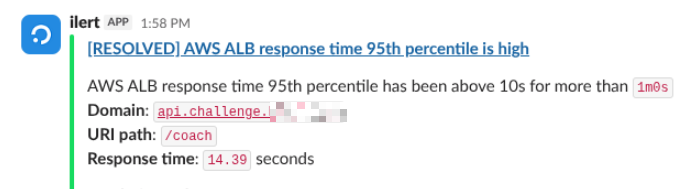
All we can do – is go to the Grafana dashboard for Kubernetes Pods and WorkerNodes, and look at the CPU/RAM load there. If everything’s fine there – then go to the RDS dashboard, and dig around there.
But having metrics from traces – I can build a link right in the alert to all the related traces, and then immediately see in Grafana and VictoriaTraces where the problem is.
AWS RDS query duration
Another example – a metric from AWS RDS logs:
- record: vmlogs:aws:rds:cloudwatch_logs:explain:query_duration:sum:avg:5m
  expr: |
    logtype:="rds" "plan:"
      | extract_regexp `.*:(?P<connection>.*_kraken_user@.*kraken_db:\[\d+\])`
      | extract_regexp ".*duration: (?P<duration>.+) ms"
      | duration:~".+"
      | extract_regexp `.*Query Text: (?P<query>.+?)(?:\s+AS\s|\s+FROM\s)`
      | query:~".+"
      | stats by (environment, connection, query) avg(duration) avg_duration
Same approach here: AWS RDS writes AUTO EXPLAIN to the log (see PostgreSQL: using EXPLAIN and configuring “auto_explain” in AWS RDS), and we parse the logs in VictoriaLogs and generate a metric.
The data in the labels is overall more interesting than in the AWS ALB example, since there’s both a part of the SQL query and a “connection ID” in the form of “<db_user>@<db_host>:<PID>” – but again, debugging such alerts is harder, because you have to take this connection ID, search for it in the RDS logs, then somehow correlate those logs with the logs of the Backend API itself.
Instead – you can have a similar metric from traces and generate a direct link to Grafana/VictoriaTraces.
So, here’s what we’ll do today – we’ll look at the metadata used in OTLP for spans, define a few metrics from traces and write a few alerts.
HTTP metrics
Our Backend API is “smothered” in OTel auto-instrumentation (hopefully I’ll actually finish that post on OTel and Python).
Traces are generated from all FastAPI and AWS calls – and, using them, we can write ourselves some metrics and alerts.
In the backend traces from FastAPI we have the fields (attributes) http.route, http.status_code, duration – so we can create handy metrics from which we can later create handy alerts.
Useful span and resource attributes
First, using an HTTP span from FastAPI as an example, let’s look in VictoriaTraces – at what interesting stuff we have in the span and resource attributes.
[
  {
    ...
    "duration": "4464509750",
    ...
    "kind": "2",
    "name": "GET /morpheus/sleep-agent/status",
    ...
    "resource_attr:k8s.namespace.name": "prod-backend-api-ns",
    "resource_attr:k8s.node.name": "ip-10-0-42-22.ec2.internal",
    "resource_attr:k8s.pod.name": "backend-api-deployment-6966566f55-khb9v",
    "resource_attr:service.name": "kraken-prod",
    ...
    "span_attr:http.method": "GET",
    "span_attr:http.route": "/morpheus/sleep-agent/status",
    "span_attr:http.scheme": "http",
    "span_attr:http.status_code": "503",
    "span_attr:http.target": "/morpheus/sleep-agent/status",
    ...
    ...
    "status_code": "2",
    "status_message": "http 503",
    "trace_id": "6a0c64013a090e5462414f3e3fba1630"
  },
What of this might be interesting and useful to us:
duration: the request execution time (in nanoseconds) – useful for HTTP latency and PostgreSQL query duration metricskind: defines the role of the span – whether it’s our service processing a request from a client (kind 2 –SERVER), or the service making a request to an external resource (kind 3 –CLIENT), see Span Kind and the values themselves in the code intrace.proto- in the examples below AWS will be
span.kind=3, i.e. “CLIENT” – our service is the client, because it makes an outgoing call to the AWS API
- in the examples below AWS will be
name: the span name, generated by the SDK – useful, because it includes several other attributes at once – easier to use in filters for Grafana (more on this later, when we build the alert)k8s.namespace.name,node.name,pod.name: resource-level attributes that are set either by the OTel Collector, or, like in my case, from the Downward API in the Kubernetes Deployment for the Backend API (a hack, until there’s an OTel Collector)- very useful attributes, because they let you build relations between Pod-level metrics, Node-level, etc – they give general context for observability
span_attr:http.methodandhttp.route: useful to display both in the alert and to have a filter in Grafana for VictoriaMetricsspan_attr:http.target: ifhttp.routeabove – is the actual route in FastAPI (with a placeholder like/chats/{chat_id}) – then inhttp.targetwe already have the specific URI that was called- in this example the difference isn’t very obvious, because the route is static, but in other spans they look like
route="/chats/{chat_id}"– andtarget="/chats/john-789?limit=10"
- in this example the difference isn’t very obvious, because the route is static, but in other spans they look like
span_attr:http.status_code: not to be confused withstatus_codebelow – here we have specifically the HTTP response code from the server to the clientstatus_code: a very useful attribute – the OTel Span Status code (not the HTTP status above), which indicates the result of the operation – Success (1) or Error (2), see Set Status- in this example you can clearly see that the HTTP request finished with 503 – Service Unavailable, and, accordingly, the status of this span == Error
status_message: a description forstatus_code– FastAPI/OTel, when it set the valuestatus_code=2, added a text description of the errortrace_id: well, and the ID of the trace itself that this particular span belongs to
Now, having the list of attributes – we can think about a metric.
The “vmtraces:backend:http:request_5xx:rate” metric
We create a new VMRule with type: vlogs:
apiVersion: operator.victoriametrics.com/v1beta1
kind: VMRule
metadata:
  name: recording-rules-vmalert-traces
  labels:
    app: vmalert-traces
spec:
  groups:
    - name: Traces.VictoriaTraces.Logs.rules
      type: vlogs
      interval: 5m

      rules:

        - record: vmtraces:kraken:http:request_5xx:rate
          expr: |
            {resource_attr:service.name=~"kraken-.*"} "span_attr:http.route":!"" "span_attr:http.status_code":~"5.."
            | stats by ("resource_attr:k8s.namespace.name", "resource_attr:service.name", "span_attr:http.route", "span_attr:http.status_code") rate() requests_per_sec
Here we select all traces from service.name=~"kraken-.*" (Kraken – the name of our backend), select only those related to HTTP – "span_attr:http.route":!"", select only the ones with 5xx errors.
Then we count the per second rate, aggregating by Kubernetes Namespace, OTel Service Name, HTTP route (URI) and error code.
Jumping a bit ahead: it would be cool to immediately build a link to a specific trace by its ID in the alert – but writing the trace_id label into the metric here isn’t a good idea, because that’s a million different values – we’ll clog the VictoriaMetrics database.
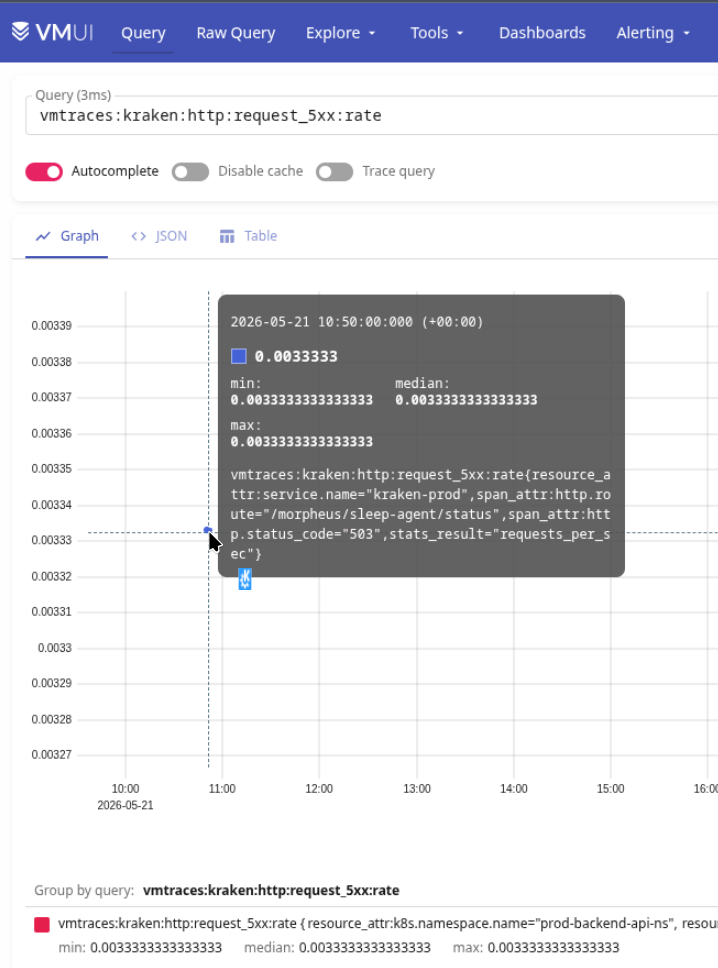
We deploy, check that the metric is in VictoriaMetrics:
The “Backend HTTP 5xx Errors” alert
To avoid writing separate alerts for Dev/Staging/Prod – we’ll use Helm range.
We add to the chart’s values.yaml:
alerts:
  traces:
    backend:
      - env: dev
        namespace: dev-backend-api-ns
        severities: [warning]
      - env: staging
        namespace: staging-backend-api-ns
        severities: [warning]
      - env: prod
        namespace: prod-backend-api-ns
        severities: [warning, critical]
We describe a new VMRule (for convenience I keep Recording Rules and alerts separate) – now with the alert itself:
apiVersion: operator.victoriametrics.com/v1beta1
kind: VMRule
metadata:
    name: alerts-kraken-traces-http
spec:

  groups:

    ##########################
    ### Kraken Traces HTTP ###
    ##########################

    - name:  Kraken.Traces.HTTP.rules

      rules:

      ##############################
      ### Kraken HTTP 5xx Errors ###
      ##############################

      {{- range .Values.alerts.traces.backend }}
      {{- $ns := . }}
      {{- range .severities }}
      {{- if not (eq . "critical") }}
      - alert: Kraken HTTP 5xx Errors
        expr: vmtraces:kraken:http:request_5xx:rate{"resource_attr:k8s.namespace.name"="{{ $ns.namespace }}",stats_result="requests_per_sec"} > 0
        for: 1s
        labels:
          severity: {{ . }}
          component: backend
          environment: {{ $ns.env }}
          ilert_routingkey: backend-{{ $ns.env }}-{{ . }}
        annotations:
          summary: "Kraken service is returning HTTP 5xx errors"
          description: |-
            HTTP 5xx error rate has been above 0 for more than `{{ "{{" }} $for }}`
            *Namespace*: `{{ "{{" }} index $labels "resource_attr:k8s.namespace.name" }}`
            *HTTP route*: `{{ "{{" }} index $labels "span_attr:http.route" }}`
            *HTTP status*: `{{ "{{" }} index $labels "span_attr:http.status_code" }}`
            *5xx rate*: `{{ "{{" }} printf "%.3f" $value }}` req/s
            <https://{{ $.Values.monitoring.root_url }}/explore?orgId=1&left=%7B%22datasource%22:%22{{ $.Values.monitoring.victoria_traces_uid }}%22,%22queries%22:%5B%7B%22refId%22:%22A%22,%22datasource%22:%7B%22type%22:%22jaeger%22,%22uid%22:%22{{ $.Values.monitoring.victoria_traces_uid }}%22%7D,%22queryType%22:%22search%22,%22service%22:%22{{ "{{" }} index $labels "resource_attr:service.name" }}%22,%22tags%22:%22http.route%3D{{ "{{" }} index $labels "span_attr:http.route" }}%22,%22limit%22:100%7D%5D,%22range%22:%7B%22from%22:%22now-1h%22,%22to%22:%22now%22%7D%7D|:grafana: VictoriaTraces>
      {{- end }}
      {{- end }}
      {{- end }}
Here with {{- range .Values.alerts.traces.backend }} we loop over all the values from values and for each environment create a separate alert.
With {{- if not (eq . "critical") }} I don’t create CRITICAL alerts, because it comes with @channel in Slack – while this is in testing, I want to see how it works.
OTel names format and Helm templating
There’s an interesting moment here, related to the OTel format of metric and label names.
While in Prometheus format they’re set with “_” – i.e. in the form “resource_attr_k8s_namespace_name“, OTel uses dots and colons – and this breaks the Helm/Go templating engine.
There’s an option to use Label sanitization – write metrics to VictoriaMetrics directly in Prometheus format, but this (for now) cannot be done for traces and logs, and then we’d have different names in different backends.
So for now I decided not to enable usePromCompatibleNaming and write the data as is, and once they add this option to VictoriaLogs and VictoriaTraces – the alerts can be updated.
Btw, you can like the issue on GitHub – OpenTelemetry: support field names transformations 😉
So here we do it with index $labels, and specify the label names in quotes:
index $labels "resource_attr:k8s.namespace.name"
The value in $labels – is of type map(map[string]string), so index walks through the nested keys and gets the label we need.
Grafana link to VictoriaTraces
The last thing built in the alert is a direct link to Grafana – so that from the alert we can immediately open all the details.
As I wrote above – it would be simpler here to search by trace_id – but we can’t write it into the labels, because again – cardinality issue.
So I did it through a filter by tags, which are substituted from the received attributes in $labels – in this case by span_attr:http.route:
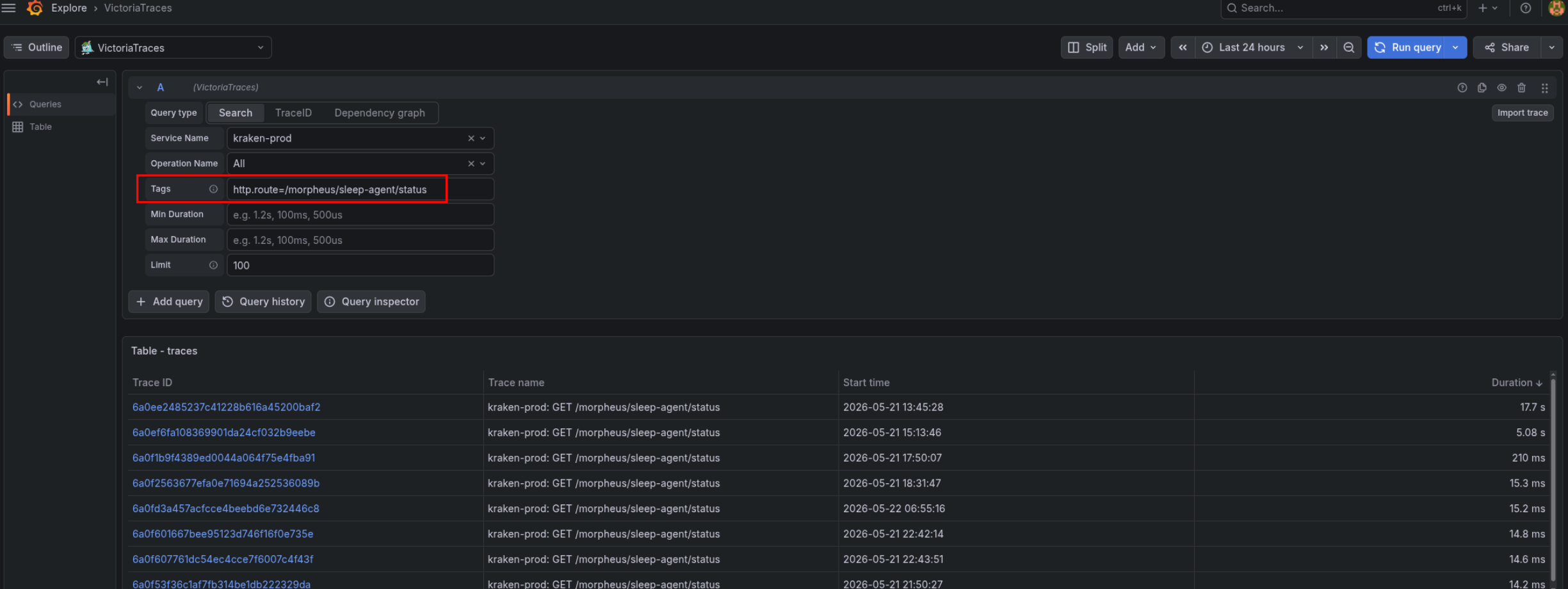
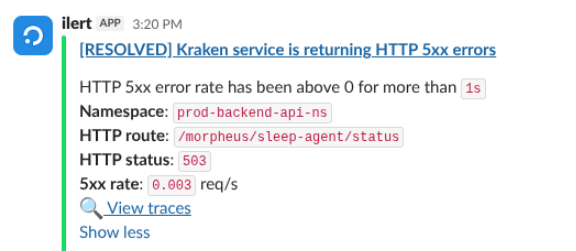
And the alert itself looks like this in Slack:
The “vmtraces:backend:http:request_duration:p95” metric
Here, actually, it’s all the same – only we count not rate() – but the 95th percentile over the duration field.
Why the 95th percentile and not some avg(): because the average will give a general “smeared picture” across all requests – but might miss problems affecting a small number of users.
The Recording Rule came out like this:
- record: vmtraces:kraken:http:request_duration:p95
  expr: |
    {resource_attr:service.name=~"kraken-.*"} "span_attr:http.route":!"" kind:=2
    | stats by ("resource_attr:k8s.namespace.name", "resource_attr:service.name", "span_attr:http.route") quantile(0.95, duration) value
Here in the filters we add kind=2, in order to count data only from spans with the SERVER kind – because we’re interested in the result from FastAPI itself on the Backend API.
Otherwise a span from the child spans of this trace could get into the results – requests from the Backend API to, for example, DynamoDB or RDS (though the filter with "span_attr:http.route":!"" should select only HTTP).
We deploy, check the metric:
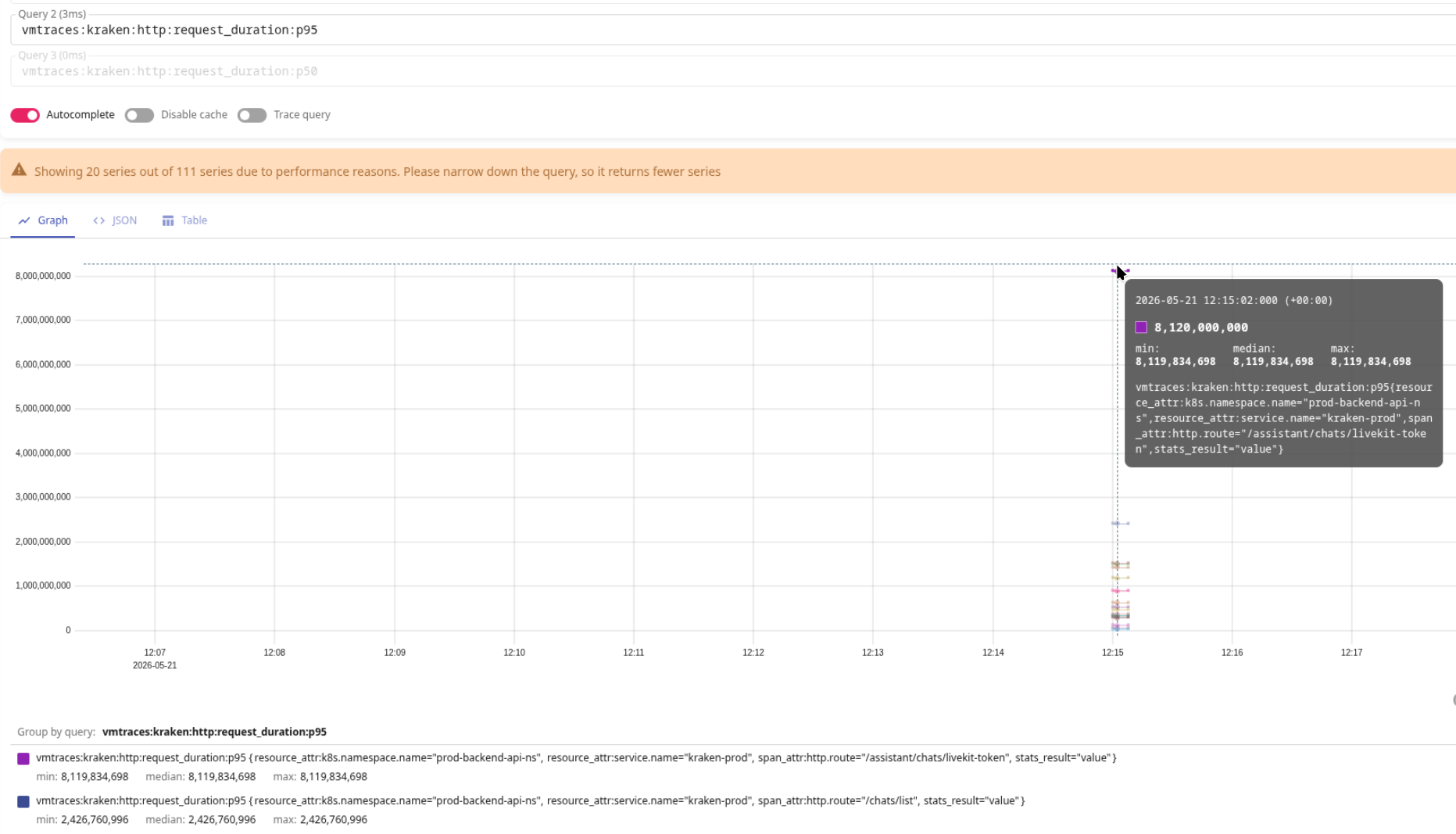
The “Backend HTTP p95 latency is high” alert
Here it’s all the same as the 5xx errors alert.
Only in the expression we convert nanoseconds to seconds – divide the result by 1e9 (a billion) and fire the alert if the p95 latency is above 5 seconds:
{{- range .Values.alerts.traces.backend }}
{{- $ns := . }}
{{- range .severities }}
{{- if not (eq . "critical") }}
- alert: Kraken HTTP Latency p95 High
  expr: vmtraces:kraken:http:request_duration:p95{"resource_attr:k8s.namespace.name"="{{ $ns.namespace }}",stats_result="value"} / 1e9 > 5
  for: 5m
  labels:
    severity: {{ . }}
    component: backend
    environment: {{ $ns.env }}
    ilert_routingkey: backend-{{ $ns.env }}-{{ . }}
  annotations:
    summary: "Kraken HTTP p95 latency is high"
    description: |-
      HTTP p95 latency has been above 5s for more than `{{ "{{" }} $for }}`
      *Namespace*: `{{ "{{" }} index $labels "resource_attr:k8s.namespace.name" }}`
      *Service name*: `{{ "{{" }} index $labels "resource_attr:service.name" }}`
      *HTTP route*: `{{ "{{" }} index $labels "span_attr:http.route" }}`
      *P95 latency*: `{{ "{{" }} printf "%.2f" $value }}` seconds
      <https://{{ $.Values.monitoring.root_url }}/explore?orgId=1&left=%7B%22datasource%22:%22{{ $.Values.monitoring.victoria_traces_uid }}%22,%22queries%22:%5B%7B%22refId%22:%22A%22,%22datasource%22:%7B%22type%22:%22jaeger%22,%22uid%22:%22{{ $.Values.monitoring.victoria_traces_uid }}%22%7D,%22queryType%22:%22search%22,%22service%22:%22{{ "{{" }} index $labels "resource_attr:service.name" }}%22,%22tags%22:%22http.route%3D{{ "{{" }} index $labels "span_attr:http.route" }}%22,%22limit%22:100%7D%5D,%22range%22:%7B%22from%22:%22now-1h%22,%22to%22:%22now%22%7D%7D|:grafana: VictoriaTraces>
{{- end }}
{{- end }}
{{- end }}
That’s it for HTTP for now – let’s move on.
AWS API metrics
To select spans related to AWS we can use a filter on the "span_attr:rpc.system" attribute.
We check what interesting stuff we have:
{resource_attr:service.name=~"kraken-.*"} "span_attr:rpc.system":"aws-api"
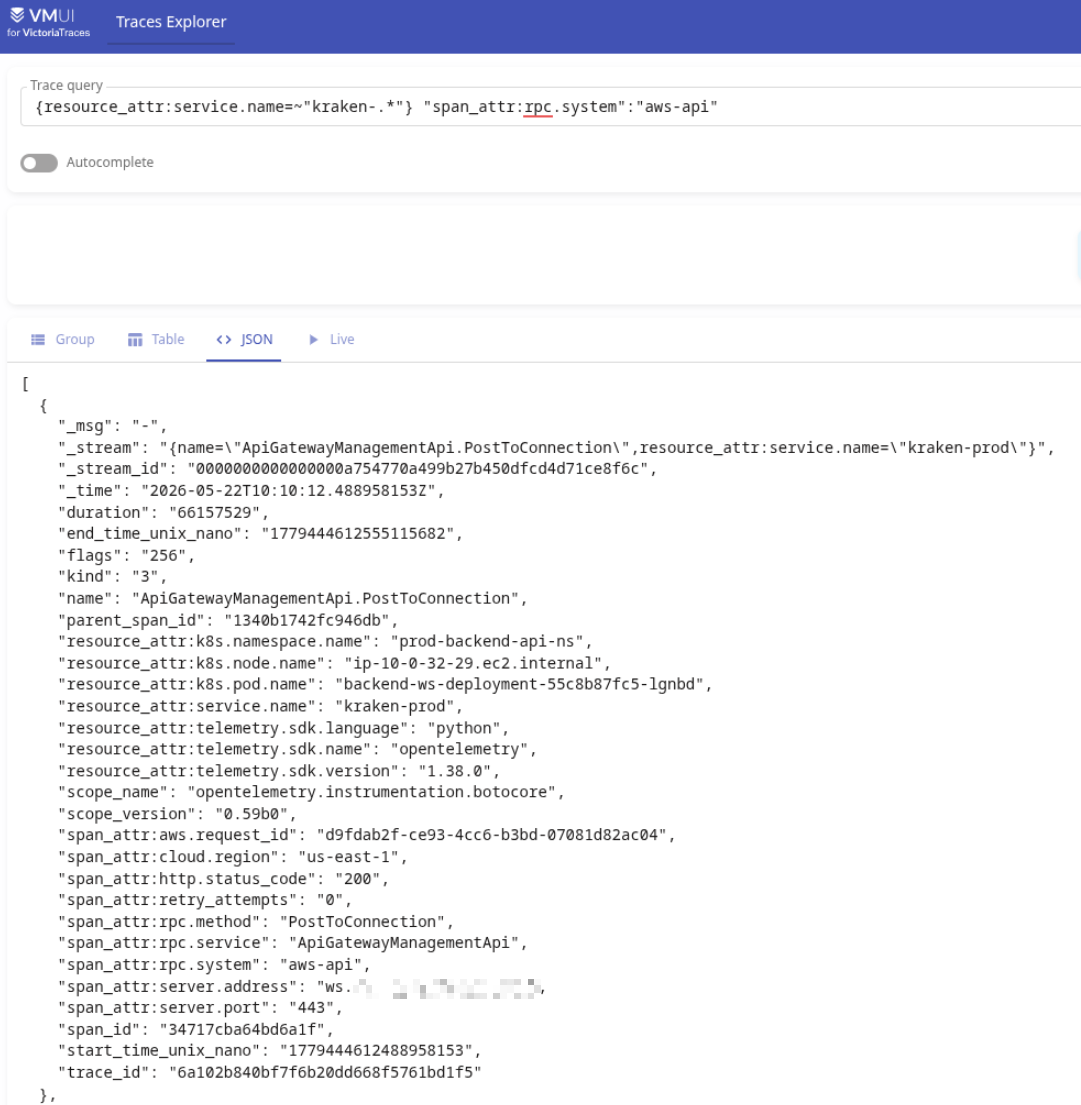
Here we can already see kind=3 – our backend acts as a CLIENT to the AWS API.
The “vmtraces:backend:aws:client_error:rate” metric
Of the interesting metrics we can build here – alerting when errors occur on requests to AWS.
We describe a new Recording Rule:
# AWS client errors
- record: vmtraces:kraken:aws:client_error:rate
  expr: |
    {resource_attr:service.name=~"kraken-.*"} "span_attr:rpc.system":"aws-api" status_code:=2
    | stats by ("resource_attr:k8s.namespace.name", "resource_attr:service.name", "span_attr:rpc.service", name) rate() requests_per_sec
Here the status_code:=2 filter selects only errors:
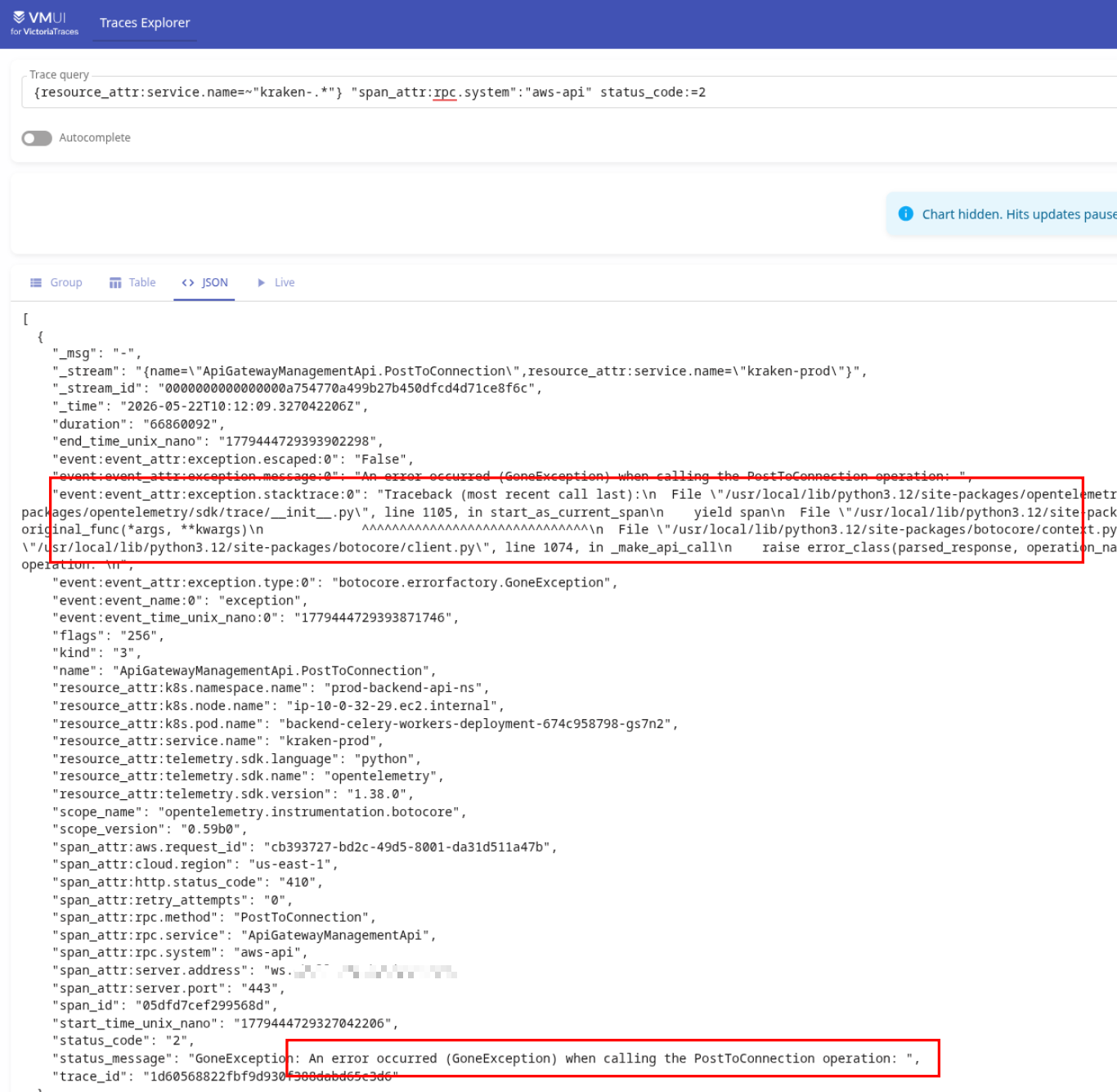
In the span attributes we have both the stacktrace itself and status_message – but we don’t write them into the labels, that you can already check in Grafana.
We deploy, check the metric:
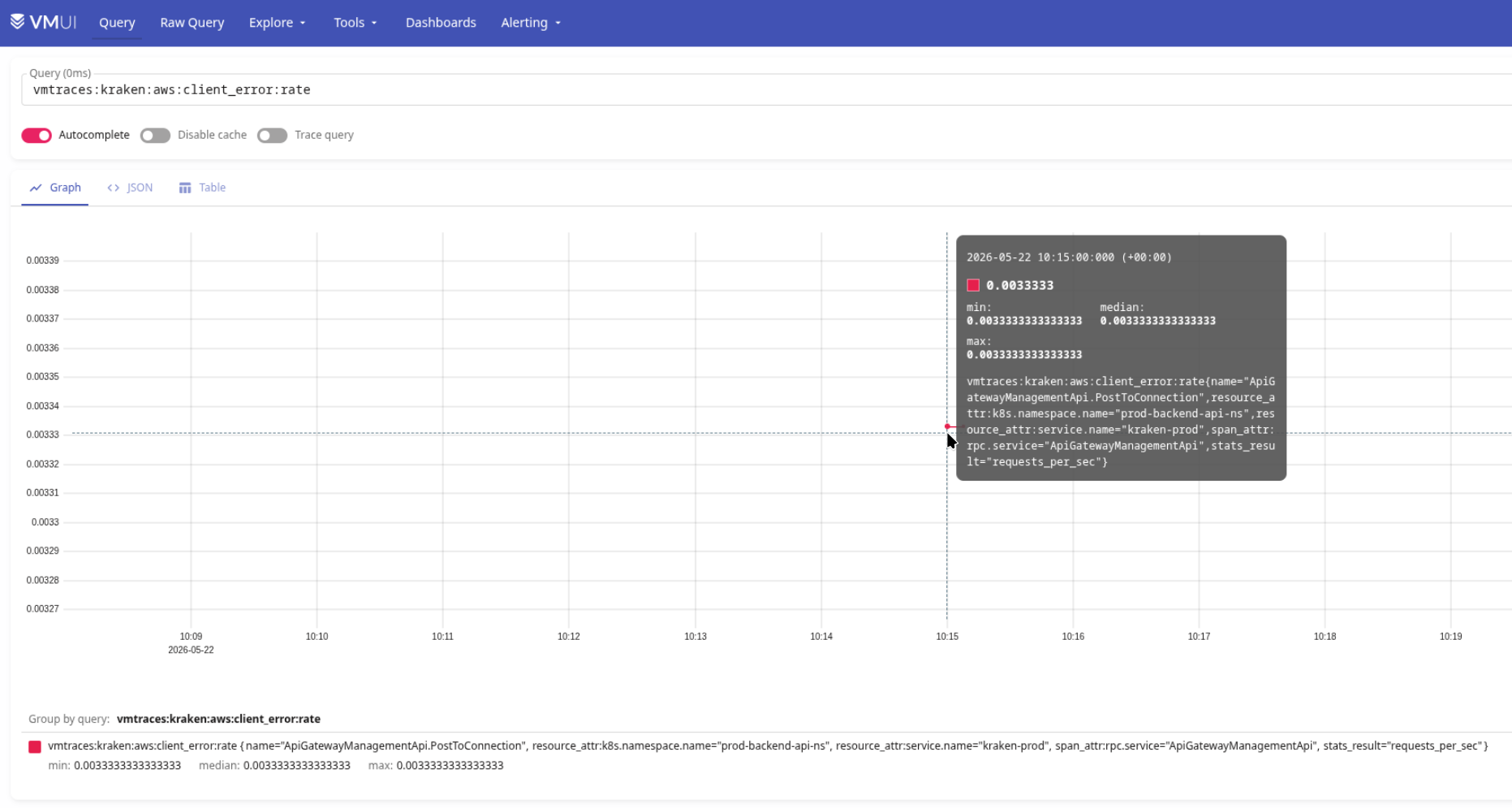
The “Backend is getting errors from AWS services” alert
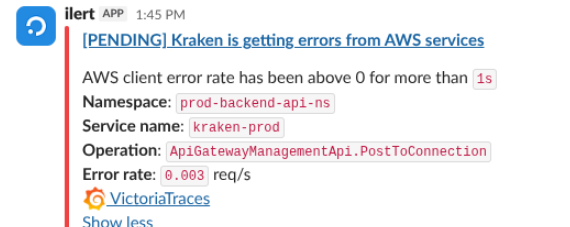
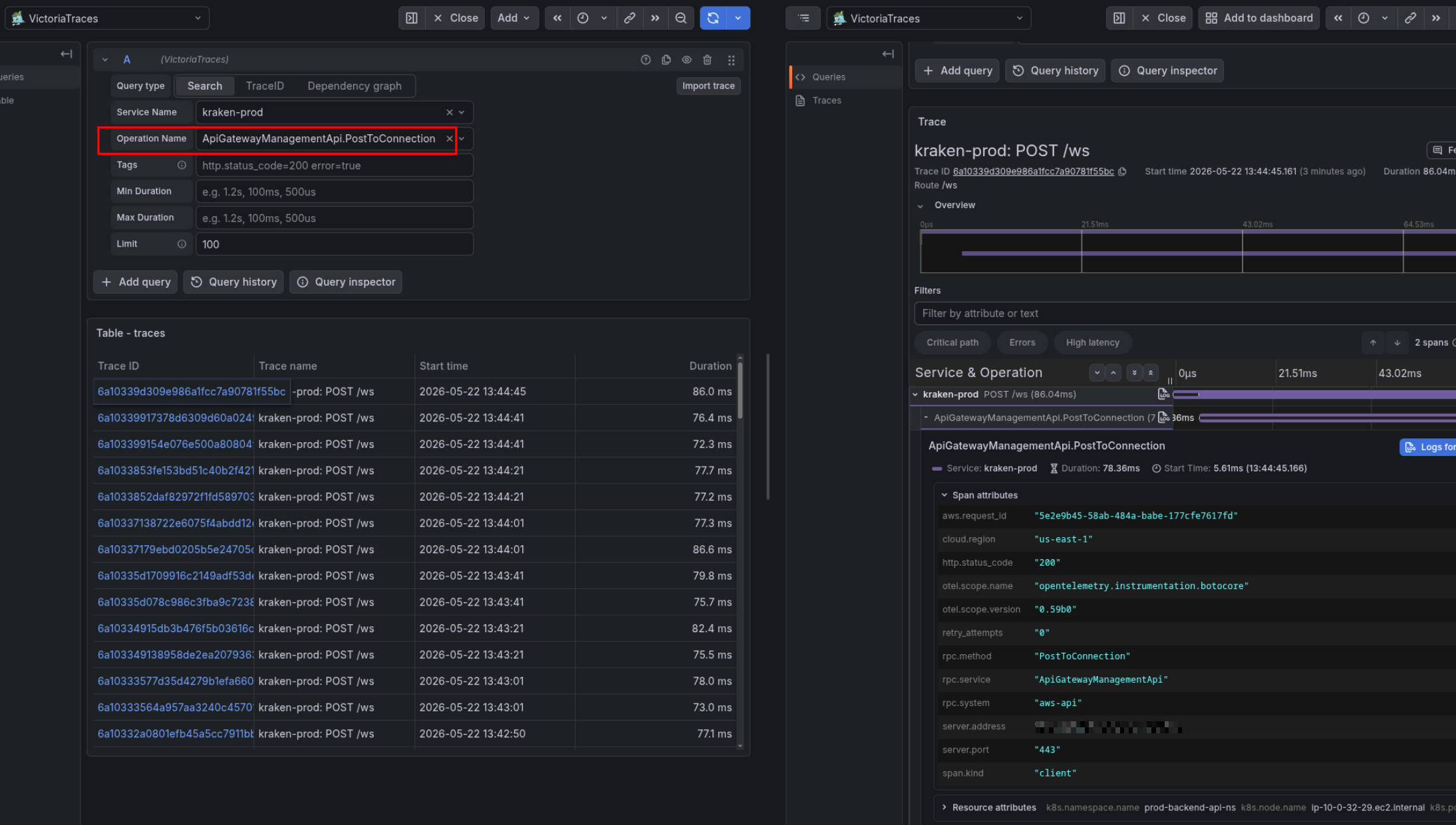
We describe the alert – it’s all the same here, only in the Grafana link we filter by name, and output the same one in the alert text in the Operation field – because it has both the AWS service name and the type of operation:
{{- range .Values.alerts.traces.backend }}
{{- $ns := . }}
{{- range .severities }}
{{- if not (eq . "critical") }}
- alert: Kraken AWS Client Errors
  expr: vmtraces:kraken:aws:client_error:rate{"resource_attr:k8s.namespace.name"="{{ $ns.namespace }}",stats_result="requests_per_sec"} > 0
  for: 1s
  labels:
    severity: {{ . }}
    component: backend
    environment: {{ $ns.env }}
    ilert_routingkey: backend-{{ $ns.env }}-{{ . }}
  annotations:
    summary: "Kraken is getting errors from AWS services"
    description: |-
      AWS client error rate has been above 0 for more than `{{ "{{" }} $for }}`
      *Namespace*: `{{ "{{" }} index $labels "resource_attr:k8s.namespace.name" }}`
      *Service name*: `{{ "{{" }} index $labels "resource_attr:service.name" }}`
      *Operation*: `{{ "{{" }} index $labels "name" }}`
      *Error rate*: `{{ "{{" }} printf "%.3f" $value }}` req/s
      <https://{{ $.Values.monitoring.root_url }}/explore?orgId=1&left=%7B%22datasource%22:%22{{ $.Values.monitoring.victoria_traces_uid }}%22,%22queries%22:%5B%7B%22refId%22:%22A%22,%22datasource%22:%7B%22type%22:%22jaeger%22,%22uid%22:%22{{ $.Values.monitoring.victoria_traces_uid }}%22%7D,%22queryType%22:%22search%22,%22service%22:%22{{ "{{" }} index $labels "resource_attr:service.name" }}%22,%22operation%22:%22{{ "{{" }} index $labels "name" }}%22,%22tags%22:%22rpc.service%3D{{ "{{" }} index $labels "span_attr:rpc.service" }}%22,%22limit%22:100%7D%5D,%22range%22:%7B%22from%22:%22now-1h%22,%22to%22:%22now%22%7D%7D|:grafana: VictoriaTraces>
{{- end }}
{{- end }}
{{- end }}
We deploy, wait for the alert in Slack:
And we have a link to Grafana with a filter by Operation name:
RDS metrics
And the last example – with requests to RDS.
The “vmtraces:backend:db:query_duration:p95” metric
We describe a Recording Rule, filter by "scope_name":="opentelemetry.instrumentation.sqlalchemy":
# DB query p95 latency
- record: vmtraces:kraken:db:query_duration:p95
  expr: |
    {resource_attr:service.name=~"kraken-.*"} "scope_name":="opentelemetry.instrumentation.sqlalchemy"
    | stats by ("resource_attr:k8s.namespace.name", "resource_attr:service.name", "span_attr:db.name", name) quantile(0.95, duration) p95_duration
Same as for HTTP – we count the 95th percentile.
The “Kraken DB Query p95 Duration High” alert
Same as the HTTP alert – we convert the value to seconds:
{{- range .Values.alerts.traces.backend }}
{{- $ns := . }}
{{- range .severities }}
{{- if not (eq . "critical") }}
- alert: "Kraken DB Query p95 Duration High"
  expr: vmtraces:kraken:db:query_duration:p95{"resource_attr:k8s.namespace.name"="{{ $ns.namespace }}",stats_result="p95_duration"} / 1e9 > 1
  for: 1m
  labels:
    severity: {{ . }}
    component: backend
    environment: {{ $ns.env }}
    ilert_routingkey: backend-{{ $ns.env }}-{{ . }}
  annotations:
    summary: "Kraken DB query p95 duration is high"
    description: |-
      DB query p95 duration has been above 1s for more than `{{ "{{" }} $for }}`
      *Namespace*: `{{ "{{" }} index $labels "resource_attr:k8s.namespace.name" }}`
      *Service name*: `{{ "{{" }} index $labels "resource_attr:service.name" }}`
      *DB name*: `{{ "{{" }} index $labels "span_attr:db.name" }}`
      *Query*: `{{ "{{" }} index $labels "name" }}`
      *P95 duration*: `{{ "{{" }} printf "%.2f" $value }}` seconds
      <https://{{ $.Values.monitoring.root_url }}/explore?schemaVersion=1&panes=%7B%22dlh%22:%7B%22datasource%22:%22dfl962zwff6yoa%22,%22queries%22:%5B%7B%22refId%22:%22A%22,%22datasource%22:%7B%22type%22:%22jaeger%22,%22uid%22:%22dfl962zwff6yoa%22%7D,%22queryType%22:%22search%22,%22service%22:%22{{ "{{" }} index $labels "resource_attr:service.name" }}%22,%22limit%22:100,%22tags%22:%22%22,%22operation%22:%22{{ "{{" }} index $labels "name" }}%22%7D%5D,%22range%22:%7B%22from%22:%22now-1h%22,%22to%22:%22now%22%7D,%22compact%22:false%7D%7D&orgId=1|:grafana: VictoriaTraces>
{{- end }}
{{- end }}
{{- end }}
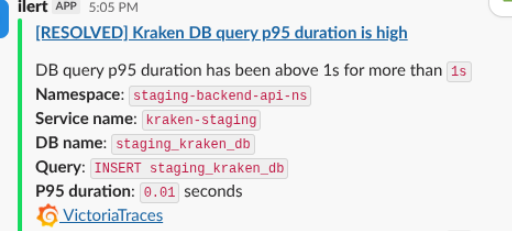
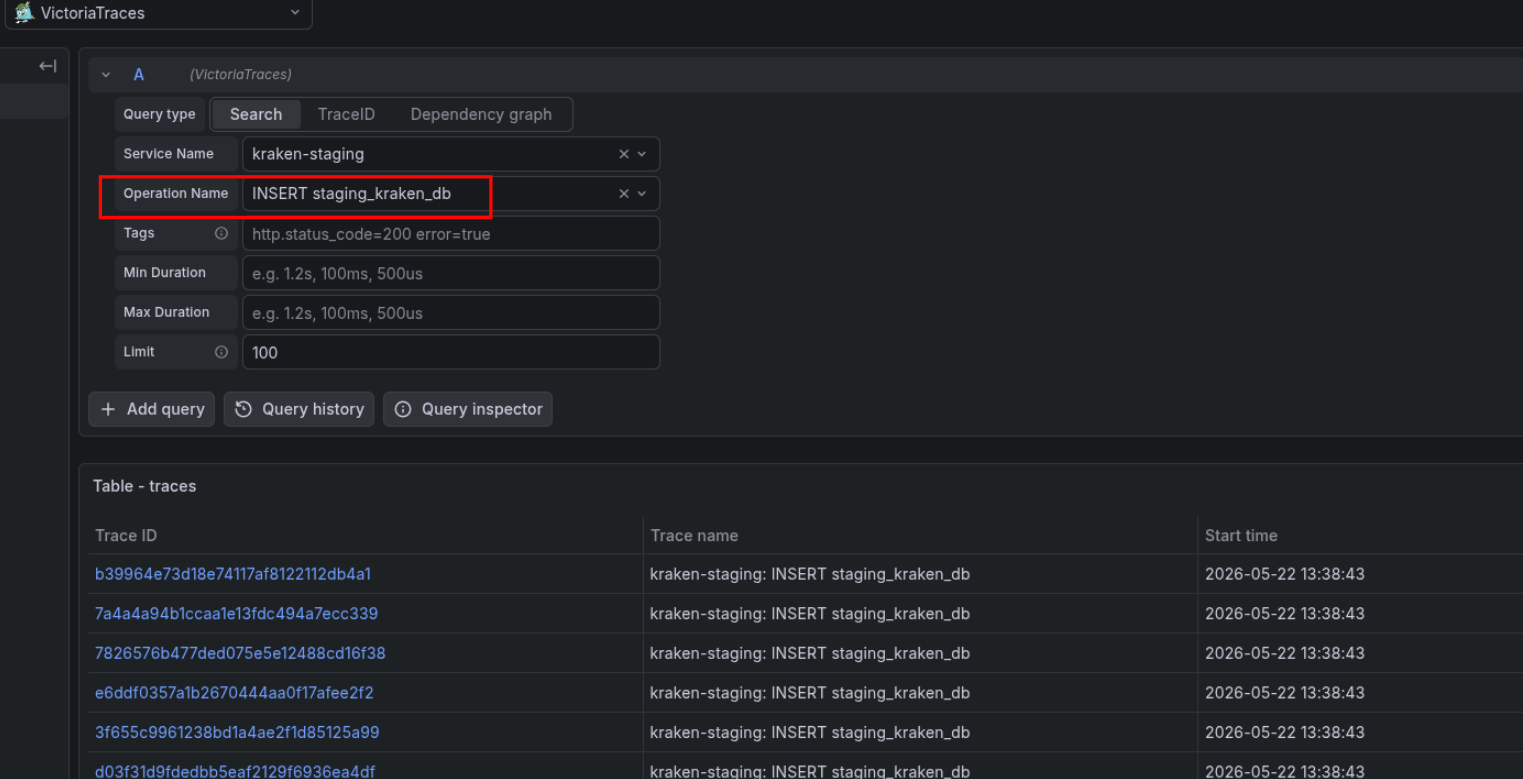
In Query we do the same as in the AWS alert – we output the value of the name label, because it has part of the query.
As a result we get this alert in Slack:
And a link in Grafana with a filter by Operation name – “INSERT staging_kraken_db“:
And that’s it.
It came out way better than the old alerts from logs.
And once we add OTel Collectors too – it’ll be even better.
