 We’re getting ready to launch a self-hosted LLM, and at the testing stage the general idea is to send client requests simultaneously both to the “default production model” like GPT-5.6 and to the model running on our own server.
And after getting the responses, we’ll compare them with Phoenix or Opik, and gradually tune our “own” models.
All our requests go through LiteLLM, and the first thing that came to mind was to use Traffic Mirroring with silent_model, but there turned out to be one not-so-pleasant nuance here, which we’ll get to later.
So today we’ll look at two options: do traffic mirroring on LiteLLM itself, or use Batch Completions and prepare the request for two models on the client side.
A bit of a spoiler – neither option worked for us, and in the end I made my own Custom Callback with “Traffic Mirroring” and traces – but that’s for the next post.
Still, both options work in general and may fit someone else’s use case.
The LiteLLM version we’re using now, and in the examples in this post, is v1.95 – hopefully they’ll clean things up in future releases.
Contents
A/B Testing – Traffic Mirroring
The first and seemingly most obvious option is to use silent_model – see A/B Testing – Traffic Mirroring.
Here, all configuration is done only on the LiteLLM side – convenient, because we don’t need to make any changes on the clients.
The idea itself looks really nice:
- we add a new
modelwith anapi_basepointing to our own server - we add the
silent_modelparameter to the existing models – and under the hood LiteLLM turns one client request into two requests to two providers, returns the response from the main model to the client, and writes the response fromsilent_modelto the traces - all spans share the same
trace_id– so we can get the original prompt and both responses, and then compare the results from the two models
Overall, the setup works and looks great – but there is a catch.
Let’s test it first, and then take a look at the problem.
Configuring silent_model
In model_list, add a model from our own server:
...

# Silent/shadow model
- model_name: ab-matrix-gemma-4-26b
  litellm_params:
    model: openai/gemma-4-26b-a4b-it-q8
    api_base: http://matrix.neoc.vpn.ops.example.co:31000/v1
    api_key: unused

...
And then for the model used by clients, add silent_model:
...

      - model_name: ab-gpt-4.1
        litellm_params:
          model: openai/gpt-4.1
          api_key: os.environ/OPENAI_API_KEY
          silent_model: ab-matrix-gemma-4-26b

...
You can test it with curl, but I made a simple script instead – because our clients are on Python after all:
#!/usr/bin/env python3

import os

from openai import OpenAI


client = OpenAI(
    api_key=os.environ["LITELLM_TESTING_KEY"],
    base_url="http://localhost:4000/v1",
)

response = client.chat.completions.create(
    model="ab-gpt-4.1",
    messages=[
        {
            "role": "user",
            "content": "Hello world",
        }
    ],
    temperature=0,
    max_tokens=256,
)

print("request_id:", response.id)
print("model:", response.model)
print("content:", response.choices[0].message.content)
Run it:
$ ./test_traffic_mirror.py
request_id: chatcmpl-EFGbgUbcpWuZ9xaXMsc2OG6vw5FN4
model: ab-gpt-4.1
content: Hello! 🌍 How can I help you today?
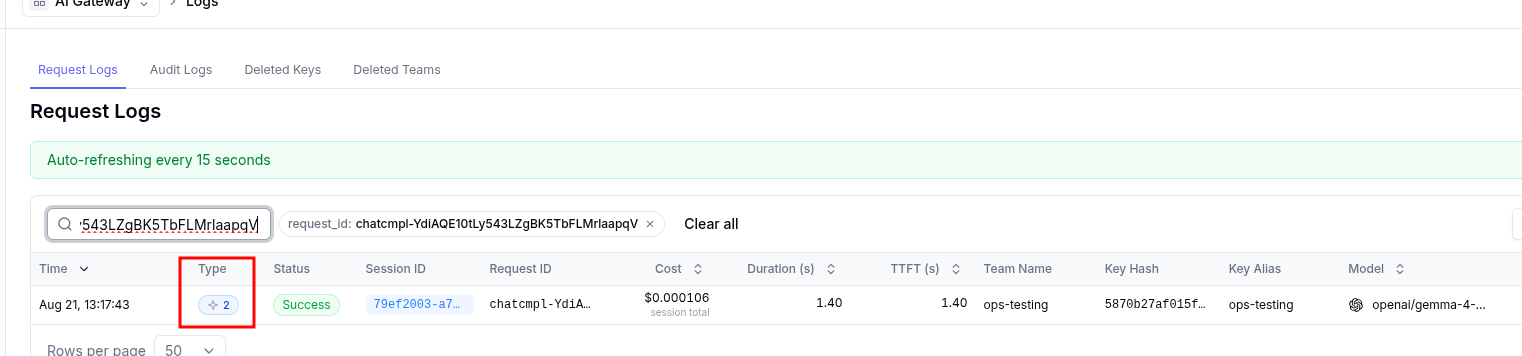
The first sign that everything works is the “2” in the Type column instead of a plain “LLM” – because LiteLLM combined two requests into one session:
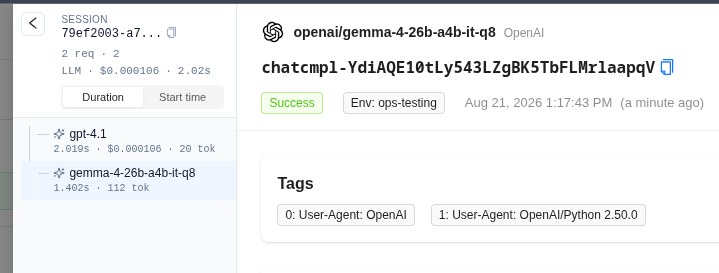
Open this session, and we can see two requests – to gpt-4.1 and gemma-4:
Nice, right?
Traces and getting responses
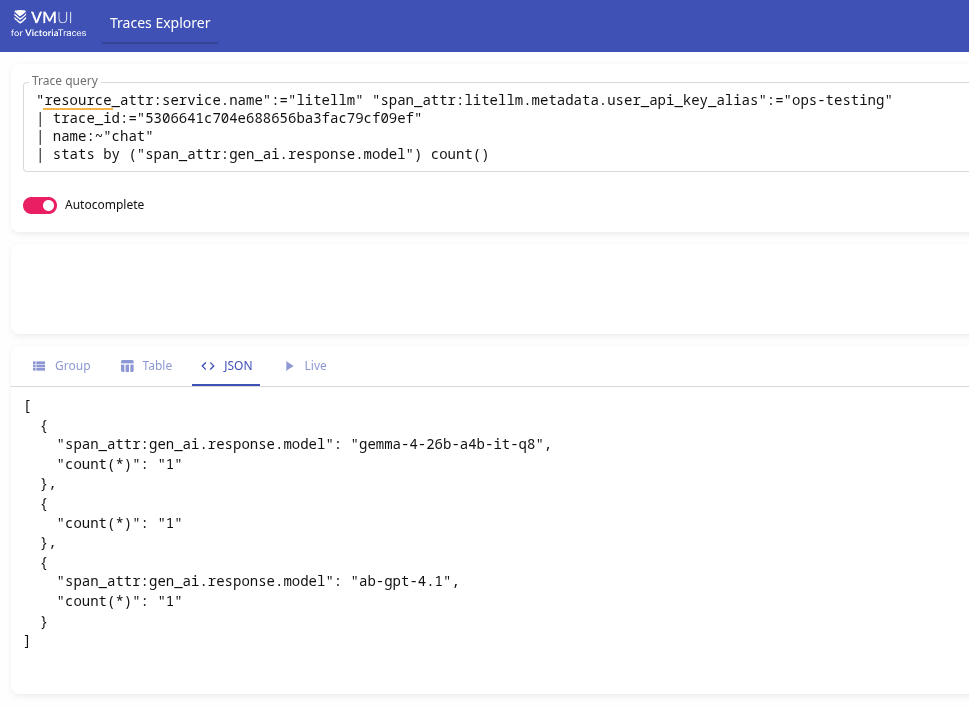
And what’s especially useful is that both requests have the same trace_id:
"resource_attr:service.name":="litellm" "span_attr:litellm.metadata.user_api_key_alias":="ops-testing"
| trace_id:="5306641c704e688656ba3fac79cf09ef"
| name:~"chat"
| stats by ("span_attr:gen_ai.response.model") count()
Which means we can get the prompt and both responses, and send them for comparison:
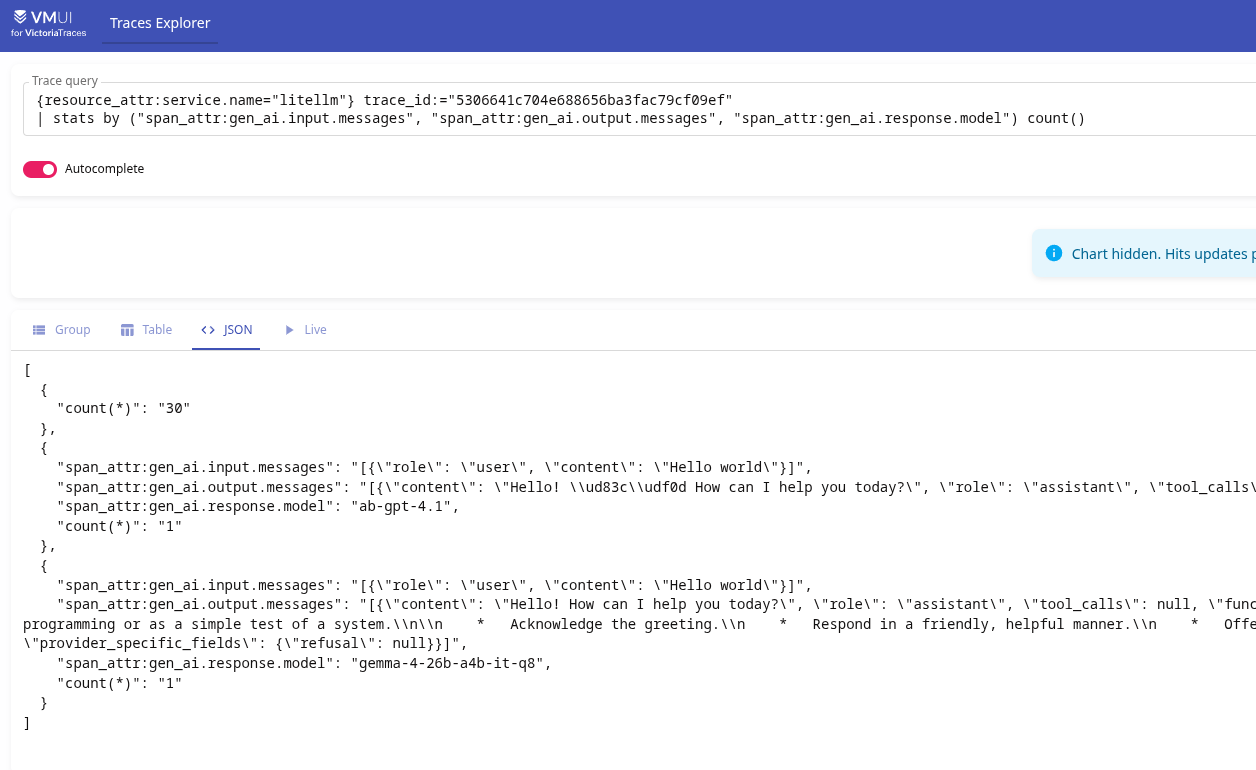
Looks exactly like what we need!
But.
LiteLLM silent_model and OpenAI Chat Completions vs Responses API
After testing everything manually and happily rubbing my hands together, I deployed the changes to our Production LiteLLM and started waiting for traces so I could finally get to evaluation.
But for some reason, Type always showed only LLM:
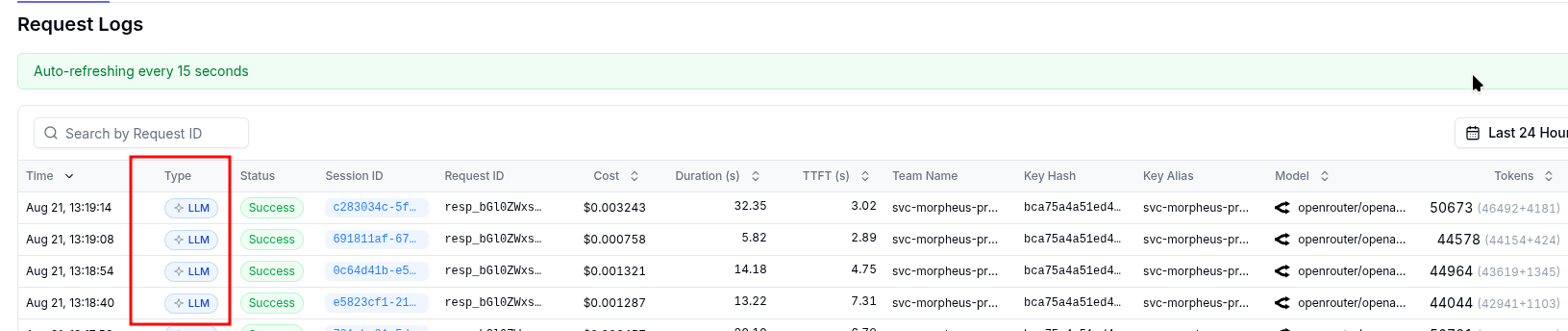
WTF?
And then we notice the name in Request ID – in production it starts with resp_, while in the test it was chatcmpl-.
Why? Because the test script uses client.chat.completions.create(), meaning the old Chat Completions API, while the clients everywhere use responses.create() and the Responses API (see Migrate to the Responses API):
openai_client = get_openai_client()

response = openai_client.responses.create(
    model="gpt-5",
    instructions="You are an expert in creating detailed and insightful daily summaries...",
    input=dynamic_prompt,
    metadata={"user_id": str(self.participant_id)},
    reasoning={"effort": "medium"},
)

return response.output_text.strip()
And if we add the actual responses.create() to our test script:
import os

from openai import OpenAI


client = OpenAI(
    api_key=os.environ["LITELLM_TESTING_KEY"],
    base_url="http://localhost:4000/v1",
)

prompt = "Hello world"


chat_response = client.chat.completions.create(
    model="ab-gpt-4.1",
    messages=[
        {
            "role": "user",
            "content": prompt,
        }
    ],
    temperature=0,
    max_tokens=256,
)

print("=== Chat Completions API: POST /v1/chat/completions ===")
print("request_id:", chat_response.id)
print("model:", chat_response.model)
print("content:", chat_response.choices[0].message.content)
print()

responses_response = client.responses.create(
    model="ab-gpt-4.1",
    input=prompt,
    temperature=0,
    max_output_tokens=256,
)

print("=== Responses API: POST /v1/responses ===")
print("request_id:", responses_response.id)
print("model:", responses_response.model)
print("content:", responses_response.output_text)
Then with the Responses API request, we really get only one request with type LLM – in the screenshot it’s 13:39:07, the last entry:

Why? Because in LiteLLM v1.95.0 silent_model is implemented only for Chat Completions, and doesn’t run on the generic execution path that handles the Responses API.
There are two open GitHub Issues – Traffic Mirroring Not Working for Responses API and enable silent_model in generic execution, but they haven’t been implemented yet.
Batch Completions – pass multiple models
Okay, I thought – I don’t really want to change the client code, but looks like I’ll have to, and there aren’t many changes anyway – so let’s try Batch Completions – pass multiple models.
The idea here is that on the client we pass a list of models – model="gpt-4.1, gpt-5":
#! /usr/bin/env python3

import os
from openai import OpenAI

client = OpenAI(
    api_key=os.environ["LITELLM_TESTING_KEY"],
    base_url="http://localhost:4000/v1",
)


responses = client.chat.completions.create(
    model="gpt-4.1, gpt-5",
    messages=[
        {
            "role": "user", "content": "this is a test request, write a short poem"
        }
    ],
)

for response in responses:
    print("request_id:", response.id)
    print("model:", response.model)
    print()
Then LiteLLM (and this is a LiteLLM-specific feature – because a direct call to OpenAI would return an error like “model not found”) parses the model names and makes two requests.
Looks pretty good, right? Yep.
Run it:
$ ./test_batch.py
request_id: chatcmpl-EFH9PYiZJspAjG366obRjy2jeiEWR
model: gpt-4.1-2025-04-14

request_id: chatcmpl-EFH9Ps2PbJxJYVTuyY9WDb2G5G5uT
model: gpt-5-2025-08-07
Wow, great!
But…
In Logs, we see only one request:

And here only request_id chatcmpl-EFH9Ps2PbJxJYVTuyY9WDb2G5G5uT is stored, while the chatcmpl-EFH9PYiZJspAjG366obRjy2jeiEWR entry is missing completely.
Even worse: chatcmpl-EFH9Ps2PbJxJYVTuyY9WDb2G5G5uT is stored as Model = openai/gpt-4.1, while in our script output the request_id with EFH9Ps2PbJxJYVTuyY9WDb2G5G5uT belonged to gpt-5-2025-08-07!
Why? Because LiteLLM runs the models from the batch request in parallel through abatch_completion(), while logging_obj and litellm_call_id are created before the batch and passed through data to abatch_completion(), see route_llm_request.py:
...
            models = [model.strip() for model in data.pop("model").split(",")]
            return llm_router.abatch_completion(models=models, **data)
...
As a result, we get a shared logging context, with values overwritten by both requests.
^@%*&!!!!!
Instead of conclusions
Actually, both options work – the requests really do go out.
But as we can see, things aren’t quite as smooth as they looked in the documentation.
So in the end I had to make my own custom callback, which sends requests to our self-hosted model itself and creates an OTel span with all the attributes we need.
The draft is already written – I’ll show how it was implemented soon.
And actually, this option is even better, because it gives us much more flexibility than using LiteLLM’s built-in mechanisms.
