 OpenRouter recently announced a 50% discount on OpenAI, so we decided to give it a try.
We’ll switch things over on LiteLLM, which already handles requests from all our services – so the switch should be pretty simple.
Before OpenRouter, we’ll set up fallbacks straight to OpenAI in LiteLLM – for cases when requests to OpenRouter fail.
Contents
Connecting OpenRouter to LiteLLM
Basically, all we need is to describe a new LiteLLM Deployment, a model, and set its api_base to OpenRouter with our own API Key.
The only difference is the model name: for direct calls to OpenAI we use model = openai/gpt-4.1-nano, but for OpenRouter it’s model = openrouter/openai/gpt-4.1-nano, see OpenRouter Completion Models.
You can get the full list of models from the OpenRouter API, see the Models docs.
$ curl -s "https://openrouter.ai/api/v1/models" | jq ".data[].id" | head
"qwen/qwen3.7-flash"
"anthropic/claude-opus-5-fast"
"anthropic/claude-opus-5"
"inclusionai/ling-3.0-flash:free"
"poolside/laguna-s-2.1"
"poolside/laguna-s-2.1:free"
"google/gemini-3.6-flash"
"google/gemini-3.6-flash:batch"
"google/gemini-3.5-flash-lite"
Creating an OpenRouter API Key
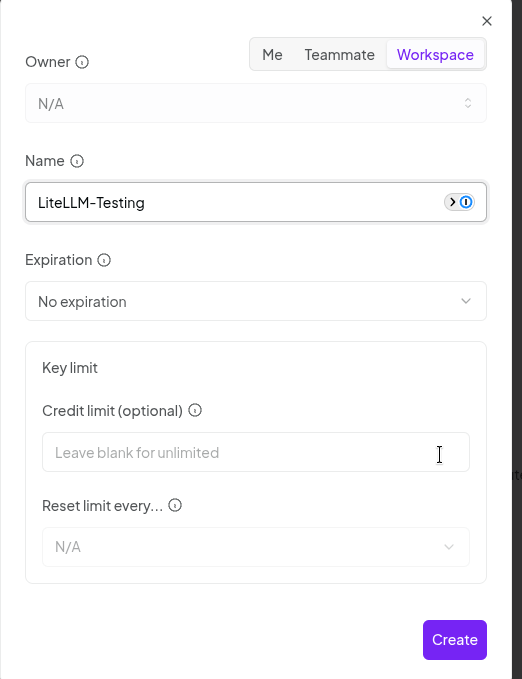
Sign up for OpenRouter, go to API Keys for the OpenRouter Workspace you need, and create an OpenRouter API Key:

By the way, in OpenRouter you can set your own limits on a key:
LiteLLM Proxy Config for OpenRouter
Let’s add a new model – for testing we’ll set our own name in model_name, but in production we use a “generic” one that clients expect.
In api_base we override the URL with the OpenRouter API one, see Using the OpenRouter API, and in api_key – the API Key we created above:
...
    model_list:

      - model_name: or-gpt-4.1-mini
        litellm_params:
          model: openrouter/openai/gpt-4.1-mini
          api_base: https://openrouter.ai/api/v1
          api_key: os.environ/OPENROUTER_API_KEY
...
While testing, we can pass the key variable through Helm’s envVars; in production this is done via External Secrets Operator (see AWS: Kubernetes and External Secrets Operator for AWS Secrets Manager and LiteLLM: AI Gateway in Kubernetes and metrics to VictoriaMetrics):
...
  envVars:
    OPENROUTER_API_KEY: "sk-or-v1-***"
...
Let’s check with curl:
$ curl -sS -D /tmp/headers 'https://aigw.test.example.co/chat/completions' -H 'Content-Type: application/json' -H "Authorization: Bearer $LITELLM_TESTING_KEY" --data ' { "model": "or-gpt-4.1-mini", "messages": [ { "role": "user", "content": "what llm are you" } ] } '  | jq
{
  "id": "gen-1785490640-Tbfwc5Rlx7cyhqpxzSB6",
  "created": 1785490640,
  "model": "or-gpt-4.1-mini",
  ...
The headers give us all the interesting info (I use -D into a file so jq works correctly):
$ cat /tmp/headers
...
x-litellm-model-name: openrouter/openai/gpt-4.1-mini
x-litellm-model-api-base: https://openrouter.ai/api/v1
...
But once we rolled OpenRouter out to “test production” – we started catching 429 errors, so we had to add fallbacks to OpenAI.
LiteLLM Fallbacks
The limits are described in Credit Limits and Rate Limits, and even though our models aren’t free – we still hit errors.
And in any case, you should have fallbacks anyway.
OpenRouter also supports Automatic failover between models, but that requires changes on the client side – and we want this as transparent as possible, with minimal changes on the clients.
So we’ll set it up on LiteLLM instead, see Fallbacks (Provider Failover).
The LiteLLM docs are a bit of a mess here (not the first time, btw) – one example describes it as litellm_settings.fallbacks, another as router_settings.fallbacks.
But router_settings is the correct one, since it takes priority – router.py:
...

      _fallbacks = fallbacks or litellm.fallbacks

...
And fallbacks “arrive” from router_params in proxy_server.py:
...
router = litellm.Router(
    **router_params,
...
The format is pretty simple – “model to set the fallback for : list of models to route to on failure”:
router_settings:
  fallbacks: [{"<QUERY_MODEL>": ["<FALLBACK_MODEL1>","<FALLBACK_MODEL2>"]}]
You can also set a general fallback instead of a model-specific one, see Default Fallbacks:
router_settings:
  default_fallbacks: ["claude-opus"]
(again – in the docs it’s set under litellm_settings instead of router_settings, though it works the same either way)
Alright, let’s try it and see how it works.
Adding a Model Fallback
Let’s add a fallback for our test model:
router_settings:
  fallbacks: [{"or-gpt-4.1-mini": ["gpt-4.1-mini"]}]
And in the model itself – we “break” the api_base with a wrong port:
model_list:
  - model_name: or-gpt-4.1-mini
    litellm_params:
      model: openrouter/openai/gpt-4.1-mini
      api_base: https://openrouter.ai:8000/api/v1
      api_key: os.environ/OPENROUTER_API_KEY
Let’s repeat the request:
$ curl -sS -D /tmp/headers 'https://aigw.test.example.co/chat/completions' -H 'Content-Type: application/json' -H "Authorization: Bearer $LITELLM_TESTING_KEY" --data ' { "model": "or-gpt-4.1-mini", "messages": [ { "role": "user", "content": "what llm are you" } ] } '  | jq
{
  "id": "chatcmpl-E7eVkBzpdbWp5n6JagYlYHTlEEI1f",
  "created": 1785492728,
  "model": "gpt-4.1-mini-2025-04-14",
  ...
And the headers – now the response is from OpenAI:
$ cat /tmp/headers | grep x-litellm-model
x-litellm-model-id: 8b2d27fc9982e18f87ed59ca8c8b0d02c52546f26ece314f17d14433ed6498c2
x-litellm-model-name: openai/gpt-4.1-mini
x-litellm-model-api-base: https://api.openai.com
x-litellm-model-group: gpt-4.1-mini
Fallback Options
See Fallbacks + Retries + Timeouts + Cooldowns.
For fallback routing you can set a few useful options:
num_retries: how many times to retry the request against the primary model group before switching to the fallback model- if the model group has several deployments, a retry can go to a different deployment without falling back
timeout: how long to wait for a response before redirecting requests to the fallback model- after each
timeout, the nextnum_retriesattempt starts (if set to more than 1), and only then does it move on to the fallback mode
- after each
allowed_fails: how many failed requests to a model are allowed before it goes into cooldown- with a value of 3, cooldown kicks in on the fourth failed attempt
cooldown_time: how many seconds the model will be “disabled” from general routing
Again, the docs are a bit… rough here, since, for example, it says “allowed_fails: 3 # cooldown model if it fails > 1 call in a minute“, and instead of “in a minute“, they probably meant 30 seconds, matching the cooldown_time example.
Fallbacks and Prometheus metrics
Of course, it’s a good idea to monitor when fallbacks kick in – and when they fail.
LiteLLM has built-in metrics for this, see Fallback (Failover) Metrics:
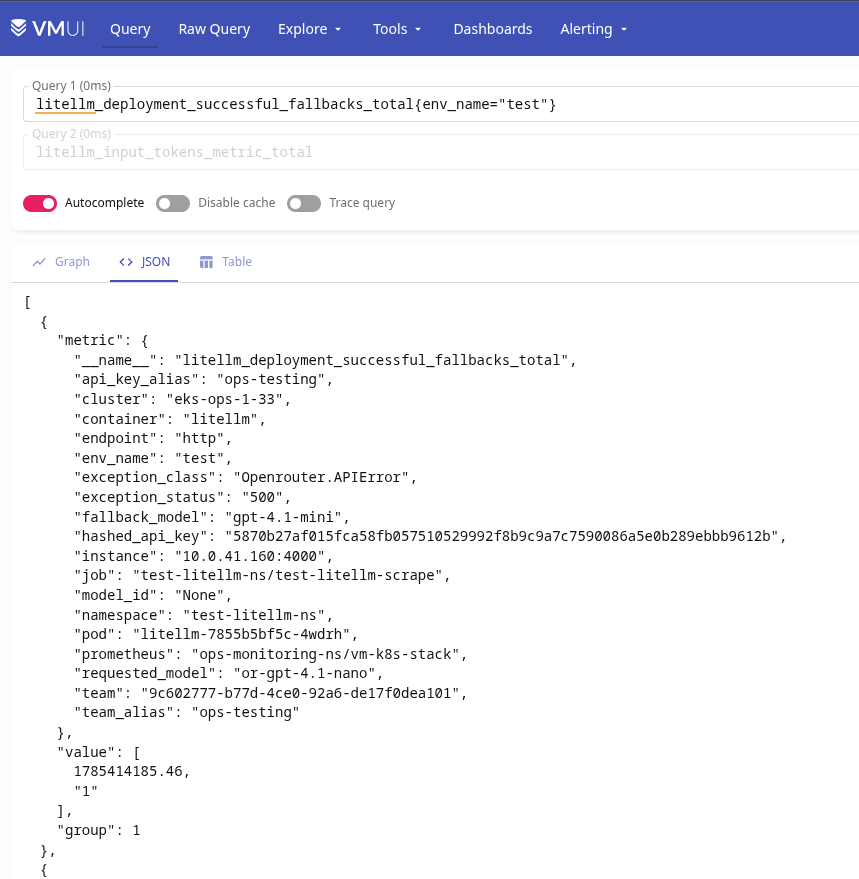
Here:
litellm_deployment_cooled_down: how many times a deployment (model) was put into cooldownlitellm_deployment_successful_fallbacks: number of successful fallback triggerslitellm_deployment_failed_fallbacks: number of failed fallback attempts
And an example alert:
- alert: LiteLLM Deployment Failed Fallback
  expr: |
    sum by (requested_model, fallback_model, api_key_alias, team_alias, exception_class, exception_status) (
      increase(litellm_deployment_failed_fallbacks_total[5m])
    ) > 0
  for: 30s
  labels:
    component: devops
    environment: ops
    severity: critical
    ilert_routingkey: devops-ops-critical
  annotations:
    summary: LiteLLM Deployment Failed Fallback
    description: |-
      LiteLLM failed to handle a request using a fallback model during the last 5 minutes.
      *Failed fallbacks*: `{{ "{{" }} $value }}`
      *Requested model*: `{{ "{{" }} $labels.requested_model }}`
      *Fallback model*: `{{ "{{" }} $labels.fallback_model }}`
      *API key alias*: `{{ "{{" }} $labels.api_key_alias }}`
      *Team alias*: `{{ "{{" }} $labels.team_alias }}`
      *Exception class*: `{{ "{{" }} $labels.exception_class }}`
      *Exception status*: `{{ "{{" }} $labels.exception_status }}`
      <https://{{ $.Values.monitoring.root_url }}/d/adtt9jj/adrmshg/litellm-system-overview |:grafana: LiteLLM System overview>
Advanced routing
We have services that want to keep going to OpenAI directly – but we don’t want to change anything in their code, meaning model_name has to stay as-is.
There are a few options here, see the Tag Based Routing docs:
- use Tags on API Keys
- use Tags from headers (with some nuances)
Routing by API Key Tags
We create a new key, though when creating a key you can’t set Tags on it right away, since “This feature is only available for LiteLLM Enterprise“.
But you can create the key – and then set the Tag you need in its Settings afterward:
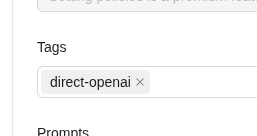
And similarly – a key tagged “direct-openrouter“.
In router_settings we add enable_tag_filtering=true, and in model_list we describe a model group – two deployments with the same model_name, but different conditions in tags:
router_settings:
  enable_tag_filtering: True

model_list:

  - model_name: or-gpt-4.1-mini
    litellm_params:
      model: openrouter/openai/gpt-4.1-mini
      api_base: https://openrouter.ai/api/v1
      api_key: os.environ/OPENROUTER_API_KEY
      tags: ["direct-openrouter"]

  - model_name: or-gpt-4.1-mini
    litellm_params:
      model: openai/gpt-4.1-mini
      api_key: os.environ/OPENAI_API_KEY
      tags: ["direct-openai"]
Let’s make a request with the “direct-openai” key:
$ curl -sS -D /tmp/openai 'https://aigw.test.example.co/chat/completions' -H 'Content-Type: application/json' -H "Authorization: Bearer sk-***" --data ' { "model": "or-gpt-4.1-mini", "messages": [ { "role": "user", "content": "what llm are you" } ] } ' | jq
{
  "id": "chatcmpl-E7f89zMEtza5liQnm8uBVQaaBcyVv",
  "created": 1785495109,
  "model": "gpt-4.1-mini-2025-04-14",
  ...
We get a response from OpenAI:
$ cat /tmp/openai | grep x-litellm-model
x-litellm-model-id: b1cd50178d84ad641058301b47c9f171d86337bcc7f0c08dc425f9f44ec2dffd
x-litellm-model-name: openai/gpt-4.1-mini
x-litellm-model-api-base: https://api.openai.com
And with the “direct-openrouter” key:
$ curl -sS -D /tmp/openrouter 'https://aigw.test.example.co/chat/completions' -H 'Content-Type: application/json' -H "Authorization: Bearer sk-***" --data ' { "model": "or-gpt-4.1-mini", "messages": [ { "role": "user", "content": "what llm are you" } ] } ' | jq
{
  "id": "gen-1785495093-Toi3dLdjHJ692Ue8bFgl",
  "created": 1785495093,
  "model": "or-gpt-4.1-mini",
  ...
We get a response from OpenRouter:
$ cat /tmp/openrouter | grep x-litellm-model
x-litellm-model-name: openrouter/openai/gpt-4.1-mini
x-litellm-model-api-base: https://openrouter.ai/api/v1
Routing by the User Agent header
Another option – instead of adding tags manually, just use the User Agent from the headers.
The docs on Regex-based tag routing (tag_regex) describe tag_regex as “Use tag_regex on a deployment to match incoming requests by their headers” – so it sounds like it can match any header, but in reality only User-Agent is taken into account (if I’m reading the code right):
...
        # Build header strings for regex matching from what the proxy already stores.
        # Currently we match against User-Agent; format matches "^User-Agent: claude-code/..."
        user_agent = metadata.get("user_agent", "")
        header_strings: list[str] = [f"User-Agent: {user_agent}"] if user_agent else []
...
Still, in my case that’s enough – one of our services is TypeScript with user-agent = "OpenAI/JS 6.26.0", and the other is Python with user-agent = "OpenAI/Python 2.45.0".
Let’s change the conditions in the models to use a regex:
- model_name: or-gpt-4.1-mini
  litellm_params:
    model: openrouter/openai/gpt-4.1-mini
    api_base: https://openrouter.ai/api/v1
    api_key: os.environ/OPENROUTER_API_KEY
    tag_regex:
      - '^User-Agent: OpenAI/JS '

- model_name: or-gpt-4.1-mini
  litellm_params:
    model: openai/gpt-4.1-mini
    api_key: os.environ/OPENAI_API_KEY
    tag_regex:
      - '^User-Agent: OpenAI/Python '
Let’s make a request with the “main” test key (which has no tags), but explicitly pass -H 'User-Agent: OpenAI/JS 6.26.0':
$ curl -sS -D /tmp/js-headers 'https://aigw.test.example.co/chat/completions' -H 'Content-Type: application/json' -H "Authorization: Bearer $LITELLM_TESTING_KEY" -H 'User-Agent: OpenAI/JS 6.26.0'   --data '{    "model": "or-gpt-4.1-mini",
    "messages": [{
      "role": "user",
      "content": "JS routing test unique-001"
    }]
  }' | jq
{
  "id": "gen-1785495531-69Gu3ziqrjBmlNyEx3Jo",
  "created": 1785495531,
  "model": "or-gpt-4.1-mini",
  ...
We got a response from OpenRouter:
$ cat /tmp/js-headers
...
x-litellm-model-name: openrouter/openai/gpt-4.1-mini
x-litellm-model-api-base: https://openrouter.ai/api/v1
...
And a similar request, but with -H 'User-Agent: OpenAI/Python 2.45.0':
$ curl -sS -D /tmp/python-headers   'https://aigw.test.example.co/chat/completions'   -H 'Content-Type: application/json'   -H "Authorization: Bearer $LITELLM_TESTING_KEY"   -H 'User-Agent: OpenAI/Python 2.45.0'   --data '{
    "model": "or-gpt-4.1-mini",
    "messages": [{
      "role": "user",
      "content": "Python routing test unique-001"
    }]
  }' | jq
{
  "id": "chatcmpl-E7fFeVdB0ZWynqc5JxO3d4lUA4Gqf",
  "created": 1785495574,
  "model": "gpt-4.1-mini-2025-04-14",
  ...
And this time we got a response from OpenAI:
$ cat /tmp/python-headers
x-litellm-model-name: openai/gpt-4.1-mini
x-litellm-model-api-base: https://api.openai.com
Done.
