 In the post GitHub Actions: Deploying Dev/Prod Environments with Terraform I’ve already touched on the topic of GitHub Actions Reusable Workflows and Composite Actions a bit, so it’s time to learn more about it.
What needs to be done: currently in my project, we write Workflow files in each repository separately. However, since all processes are step-by-step unified, i.e. infrastructure management through Terraform, and launching services in Kubernetes and deploying with Helm – we decided that it is the time to clean up GitHub Actions and stop writing “each for themselves.”
Instead, we will create a separate repository with Shared Workflows with a set of Jobs that will perform the required actions, and then we will include these Workflows in the Workflow of the project.
But Reusable Workflows has some interesting details.
So, first, let’s see what the difference between Reusable Workflows and Composite Actions is and what they are intended for, and then we’ll take a look at working with Reusable Workflows.
Contents
Comparing Reusable Workflows and Composite Actions
Composite Actions
Composite Actions allow you to combine several Steps into a single Action. Such Steps are described in a single file, and can perform several different runs or call other Actions.
A good example of working with Composite Actions is in GitHub Actions: Deploying Dev/Prod Environments with Terraform – the Creating Composite Action “terraform-init” part.
It is an ideal solution when you want to use the Steps sequence in multiple Jobs or Workflows.
- Composite Actions allows you to combine several steps in one Action to call them all as one Step in the Workflow
- you cannot have multiple Jobs in Composite Actions
- A Job that calls Composite Actions can have other Steps
Reusable Workflows
Reusable Workflows allow you to reuse an entire Workflow with all its Jobs and Steps. They provide more options because they include contexts, environment variables, and secrets.
It’s the perfect solution when you want to use an entire CI/CD pipeline in multiple repositories.
From now on, we will use the following names:
- Reusable Workflow: a workflow that is stored in a separate repository and is called for execution by another workflow
- Caller Workflow: the workflow that calls the Reusable Workflow
Features of Reusable Workflows:
- Reusable Workflows cannot call other Reusable Workflows
- Reusable Workflows have quite detailed execution logs – each Job and Step is logged separately
- Reusable Workflows are invoked as Jobs, but such a Job cannot have other Steps
- because of this, you cannot use
$GITHUB_ENVto pass values to Jobs and Steps in the Workflow Caller that invokes the Reusable Workflow
- because of this, you cannot use
- you can use different versions of the same Reusable Workflow by annotating
@REFwith the brunch name or git tag
See also Limitations.
Reusable Workflows and Composite Actions: Key differences
| Reusable workflows | Composite actions |
| Can connect a maximum of four levels of workflows | Can be nested to have up to 10 composite actions in one workflow |
| Can use secrets | Cannot use secrets |
| Can use if: conditionals | Cannot use if: conditionals |
| Can be stored as normal YAML files in your project | Requires individual folders for each composite action |
| Can use multiple jobs | Cannot use multiple jobs |
| Each step is logged in real-time | Logged as one step even if it contains multiple steps |
Creating Reusable Workflows
Let’s create test Workflows to check the scheme in general:
- the
atlas-github-actionsrepository will have a Reusable Workflow - in the
atlas-testrepository there will be a Caller Workflow
Create a repository for our Reusable Workflows – atlas-github-actions, and in it, create a directory .github/workflows with the test-reusable-workflow.yml file:
name: Reusable Workflow

# trigger from other workflows
on:
  workflow_call:

jobs:

  test:
    runs-on: ubuntu-latest

    steps:
      - name: "Test: print Hello"
        run: echo "Hello, World!"
Save it and push it to GitHub.
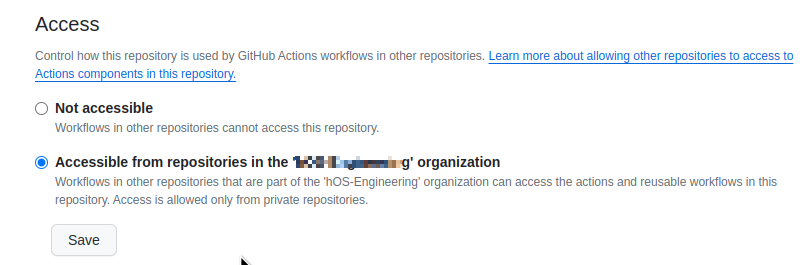
Next, we need to authorize the use of Workflows from this repository.
Go to Setting > Actions, and at the bottom of the page allow access from other repositories of the organization:
Go to the Caller repository – atlas-test, and create a directory .github/workflows with the test-caller-workflow.yml file:
name: Caller Workflow

on:
  # can be ran manually
  workflow_dispatch:

jobs:

  test:
    # call the Reusable Workflow file
    uses: <ORG_NAME>/atlas-github-actions/.github/workflows/test-reusable-workflow.yml@master
Push, and run:
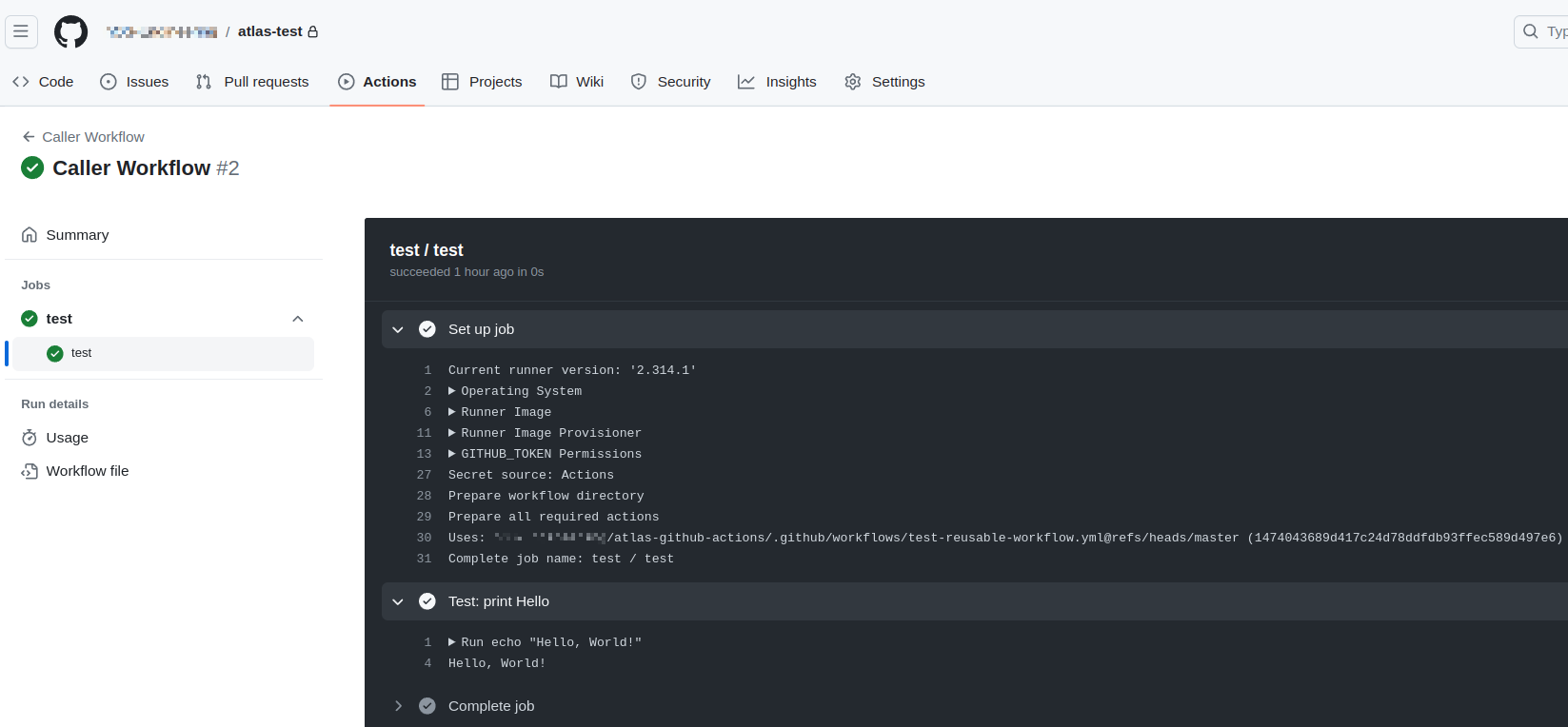
Now let’s take a closer look at the details of how to work with Reusable Workflows.
Permissions
A great post on GitHub Actions Permissions and Security in general is in the GitHub Actions Workflow Permissions.
In a short:
- when using third-party Actions – check their code and use SHA hash instead of Git tag (I’ve never done this, but for absolutely security it makes sense)
- always configure the
permissionsfor$GITHUB_TOKENexplicitly at the Workflow or Job level to avoid using default permissions - Reusable Workflow inherits
permissionsfrom the Job or Workflow that calls the Reusable Workflow
That is, if we set permissions.pull-request: write in the Caller Workflow, we will be able to create comments in Pull Requests and from our Reusable Workflow.
GitHub Actions envs, vars, secrets and Reusable Workflow
We have three types of data, but with different “levels”:
envcontext:- set at the Workflow/Job/Step level – not passed to Reusable Workflow
varscontext:- is set either at the GitHub Actions Environments level – not passed to Reusable Workflow
- or at the level of Repository and Organization Variables – in Reusable Workflow are available without additional actions
secretscontext:- is set either at the level of GitHub Actions Environments – are not passed to Reusable Workflow
- or at the level of Repository and Organization Secrets – in Reusable Workflow are available through
secrets: inherit
We can’t use Environments at all in Caller Workflows and Jobs that call Reusable Workflows – see Supported keywords for jobs that call a reusable workflow, so we won’t see all the vars and secrets that are set to a specific Environment in Reusable Workflows.
That is, you can’t do something like this in Caller Workflow:
...
jobs:

  test:
    # using 'environment' will fail
    environment: test
    uses: <ORG_NAME>/atlas-github-actions/.github/workflows/test-reusable-workflow.yml@master
...
So let’s check what we can see in the Caller Workflow and the Reusable Workflow.
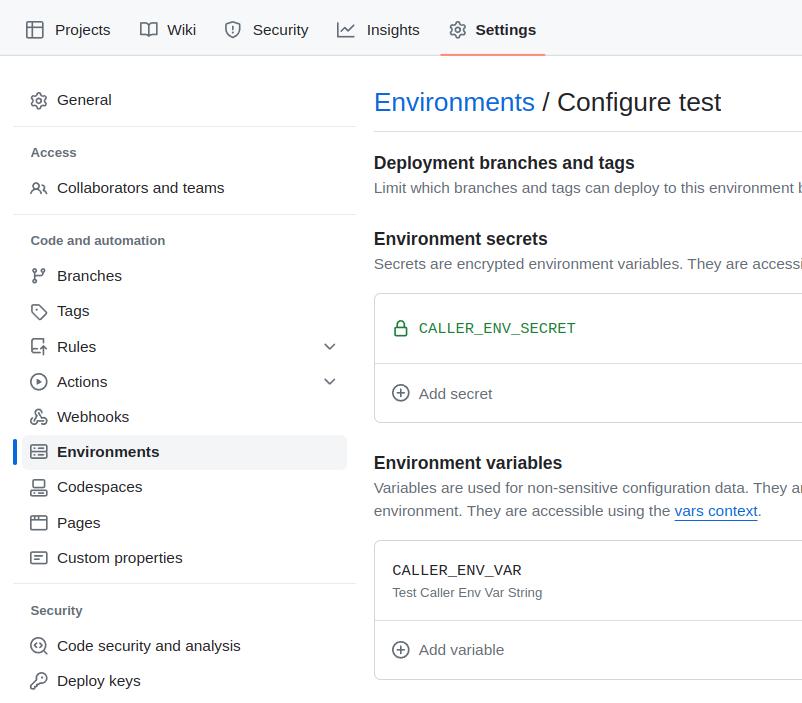
In the atlas-test repository from Caller Workflow, add the Environment, and in it Environment secrets and Environment variables:
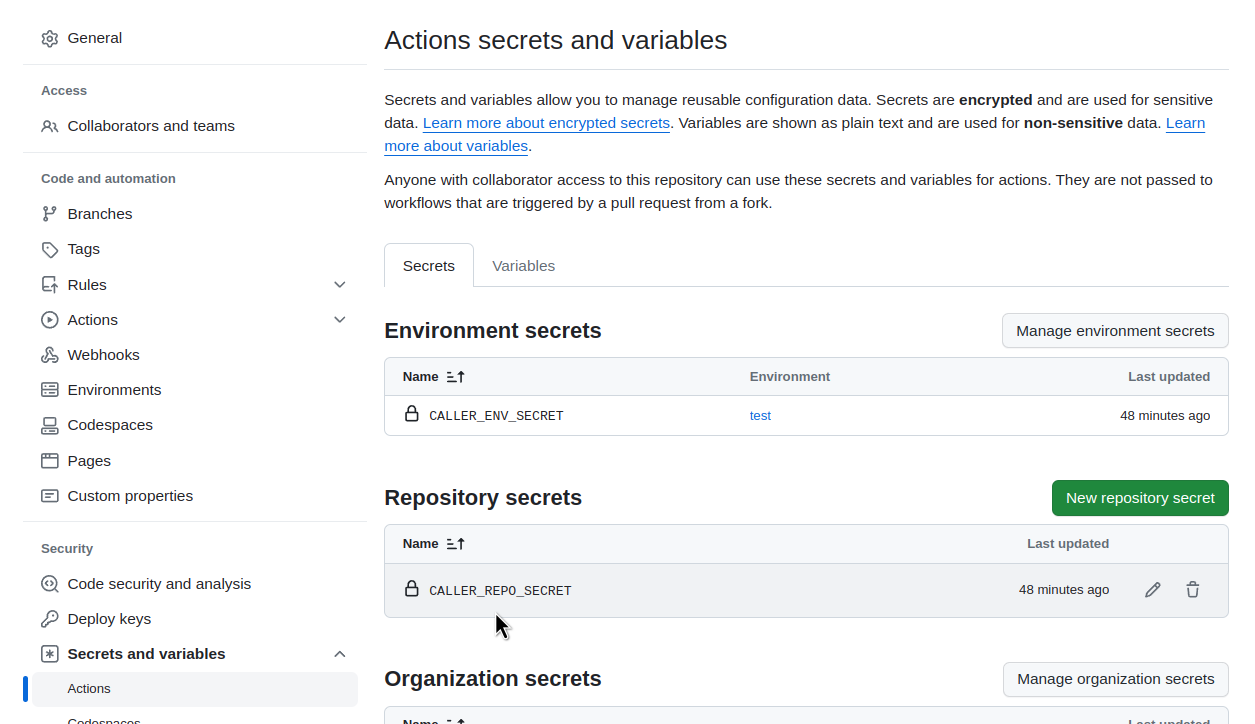
In the same repository, add the usual Repository secrets:
Та Repository variables:
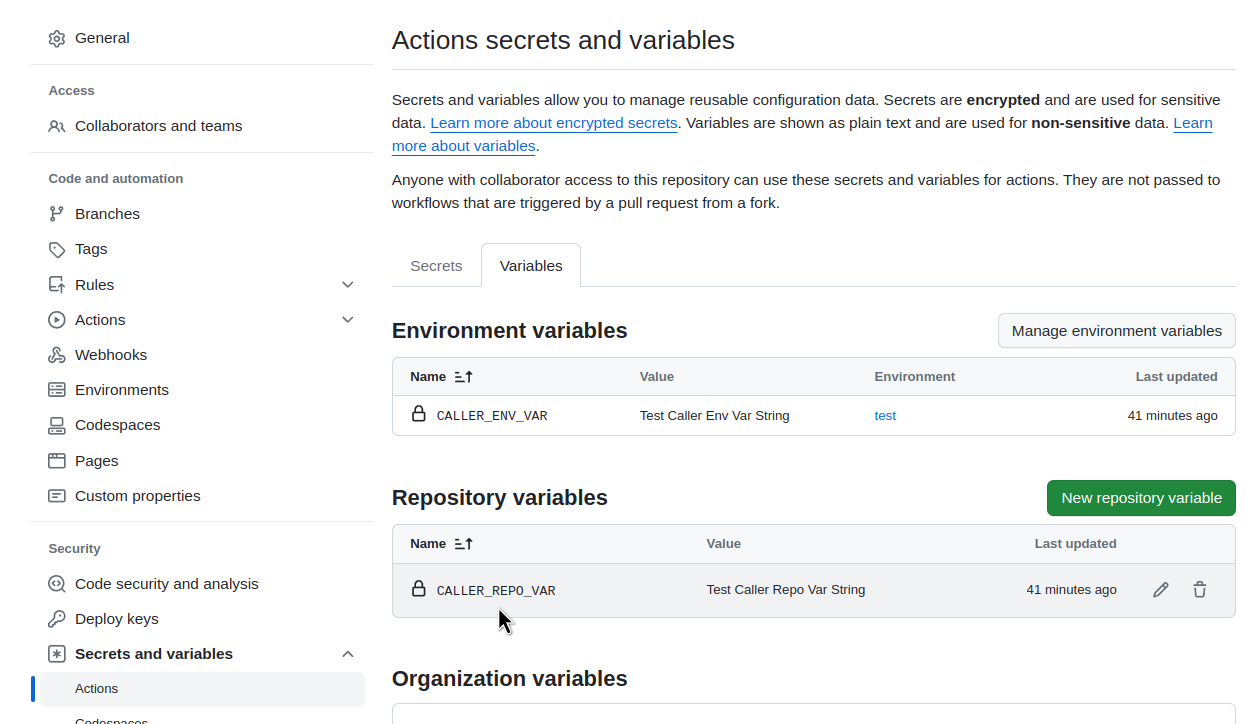
In the same repository, update the Caller Workflow file – test-caller-workflow.yml:
- at the Workflow level, add
env: CALLER_WORKFLOW_ENV. - to a Job with our Reusable Workflow:
- add a
test-inputpass to the Reusable Workflow - add a
secrets: inherit
- add a
- at the Workflow level, add a Job
prints-envs
name: Caller Workflow

on:
  # can be ran manually
  workflow_dispatch:

env:
  CALLER_WORKFLOW_ENV: "Caller Env String"

jobs:

  test:
    # call the Reusable Worfklow file
    uses: <ORG_NAME>/atlas-github-actions/.github/workflows/test-reusable-workflow.yml@master
    with:
      test-input: "Test Input String"
    secrets: inherit


  prints-envs:

    environment: test
    runs-on: ubuntu-latest

    steps:

      # Can use Envs from the Workflow level
      - name: "Test: print Caller Workflow Env"
        run: echo ${{ env.CALLER_WORKFLOW_ENV }}

      # can use Variables from the Workflow Environments level
      - name: "Test: print Caller Repository Env Variable"
        run: echo ${{ vars.CALLER_ENV_VAR }}

      # can use Variables from the Reposiotiry level
      - name: "Test: print Caller Repository Repo Variable"
        run: echo ${{ vars.CALLER_REPO_VAR }}

      # CAN'T use Secrets from the Workflow Environments level
      - name: "Test: print Caller Env Secret"
        run: echo ${{ secrets.CALLER_ENV_SECRET }}

      # can use Secrets from the Reposiotiry level
      - name: "Test: print Caller Repo Secret"
        run: echo ${{ secrets.CALLER_REPO_SECRET }}
In the atlas-github-actions repository, update our Reusable Workflow – the file test-reusable-workflow.yml.
Add inputs and steps, in which we will try to display env, vars and secrets from Caller Workflow/Repository/Environment:
name: Reusable Workflow

# trigger from other workflows
on:
  workflow_call:
    inputs:
      test-input:
        required: true
        type: string

jobs:

  test:
    runs-on: ubuntu-latest

    steps:
      - name: "Test: print Hello"
        run: echo "Hello, World!"

      # CAN'T use Envs from the Caller Workflow
      - name: "Test: print Caller Workflow Env"
        run: echo ${{ env.CALLER_WORKFLOW_ENV }}

      # CAN'T use Variables from the Caller Workflow Environments level
      - name: "Test: print Caller Repository Env Variable"
        run: echo ${{ vars.CALLER_ENV_VAR }}

      # can use Variables from the Caller Repository Variables
      - name: "Test: print Caller Repository Repo Variable"
        run: echo ${{ vars.CALLER_REPO_VAR }}

      # CAN'T use Secrets from the Caller Workflow Environments Secrets
      - name: "Test: print Caller Env Secret"
        run: echo ${{ secrets.CALLER_ENV_SECRET }}

      # can use Secrets from the Caller Reposiotiry
      - name: "Test: print Caller Repo Secret"
        run: echo ${{ secrets.CALLER_REPO_SECRET }}

      # can use Inputs from the Caller Workflow
      - name: "Test: print Caller Repo Input"
        run: echo ${{ inputs.test-input }}
Using Secrets
A bit about the Secrets.
The first option is to use secrets: inherit – then all the variables in Repository secrets and Organization secrets from the Caller Workflow will be available in the Reusable Workflow.
Then, in Reusable Workflow, you can use them directly or set in env:
...
on:
  workflow_call:
    inputs:
      test-input:
        required: true
        type: string

env:
  reusable_wf_local_secret: ${{ secrets.CALLER_REPO_INHERITED_SECRET }}

jobs:

  test:
...
The second option is to pass a specific Secret instead of using secrets: inherit:
...
  test:
    # call the Reusable Worfklow file
    uses: <ORG_NAME>/atlas-github-actions/.github/workflows/test-reusable-workflow.yml@master
    with:
      test-input: "Test Input String"
    secrets:
      REUSAVBLE_WF_SECRET_NAME: ${{ secrets.CALLER_WF_SECRET_NAME }}
...
In this case, REUSAVBLE_WF_SECRET_NAME must be specified in the Reusable Workflow along with inputs:
...
on:
  workflow_call:
    secrets:
      REUSABLE_WF_SECRET_NAME:
        required: false
    inputs:
      test-input:
        required: true
        type: string
...
Then you can use it as ${{ secrets.REUSABLE_WF_SECRET_NAME }} in Reusable Workflow.
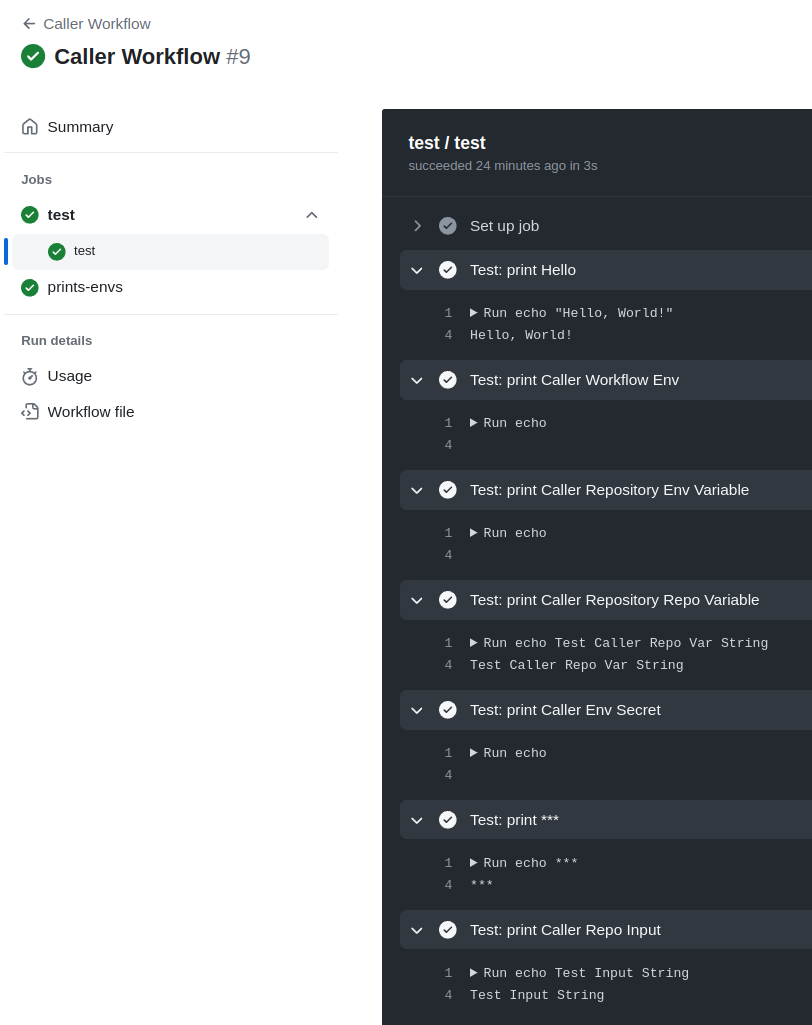
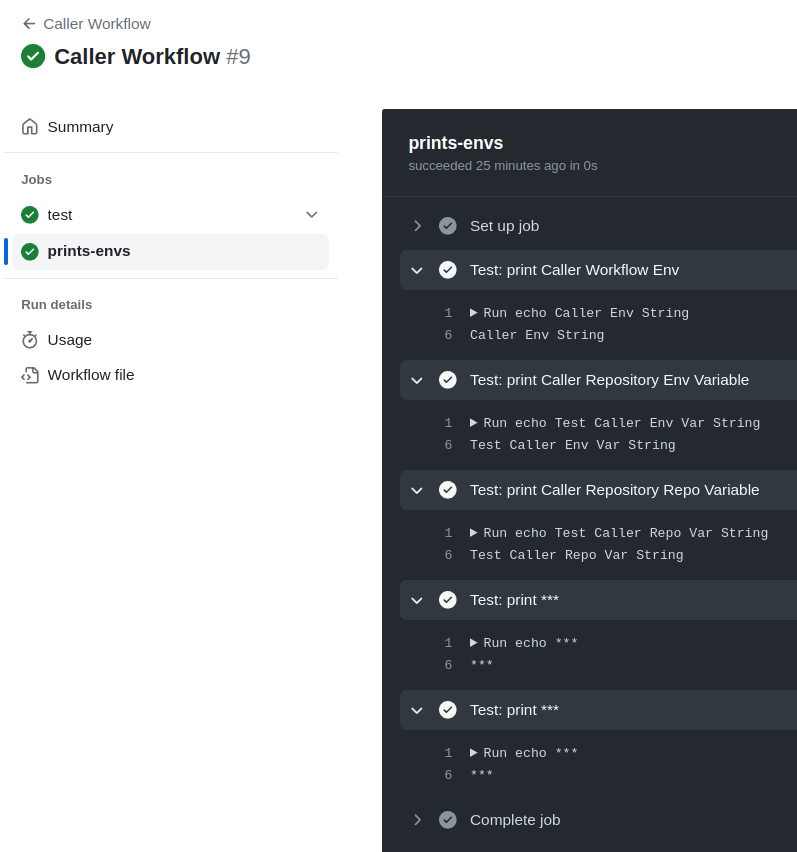
Okay, let’s proceed to see what was passed from the Caller to the Reusable workflow.
Put everything in the repository and start the Workflow.
The Job that calls the Reusable Workflow is missing some of the data:
The Job that is called directly in the Caller Workflow has all the data:
GitHub Context
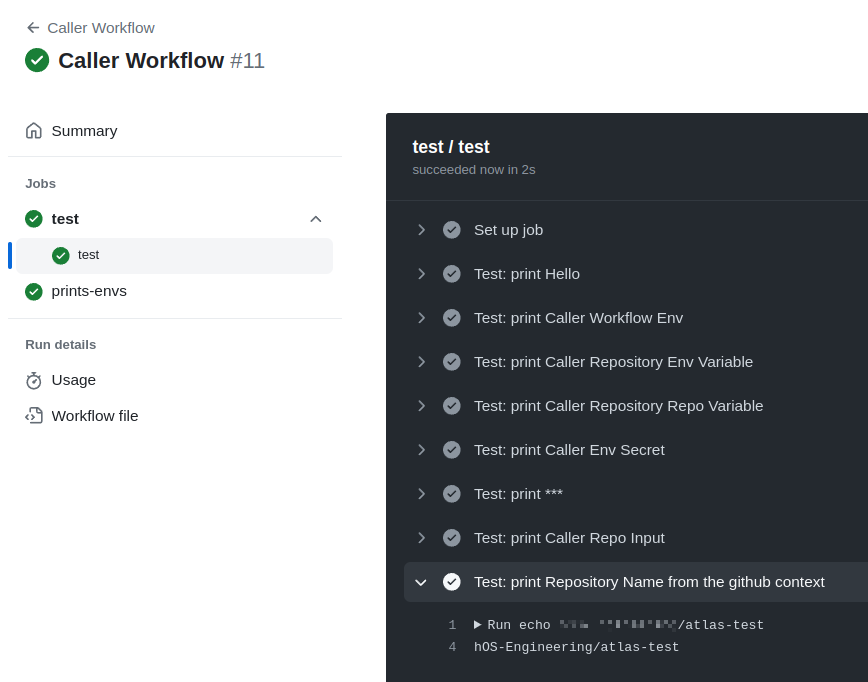
When Reusable Workflows is called from a Caller Workflow, the github context will always have data from the Caller Workflow.
For example, in the Reusable Workflow, let’s add a display of the repository name:
name: Reusable Workflow

# trigger from other workflows
on:
  workflow_call:
    inputs:
      test-input:
        required: true
        type: string

jobs:

  test:
    runs-on: ubuntu-latest

    steps:
      - name: "Test: print Hello"
        run: echo "Hello, World!"

      ...

      - name: "Test: print Repository Name from the github context"
        run: echo ${{ github.repository }}
And we have a name atlas-test – a repository with Caller Workflow:
Now you can start making Worfklow for Terraform and Helm, but that’s a whole other story.
Useful links
- Github Not-So-Reusable Actions
- GitHub: Composite Actions vs Reusable Workflows [Updated 2023]
- How to start using reusable workflows with GitHub Actions
- Using inputs and secrets in a reusable workflow
- The Ultimate Guide to GitHub Reusable Workflows: Maximize Efficiency and Collaboration
