 In the previous post, FreeBSD: WireGuard VPN, Linux peer and routing between networks, we set up a VPN to connect two networks – my office and home – and everything is working perfectly.
However, currently, to connect to any host in the networks, you have to specify an IP address.
Of course, you could manually enter everything into /etc/hosts files, but that is not very convenient, especially since there will be clients like Android phones. Overall – I want everything to be elegant.
Therefore, we will set up a local DNS server that will provide centralized DNS for the entire infrastructure:
- A private local DNS zone:
.setevoy - DNS responses for
.setevoythat depend on the network the request originates from (office/home/VPN) - Resolution of external domains via forward-DNS (Cloudflare/Google)
All posts in this blog series:
- FreeBSD: Home NAS, part 1 – configuring ZFS mirror (RAID1)
- FreeBSD: Home NAS, part 2 – introduction to Packet Filter (PF) firewall
- FreeBSD: Home NAS, part 3 – WireGuard VPN, Linux peer, and routing
- (current) FreeBSD: Home NAS, part 4 – Local DNS with Unbound
- FreeBSD: Home NAS, part 5 – ZFS pool, datasets, snapshots, and ZFS monitoring
- FreeBSD: Home NAS, part 6 – Samba server and client connections
- FreeBSD: Home NAS, part 7 – NFSv4 and use with Linux clients
- FreeBSD: Home NAS, part 8 – NFS and Samba data backup with restic
- FreeBSD: Home NAS, part 9 – data backup to AWS S3 and Google Drive with rclone
- FreeBSD: Home NAS, part 10 – monitoring with VictoriaMetrics and Grafana
- FreeBSD: Home NAS, part 11 – extended monitoring with additional exporters
- FreeBSD: Home NAS, part 12: synchronizing data with Syncthing
- FreeBSD: Home NAS, Part 13: Planning Data Storage and Backups
- FreeBSD: Home NAS, part 14 – logs with VictoriaLogs and alerts with VMAlert
- FreeBSD: Home NAS, Part 15: Automating Backups – scripts, rsync, rclone
- … to be continued
Contents
Choosing a DNS Server
It’s a matter of taste.
I once used BIND, which even served the zone for rtfm.co.ua itself – but for a small home network, that is complete overkill.
I’ve also dealt with dnsmasq – simple, fast, supports DHCP, but a bit limited in features.
And then there’s Unbound – native to FreeBSD, also simple and fast, supports DNSSEC validation out of the box, and handles views/access-control – exactly what I need.
Routers and DHCP with Static IP
In theory, I could go through the trouble of automating IP assignment for hosts in the networks, but, honestly – I only have three machines across two networks 🙂
Secondly – the work laptop and the ThinkCentre are in the office, while the home laptop is at home. So, running DHCP on the FreeBSD host is a bit problematic, as the home laptop might not always be connected to the VPN.
Therefore – let’s set everything statically in the router settings (I’m eagerly waiting for my MikroTik hAP ax3 to arrive!):
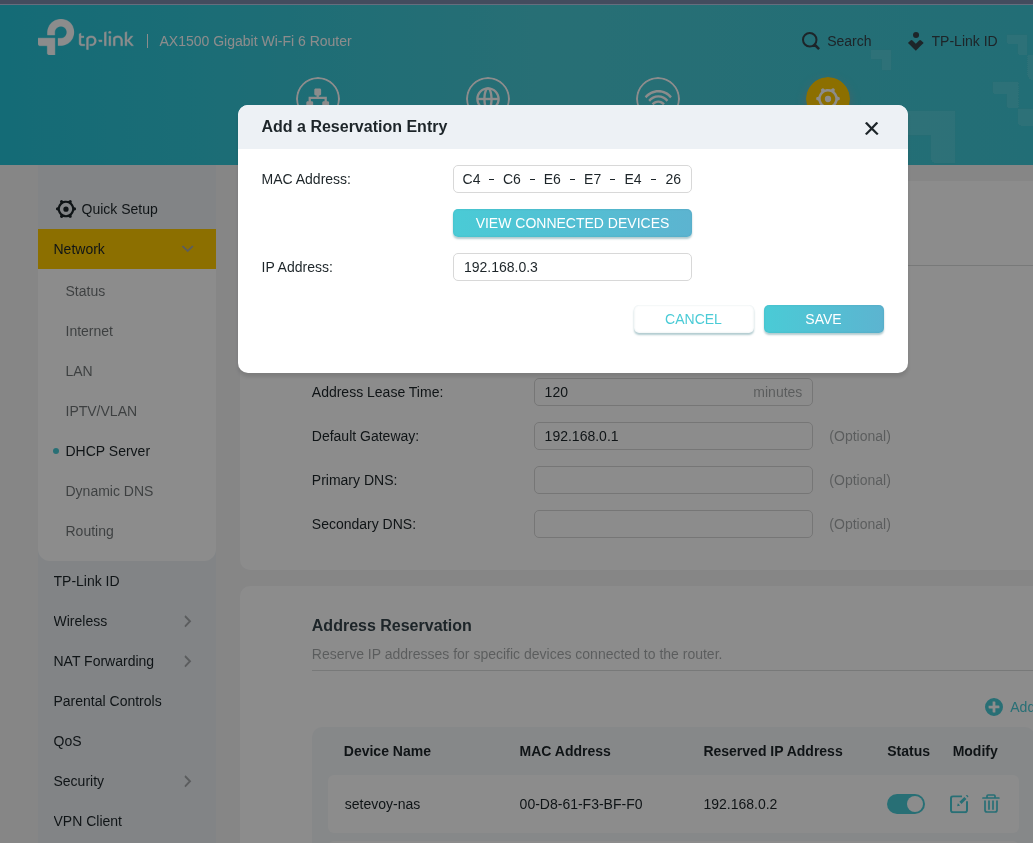
Now, for the work laptop, when it’s connected via Ethernet, the address will always be 192.168.0.3.
Basic Unbound Configuration
Install the package:
root@setevoy-nas:/home/setevoy # pkg install -y unbound
The configuration file is located at /usr/local/etc/unbound/unbound.conf.
There is an interesting configuration example: Example of how to configure Unbound as a local forwarder using DNS-over-TLS to forward queries, which is worth checking out.
Documentation – unbound.conf and official documentation Unbound by NLnet Labs.
Let’s back up the default config and write our own from scratch:
root@setevoy-nas:/home/setevoy # cp /usr/local/etc/unbound/unbound.conf /usr/local/etc/unbound/unbound.conf-origin
Edit/create /usr/local/etc/unbound/unbound.conf with a minimal configuration for now:
server:
    interface: 0.0.0.0

    access-control: 127.0.0.0/8 allow          # local
    access-control: 192.168.0.0/24 allow      # office LAN
    access-control: 192.168.100.0/24 allow    # home LAN
    access-control: 10.8.0.0/24 allow          # WireGuard VPN

    do-ip6: no
    do-daemonize: yes

    hide-identity: yes
    hide-version: yes

    local-zone: "setevoy." static
    local-data: "nas.setevoy. A 192.168.0.2"
    local-data: "work.setevoy. A 192.168.0.1"
    local-data: "home.setevoy. A 192.168.100.205"
Here we specify:
- Which address to listen for connections on
- Which networks to accept queries from
- Disable IPv6 (because why would I need that at home?)
- Hide server identity and version
- I didn’t even know this was possible –
dig CHAOS TXT id.server @192.168.0.2 +shortwill returnCH TXT "setevoy-nas"
- I didn’t even know this was possible –
- And define the local zone
.setevoywith three DNS records
Check the config syntax:
root@setevoy-nas:/home/setevoy # unbound-checkconf
unbound-checkconf: no errors in /usr/local/etc/unbound/unbound.conf
Enable it on autostart:
root@setevoy-nas:/home/setevoy # sysrc unbound_enable=YES
unbound_enable:  -> YES
Start the service:
root@setevoy-nas:/home/setevoy # service unbound start
Check locally from the FreeBSD host using drill instead of dig:
root@setevoy-nas:/home/setevoy # drill nas.setevoy @127.0.0.1
...
;; ANSWER SECTION:
nas.setevoy.    3600    IN      A       192.168.0.2
...
And test an external domain:
root@setevoy-nas:/home/setevoy # drill google.com @127.0.0.1
...
;; ANSWER SECTION:
google.com.     300     IN      A       142.251.98.101
google.com.     300     IN      A       142.251.98.139
...
Add a pf rule for DNS access (see FreeBSD: introduction to Packet Filter (PF) firewall):
...
# DNS
pass in on em0 proto { udp tcp } from { 192.168.0.0/24, 192.168.100.0/24, 10.8.0.0/24 } to (em0) port 53 keep state
...
Verify the syntax and apply:
root@setevoy-nas:/home/setevoy # pfctl -nvf /etc/pf.conf && pfctl -f /etc/pf.conf
Now try it from the work laptop:
[setevoy@setevoy-work ~]  $ dig nas.setevoy @192.168.0.2 +short
192.168.0.2

[setevoy@setevoy-work ~]  $ dig google.com @192.168.0.2 +short
142.251.98.138
142.251.98.102
...
Set the custom DNS servers on the office router:
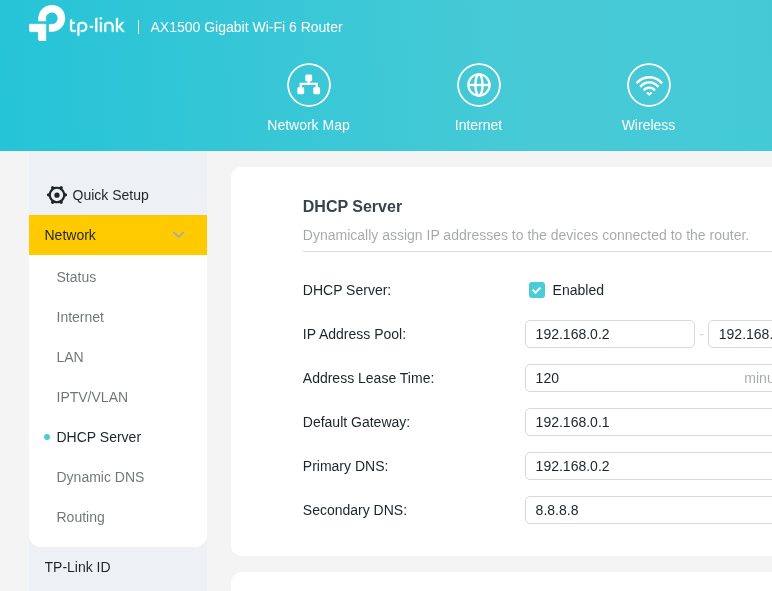
WireGuard DNS settings
The home laptop connects via WireGuard, where we can specify our new DNS in the connection settings.
From home, with the VPN connected, our DNS server will be at 10.8.0.1:
[setevoy@setevoy-home ~]$ dig work.setevoy @10.8.0.1 +short
192.168.0.1
Edit /etc/wireguard/wg0.conf and add DNS to the [Interface] block:
[Interface]
PrivateKey = 0Cu***UWU=
Address = 10.8.0.3/24
DNS = 10.8.0.1, 192.168.100.1

[Peer]
PublicKey = xLWA/FgF3LBswHD5Z1uZZMOiCbtSvDaUOOFjH4IF6W8=
Endpoint = setevoy-***.ddns.me:51830

AllowedIPs = 10.8.0.1/32, 192.168.0.0/24
PersistentKeepalive = 25
Now, when the VPN connects, 10.8.0.1 will be set as the primary DNS, with the home router address 192.168.100.1 as the fallback.
You could also configure split-DNS by setting Domains = ~setevoy to route queries for the .setevoy zone only to 10.8.0.1. See systemd-resolved and systemd-networkd.
Configuring forward-only DNS
With the current configuration, our Unbound performs a full recursive search.
This means that when we query google.com from a client:
- Unbound contacts the DNS root servers
- It looks for the Name Servers for the
.comzone - It contacts those Name Servers to ask for the Name Servers for
google.com - Only after that does it go to the
google.comName Servers to get the IP information to return to the client
Instead, we can configure forward-only mode, and Unbound will reach out to 1.1.1.1 or 8.8.8.8 in a single request and return the response to the client immediately.
Add the following to the end of the config:
...

forward-zone:
    name: "."
    forward-addr: 1.1.1.1
    forward-addr: 8.8.8.8
Verify and apply the changes:
root@setevoy-nas:/home/setevoy # unbound-checkconf && service unbound reload
Now Unbound will check its local zone first; if it doesn’t serve google.com, it will forward the query to Cloudflare or Google.
Logging Setup
I did this to see how the forward-zone setting affects performance – so let’s include it here as well.
Add to the server: block:
...
server:
    ...

    # enable logging
    verbosity: 3
    log-queries: yes
    log-replies: yes
    logfile: "/var/log/unbound.log"

    # disable caching during tests
    cache-min-ttl: 0
    cache-max-ttl: 0

...
During testing, you can disable local caching with cache-min/max-ttl.
By default, Unbound runs in a chroot environment with the root directory at /usr/local/etc/unbound – create the log file there:
root@setevoy-nas:/home/setevoy # mkdir -p /usr/local/etc/unbound/var/log
root@setevoy-nas:/home/setevoy # touch /usr/local/etc/unbound/var/log/unbound.log
root@setevoy-nas:/home/setevoy # chown unbound:unbound /usr/local/etc/unbound/var/log/unbound.log
root@setevoy-nas:/home/setevoy # chmod 640 /usr/local/etc/unbound/var/log/unbound.log
root@setevoy-nas:/home/setevoy # unbound-checkconf
root@setevoy-nas:/home/setevoy # service unbound reload
Verifying Recursive DNS Operation
Now disable the forward-zone and query google.com from the work laptop to our DNS:
[setevoy@setevoy-work ~]  $ time dig +short google.com @192.168.0.2
...

real    0m0.109s
Execution time – 0.109s.
Check the Unbound log:
...
info: 192.168.0.3 google.com. A IN
...
info: priming . IN NS
info: sending query: . NS IN
info: reply from <.> 199.7.83.42#53
info: priming successful for . NS IN
...
info: sending query: com. A IN
info: reply from <.> 202.12.27.33#53
info: query response was REFERRAL
...
info: sending query: google.com. A IN
info: reply from <google.com.> 216.239.38.10#53
info: query response was ANSWER
...
info: 192.168.0.3 google.com. A IN NOERROR 0.101574
...
You can clearly see how Unbound works as a recursive resolver:
- It first queries the root zone “
.” to get the Name Servers for the.comzone - Then it contacts the
.comzone Name Servers to get the addresses of thegoogle.comName Servers - Finally, it contacts the
google.comName Servers directly to get the final A-response with Google’s IP addresses
Now re-enable the forward-zone, but keep caching disabled (cache-min/max-ttl) and query from the client again:
[setevoy@setevoy-work ~]  $ time dig +short google.com @192.168.0.2
...
real    0m0.016s
Now the response time is 0.030s, whereas without forward-zone it was 0.109s (or 0.101574 from the log). It’s almost three times faster. Sometimes it’s as low as 0.01s.
And the Unbound logs are much shorter now:
...
debug: forwarding request
...
debug:    ip4 1.1.1.1 port 53
debug:    ip4 8.8.8.8 port 53
info: sending query: google.com. A IN
debug: sending to target: <.> 8.8.8.8#53
...
info: 192.168.0.3 google.com. A IN NOERROR 0.039006
...
All it did was pass the query to 8.8.8.8 and return the result.
Unbound DNS views for different networks
Currently, when querying nas.setevoy from home via VPN, it returns 192.168.0.2:
...
local-data: "nas.setevoy. A 192.168.0.2"
...
However, if we want to use the VPN network exclusively, we can separate the zones using views and create dedicated zones for each network:
server:
    interface: 0.0.0.0
    do-daemonize: yes
    do-ip6: no

    hide-identity: yes
    hide-version: yes

    # map client networks to views
    access-control-view: 127.0.0.0/8 office
    access-control-view: 192.168.0.0/24 office
    access-control-view: 10.8.0.0/24 vpn

#######################
### Hosts list note ###
#######################
# -Office:
#   - setevoy-work: Arch Linux laptop
#   - setevoy-pc: Arch Linux/Windows gaming PC
#   - setevoy-nas: FreeBSD ThinkCentre
#   - TP-Link router
# - Home:
#   - setevoy-home: Arch Linux laptop
#   - TP-Link router

################
# OFFICE VIEW #
################
view:
    name: "office"
    local-zone: "setevoy." static
    local-data: "nas.setevoy. A 192.168.0.2"
    local-data: "work.setevoy. A 192.168.0.3"
    local-data: "pc.setevoy. A 192.168.0.4"

#############
# VPN VIEW #
#############
view:
    name: "vpn"
    local-zone: "setevoy." static
    local-data: "nas.setevoy. A 10.8.0.1"
    # not VPN-connected, but Home has routing to the 192.168.0.0/24
    local-data: "work.setevoy. A 192.168.0.3"
    local-data: "pc.setevoy. A 192.168.0.4"

#################
# FORWARD ONLY #
#################
forward-zone:
    name: "."
    forward-addr: 1.1.1.1
    forward-addr: 8.8.8.8
Here, access-control-view: 10.8.0.0/24 vpn links clients from the VPN network 10.8.0.0/24 to the view named vpn, which then has its own separate DNS logic defined.
In my specific setup, the home laptop still has routing to the 192.168.0.0/24 network via 10.8.0.1, so returning addresses from that range is fine – but overall, this is a very useful feature.
Verify and apply:
root@setevoy-nas:/home/setevoy # unbound-checkconf && service unbound reload
unbound-checkconf: no errors in /usr/local/etc/unbound/unbound.conf
Testing from home – we get the address from the VPN network:
[setevoy@setevoy-home ~] $ dig nas.setevoy @10.8.0.1 +short
10.8.0.1
And from the office – the result comes from the office network:
[setevoy@setevoy-work ~] $ dig nas.setevoy @192.168.0.2 +short
192.168.0.2
Done.
