 Got an alert from the monitoring system this morning, indicating that the blog is down:
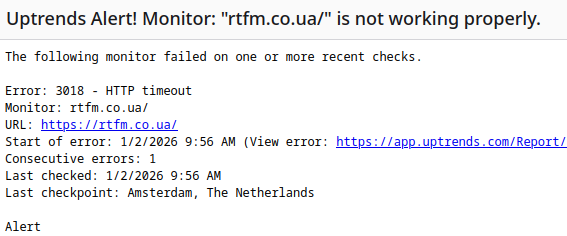
Well, I thought: another one DDoS, not the first time.
Contents
Investigating the issue
I went to the Cloudflare admin, enabled the Under Attack Mode, and started the investigation.
Checked the requests:
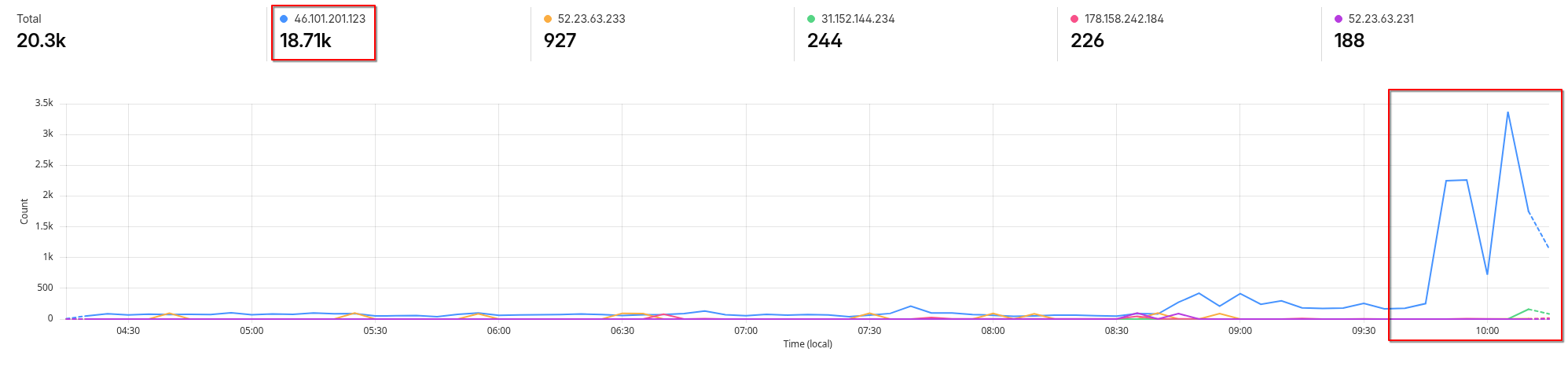
I think, okay, it’s simple – requests are coming from a single IP, I’ll just block it – and be done.
Added a new rule with Action = Block in Cloudflare Security Rules and went to check what kind of IP it is.
Whois says it’s some host from DigitalOcean:
$ whois 46.101.201.123
...
inetnum:        46.101.128.0 - 46.101.255.255
abuse-c:        AD10778-RIPE
netname:        DIGITALOCEAN
...
Many bots are often launched there; nothing unusual.
Next, I decided to check what services are running on that attacking host using nmap:
# nmap -sS 46.101.201.123
...
PORT     STATE    SERVICE
22/tcp   open     ssh
80/tcp   open     http
443/tcp  open     https
...
Hmm, I thought, That’s that’s werid – what kind of bot has ports 80 and 443 open?
So I opened the https://46.101.201.123 in a browser, and… Got redirected on my own blog 🙂
Wait, what?…
I checked which IPs I have in DigitalOcean, and:
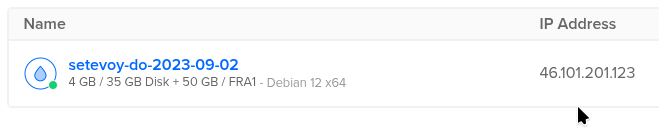
So – yes, 46.101.201.123 is the Droplet IP of the server where RTFM blog is hosted.
Although, in general, a DigitalOcean Reserved IP is used for rtfm.co.ua in the DNS IN A record, which can be switched between droplets:
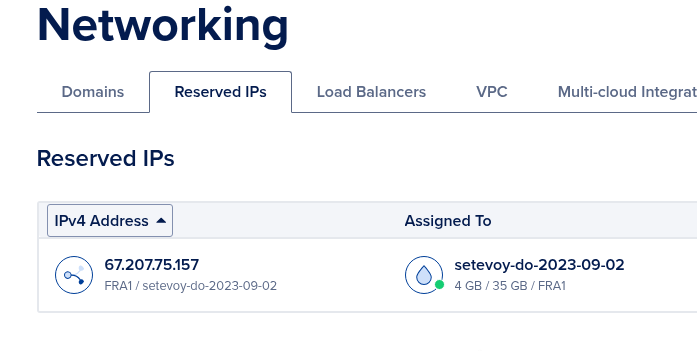
So:
- NS for
rtfm.co.uaare Cloudflare’s - they have IN A is 67.207.75.157 for the
rtfm.co.ua - Droplet IP 46.101.201.123 is not specified anywhere
- yet, requests are going to it
Okay…
There’s still a separate question – why Cloudflare was showing requests from 46.101.201.123 – but more on that at the end.
SYN flood and connections in SYN_RECV
I went to check the activities on the server – what are the active connections?
And there…
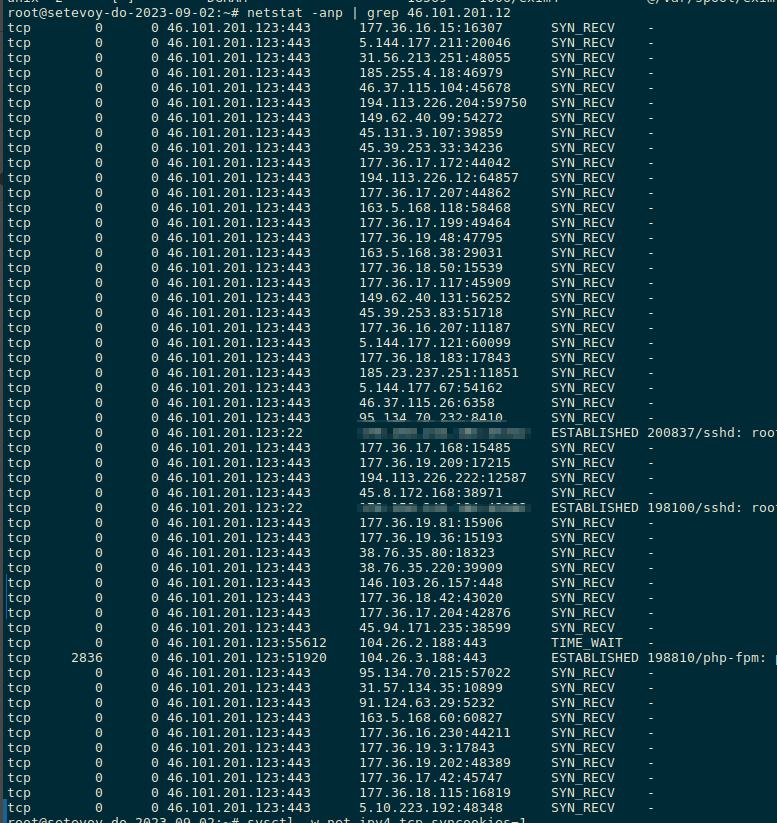
A lot of connections in SYN_RECV status – a classic SYN flood: the client sends us a TCP packet with the SYN flag, we reply with SYN-ACK, and wait for an ACK from them – but it never arrives, and the server’s CPU/RAM resources are occupied by the wait (see TCP handshake, which I wrote about recently).
Mitigating the issue
Since the connections aren’t coming through Cloudflare, its Security Rules won’t help us.
And the Network Firewall in Digital Ocean, much like Security Groups in AWS, only supports Allow rules – not Deny (in AWS, you can do Deny through VPC NACL rules – Network Access Control List).
Linux Kernel TCP tuning
First, I updated the TCP stack parameters:
# sysctl -w net.ipv4.tcp_syncookies=1
net.ipv4.tcp_syncookies = 1
# sysctl -w net.ipv4.tcp_max_syn_backlog=4096
net.ipv4.tcp_max_syn_backlog = 4096
# sysctl -w net.ipv4.tcp_synack_retries=2
net.ipv4.tcp_synack_retries = 2
Here:
net.ipv4.tcp_syncookies: enable SYN cookies – the kernel can avoid holding the TCP connection state when the backlog is fullnet.ipv4.tcp_max_syn_backlog: increase the backlog size forSYN/SYN-ACKso that legitimate clients don’t get dropped- default is 256
net.ipv4.tcp_synack_retries: limit the number of times the kernel attempts to respond to aSYN– how many times we send theSYN-ACKif the client doesn’t returned anACK- default is 5
The picture became much better now, although some SYN_RECV were still present:

Next, I could limit access on the DigitalOcean firewall only from Cloudflare networks, but they are changing, and I’m too lazy yet to set up automation for that right now.
Iptables and DROP by Source Address
Of course, attacking networks can be banned – at the time of checking, there was one: 177.36.16.0/20:
# netstat -anp | grep 46.101.201.123 | grep SYN_RECV
tcp        0      0 46.101.201.123:443      177.36.16.214:15795     SYN_RECV    -
tcp        0      0 46.101.201.123:443      177.36.16.152:43548     SYN_RECV    -
tcp        0      0 46.101.201.123:443      177.36.17.0:43309       SYN_RECV    -
tcp        0      0 46.101.201.123:443      177.36.17.237:47283     SYN_RECV    -
Add a rule with DROP and logging for verification:
# iptables -I INPUT -s 177.36.16.0/20 -j LOG --log-prefix "DROP 177.36.16.0/20 "
Check if the rule works:
# journalctl -k | grep "DROP 177.36.16.0/20" | head
Jan 02 08:34:35 setevoy-do-2023-09-02 kernel: DROP 177.36.16.0/20 IN=eth0 OUT= MAC=de:71:8d:d9:82:55:fe:00:00:00:01:01:08:00 SRC=177.36.16.242 DST=46.101.201.123 LEN=52 TOS=0x00 PREC=0x00 TTL=54 ID=40235 DF PROTO=TCP SPT=17587 DPT=443 WINDOW=65535 RES=0x00 SYN URGP=0
Jan 02 08:34:37 setevoy-do-2023-09-02 kernel: DROP 177.36.16.0/20 IN=eth0 OUT= MAC=de:71:8d:d9:82:55:fe:00:00:00:01:01:08:00 SRC=177.36.16.193 DST=46.101.201.123 LEN=52 TOS=0x00 PREC=0x00 TTL=56 ID=8752 DF PROTO=TCP SPT=45940 DPT=443 WINDOW=65535 RES=0x00 SYN URGP=0
...
Keep the rule but remove the log entry, as it’s an unnecessary load on the disk and system:
# iptables -R INPUT 1 -s 177.36.16.0/20 -j DROP
Better – but, as expected, connections from other addresses started coming:
# netstat -anp | grep 46.101.201.123 | grep SYN_RECV
tcp        0      0 46.101.201.123:443      45.94.171.239:48242     SYN_RECV    -
tcp        0      0 46.101.201.123:443      146.103.26.224:30654    SYN_RECV    -
tcp        0      0 46.101.201.123:443      91.124.63.174:45287     SYN_RECV    -
tcp        0      0 46.101.201.123:443      194.116.228.226:15311   SYN_RECV    -
Iptables and DROP by Destination Address
Actually, there’s a very simple solution here:
- valid requests must go only to the Reserved IP specified in the Cloudflare DNS
- requests to the Droplet IP on port 443 should not arrive at all
Therefore, I just baned them with iptables:
# iptables -A INPUT -p tcp -d 46.101.201.123 --dport 443 -j DROP
Now, not a single SYN_RECV remains.
Saving rules with iptables-persistent
Check the current rules:
# iptables -L INPUT -n --line-numbers
Chain INPUT (policy ACCEPT)
num  target     prot opt source               destination
1    DROP       0    --  177.36.16.0/20       0.0.0.0/0
2    DROP       6    --  0.0.0.0/0            46.101.201.123       tcp dpt:443
To preserve them upon system reboots, install iptables-persistent:
# apt install iptables-persistent
During installation, it will suggest saving the rules to the /etc/iptables/rules.v4 file:

Check what’s in there:
# cat /etc/iptables/rules.v4 | grep 46.101.201.123
-A INPUT -d 46.101.201.123/32 -p tcp -m tcp --dport 443 -j DROP
Done.
However, this will only work until they start flooding the Reserved IP 67.207.75.157 itself.
At that point, will have to allow access only from Cloudflare IPs.
Bonus: WordPress, Cloudflare and requests from Droplet IP
But after supposedly dealing with the SYN flood – the request count graphs in Cloudflare didn’t decrease.
This makes sense: because the SYN was going directly to the server at IP 46.101.201.123, not through Cloudflare, so those requests weren’t tracked in Cloudflare at all.
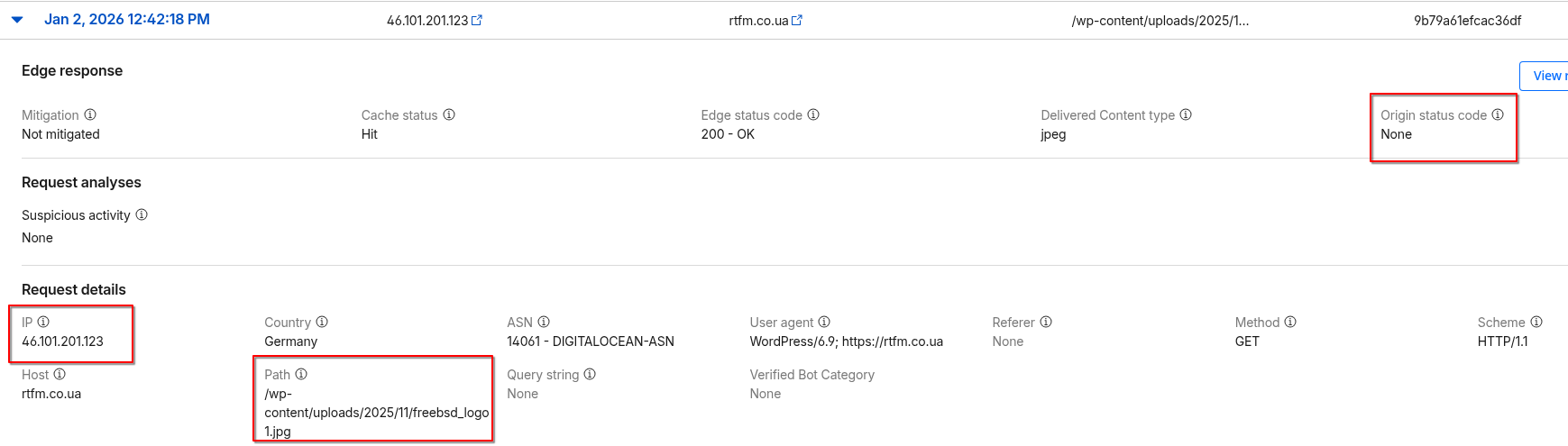
Meanwhile, in the Cloudflare a lot of logs from IP 46.101.201.123, and the Path was always the same: /wp-content/uploads/2025/11/freebsd_logo1.jpg:
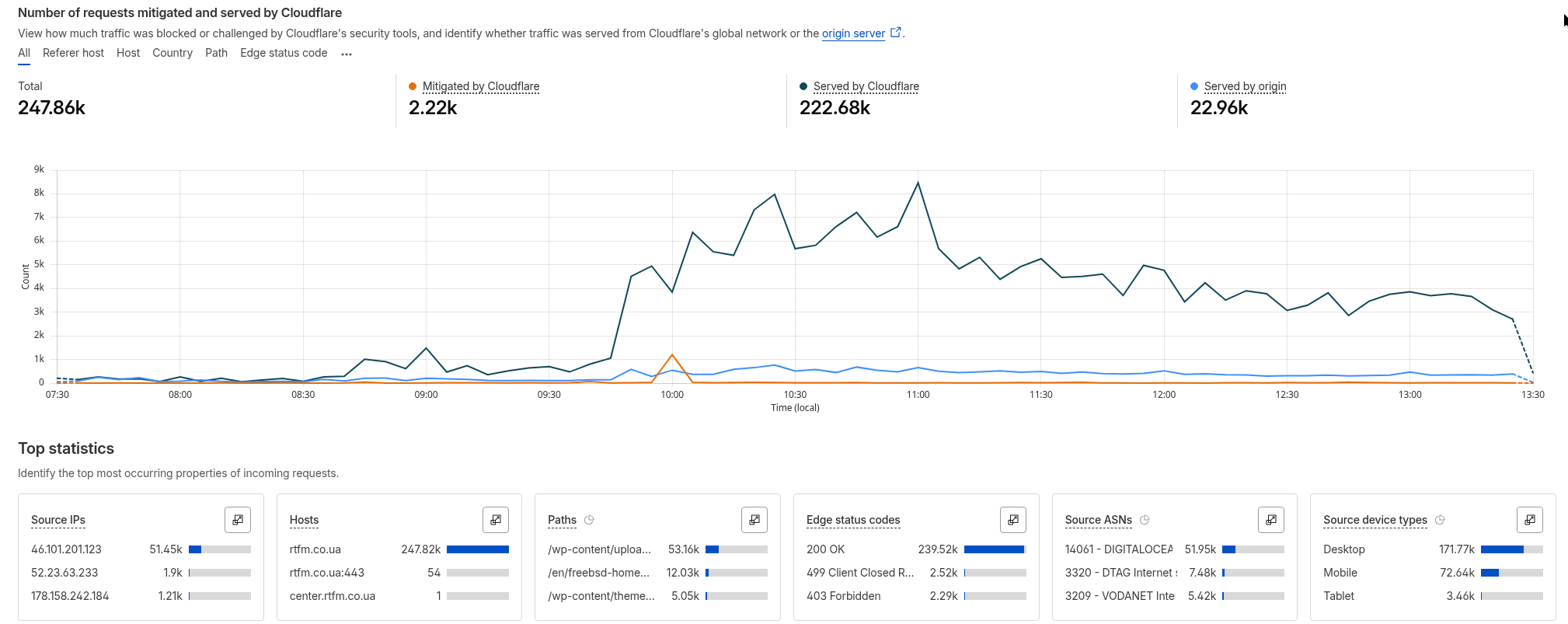
 The Cloudflare graphs for the last 6 hours looked like this – with 46.101.201.123 at the top of the Source IPs in the bottom left:
 At this point, I got worried:
- the SYN flood started around 10 AM Kyiv time
- at the same time, there’s a spike in requests to Cloudflare from the RTFM server itself
So I suspected that some code on the server was constantly accessing the same URL on the server itself.
I disabled the Cloudflare WordPress plugin – no, the requests aren’t decreasing.
Disabled WP_CRON – that didn’t help either.
“WTF is going on?” – I thought frantically, and it occurred to me that it was time to enable and check the NGINX access logs to see what exactly was coming to the server.
In the access logs, I saw many entries like:
...
[02/Jan/2026:11:07:35 +0000] "GET /en/freebsd-home-nas-part-1-configuring-zfs-mirror-raid1/ HTTP/1.1" 200 35451 "-" "HackerNews/1536 CFNetwork/3860.200.71 Darwin/25.1.0"
[02/Jan/2026:11:07:42 +0000] "GET /en/freebsd-home-nas-part-1-configuring-zfs-mirror-raid1/ HTTP/1.1" 200 35462 "https://news.ycombinator.com/" "Mozilla/5.0 (Linux; Android 10; K) AppleWebKit/537.36 (KHTML, like Gecko) Chrome/143.0.0.0 Mobile Safari/537.36"
[02/Jan/2026:11:07:43 +0000] "GET /wp-json/pvc/v1/increase/33806 HTTP/1.1" 200 99 "https://rtfm.co.ua/en/freebsd-home-nas-part-1-configuring-zfs-mirror-raid1/" "Mozilla/5.0 (Linux; Android 10; K) AppleWebKit/537.36 (KHTML, like Gecko) Chrome/143.0.0.0 Mobile Safari/537.36"
...
HackerNews, ycombinator? Wow…
And second, the actual reason for the 46.101.201.123 in the Cloudflare logs: “GET /wp-json/pvc/v1/increase/” is a request to the WordPress plugin Page View Count, which I enabled not too long ago. And the “https://rtfm.co.ua/en/freebsd-home-nas-part-1-configuring-zfs-mirror-raid1″ – is where the request was made from.
That is, the plugin on the post page makes a request to increase the view counter – while passing the Referrer of the page from which the request is being made.
Cloudflare then sees that the request is coming from the Origin – and uses the Droplet IP in the logs.
And then a simple check – what’s actually happening with the post FreeBSD: Home NAS, part 1 – configuring ZFS mirror (RAID1):
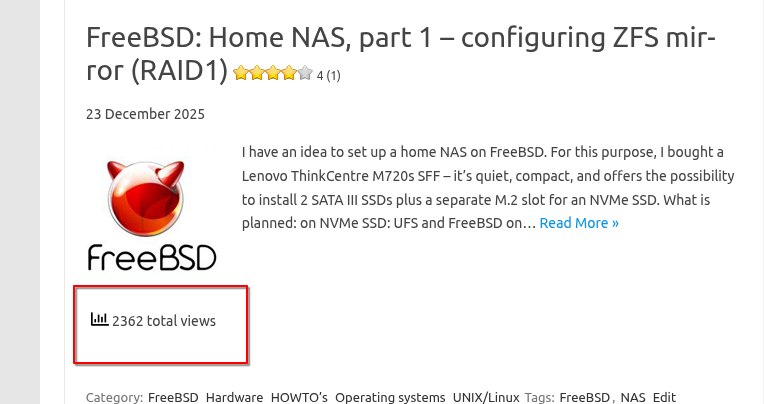
This is even though views are usually a few dozen, at most 100-200.
And a Google check already revealed the reason for such an influx:
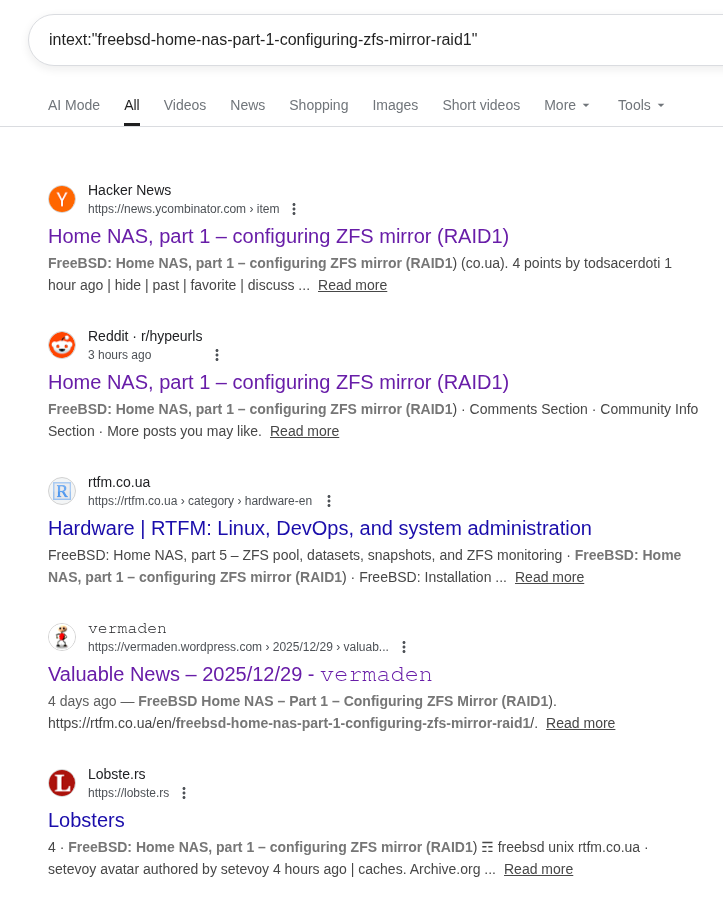
What happened was that this morning I posted a link on https://lobste.rs for the first time, from where it was reposted to Hacker News, and I received the “Hacker News hug of death” – see Surviving the Hug of Death with a similar situation.
After disabling the Page View Count plugin – the Droplet IP 46.101.201.123 disappeared from Cloudflare.
