 Continuing the setup of the new RTFM server. The next step is configuring the ability to send mail from EC2, since both important messages for the root user and RTFM itself need to send emails.
I was thinking of using AWS Simple Email Service – purely to refresh my memory on how to work with it, but it’s not that Simple after all, because the domain verification dragged on.
So I dropped it and went with an old friend – Postfix, relaying mail through a regular Gmail account.
OMG… The last time I wrote about Postfix was in June 2013.
Actually, everything is analogous to what’s described in the post FreeBSD: configuring DragonFly Mail Agent for root mail:
- Postfix acts as the MTA (Mail Transfer Agent) – accepts mail from clients and forwards it to the SMTP Relay host
- Relay: Gmail SMTP – we authenticate with a login and password configured in Postfix, and send mail through Gmail
Example on Amazon Linux AL2023, but the same solution works for any system.
See also related posts:
- AWS: Basic Infrastructure Setup for WordPress
- AWS: Self-Managed EC2 NAT Gateway vs AWS Managed NAT
- AWS: ALB and Cloudflare – Configuring mTLS and AWS Security Rules
- VictoriaMetrics: Basic Monitoring for AWS, Linux, NGINX, and PHP
Install Postfix:
[root@ip-10-0-1-79 ~]# dnf install postfix cyrus-sasl-plain mailx
cyrus-sasl-plain should already be in the system, but we include it just in case, and mailx is a convenient MUA (Mail User Agent) for testing or use in scripts.
Enable and start the service:
[root@ip-10-0-1-79 ~]# systemctl enable --now postfix
Created symlink /etc/systemd/system/multi-user.target.wants/postfix.service → /usr/lib/systemd/system/postfix.service.
For Gmail authentication it’s better to create a separate app password – the process is described in Creating Google Mail App Passwords.
Configure Postfix authentication for Gmail – file /etc/postfix/sasl_passwd, format:
[smtp.gmail.com]:587 [email protected]:apppassword
Use postmap to generate sasl_passwd.db, since Postfix doesn’t use the /etc/postfix/sasl_passwd file directly:
[root@ip-10-0-1-79 ~]# postmap /etc/postfix/sasl_passwd
[root@ip-10-0-1-79 ~]# chmod 600 /etc/postfix/sasl_passwd /etc/postfix/sasl_passwd.db
And in Postfix /etc/postfix/main.cf add:
relayhost: where to forward mail for sending, in our case Gmail SMTPsmtp_sasl_auth_enable: enable SMTP authentication (login/password) with Simple Authentication and Security Layer (SASL)smtp_sasl_password_maps: path to the file with Gmail credentialssmtp_sasl_security_options = noanonymous: disallow anonymous authenticationsmtp_tls_security_level = encrypt: mandatory TLSsmtp_tls_CAfile: CA certificates for verifying Gmail SMTPinet_protocols = ipv4: if IPv6 wasn’t configured for the VPC, allow only IPv4
Use postconf, since some parameters already exist in the config – postconf will replace existing ones rather than adding duplicates:
[root@ip-10-0-1-79 ~]# postconf -e "relayhost = [smtp.gmail.com]:587"
[root@ip-10-0-1-79 ~]# postconf -e "smtp_sasl_auth_enable = yes"
[root@ip-10-0-1-79 ~]# postconf -e "smtp_sasl_password_maps = hash:/etc/postfix/sasl_passwd"
[root@ip-10-0-1-79 ~]# postconf -e "smtp_sasl_security_options = noanonymous"
[root@ip-10-0-1-79 ~]# postconf -e "smtp_tls_security_level = encrypt"
[root@ip-10-0-1-79 ~]# postconf -e "smtp_tls_CAfile = /etc/ssl/certs/ca-bundle.crt"
Restart, check the logs:
[root@ip-10-0-1-79 ~]# systemctl restart postfix
[root@ip-10-0-1-79 ~]# journalctl -f -u postfix.service
Update the root user’s address – edit /etc/aliases:
...
# Basic system aliases -- these MUST be present.
mailer-daemon:  postmaster
postmaster:     root

# add mailbox for the root user
root: [email protected]

...
Update the database:
[root@ip-10-0-1-79 ~]# newaliases
And test sending – in one terminal run journalctl -f -u postfix.service, and in another send a test email to root using mailx:
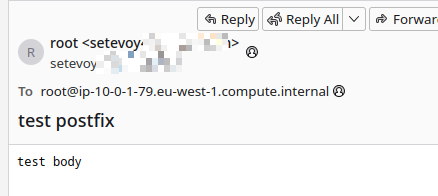
[root@ip-10-0-1-79 ~]# echo "test body" | mailx -s "test postfix" root
We can see the send in the logs:
[...] postfix/qmgr[176329]: BB15174EFD: from=<[email protected]>, size=714, nrcpt=1 (queue active)
[...] postfix/smtp[176331]: BB15174EFD: to=<[email protected]>, orig_to=<root>, relay=smtp.gmail.com[172.253.116.109]:587, delay=333, delays=332/0.03/0.32/0.59, dsn=2.0.0, status=sent
[...] postfix/qmgr[176329]: BB15174EFD: removed
And the email lands in the inbox:
Done.
While finishing this up, I also found the documentation AWS Integrating Amazon SES with Postfix – analogous to what we did above, just using AWS SES SMTP instead.
